












AMD's Strix Halo APUs are a small revolution in the mobile world. They pack potent cores paired with an iGPU that rivals entry-level dedicated graphics cards, plus up to 50 NPU TOPS. When we checked out the ASUS ProArt GoPro Edition (PX13, HN7306), the AMD Ryzen AI Max+ 395 showed off some serious muscle for a 13-inch machine.
Now, it's time to see how it fits into a more traditional chassis - well, mostly traditional. The HP ZBook Ultra G1a 14 is a compact workstation available with a wide range of CPU options. Base models come with the Ryzen AI Max PRO 380, while the top-tier versions rock that 395 model with added PRO features. If you're not sure what separates the "normal" chips from the PRO ones, here's a quick breakdown.
The PRO insignia isn't actually about boosting speed; instead, it focuses on reliability, security, and large-scale management. When you find these processors in a laptop, like the HP ZBook Ultra G1a, it means the machine was designed specifically for professional corporate use.
Regarding AMD PRO Security, these chips feature a multi-layered defense system including AMD Memory Guard, which encrypts your entire system memory. Combined with integrated Microsoft Pluton hardware, it ensures your sensitive information stays protected even if the device is physically stolen. AMD PRO Manageability further expands on this by giving IT departments the tools to set up, update, and monitor laptops remotely. Supporting standard protocols like DASH, it makes maintaining a huge fleet of computers across a whole company much simpler.
For Business-Ready Reliability, these processors come with a stability guarantee that promises 24 months of consistent software support. They will also stay on the market longer, allowing businesses to purchase the exact same hardware configurations for several years at a time. Finally, ECC memory support is a major highlight, as these versions officially support Error Correction Code RAM. This is a game-changer for high-stakes tasks like 3D rendering or complex scientific math, where even a tiny data error could crash the OS or ruin hours of work.
Security isn't just happening at the CPU level, either. A fingerprint reader and facial recognition are optional extras, though they're practically essential for corporate use. Fortunately, dTPM 2.0, a privacy shutter, and a self-healing BIOS come standard on all configurations.
Let's dive back into the ZBook Ultra G1a 14's specs. The base 1200p display is a great fit for a 14-inch screen. It's geared toward anyone doing standard office work, video calls, or browsing. HP claims full sRGB coverage, but we can't confirm that since our review unit packs the gorgeous 1800p OLED touchscreen. This screen is a dream for creators and designers who need color accuracy and sharp visuals.
Like other "Team Red" machines on this platform, upgradability is pretty much non-existent. To be fair, the lack of RAM slots isn't a dealbreaker when you can spec this little beast with up to 128 GB of LPDDR5x, and the required bandwidth essentially mandates a soldered setup. Storage is also limited to a single slot, but at least it fits standard M.2 2280 drives.
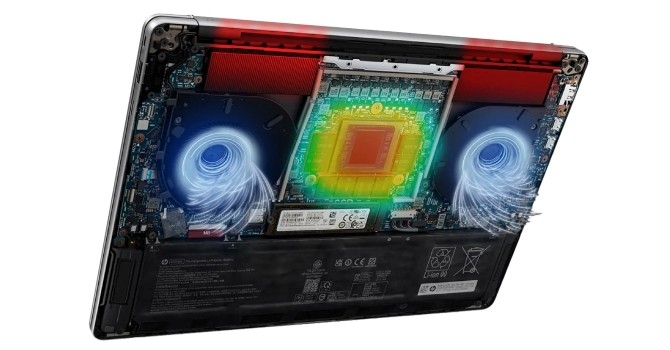
To keep that beefy CPU in check, HP used a massive vapor chamber covering nearly two-thirds of the motherboard. Let's find out if that's enough to make this a truly worthy portable workstation.
| Specifications | |
|---|---|
| Manufacturer: | HP |
| Model: | HP ZBook Ultra G1a 14 |
| Weight: | Starting at 1.568 kg |
| Processor: | AMD Ryzen AI Max+ PRO 395/Strix Halo 16 cores/32 threads up to 5.1 GHz, 64 MB L3 cache 55 W Default TDP AMD Ryzen AI Max+ PRO 390/Strix Halo 12 cores/24 threads up to 5.0 GHz, 64 MB L3 cache 55 W Default TDP AMD Ryzen AI Max+ PRO 385/Strix Halo 8 cores/16 threads up to 5.0 GHz, 32 MB L3 cache 55 W Default TDP AMD Ryzen AI Max PRO 380/Strix Halo 6 cores/12 threads up to 4.9 GHz, 16 MB L3 cache 55 W Default TDP |
| Chipset: | AMD Promontory/Bixby FCH |
| Display: | Display: Default Display: 14.0"/1920×1200 (16:10)/IPS/60 Hz ~400 nits/100% sRGB/Non-Touch Anti-Glare Optional Display: 14.0"/2880×1800 (16:10)/OLED/120 Hz ~400 nits/100% DCI-P3 /Touchscreen VRR support/BrightView tech |
| Operating System: | Windows 11 Home/Pro/Enterprise Ubuntu 24.04 LTS FreeDOS |
| Integrated Graphics: | AMD Radeon 8060S AMD Radeon 8050S AMD Radeon 8040S |
| Memory: | up to 128 GB of soldered LPDDR5x-8000 |
| Storage: | 1× M.2 2280 PCI Express 4.0 x4 |
| Optical Drive: | None |
| Connectivity: | 1× 10 Gbps USB Type-A/3.2 Gen. 2 1× 10 Gbps USB Type-C/3.2 Gen. 2 with DP 2.1 Alt Mode/PD 2× 40 Gbps Thunderbolt 4 with DP 2.1 Alt Mode/PD HDMI 2.1 Lock slot Audio combo jack |
| Communications: | Wi-Fi 7 + Bluetooth 5.4 5MP IR webcam |
| Audio: | 4-speakers audio system optimized by Poly Studio |
| Input device: | Microsoft Precision Touchpad with gesture support Spill resistant backlit keyboard |
| Power: | 1× 140 W Type-C adapter 74.5 Wh battery |
| Warranty: | Two years (region dependent) |
| MSRP: | Starting at $2747 for AI Max PRO 390 + 32 GB RAM |
此内容由惯性聚合(RSS阅读器)自动聚合整理,仅供阅读参考。 原文来自 — 版权归原作者所有。