惯性聚合 高效追踪和阅读你感兴趣的博客、新闻、科技资讯
阅读原文 在惯性聚合中打开

推荐订阅源

N
News | PayPal Newsroom
云风的 BLOG
云风的 BLOG
GbyAI
GbyAI
Engineering at Meta
Engineering at Meta
B
Blog RSS Feed
钛媒体:引领未来商业与生活新知
钛媒体:引领未来商业与生活新知
The Register - Security
L
LangChain Blog
A
About on SuperTechFans
S
Schneier on Security
博客园 - 三生石上(FineUI控件)
Stack Overflow Blog
Stack Overflow Blog
The Hacker News
The Hacker News
AWS News Blog
AWS News Blog
博客园 - 司徒正美
Scott Helme
Scott Helme
K
Kaspersky official blog
Cyberwarzone
Cyberwarzone
T
Tenable Blog
腾讯CDC
Recorded Future
Recorded Future
cs.CL updates on arXiv.org
G
GRAHAM CLULEY
Security Latest
Security Latest
S
Securelist
D
Darknet – Hacking Tools, Hacker News & Cyber Security
aimingoo的专栏
aimingoo的专栏
Google DeepMind News
V
Vulnerabilities – Threatpost
雷峰网
雷峰网
T
The Exploit Database - CXSecurity.com
freeCodeCamp Programming Tutorials: Python, JavaScript, Git & More
V
V2EX
T
The Blog of Author Tim Ferriss
D
Docker
S
Security Affairs
F
Full Disclosure
Know Your Adversary
Know Your Adversary
N
News and Events Feed by Topic
N
News and Events Feed by Topic
T
Tor Project blog
Hugging Face - Blog
Hugging Face - Blog
www.infosecurity-magazine.com
Microsoft Security Blog
Simon Willison's Weblog
Recent Announcements
博客园_首页
博客园 - 聂微东
让小产品的独立变现更简单 - ezindie.com
S
Security @ Cisco Blogs

wp-1click.com

Best Audacity Plugins for WordPress Podcasters in 2026 How to Delete WordPress Comments (Single, Bulk, Spam & All Comments Guide) 2026 5 Best SEMrush Alternatives for Keyword Research in 2026 WordPress Website Launch: Essential Pre-Launch Checklist Top 11 SEO Internal Links Plugins for WordPress in 2026 Local SEO Strategies in WordPress for Better Rankings 5 Best WordPress CRM Plugins for Better Customer Management 5 Best WordPress CDN Plugins to Speed Up Your Website in 2026 9 Best Ecommerce Plugins for WordPress in 2026 (Expert Guide) Cybersecurity in Financial Services: 5 Best Practices Financial Companies Must Follow What is WordPress Plugins: A Complete Guide for Beginners 6 Ways a Crypto Dedicated Server Improves WordPress Site Performance SQL Window Functions Explained: Syntax, Examples & Best Practices SEO Tips For Video Marketing To Improve Your Content Performance Top 5 WordPress Survey Plugins for Creating Engaging Surveys Why Fintech Products Fail Adoption Despite Strong Technology How to Show a Promotion on LinkedIn and Improve Post Visibility What Is a Checksum? How It Works, Types, and Limitations 7 Best WordPress Backup Plugins in 2026 (Compared & Ranked) Best WordPress Search Engine Plugins to Improve Your Site Search On-Page vs Off-Page SEO: What's the Difference and Why It Matters 10 Best WordPress Translation Plugins for a Multilingual Website Best Coding Kata Sites in 2026: Top 7 Platforms for Sharper Programming Skills Getting Started with Rust Programming Language in 2026 GuestPostCRM Launching Soon: A Smarter Way to Manage Guest Posting Campaign Drop Down Info Plugin for WordPress: Features, Benefits, and Setup Guide Best WordPress Booking Plugin Options to Streamline Your Business Custom Web Development Services for Modern Businesses: Handy Guide What Is a Runtime Environment? A Complete Guide for Beginners and Developers Plugins Not Working Minecraft? Common Causes & Easy Fixes Top Cybersecurity Bootcamp Courses to Kickstart Your IT Security Career 15 Top Programming Tutorials to Learn Coding Faster Database Design Patterns Every Developer Should Know WordPress vs Weebly: Which Website Builder Is Better? WordPress vs Bluehost: Which Web Hosting Platform Is Right? Top 10 Best SEO Plugins for WordPress in 2026 WordPress vs Blogger: Which Blogging Platform Should You Choose? WordPress vs Joomla: Choosing the Right CMS for Business - wp-1click.com 30 Best Coding Challenges for Beginners (With Solutions) WordPress vs Drupal: Which CMS Is Right for Website in 2026? How to Change IP for a Minecraft Server WordPress vs WooCommerce: Which Platform Is Best for Website Best GoDaddy Alternative Domain Registration in 2026 Plugin Not Working in WordPress: Easy Way to Fix It WordPress vs Wix: Which Platform Is Better in 2026? (Complete Guide) Webflow vs WordPress: What to Choose for a Better Website Development in 2026 How to Change SQL Server System Admin: A Complete Guide for 2026 Localhost WordPress: A 2026 Guide to Local Development how to make a clickable phone number in WordPress Is WordPress Multisite One Theme or Multiple Top 10 Best Email Extractor Websites for Marketers 2026 How to install WordPress What is WordPress: Beginner's Guide to the Best CMS Understanding WordPress 6.5: New Plugin Capabilities How to Connect a Domain to a WordPress Website | WP-1Click Is Your WordPress Website Slow? And How to Fix It How to Install WordPress on Laragon (Step-by-Step Guide for Beginners) How to Migrate WordPress Website to Another Hosting WordPress 6.9 Broke Slider Revolution: Causes, Fixes & Recovery Guide How to Secure a WordPress Site in 2026 (Step-by-Step Guide) How to Make a Website Mobile Friendly | WP-1Click How to Find Your WordPress User ID Number (5 Methods) – 2026 Guide - wp-1click.com
Google Meet vs Zoom: Which Video Conferencing Tool Is Right for You?
mayank_kukreti · 2026-06-25 · via wp-1click.com

Video conferencing is a pillar for modern day coordination, collaboration, and periodic updates. Without video conferencing, we cannot even imagine modern-day workplaces. Irrespective of whether you are handling a remote team, running client calls, or hosting large-scale webinars, the platform you select matters a lot. Two names appear consistently at the top of the list, i.e., Google Meet and Zoom. However, which one is the right fit for your workflow?

This Google Meet vs Zoom breakdown encompasses all you need to know about pricing and usability to AI security and features, so that you can make a data-driven decision without any guesswork or doubts.

What Is Google Meet?

What Is Google Meet?

Google Meet is a video conferencing solution created by Google, directly built into the Google Workspace environment. It enables users to share screens, host video calls, and ensure real-time collaboration via a browser; no desktop application is needed. Since it natively integrates with Google Calendar, Gmail, and Google Drive, it is a natural choice for teams who are already working within the Google environment.

The free plan of Google Meet supports group video calls of up to 1 hour with a maximum of 100 participants. Premium plans are available via Google Workspace subscriptions, beginning at $6/month (billed per year), which extends meeting duration to 24 hours and unlocks more features.

Native integration with Google productivity tools makes it an ideal option to store and repurpose recordings for marketing purposes. You can also further use SEO tips for video marketing to enhance content performance. 

What Is Zoom?

What Is Zoom?

Zoom is a video communications platform that has been widely adopted across workplaces during the pandemic and has since evolved into a comprehensive productivity suite. Referred to as Zoom Workplace, the platform involves team chat, video meetings, calendar, email, and collaborative documents, positioning itself as a direct competitor to Google Workspace.

In the free plan of Zoom, you get around 40 minutes of meeting and can invite up to 100 participants. Premium plans start at around $14/user/per month (billed annually) and unlock longer meetings, AI features, and cloud recording. While more cost-effective than Google Meet, the advanced feature set of Zoom can justify the cost for bigger organizations.

Google Meet vs Zoom: Key Feature Comparison

1. Simplicity and User-friendly UI:

Google Meet is broadly recognized for its minimum and clean interface. Starting or joining a meeting takes just a few clicks, and the in-meeting settings are very simple. This suits users who want to set up a quick call without learning any advanced settings.

On the contrary, Zoom provides a more advanced interface with a wider range of customization and settings options. While this depth proves to be an asset for power users, it can feel extremely overwhelming for users who want simplicity. Zoom can compensate that by providing desktop apps for macOS, Windows, and Linux, something Google Meet does not provide, as it entirely operates through a browser.

Verdict: Google Meet wins in terms of simplicity. Zoom wins in terms of features’ depth.

2. Pricing:

  • Google Meet (through Google Workspace): from $8.40/user/month — group meetings can stretch up to 24 hours, between 100-1000 participants as per the plan.
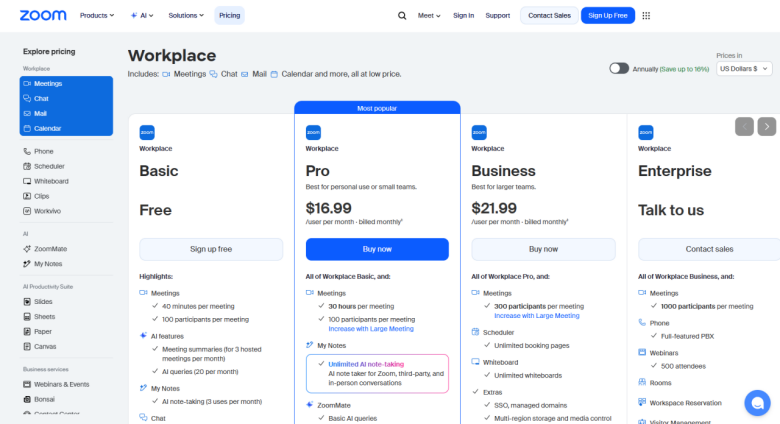
  • Zoom (Zoom Workplace Pro): from around $16/user/month — meetings can go up until 30 hours; between 100-1000 participants can join the meeting as per the plan.

Google Meet is a more cost-effective option, specifically for small teams. However, the pricing plan of Zoom represents its wider set of features, making it a successful investment for businesses with complicated conferencing requirements.

The pricing tiers of Google Meet and Zoom are shown in the screenshot below:
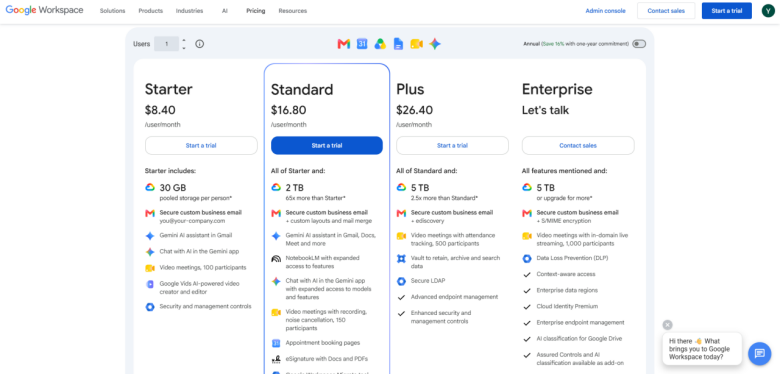
Google Workspace Pricing Plan:

Google Workspace Pricing Plan

Zoom Workspace Pricing Plan:

Zoom Workspace Pricing Plan

3. Chat and Messaging:

This is one of the areas where Zoom gets a clear edge. Zoom saves chat messages during the meeting and enables participants to send one-on-one, and private messages during calls. Its feature of meeting chat even allows communication after and before the meeting itself.

On the other hand, Google Meet provides support only to group messages during meetings and does not save the chat messages once the call concludes. While Google Workspace involves Google Chat for asynchronous communication, users find it inadequate when compared to messaging tools.

4. Recording and Screen Sharing:

Both platforms support meeting recordings. However, there are a few important differences:

  • Google Meet limits recording to premium plan users only; recordings are directly saved to Google Drive.
  • Zoom provides local recording on its free plan, with cloud recording now available on premium tiers; even free users can record meetings, though they are restricted at 40 minutes.

As far as screen sharing is concerned, Zoom provides more sophisticated options, including the capability to share a particular application window, a secondary camera view, or a portion of your screen. Google Meet can pose restrictions when it comes to sharing full screen, a browser window, or a particular tab.

5. AI Capabilities:

  • Google Meet utilizes Gemini, which can generate meeting recaps, take notes, and provide real-time translated captions in around 60 languages, and create AI-generated background images with the help of text-based prompts.
  • Zoom utilizes AI Companion, which provides meeting summaries, intelligent recording with chapter breakdowns, in-meeting question answering, and action item extraction.

Both AI platforms are available on premium plans. Zoom’s AI companion is broadly recognized as more practically valuable for day-to-day management of meetings, while multilingual caption support of Gemini AI is a standout option for global teams.

6. Security:

Both platforms utilize encryption and two-factor authentication. Google Meet has an effective track record with security, data encryption in transit and at rest, and providing end-to-end encryption (E2EE) for personal accounts.

Zoom has faced a lot of scrutiny in early years over Zoombombing and misleading encryption claims. Ever since, the platform has introduced a broad range of waiting rooms, passcode-secure meetings, E2EE, and a host-level feature known as Suspend Participant Activities, which shuts down all audio, video, and chat in an emergency. Verdict: Google Meet comprises a more consistent history of security; Zoom has robust controls for host management.

7. Integrations:

  • Zoom tethers with 3,000+ third-party apps via its App Marketplace, covering document creation, project management, and communication tools.
  • Google Meet deeply incorporates the Google environment, Calendar, Gmail, Drive, and YouTube for live streaming. However, it provides support to lesser third-party integrations overall (close to 200+).

If your team depends greatly on non-Google tools, the wider integration library of Zoom gives it a vital advantage.

Google Meet vs Zoom: Which Should You Choose?

There is no universal right answer to the Google Meet Vs Zoom debate; the right choice depends a lot on the budget, team size, and existing tools.

Select Google Meet if you:

  • Use Google Workspace already (Calendar, Gmail, Drive)
  • Require a browser-based and simple tool with no installation of any app.
  • Manage a smaller or medium team on a closer budget.
  • Emphasize smooth Google integration and security.

Select Zoom if you:

  • Need sophisticated host customization and controls
  • Host complex events or webinars consistently.
  • Require wider third-party integrations.
  • Want a lot more capable AI meeting assistant.

Conclusion

Both Google Meet and Zoom are referred to as video conferencing platforms, each with a diverse set of strengths. Google Meet is a lot better option for affordability, simplicity, and Google Workspace integration. Zoom leads as far as advanced features, scalability, third-party integrations, and host-level controls is concerned.

For most individuals and small businesses, Google Meet gives all you need out of the box. For larger enterprises, businesses, or teams host webinars and complex virtual events regularly, Zoom is likely a preferable investment. Assess particular requirements of your team and select the platform between Google Meet Vs Zoom that best complements how you work.

Frequently Asked Questions :

Q1. Which platform is a better option for free users?  

It depends on the existing tools you are using, budget, and the number of participants. Google Meet provides users with a 60-minute limit for meetings with around 100 participants. One-on-one meetings do not have any time limits.  

Q2. Which platform is easier to use?  

Broadly considered simpler to set up since it is completely simpler to set up. You do not need to download any desktop application in order to join or host a meeting, which is an ideal option for minimizing IT headaches.  

Q3. Which is better for webinars or large meetings? 

Zoom provides a lot more hosting controls (e.g., restricting specific screen shares, granular mute-all, and detailed private chat controls). It provides support to 1,000 interactive participants through large meeting add-ons.  

Q4. Which platform provides better presentation and collaboration tools?  

Zoom features more advanced controls for presentation, in-built whiteboards, and annotation tools, making it extremely interactive for collaborative teams.

Q5. Which is more secure: Google Meet or Zoom?  

Google Meet. Incorporates directly with the Google Cloud security settings, making it extremely secure if your business depends on the Google Workspace already. It leverages AES-128 encryption.