



惯性聚合 高效追踪和阅读你感兴趣的博客、新闻、科技资讯
阅读原文 在惯性聚合中打开

推荐订阅源

WordPress大学
WordPress大学
O
OpenAI News
Y
Y Combinator Blog
MyScale Blog
MyScale Blog
C
Check Point Blog
Vercel News
Vercel News
小众软件
小众软件
The Register - Security
N
News and Events Feed by Topic
腾讯CDC
S
SegmentFault 最新的问题
H
Heimdal Security Blog
cs.CV updates on arXiv.org
S
Secure Thoughts
H
Hackread – Cybersecurity News, Data Breaches, AI and More
Schneier on Security
G
GRAHAM CLULEY
云风的 BLOG
云风的 BLOG
S
Schneier on Security
J
Java Code Geeks
L
LINUX DO - 最新话题
奇客Solidot–传递最新科技情报
奇客Solidot–传递最新科技情报
P
Privacy & Cybersecurity Law Blog
Forbes - Security
Forbes - Security
Cisco Talos Blog
Cisco Talos Blog
L
LINUX DO - 热门话题
Scott Helme
Scott Helme
爱范儿
爱范儿
GbyAI
GbyAI
Simon Willison's Weblog
L
Lohrmann on Cybersecurity
Cloudbric
Cloudbric
W
WeLiveSecurity
The Hacker News
The Hacker News
V
V2EX
Last Week in AI
Last Week in AI
Hacker News: Ask HN
Hacker News: Ask HN
Threat Intelligence Blog | Flashpoint
Blog — PlanetScale
Blog — PlanetScale
Cyberwarzone
Cyberwarzone
Google Online Security Blog
Cyber Security Advisories - MS-ISAC
S
Security @ Cisco Blogs
P
Proofpoint News Feed
Google DeepMind News
C
Cyber Attacks, Cyber Crime and Cyber Security
U
Unit 42
Webroot Blog
Webroot Blog
Martin Fowler
Martin Fowler
Exploit-DB.com RSS Feed

wp-1click.com

Knowledge Base Software: What It Is, How It Works, and Why Businesses Use It WordPress Runtime Errors: Common Issues and How to Fix Them How to Fix Slow MySQL Queries and Boost WordPress Performance Custom WordPress Development: 7 Signs Your WordPress Site Has Outgrown No-Code Tool How to Fix PageSpeed Insights Errors in WordPress (2026 Guide) WordPress SEO Guide: Achieve Local Search Dominance in 2026 How to Fix a 504 Error in WordPress: Step-by-Step Guide How to Solve CAPTCHA Challenge Response Errors Quickly What Is Latency vs Bandwidth? Key Differences Explained ERR_CONNECTION_RESET Error: Causes, Solutions, and Prevention Tips Pixlr vs Canva: Which AI Design Tool Is Better in 2026? Software Testing Basics: Manual Testing vs Automation Testing Explained How to Add Blooket Join to Your WordPress Educational Website How to Fix Slow DNS Lookup Issues: 9 Easy Solutions That Work Understanding Version Control Systems for WordPress Development Best Coding Practice Websites to Learn How to Code How to Fix WordPress Theme Installation Failed Error Best Audacity Plugins for WordPress Podcasters in 2026 Google Meet vs Zoom: Which Video Conferencing Tool Is Right for You? How to Delete WordPress Comments (Single, Bulk, Spam & All Comments Guide) 2026 5 Best SEMrush Alternatives for Keyword Research in 2026 WordPress Website Launch: Essential Pre-Launch Checklist Top 11 SEO Internal Links Plugins for WordPress in 2026 Local SEO Strategies in WordPress for Better Rankings 5 Best WordPress CRM Plugins for Better Customer Management 5 Best WordPress CDN Plugins to Speed Up Your Website in 2026 9 Best Ecommerce Plugins for WordPress in 2026 (Expert Guide) Cybersecurity in Financial Services: 5 Best Practices Financial Companies Must Follow What is WordPress Plugins: A Complete Guide for Beginners 6 Ways a Crypto Dedicated Server Improves WordPress Site Performance SQL Window Functions Explained: Syntax, Examples & Best Practices SEO Tips For Video Marketing To Improve Your Content Performance Top 5 WordPress Survey Plugins for Creating Engaging Surveys Why Fintech Products Fail Adoption Despite Strong Technology How to Show a Promotion on LinkedIn and Improve Post Visibility What Is a Checksum? How It Works, Types, and Limitations 7 Best WordPress Backup Plugins in 2026 (Compared & Ranked) Best WordPress Search Engine Plugins to Improve Your Site Search On-Page vs Off-Page SEO: What's the Difference and Why It Matters 10 Best WordPress Translation Plugins for a Multilingual Website Best Coding Kata Sites in 2026: Top 7 Platforms for Sharper Programming Skills Getting Started with Rust Programming Language in 2026 GuestPostCRM Launching Soon: A Smarter Way to Manage Guest Posting Campaign Drop Down Info Plugin for WordPress: Features, Benefits, and Setup Guide Best WordPress Booking Plugin Options to Streamline Your Business Custom Web Development Services for Modern Businesses: Handy Guide What Is a Runtime Environment? A Complete Guide for Beginners and Developers Plugins Not Working Minecraft? Common Causes & Easy Fixes Top Cybersecurity Bootcamp Courses to Kickstart Your IT Security Career 15 Top Programming Tutorials to Learn Coding Faster Database Design Patterns Every Developer Should Know WordPress vs Weebly: Which Website Builder Is Better? WordPress vs Bluehost: Which Web Hosting Platform Is Right? Top 10 Best SEO Plugins for WordPress in 2026 WordPress vs Blogger: Which Blogging Platform Should You Choose? WordPress vs Joomla: Choosing the Right CMS for Business - wp-1click.com 30 Best Coding Challenges for Beginners (With Solutions) WordPress vs Drupal: Which CMS Is Right for Website in 2026? How to Change IP for a Minecraft Server WordPress vs WooCommerce: Which Platform Is Best for Website Best GoDaddy Alternative Domain Registration in 2026 Plugin Not Working in WordPress: Easy Way to Fix It WordPress vs Wix: Which Platform Is Better in 2026? (Complete Guide) Webflow vs WordPress: What to Choose for a Better Website Development in 2026 How to Change SQL Server System Admin: A Complete Guide for 2026 Localhost WordPress: A 2026 Guide to Local Development how to make a clickable phone number in WordPress Is WordPress Multisite One Theme or Multiple Top 10 Best Email Extractor Websites for Marketers 2026 How to install WordPress What is WordPress: Beginner's Guide to the Best CMS Understanding WordPress 6.5: New Plugin Capabilities How to Connect a Domain to a WordPress Website | WP-1Click Is Your WordPress Website Slow? And How to Fix It How to Install WordPress on Laragon (Step-by-Step Guide for Beginners) How to Migrate WordPress Website to Another Hosting WordPress 6.9 Broke Slider Revolution: Causes, Fixes & Recovery Guide How to Secure a WordPress Site in 2026 (Step-by-Step Guide) How to Make a Website Mobile Friendly | WP-1Click How to Find Your WordPress User ID Number (5 Methods) – 2026 Guide - wp-1click.com
How to Launch Anime Websites Using WordPress?
mayank_kukreti · 2026-07-21 · via wp-1click.com

Anime fandom has grown tremendously, turning into a global community that has fans everywhere, and such growth has created a phenomenal demand for key online spaces. Irrespective of whether you want to launch a fan blog, a merchandize store, a streaming guide, or a community hub, developing anime website on WordPress is one of the most efficient ways to get started. WordPress provides creators with complete control over content, design, and functionality without needing sophisticated coding skills, making it a valuable choice for businesses and anime enthusiasts alike.

In this guide, we will understand what an anime website is actually, the tools you would require, and the key steps to successfully launch a website using WordPress.

What Is an Anime Website?

An anime website is a digital platform dedicated to anime-related communities, content, or commerce.

Such websites can take various forms such as follows:

  • Fan blogs that cover news, reviews, and episode discussions.
  • Streaming directories that organize legal viewing links as per the series.
  • Merchandise stores sell apparel, figures, and collectibles.
  • Community hubs with fan art galleries, forums, and discussion boards. 

The main purpose of an anime website is to attract all anime fans with quality content. A well-organized anime website template integrated with a dependable website builder can allow creators to quickly launch such a platform, even without any technical knowledge.

Why Is WordPress a Preferable Choice for Anime Websites?

WordPress powers the majority of websites around the world, and its flexibility makes it ideal for niche content such as anime. Main advantages involve:

  • Extensive plugin environment for adding forums, galleries, and e-commerce characteristics.
  • Thousands of themes, which also includes the ones specifically built for fan and entertainment websites.
  • Scalability that enables a small blog to scale into a complete community platform.
  • SEO-friendly architecture that provides support to organic discovery through search engines.

For creators that research anime websites, WordPress remains a reliable foundation since it balances simplicity with lasting personalization potential.

Selecting the Best Website Builder and Template

Choosing a correct website builder is a first practical step. Page builders such as Elementor are broadly utilized for developing visually engaging anime websites without creating custom code. Once you install a builder, the next step is the design layer itself.

An anime website template, which is purpose-built, like the Zoomics template pack specialized for Elementor, can greatly minimize the setup time. Such templates generally involve:

  • Pre-built landing pages.
  • Layouts that are illustration friendly.
  • In-built CTA sections.
  • Category structures ideal for anime or comics content.

Utilizing a template pack means creators do not have to create layouts from scratch, which is greatly valuable for those who do not have any design experience. 
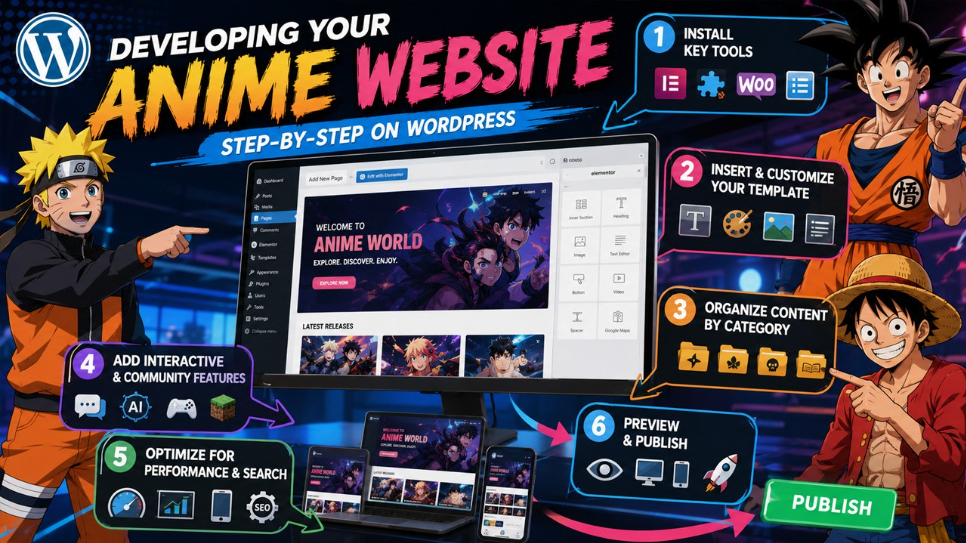
Developing Your Anime Website Step-by-
Step on WordPress
  

Developing Your Anime Website Step-by-Step on WordPress  


Step 1: Install Key Tools :

Before you design anything, you need to establish the foundational plugins:

  • A page builder like Elementor.
  • An addon plugin for design elements and extended widgets.
  • WooCommerce, if the website sells merchandise.
  • A template library plugin to gain access to ready-to-use designs.

Step 2: Insert and Personalize Your Template :

After installation of the required plugin, insert the selected anime website template into a fresh page. The majority of template libraries enables one-click insertion, after which you can personalize the layout with your own:

  • Color and branding scheme .
  • Typography .
  • Illustrations and images .
  • Structure of navigation menu .

Step 3: Organize Content by Category :

Anime audiences are highly organized by series and genres. Organizing content enables visitors to clearly find what they desire quickly. Common approaches of categorization involve the following:

  • Genre-based sections (isekai, shonen, slice of life, etc.).
  • Series-based archives.
  • Individual categories for manga versus anime content.
  • Different sections for news, reviews, and community discussions.

Step 4: Add Interactive and Community Features :

Plenty of successful anime websites do not stay limited to static content but also integrate interactive elements. For instance, fan communities often times go beyond engagement through platforms such as an Anime AI Chat feature, enabling visitors to interact with anime-themed AI characters on the website directly. Similarly, anime-inspired gaming communities have evolved around modded multiplayer experiences, like Minecraft Server created around the Solo Leveling universe, which shows how anime fandoms venture into the gaming industry as well.

Step 5: Optimize for Performance and Search :

Before publishing is done, make sure that the website is technically sound enough:

  • Compress images for quicker load times.
  • Leverage SEO plugins to handle metadata.
  • Confirm responsiveness of mobile across different templates.
  • Set up a crawlable and clear website structure.

Step 6: Preview and Publish

Once personalization is done, you can preview the website completely across devices and then hit “Publish.” Regular updates after that, including refreshed categories and new posts, ensure that the visitor engagement is maintained over time.

Prevalent Mistakes You Need to Avoid 

  • Overcrowded Navigation: Different menu items can confuse visitors instead of assisting them.
  • Inconsistent Categorization: Mixing series and genres without organized structure makes content difficult to find.
  • Ignoring mobile users: A large chunk of anime fans browses through mobile devices. Thus, responsiveness is vital.
  • Skipping SEO basics: Without organized structure and metadata, even quality content does not get any visibility in SERP results.

Conclusion

Launching your anime websites on WordPress is a practical step, achievable for creators, fans, and businesses alike. By choosing the right website builder, applying a dedicated anime website template, and organizing content thoughtfully, anyone can set up a platform that resonates with anime audiences. With consistent attention to SEO fundamentals and updates, an anime website into a long-term destination for fans.

Frequently Asked Questions :

Do I require coding skills to establish an anime website on WordPress?

No. Ready-made templates and page builders enable you to design as well as launch a website without writing even a single line of code.

What plugins are vital for an anime website?

A page builder, addons plugin for additional design elements, and WooCommerce if you are planning to sell merchandise are generally essential.

Can I sell anime merchandise through my WordPress website directly?

Yes. Incorporating WooCommerce enables you to establish a completely functional digital store along with your content.

How significant is categorization for anime websites?

Very significant. Clear categories by series or genre enable visitors to efficiently go through large content libraries.

Are templates of anime website customizable?

Yes. Most templates enable complete customization of fonts, colors, images, and layouts to align with your brand.