
惯性聚合 高效追踪和阅读你感兴趣的博客、新闻、科技资讯
阅读原文 在惯性聚合中打开

推荐订阅源

D
Docker
IT之家
IT之家
Microsoft Security Blog
博客园 - 司徒正美
云风的 BLOG
云风的 BLOG
P
Proofpoint News Feed
D
DataBreaches.Net
B
Blog RSS Feed
博客园_首页
The GitHub Blog
The GitHub Blog
I
InfoQ
L
LangChain Blog
G
Google Developers Blog
M
MIT News - Artificial intelligence
美团技术团队
腾讯CDC
V
Visual Studio Blog
aimingoo的专栏
aimingoo的专栏
博客园 - 聂微东
Cyber Security Advisories - MS-ISAC
Apple Machine Learning Research
A
About on SuperTechFans
博客园 - 三生石上(FineUI控件)
博客园 - 叶小钗

wp-1click.com

Software Testing Strategies: A Complete Guide for Teams P2P Network: What It Is, How It Works & Types Python Data Analysis: Beginner’s Guide to Data Analysis What Is a Cache Miss? Types, Causes & Fixes What is an API Key? Meaning, Uses, and How It Works? OOPs Concepts in Java: Classes, Objects & 4 Pillars What Is W3Schools.com? Web Development Guide Top 6 Developer-Friendly APIs for Video Content Creation What Is Pingback in WordPress? How It Works Explained CSS Padding Explained: Syntax & Examples What Are Data Structures? Types, Uses & Examples What Is C? History, Features & Examples Explained What Is an Excerpt? Complete Guide What Is a Nonce in Security? Definition, Types & Uses WebP Image Format: JPEG & PNG Comparison Guide Weebly Login Guide: Access, Troubleshoot & Manage Account Healthcare Web Design: Best Practices for 2026 Best Website Builders for Small Business in 2026: A Complete Guide Database Optimization: A Complete Guide to Improving Database Performance 10 AI software development companies setting new industry standards in 2026 Knowledge Base Software: What It Is, How It Works, and Why Businesses Use It How to Launch Anime Websites Using WordPress? WordPress Runtime Errors: Common Issues and How to Fix Them How to Fix Slow MySQL Queries and Boost WordPress Performance Custom WordPress Development: 7 Signs Your WordPress Site Has Outgrown No-Code Tool How to Fix PageSpeed Insights Errors in WordPress (2026 Guide) WordPress SEO Guide: Achieve Local Search Dominance in 2026 How to Fix a 504 Error in WordPress: Step-by-Step Guide How to Solve CAPTCHA Challenge Response Errors Quickly What Is Latency vs Bandwidth? Key Differences Explained
WordPress vs Wix: Which Platform Is Better in 2026? (Comp...
ashu_masih · 2026-04-27 · via wp-1click.com

Building a website in this digital era should feel exciting, rather than overwhelming. But the moment when most people start to build their websites, they are hit with a question: WordPress or Wix? Both platforms are highly recommended and promise to help you build something great. So, the real question is how do you actually choose? Honestly, neither platform is perfect for everyone, nor is a bad choice. It all comes down to what you need. This blog breaks down everything you need to know so you can decide with confidence. 


WordPress vs Wix: Understanding the Basics

To understand which platform to choose from in 2026, it is important to learn about the functioning and key aspects of each platform. 


What is WordPress?

Let’s understand what WordPress is. It is among the largest, free, and open-source content management systems, which powers about 43% of the global websites. WordPress can manage websites without the need for writing a single line of code. WordPress features over 11,000 customizable themes and over 60,000 plugins, which allow users to change the visual layout, along with the features of the website.  

There are two types of WordPress, i.e., WordPress.org, a self-hosted platform, which offers maximum control, and WordPress.com, a hosted service, in which controls are managed by the platform itself. WordPress offers various key features to users, like enhanced flexibility, SEO-friendliness, and cost-effectiveness. In WordPress, users can also create a wide range of websites, from a high-content blog page to a scalable e-commerce store. 


What is Wix?

Wix is a user-friendly, cloud-based website builder that allows users to create professional websites using a drag-and-drop editor. Wix offers an all-in-one solution for web hosting, SEO tools, and e-commerce capabilities. The platform mainly caters to beginners and professionals, as it features a standard studio, a user-friendly website development, and Wix Studio for more advanced and collaborative projects.  

Wix features more than 800 designer-made templates, which include drag-and-drop customization. It also includes an AI tool, Wix AI, which can generate site text, images, and a full website structure automatically. Wix features various business solutions, like built-in tools for online stores, booking systems, and blog management. 
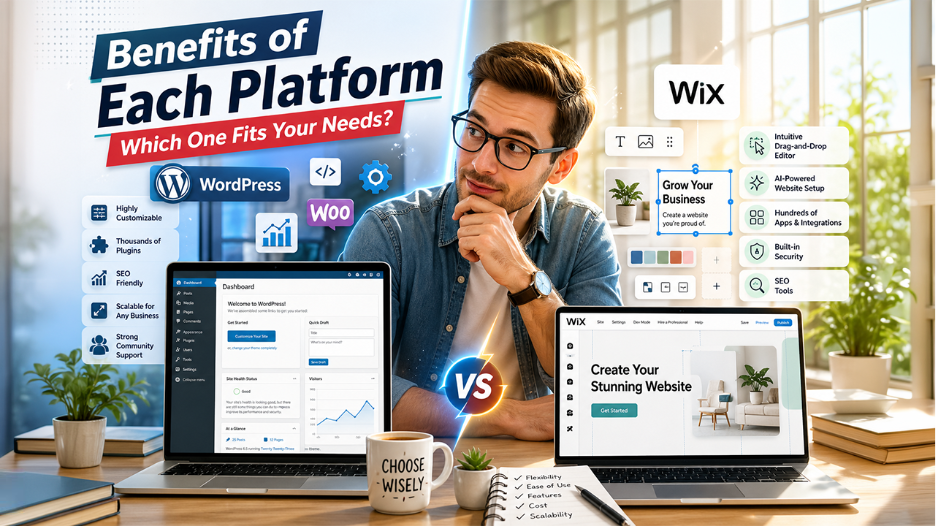

Benefits of Each Platform


Benefits of Each Platform

Both the platform, WordPress and Wix, offer various distinctive advantages over others. WordPress offers unmatched flexibility in website building with more than 60,000 plugins, while Wix provides a drag-and-drop experience and fully hosted domain features. 


Benefits of WordPress


  • Highly Customizable: WordPress offers more than 11,000 themes and more than 60,000 plugins, which offer versatility and unique customization to users.  

  • Ease of Use: The platform features an intuitive interface, along with a Gutenberg drag-and-drop editor, which allows beginners to design and create websites without coding. 

  • SEO-Friendly: WordPress is designed to offer higher search engine optimization. It offers various plugins, like RankMath and Yoast SEO, that enable improved results. 

  • Enhance Scalability: WordPress offers enhanced scalability to the business, as it is ideal for managing a small blog page or a high-traffic enterprise site. 

  • Strong Community Support: WordPress offers stronger community support, as it is among the most popular and open-source CMS platforms. 

Benefits of Wix 


  • Intuitive Drag-and-Drop Editor: Users can design their website just how they envision it by placing elements freely on the canvas without facing any technical barrier.  

  • Wix ADI (Artificial Intelligence Design): Wix offers an AI-powered setup tool that can generate a personalized website based on a short questionnaire. This makes it one of the fastest ways to make your website live.  

  • App Market: Wix’s app market offers hundreds of integrations and add-ons. This is helpful as it allows users to add features like booking systems, live chat, and email marketing without technical expertise. 

  • Built-in Security: Wix manages the hosting environment. All Wix websites users benefit from automatic SSL certificates, regular backups, and platform-level security. None of them require manual configuration. 

  • SEO Tools: Wix is ideal for SEO professionals as it offers editable meta tags, automatic sitemaps, and clean URLs along with SEO setup guides.

WordPress vs Wix: Limitations

Every platform comes with its own constraints. Understanding these limitations is essential to choose the right website builder.  


WordPress Limitations:


  • For non-technical users, the learning curve is steep. It requires time and willingness to learn to setup WordPress correctly including theme installation, hosting, plugin configuration, and performance optimization. 

  • Costs can accumulate over time. WordPress itself is free, but premium themes, plugins, hosting, and developer support can make it a more expensive option in practice than it first appears. 

  • Maintaining the website is the user’s responsibility. Updates to the WordPress core, themes, and plugins must be managed actively. When these updates are neglected, it can create security vulnerabilities, which is why it is important to secure a WordPress site from the very beginning using the right plugins and security practices. 

  • Plugin conflicts pose a significant risk. Using multiple plugins at the same time can occasionally cause compatibility issues that can be solved with technical troubleshooting.  

Wix Limitations:


  • Design portability is limited. Once you choose a Wix template and build a site, switching to a different template requires rebuilding the site from scratch. This is a significant limitation for brands that are evolving.  

  • While Wix offers is highly capable for most users, developers who need advanced and complex customization capabilities will find its environment restrictive.  

  • Wix sites are difficult to migrate to another platform. Your content and design are tied to Wix’s proprietary system, which creates long-term dependency. 

  • Wix SEO capabilities are improving, but they still remain less granular than WordPress. Some technical SEO controls are limited or unavailable within Wix’s managed environment. 

WordPress vs Wix: Customization and Flexibility

This is where the two platforms differ the most sharply. WordPress gives users complete control. It allows users to modify every aspect; from the database structure to the front-end rendering. Developers can write custom plugins, build bespoke themes from scratch, and integrate third-party APIs with precision. This level of control is necessary for complex projects. However, it demands a corresponding level of technical investment. 

Wix, by contrast, operates within a curated environment. Its editor is exceptionally powerful within its boundaries. Users can easily customize colors, fonts, layouts, animations, and section arrangements. However, those boundaries exist. Unlike WordPress, Wix does not grant access to its underlying code in the same way. This means which highly specialized customizations are either simplified or simply unavailable. 

Wix’s customization tools are more than sufficient for a freelancer photographer, a small business, or a restaurant owner. However, for a SaaS company, an enterprise, or a large-scale publisher that has unique technical requirements, WordPress’s flexibility is a necessity.  


WordPress vs Wix: Key Capabilities 

Understanding what each platform can actually do makes it easier to match the right tool with your website’s goals.  


Feature  WordPress  Wix  
Ease of Use  Moderate to difficult  Very easy  
Design Flexibility  Unlimited  High within platform limits  
Hosting   Self-managed or managed WordPress hosting  Fully included  
E-Commerce  WooCommerce (highly scalable)  Wix Stores (beginner to mid-level)  
SEO Control  Advanced and granular  Good, but limited  
Plugin/ App Ecosystem  59,000+ plugins  300+ apps  
Security Management  User’s responsibility  Managed by Wix  
Pricing  Variable (hosting +plugins + themes)  Fixed subscriptions tiers  
Scalability  Enterprise-grade  Small to mid-sized business 
Ownership of Data  Full ownership  Platform dependent  

WordPress vs Wix: Setting Up Each Platform

Both platforms take different approaches to setup, and knowing the process helps you decide what feels more manageable.


Setting up WordPress  

WordPress gives you full control from the very first step, which also means there are more steps to manage. 

  1. Buy a domain name: Pick a domain registrar like GoDaddy or Namecheap and register your website name. It usually costs around $10–$20 per year. 

  1. Get hosting: Choose a hosting provider such as Bluehost, SiteGround, or Hostinger. Pick a plan that fits your budget and expected traffic. 

  1. Install WordPressMost hosting providers today include a one-click WordPress setup in their dashboard. Log into your hosting account, find the installer, and follow the prompts. Within minutes, WordPress will be installed and ready on your domain. 

  1. Choose a theme: Go to Appearance → Themes in your dashboard. Pick a free theme or upload a premium one, then activate it. 

  1. Add essential plugins: Install key plugins for SEO, security, performance, and contact forms. These help your site run smoothly. 

  1. Create your pages: Build basic pages like Home, About, Services, and Contact using the WordPress editor or a page builder. 

  1. Adjust settings: Set your site title, clean URL structure, and connect tools like Google Search Console. 

  1. Go live: Publish your site. From here, just keep things updated and running smoothly. 

WordPress setup takes time, and the first experience can feel overwhelming. But every step you complete teaches you something about how your site works, and that knowledge compounds over time. 


Setting up Wix 

Wix keeps the setup process simple, allowing you to build and launch a website quickly without technical complexity.  

  1. Create a Wix account: Go to Wix.com and sign up using your email or Google account. 

  1. Choose how you want to build: Use Wix ADI for a quick AI-generated site or pick a template and build it yourself. 

  1. Pick a template: Browse Wix’s templates, choose one that fits your style, and open it in the editor. 

  1. Customize your site: Use the drag-and-drop editor to adjust text, images, colors, and layout until it feels right. 

  1. Add pages and features: Create pages like Home or Contact, and add extras like a blog, store, or booking system from the Wix App Market. 

  1. Connect your domain: Link your existing domain or buy one directly through Wix. 

  1. Upgrade and publish: Choose a paid plan to remove Wix branding, then hit publish to make your site live. 

Conclusion: WordPress vs Wix 

Choosing between WordPress and Wix doesn’t have to be a stressful decision. First, think about what you actually need. If you are looking for full control, room to grow, and okay with a bit of learning curve, WordPress is worth trying. However, if you want something that looks great, works well, and doesn’t need any technical knowledge, Wix is a strong choice. There is no single right answer here. Choose the platform that aligns with your goals, fits your skills, and the website that you are trying to build.  

Also Read

Webflow vs WordPress: What to Choose for a Better Website Development