


惯性聚合 高效追踪和阅读你感兴趣的博客、新闻、科技资讯
阅读原文 在惯性聚合中打开

推荐订阅源

奇客Solidot–传递最新科技情报
奇客Solidot–传递最新科技情报
人人都是产品经理
人人都是产品经理
爱范儿
爱范儿
aimingoo的专栏
aimingoo的专栏
博客园 - 叶小钗
H
Help Net Security
Microsoft Security Blog
The Cloudflare Blog
S
SegmentFault 最新的问题
小众软件
小众软件
钛媒体:引领未来商业与生活新知
钛媒体:引领未来商业与生活新知
博客园 - 司徒正美
The GitHub Blog
The GitHub Blog
量子位
H
Hackread – Cybersecurity News, Data Breaches, AI and More
V
V2EX
Martin Fowler
Martin Fowler
博客园 - 【当耐特】
J
Java Code Geeks
D
DataBreaches.Net
云风的 BLOG
云风的 BLOG
F
Fortinet All Blogs
Blog — PlanetScale
Blog — PlanetScale
Last Week in AI
Last Week in AI

Raspberry Pi Foundation

Bring AI literacy into every classroom with our new themed resources - Raspberry Pi Foundation Launching Astro Pi 2026/27: Code your way to the International Space Station - Raspberry Pi Foundation Join the UK Bebras Challenge 2026 - Raspberry Pi Foundation Experience AI evolves with flexible resources for every classroom - Raspberry Pi Foundation Supporting a technical AI-focused qualification for young people in England - Raspberry Pi Foundation How to improve students’ problem-solving skills using subgoal labels - Raspberry Pi Foundation Celebrating the community: Douglas and Oasis Mathare - Raspberry Pi Foundation Supporting AI education for 150,000 learners in Aotearoa New Zealand and Australia - Raspberry Pi Foundation Bringing the global Bebras community together in Cambridge - Raspberry Pi Foundation From one club to a global movement: Celebrating 15 years of CoderDojo! - Raspberry Pi Foundation Robots, games, AI, and more at Coolest Projects UK 2026 - Raspberry Pi Foundation Building education technology that children can trust - Raspberry Pi Foundation AI literacy begins with data literacy: An example from healthcare - Raspberry Pi Foundation Hello World #30 out now: Critical thinking in the age of AI - Raspberry Pi Foundation Empowering global AI literacy: Translating Experience AI resources into Croatian - Raspberry Pi Foundation Enhancing your enrichment offer? Code Club is the answer - Raspberry Pi Foundation Joy in learning computer science with Experience CS - Raspberry Pi Foundation Celebrating over 15,000 young creators at the Coolest Projects 2026 online showcase - Raspberry Pi Foundation How to design and present clear computing lessons - Raspberry Pi Foundation What students and teachers in England want from a computing curriculum - Raspberry Pi Foundation Young people’s computer programs get data from space Support your young people with our AI literacy resources Building confidence to teach AI in the classroom Can AI support creativity? What educators can learn from creative machine learning Celebrating young tech creators at Coolest Projects Ireland 2026 Beyond content: Helping teachers feel ready to teach AI Start small, dream big with Code Club: Become an Incubator Partner AI is not neutral: What recent research says about bias, identity, and power A day of big ideas at Coolest Projects USA Minnesota 2026 Why localisation matters for AI literacy: Lessons from Uzbekistan
Keep coding when your internet drops: Offline support in ...
Greg Annandale · 2026-08-20 · via Raspberry Pi Foundation

Our free, browser-based Code Editor now keeps working when your internet connection doesn’t. If your connection breaks in the middle of a lesson or a project, you can carry on writing and running your code without disruption, even if the page is reloaded.

Learners in a classroom in Kenya.

Why we built this

An unstable internet connection is a minor annoyance when you’re reading a web page, but it’s a much bigger problem when you’re 20 minutes into creating a program.

Until now, losing your connection while using the Code Editor could mean losing your work: if you refreshed the page at the wrong moment, you might have seen a blank screen or a browser error instead of your program.
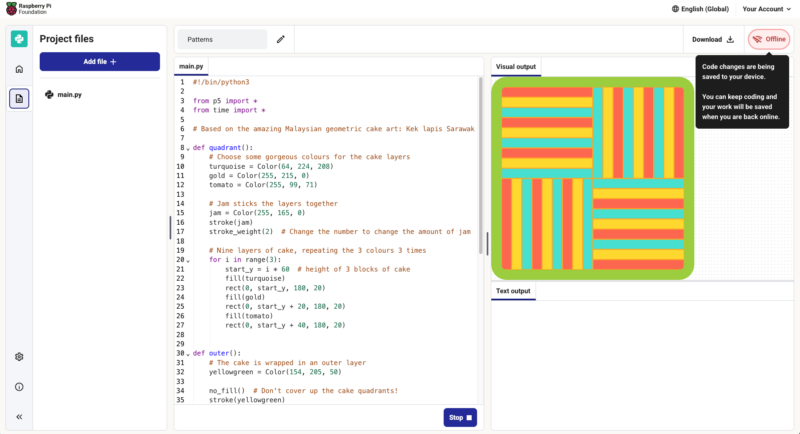
A screenshot of the Code Editor being used without internet connection.
Better offline support means the Code Editor can be more useful for learning and teaching.

When we wanted to understand better what learners and educators around the world need from the Code Editor, we carried out research in countries including India, Kenya, and South Africa. One topic we explored was the availability and reliability of internet connections in metropolitan and rural areas. While it was no surprise that internet access is often slow, unreliable, or expensive in rural areas, we learned that issues related to electricity supply, such as load-shedding and brownouts, are also prevalent in metropolitan areas. All this shapes what is realistically possible in a programming activity using an online editor.

And connectivity issues can occur in any school computing lab where 30 learners are all accessing the same WiFi at once, or for a Code Club running off a mobile hotspot in a community centre, or for someone finishing their homework on patchy mobile data.

That’s why it became a priority for us to improve the Code Editor’s offline support by making it resilient to disconnection.

As we describe in our recently shared draft principles for safe and responsible education technology, one of our commitments is to design for diverse needs, abilities, and contexts — including not to assume constant internet connectivity. This Code Editor update is a small, practical piece of that commitment.

What this means for learners and teachers

The Code Editor was built with resilience in mind from the start, for example running code in your browser rather than on a server, and saving your project locally on your device as you go.

Our recent additions ensure that once you’ve opened the Code Editor while online, your browser holds on to even more of the parts you need to keep coding without a connection. Now if you go offline midway through using the Editor:
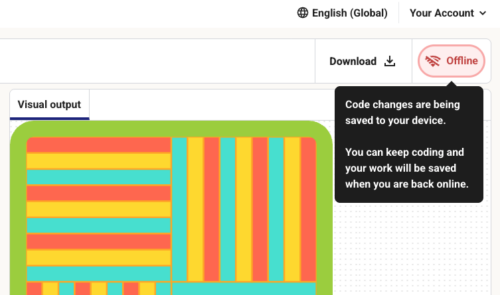
  • You’ll see a clear message in the Editor flagging that you’re offline
  • A full page refresh won’t result in a connection error or blank screen
  • If you’re logged in, everything you do in the Editor while offline is saved to your account automatically once you’re back online
  • You can still download your code using the ‘download’ button, in case you know you’re going to be offline for a while and need to save your program file on your computer or a storage device
A screenshot of the message the Code Editor shows when it is being used offline.
A message shows in the Editor when the internet connection is down.

How it works, in brief

This update is built on a service worker, a script your internet browser runs in the background. When you first load the Code Editor, the service worker stores the files the Editor needs in your browser’s cache. If the network connection then breaks, the service worker serves those stored files instead of trying and failing to fetch them. When you come back online, it automatically refreshes the cache so you’re not left running old files.

What is not possible at the moment

The Code Editor isn’t a full offline app that you install. It’s a browser-based app that we have now upgraded to better cope with losing its internet connection, which means:

  • You need to have loaded the Code Editor at least once while online, in the browser and on the device you’re going to use
  • When you go offline, you can’t open projects you haven’t already loaded
  • If you clear your browser data while offline, any changes you’ve made to projects will disappear
  • You can’t log into or out of your account while offline, and saving to your account pauses until you’re back online
  • Any feature that needs the network, such as sharing projects with students in Code Classroom, won’t be available until you reconnect

We’ll keep working to extend what parts of the Editor work offline.

Try it and tell us how you get on

The Code Editor works in your browser with no setup and will always be free for educators and learners. We hope this update makes it more useful for people in lots of different settings.

The update is one of those features some people will never notice, which is rather the point: it should feel like nothing went wrong. If your connection is unreliable and you try out the updated Code Editor, we’d love you to tell us whether or not it works well for you.

We would like to thank Cisco for the generous funding that made this work possible.