
惯性聚合 高效追踪和阅读你感兴趣的博客、新闻、科技资讯
阅读原文 在惯性聚合中打开

推荐订阅源

酷 壳 – CoolShell
酷 壳 – CoolShell
H
Hacker News: Front Page
P
Palo Alto Networks Blog
T
ThreatConnect
Apple Machine Learning Research
博客园_首页
T
True Tiger Recordings
P
Privacy & Cybersecurity Law Blog
B
Blog
IT之家
IT之家
Last Week in AI
Last Week in AI
F
Full Disclosure
Hacker News: Ask HN
Hacker News: Ask HN
C
Comments on: Blog
Microsoft Azure Blog
C
Cybersecurity and Infrastructure Security Agency CISA
Microsoft Security Blog
博客园 - 【当耐特】
N
News and Events Feed by Topic
NISL@THU
NISL@THU
腾讯CDC
雷峰网
雷峰网
Security Latest
Security Latest
李成银的技术随笔
M
Microsoft Research Blog - Microsoft Research
L
LangChain Blog
L
Lohrmann on Cybersecurity
cs.CL updates on arXiv.org
C
Check Point Blog
Y
Y Combinator Blog
Recent Announcements
博客园 - Franky
N
News | PayPal Newsroom
V
V2EX
A
About on SuperTechFans
The Register - Security
月光博客
月光博客
奇客Solidot–传递最新科技情报
奇客Solidot–传递最新科技情报
Google Online Security Blog
MyScale Blog
MyScale Blog
Cisco Talos Blog
Cisco Talos Blog
Vercel News
Vercel News
WordPress大学
WordPress大学
C
Cyber Attacks, Cyber Crime and Cyber Security
The Hacker News
The Hacker News
IntelliJ IDEA : IntelliJ IDEA – the Leading IDE for Professional Development in Java and Kotlin | The JetBrains Blog
爱范儿
爱范儿
A
Arctic Wolf
L
LINUX DO - 最新话题
freeCodeCamp Programming Tutorials: Python, JavaScript, Git & More

博客园 - 阿土仔

Unity 2019中对象池的用法 Unity场景间数据传递方法 UGUI防止穿透和判断点击的是否是UI Unity中的Character Controller Unity插件研究-EasyTouch V5 Unity塔防游戏的创建 Unity性能优化-DrawCall Unity性能优化-对象池 Unity性能优化-音频设置 Unity性能优化-遮挡剔除 Unity异步加载场景 Unity 协程 HBuilder git使用-分工合作 HBuilder git合作-代码同步 微信小程序开发-窗体设置 HBuilder git合作-从Git Hub Clone项目 HBuilder git合作-上传项目到Git Hub 微信小程序开发-tabbar组件 HBuilder git使用-建立仓库,邀请用户
Unity UGUI动态生成控件
阿土仔 · 2019-09-06 · via 博客园 - 阿土仔

       一、 首先你得先清楚RectTransform组件的一些程序控制  

        1. 先得到UGUI控件上面的RectTransform组件

RectTransform rtr = gameObject.GetComponent<RectTransform>();

          2.  设置top和bottom值

rtr.offsetMax = new Vector2(rtr.offsetMax.x, top);
rtr.offsetMin = new Vector2(rtr.offsetMin.x, bottom);

           3. 设置width,height

rtr.sizeDelta = new Vector2(width, height);

           4.  设置pos

rtr.anchoredPosition3D = new Vector3(posx,posy,posz);

rtr.anchoredPosition = new Vector2(posx,posy);

           二、动态生成Button实例

          1. 目标是要生成这样一个Button,这是手工设置的方式:
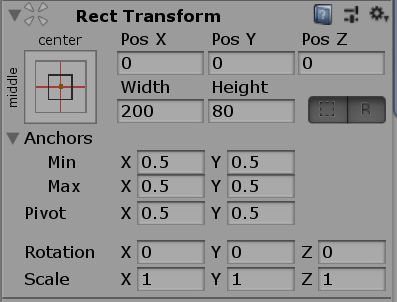
                    

             2. 现在是代码方式:

        canvas = GameObject.Find("Canvas").transform;
        if (ButtonPrefab)
        {
            NewButton = (Button)Instantiate(ButtonPrefab);
            NewButton.transform.SetParent(canvas);
            RectTransform rtr = NewButton.GetComponent<RectTransform>();
            //设置父级基准位置
            rtr.anchorMin = new Vector2(0.5f,0.5f);
            rtr.anchorMax = new Vector2(0.5f, 0.5f);
            //定义控件自身定位点位置
            rtr.pivot = new Vector2(0.5f, 0.5f);
            //定义控件定位点相对基准位置的偏移
            rtr.anchoredPosition = new Vector2(0, 0);
            //定义控件大小
            rtr.sizeDelta = new Vector2(200, 80);
            //事件添加
            NewButton.onClick.AddListener(ButtonClicked);