





惯性聚合 高效追踪和阅读你感兴趣的博客、新闻、科技资讯
阅读原文 在惯性聚合中打开

推荐订阅源

L
LINUX DO - 最新话题
cs.CV updates on arXiv.org
PCI Perspectives
PCI Perspectives
cs.AI updates on arXiv.org
K
KPMG report finds enterprise disconnect between AI and its ROI | CIO
H
Heimdal Security Blog
S
Security @ Cisco Blogs
N
News | PayPal Newsroom
J
Java Code Geeks
罗磊的独立博客
Security Archives - TechRepublic
N
News and Events Feed by Topic
V
V2EX
WordPress大学
WordPress大学
Google Online Security Blog
N
News and Events Feed by Topic
www.infosecurity-magazine.com
月光博客
月光博客
AI
AI
小众软件
小众软件
The GitHub Blog
The GitHub Blog
MongoDB | Blog
MongoDB | Blog
A
Arctic Wolf
CTFtime.org: upcoming CTF events
美团技术团队
Threat Intelligence Blog | Flashpoint
Exploit-DB.com RSS Feed
Hacker News - Newest:
Hacker News - Newest: "LLM"
T
Tailwind CSS Blog
S
Schneier on Security
博客园 - 三生石上(FineUI控件)
F
Full Disclosure
B
Blog RSS Feed
Forbes - Security
Forbes - Security
S
SegmentFault 最新的问题
钛媒体:引领未来商业与生活新知
钛媒体:引领未来商业与生活新知
人人都是产品经理
人人都是产品经理
云风的 BLOG
云风的 BLOG
Jina AI
Jina AI
Cisco Talos Blog
Cisco Talos Blog
U
Unit 42
Project Zero
Project Zero
H
Hacker News: Front Page
Y
Y Combinator Blog
Application and Cybersecurity Blog
The Cloudflare Blog
大猫的无限游戏
大猫的无限游戏
S
Secure Thoughts
The Hacker News
The Hacker News
Microsoft Azure Blog

wp-1click.com

WordPress SEO Guide: Achieve Local Search Dominance in 2026 How to Fix a 504 Error in WordPress: Step-by-Step Guide How to Solve CAPTCHA Challenge Response Errors Quickly What Is Latency vs Bandwidth? Key Differences Explained ERR_CONNECTION_RESET Error: Causes, Solutions, and Prevention Tips Pixlr vs Canva: Which AI Design Tool Is Better in 2026? Software Testing Basics: Manual Testing vs Automation Testing Explained How to Add Blooket Join to Your WordPress Educational Website How to Fix Slow DNS Lookup Issues: 9 Easy Solutions That Work Understanding Version Control Systems for WordPress Development Best Coding Practice Websites to Learn How to Code How to Fix WordPress Theme Installation Failed Error Best Audacity Plugins for WordPress Podcasters in 2026 Google Meet vs Zoom: Which Video Conferencing Tool Is Right for You? How to Delete WordPress Comments (Single, Bulk, Spam & All Comments Guide) 2026 5 Best SEMrush Alternatives for Keyword Research in 2026 WordPress Website Launch: Essential Pre-Launch Checklist Top 11 SEO Internal Links Plugins for WordPress in 2026 Local SEO Strategies in WordPress for Better Rankings 5 Best WordPress CRM Plugins for Better Customer Management 5 Best WordPress CDN Plugins to Speed Up Your Website in 2026 9 Best Ecommerce Plugins for WordPress in 2026 (Expert Guide) Cybersecurity in Financial Services: 5 Best Practices Financial Companies Must Follow What is WordPress Plugins: A Complete Guide for Beginners 6 Ways a Crypto Dedicated Server Improves WordPress Site Performance SQL Window Functions Explained: Syntax, Examples & Best Practices SEO Tips For Video Marketing To Improve Your Content Performance Top 5 WordPress Survey Plugins for Creating Engaging Surveys Why Fintech Products Fail Adoption Despite Strong Technology How to Show a Promotion on LinkedIn and Improve Post Visibility What Is a Checksum? How It Works, Types, and Limitations 7 Best WordPress Backup Plugins in 2026 (Compared & Ranked) Best WordPress Search Engine Plugins to Improve Your Site Search On-Page vs Off-Page SEO: What's the Difference and Why It Matters 10 Best WordPress Translation Plugins for a Multilingual Website Best Coding Kata Sites in 2026: Top 7 Platforms for Sharper Programming Skills Getting Started with Rust Programming Language in 2026 GuestPostCRM Launching Soon: A Smarter Way to Manage Guest Posting Campaign Drop Down Info Plugin for WordPress: Features, Benefits, and Setup Guide Best WordPress Booking Plugin Options to Streamline Your Business Custom Web Development Services for Modern Businesses: Handy Guide What Is a Runtime Environment? A Complete Guide for Beginners and Developers Plugins Not Working Minecraft? Common Causes & Easy Fixes Top Cybersecurity Bootcamp Courses to Kickstart Your IT Security Career 15 Top Programming Tutorials to Learn Coding Faster Database Design Patterns Every Developer Should Know WordPress vs Weebly: Which Website Builder Is Better? WordPress vs Bluehost: Which Web Hosting Platform Is Right? Top 10 Best SEO Plugins for WordPress in 2026 WordPress vs Blogger: Which Blogging Platform Should You Choose? WordPress vs Joomla: Choosing the Right CMS for Business - wp-1click.com 30 Best Coding Challenges for Beginners (With Solutions) WordPress vs Drupal: Which CMS Is Right for Website in 2026? How to Change IP for a Minecraft Server WordPress vs WooCommerce: Which Platform Is Best for Website Best GoDaddy Alternative Domain Registration in 2026 Plugin Not Working in WordPress: Easy Way to Fix It WordPress vs Wix: Which Platform Is Better in 2026? (Complete Guide) Webflow vs WordPress: What to Choose for a Better Website Development in 2026 How to Change SQL Server System Admin: A Complete Guide for 2026 Localhost WordPress: A 2026 Guide to Local Development how to make a clickable phone number in WordPress Is WordPress Multisite One Theme or Multiple Top 10 Best Email Extractor Websites for Marketers 2026 How to install WordPress What is WordPress: Beginner's Guide to the Best CMS Understanding WordPress 6.5: New Plugin Capabilities How to Connect a Domain to a WordPress Website | WP-1Click How to Install WordPress on Laragon (Step-by-Step Guide for Beginners) How to Migrate WordPress Website to Another Hosting WordPress 6.9 Broke Slider Revolution: Causes, Fixes & Recovery Guide How to Secure a WordPress Site in 2026 (Step-by-Step Guide) How to Make a Website Mobile Friendly | WP-1Click How to Find Your WordPress User ID Number (5 Methods) – 2026 Guide - wp-1click.com
Is Your WordPress Website Slow? And How to Fix It
2026-04-06 · via wp-1click.com

Is your WordPress website slow, and is it affecting the operational and technical aspects of your online business? This blog takes you on a guided journey of WordPress performance optimization.  

To learn how to speed up a WordPress site, you first need to understand what WordPress is and what slows down its website. WordPress is among the biggest and most popular content management systems (or CMS), and powers about 43% of all websites on the internet. There are various factors that make a WordPress website slow among which plugins & themes and unoptimized media are among the leading factors.  

WordPress is a free-to-use CMS site, which is integrated with various key plugins and themes, offering customizations to the users. These plugins and themes introduce new code to the website, which increases the HTTP requests. These poorly optimized plugins and themes increase the workload of the servers and visitors’ browsers, increasing the load time of the WordPress website. Similarly, the usage of unoptimized and large media files, which include images and videos, also significantly increases the load time of the website. 

From higher search visibility to faster indexing and reduced bounce rate, a faster WordPress website offers core business benefits, along with technical stabilities. A fast-loading website increases the conversion rate of businesses and also lowers the operational cost of hosting. 

There are three major methods to fix a slow WordPress website, which include performing critical performance fixes, enabling technical optimization, and a better content or plugin management. These methods help in optimizing the media, plugins, themes, and other technical bottlenecks that make your WordPress website slow.  

Benefits of a Fast WordPress Website

A fast WordPress Website offers critical advantages to the business or users. A faster website also helps in improving its ranking, along with increasing the conversion rates. Some of the major advantages of a faster WordPress website include:
  • Higher SEO Ranking: With a faster WordPress website, the ranking of the website increases significantly. One of the major ranking factors of Google is the speed of the page, which prioritizes the website over a slow-loading competitor website. A better and enhanced WordPress SEO also offers key benefits, like intuitive content management, fast publishing, and extensive plugin libraries.
  • Improves Conversion Rates: With the faster and more optimized webpage, the loading time of the website increases significantly, resulting in higher sales and conversions, especially for e-commerce platforms.
  • Enhances User Experience: A faster and optimized website offers the user a smooth journey across different pages, increasing the brand trust, and encouraging visitors to explore the website.
  • What Slows Down the WordPress Website?

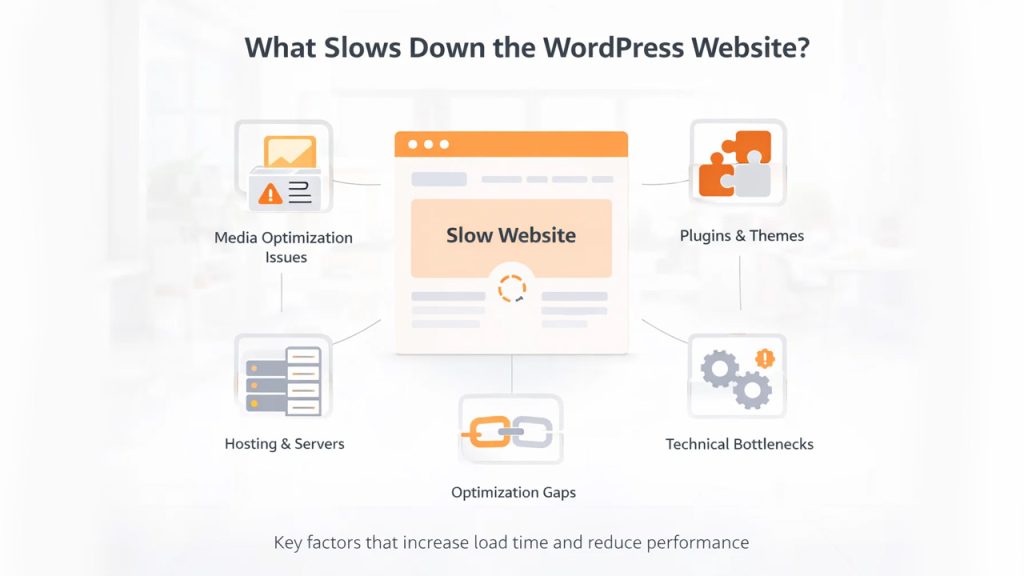
What Slows Down the WordPress Website

Some of the major factors that slow down a WordPress website are unoptimized plugins, large images, and poorly coded plugins. Large media files, which include large images and videos, along with heavy code, also increase the load time of the website.

Some of the primary factors which slows down a WordPress website are as follows:

  • Media Optimization Issue: Unoptimized images, along with large videos and file sizes, slow the load time. Similarly, a lack of lazy loading results in the loading of multiple images all at once, slowing the website.
  • Plugins and Themes: Utilization of too many unoptimized themes, along with the usage of poorly coded plugins, also slows down the WordPress Website significantly.
  • Hosting and Servers: Inadequate and cheap hosting providers limit the server performance. Also, the distance of the server from the user affects the speed of the website.
  • Technical Bottlenecks: Various key technical bottlenecks, like no caching, a bloated database, and excessive external scripts, are also considered the major factors slowing down the WordPress website.
  • Optimization Gaps: Various optimization gaps, like no Content Delivery Network, also limit the speed of the files reaching different users.

How to Speed up a WordPress Site?

There are basically three major methods to fix the speed of the WordPress website, which include major performance fixes, technical optimizations, and content & plugin management. Before fixing a slow WordPress website, you need to identify the specific bottlenecks, which can be done by various diagnostic tools, like Google PageSpeed Insights or GTmetrix. Post-diagnostic, you can optimize your website using any or all of the following methods.

Method 1: Critical Performance Fixes

Fixing the critical performance of the website is among the most important ways for WordPress performance optimization. In this method, three major aspects are fixed, which include:
  • Modern Image Format Conversion: In this, the existing images which are in JPEG or PNG format are converted to be in more efficient WebP or AVIF format. The conversion reduces the file size of the image without sacrificing the visual quality.
  • Embed Optimization: In this WordPress website slow fix, the performance of third-party embeds like YouTube videos is enhanced by loading these embeds when they are visible.
  • Database Cleanups: The database cleanup process regularly removes any bloat, like old post revisions, expired transients, and spam comments. This process reduces the time taken by the server to process the queries of the database.
  • Asset Compression: Under this process, unnecessary characters from CSSJavaScript, and HTML files are stripped, and the shrunk data is sent from the server to the browser.

Method 2: Technical Optimizations


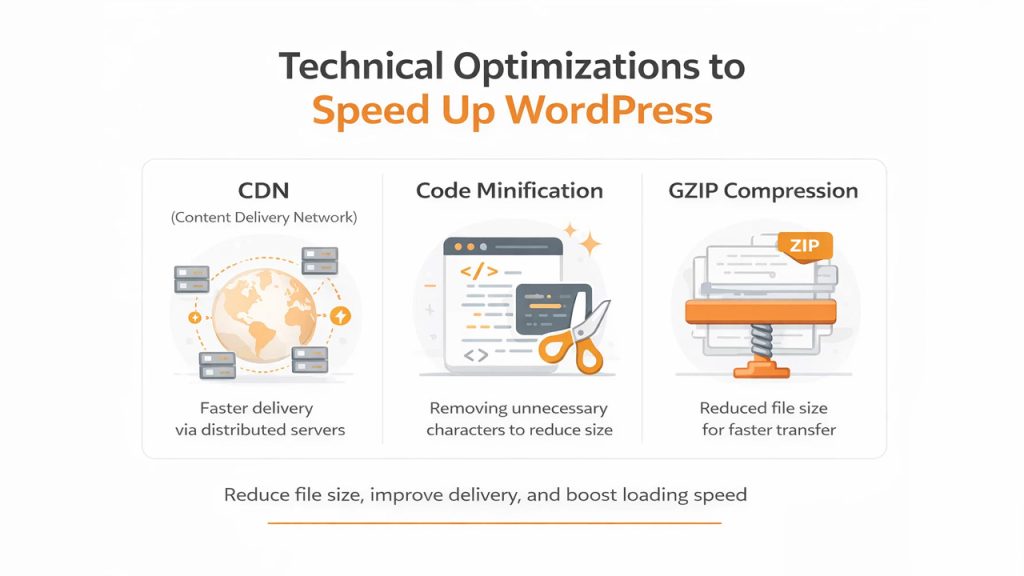
Technical Optimizations to speed up WordPress

Under the technical optimization method, various key techniques like enabling caching plugins, using lazy loading media, and a content delivery network are utilized for WordPress performance optimization.

  • Content Delivery Network (CDN): In a technical optimization method, the static assets of your website are distributed across global servers, which reduces the latency.
  • Code Minification: In code minification, all the unnecessary spaces, characters, and comments are removed from the code, which reduces the size of the total data sent to the browser.
  • GZIP Compression: In this WordPress website slow fix, the web files are compressed before sending them from the server to the browser, which significantly reduces the transfer time.

Method 3: Content or Plugin Management

Managing the plugins and the contents significantly increases the speed of your WordPress website. Managing content and plugins is also considered an ideal way for WordPress performance optimization. Under this, three major aspects are managed that are:

  • Audit Plugins: Under this, you need to deactivate and delete any plugins that you do not use. For this, you can also use Query Monitor, which helps in finding specific plugins that are slowing down the website.
  • Switch to a Lightweight Theme: You can also switch from heavy themes with excessive features to a lightweight theme. For this, you can also switch to various high-performance themes.
  • Lazy Load Mode: Enabling the lazy load mode also enhances the load time of your website. With this, images and videos are loaded until they are scrolled into view.

Conclusion

WordPress is among the most popular and free-to-use content management systems, which allows users to create, manage, and customize websites. In WordPress, you can manage a wide range of websites, which range from blogs to e-commerce stores. It also acts as a backend dashboard in which you can easily add, edit, and delete content, pages, and images. WordPress also includes a large set of customizable and free-to-use plugins and themes, which are utilized to enhance the security, functionality, and interface of the websites.

Some of these unoptimized or poorly coded plugins, along with large images and low-quality shared hosting slow down the website. There are three major methods for WordPress performance optimization, which include critical performance fixes, technical optimizations, and content & plugin management. These methods generally include steps like optimizing images, upgrading hosting, updating PHP versions, and switching to lightweight themes among others.