



It might seem complicated when you first get started with WordPress, but once you realize their capabilities, plugins become one of the most valuable features of WordPress websites. To put it simply, plugins are extensions which help improve and extend the capabilities of your site all without touching a single line of code.
Regardless of whether you wish to optimize your website’s SEO performance, add contact forms to it, increase its loading speed, or create an online store, chances are good that there exists a plugin designed especially for that purpose.
This article is going to show you all the basics of using WordPress plugins and what you need to know about them.
Consider WordPress plugins as applications for your website — similar to how you install various applications on your mobile phone for added functions, plugins enable you to enhance your WordPress website without writing any line of code.
This phrase seems pretty common among the WordPress community: “There’s a plugin for that.” And indeed, it’s accurate. Whatever functionality you are searching for, there’s a very high probability that someone has developed a plugin for it.
The design philosophy of WordPress is such that anyone interested could get in and develop using it. By utilizing the WordPress plugin API, which is basically made up of hooks and filters, developers can even alter the existing functionalities of WordPress or even introduce entirely new ones.
Installing a Plugin on WordPress is simpler than you might think. Here is how to do it step by step:
Keeping your plugins updated is one of the simplest things you can do to keep your site secure and running smoothly. Here is what you need to know:
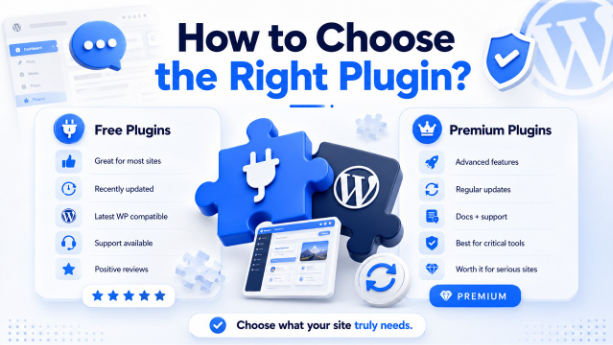
There is no shortage of Plugins on the market, making choosing the best option a difficult task. And what if multiple plugins have almost identical functionality? Here are some things you should consider before purchasing:
They will be sufficient for the majority of sites as they can fulfil most of their requirements and give excellent results for no money at all.
However, not all free plugins are created equal. When downloading a plugin, make sure that:
These are paid plugins with extended functionality, support service documentation, and regular updates. Their purchase is recommended if you are ready to take your site seriously.
Generally, it is safe to say that if the plugin plays an important role in your site operation, and its malfunction will affect your activity, negatively, you better buy its premium version.
This is honestly one of the most common questions beginners ask, and it makes sense because with thousands of options out there, knowing where to start is half the battle.
The truth is, there is no single best plugin for everyone. It all comes down to what your website needs. An ecommerce store will need completely different plugins compared to a personal blog or a business portfolio site.
That said, there are a few categories where almost every WordPress site will need a reliable plugin at some point:
The best approach is to identify what your site actually needs right now, research the top options in that category, check the reviews and update history, and start with one plugin at a time rather than installing everything at once.
As your site grows your plugin stack will naturally evolve — and that is completely normal.
WordPress plugins are what make WordPress truly powerful, and once you get the hang of them, they become one of the most valuable parts of managing your site. The key is to keep things simple: install only what you actually need, stay on top of updates, and remove anything you are no longer using.
As your site grows, your plugin needs will naturally evolve too — and that is completely fine. Start lean, choose wisely, and you will have a fast, functional website that does exactly what you need it to do.
此内容由惯性聚合(RSS阅读器)自动聚合整理,仅供阅读参考。 原文来自 — 版权归原作者所有。