








If you’ve ever scrolled through a blog’s homepage and seen a short snippet under each title instead of the full article, you’ve already run into an excerpt, even if you never thought about what it was called. It’s one of those small content elements that quietly shapes how people decide what to click on.
An excerpt is a short piece of text that gives an overview or highlights the main points of a longer text. As a content creator, whether you are just beginning to explore the blogging world or you have already been at it for some time, it will pay off for you to understand what excerpts are and how to use them properly.
In this blog, we’ll break down what an excerpt actually is, why it matters, the different types you’ll come across, and how to write and manage them well, especially inside WordPress.
An excerpt is a short, standalone piece of text pulled from or written about a longer article, used to give readers a preview before they click through to read the whole thing. It’s not a full summary, and it’s not the introduction either; it’s just enough to spark interest.
The easiest way to explain it is with a book jacket. It doesn’t tell you the whole story; it just gives you enough of a taste to decide whether you want to pick it up. That’s exactly the job an excerpt does for a blog post, article, or any piece of written content online.
Excerpts can be found everywhere when one learns to recognize them, from blog homepages to search engines to social media previews to archive pages. Their role in all cases is the same; that is, they help the reader decide whether or not to continue reading.
The distinction between showing excerpts and showing posts is relatively minor; however, its influence on user experience cannot be underestimated.
Displaying full posts on a homepage or archive page means visitors scroll past entire articles just to see what else you’ve written. It can feel overwhelming, especially on mobile, where scrolling through five full posts before reaching the sixth headline gets tedious fast.
On the contrary, the use of excerpts provides an opportunity to scan through several posts at once and determine whether they are interesting or not. Thus, there is a very high possibility that more page views will be achieved as users will spend more time browsing through your content.
There’s also a performance angle worth knowing. Pages loading only excerpts instead of full articles tend to load faster, since there’s simply less content being rendered at once. On a blog homepage with a dozen posts, that difference adds up.
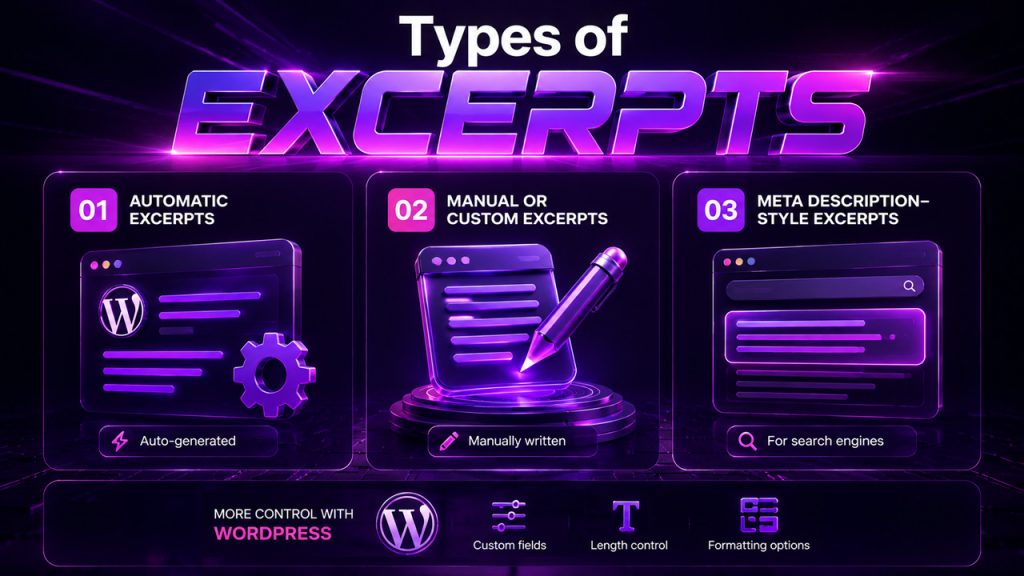
Not all excerpts are built the same way, and knowing the difference helps you decide which one actually serves your content best.
Automatic excerpts: Most platforms, including WordPress, generate these by default, usually just the first 55 words of your post, cut off with an ellipsis. Quick, but not always the most compelling preview.
Manual or custom excerpts: Written specifically to summarize or tease the post, rather than just grabbing the opening lines. These tend to perform better since they’re written with the reader’s decision to click in mind.
Meta description-style excerpts: Sometimes used interchangeably with SEO meta descriptions, they show in search engine results rather than on the site itself.
How much control you get over these also depends on the platform. If you’re weighing WordPress vs Blogger, WordPress gives you far more flexibility here: custom excerpt fields, length control, and formatting options that Blogger simply doesn’t offer out of the box.
A strong excerpt doesn’t happen by accident; it takes a little intention to get right:
Lead with the hook, not the setup: Skip the throat-clearing. Start with whatever’s most interesting or useful about the post.
Make it brief: Usually 20-30 words are sufficient to convey the main idea of your post without spoiling it for the reader.
Maintain the same tone as your post: Light-hearted posts should be supported by light-hearted excerpts; informative posts, by informative excerpts.
Avoid vague teasers: “You won’t believe what happened next” tells the reader nothing. Give them an actual reason to click.
Write it separately from your intro: Don’t just copy your first sentence. A good excerpt is often written after the post is finished, once you know exactly what’s worth highlighting.
This matters even more for anyone still figuring out how to start a blog, since good excerpt habits early on make it much easier to keep readers engaged as your content library grows.
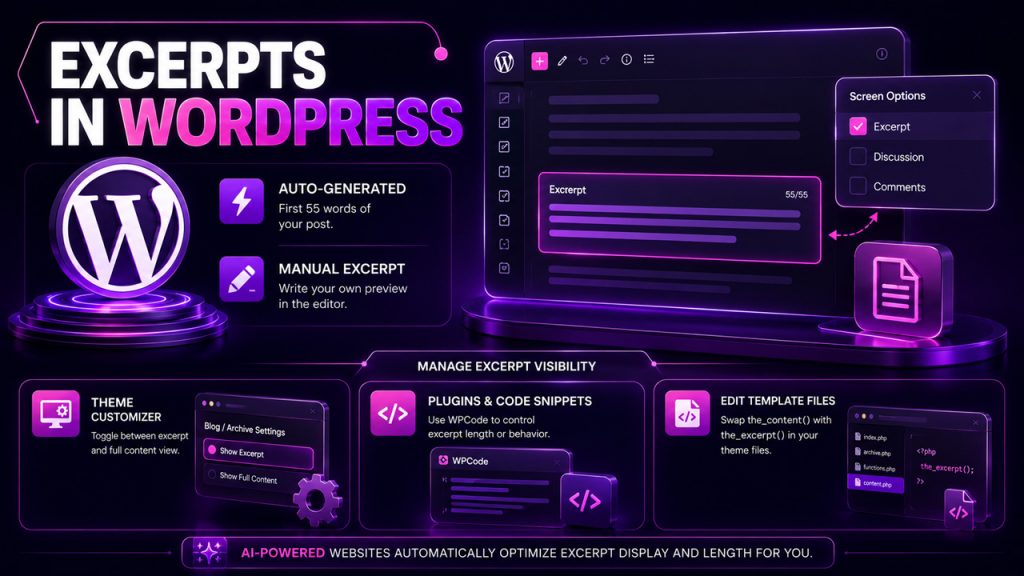
WordPress handles excerpts in WordPress better than most platforms, giving you real control over how previews appear across your site.
WordPress comes up with an auto-generated excerpt, which will consist of the first 55 words of your post. However, you can opt to make a manual excerpt on your blog post; you need to scroll to the Excerpt box in the block editor or simply activate it via the Screen Options if you can’t see it.
The visibility of the excerpts on your blog depends on your theme design. Most of the time, some themes will have a preview of your excerpts, but not all of them, so depending on your theme, here are some things you should do:
Go through your theme’s Customizer settings: Many themes have Blog or Archive settings wherein you can simply toggle between excerpt and content view for your blog archives.
Use plugins to add code snippets: Such plugins as WPCode allow you to change the excerpt length or behavior without having to edit your theme’s files.
Edit template files directly: A more advanced option for developers comfortable swapping the_content() for the_excerpt() inside theme files.
If you’d rather skip the manual setup work entirely, this is exactly the kind of formatting detail that platforms offering AI-powered website design and content automation tend to handle automatically, adjusting excerpt display and length as part of the overall site build.
Ultimately, the excerpt is a small bit of content that is doing a lot of heavy lifting in terms of helping readers determine whether they want to commit to reading the entire piece. Whether it is created through an automatic system or is hand-crafted, it makes a big difference in how your content is perceived.
Spend a minute to create custom excerpts and avoid using the automatic cutoffs. This is a very simple action that results in a higher click-through rate and a cleaner layout overall.
This is the kind of small thing you should do when you have a blog or work with many blog posts regularly. A minute spent on writing an excerpt will add up and will make a significant difference.
An excerpt is a short preview meant to spark interest, while a summary condenses the entire post’s key points. Excerpts tease, summaries inform. One makes you want to click; the other tells you what you’d find if you did.
Yes, by default, the first 55 words of your post are used by WordPress for automatic excerpts. This is something you may manually change at any time by writing your own excerpt using the block editor.
It would be ideal if your excerpt had about 20-30 words. It should provide enough information to allow readers to know what your post will be all about.
Many themes show complete articles rather than excerpts. You can use the Customizer to find such settings under “Blog” or “Archive”, and if this feature is not available, a plugin for inserting code will usually solve the problem safely.
Not directly, but yes, in an indirect way. A quality excerpt would likely resemble your meta description, which will appear in search results, and a good one will increase click-through rates on Google.
此内容由惯性聚合(RSS阅读器)自动聚合整理,仅供阅读参考。 原文来自 — 版权归原作者所有。