

惯性聚合 高效追踪和阅读你感兴趣的博客、新闻、科技资讯
阅读原文 在惯性聚合中打开

推荐订阅源

cs.AI updates on arXiv.org
G
GRAHAM CLULEY
Cyberwarzone
Cyberwarzone
Cisco Talos Blog
Cisco Talos Blog
I
Intezer
V
Vulnerabilities – Threatpost
C
CERT Recently Published Vulnerability Notes
AWS News Blog
AWS News Blog
L
LINUX DO - 热门话题
AI
AI
Webroot Blog
Webroot Blog
W
WeLiveSecurity
O
OpenAI News
T
Threatpost
L
Lohrmann on Cybersecurity
S
Secure Thoughts
cs.CV updates on arXiv.org
T
The Exploit Database - CXSecurity.com
C
Cyber Attacks, Cyber Crime and Cyber Security
C
CXSECURITY Database RSS Feed - CXSecurity.com
Security Archives - TechRepublic
S
Security Affairs
V2EX - 技术
V2EX - 技术
Cloudbric
Cloudbric
Google DeepMind News
Stack Overflow Blog
Stack Overflow Blog
N
Netflix TechBlog - Medium
P
Proofpoint News Feed
F
Fortinet All Blogs
G
Google Developers Blog
K
Kaspersky official blog
Microsoft Security Blog
Recorded Future
Recorded Future
云风的 BLOG
云风的 BLOG
T
Troy Hunt's Blog
N
News | PayPal Newsroom
Google DeepMind News
Martin Fowler
Martin Fowler
Recent Announcements
P
Proofpoint News Feed
T
The Blog of Author Tim Ferriss
L
LangChain Blog
A
About on SuperTechFans
D
Docker
WordPress大学
WordPress大学
V
V2EX
Simon Willison's Weblog
M
MIT News - Artificial intelligence
T
Threat Research - Cisco Blogs
Attack and Defense Labs

wp-1click.com

Database Optimization: A Complete Guide to Improving Database Performance 10 AI software development companies setting new industry standards in 2026 Knowledge Base Software: What It Is, How It Works, and Why Businesses Use It How to Launch Anime Websites Using WordPress? WordPress Runtime Errors: Common Issues and How to Fix Them How to Fix Slow MySQL Queries and Boost WordPress Performance Custom WordPress Development: 7 Signs Your WordPress Site Has Outgrown No-Code Tool How to Fix PageSpeed Insights Errors in WordPress (2026 Guide) WordPress SEO Guide: Achieve Local Search Dominance in 2026 How to Fix a 504 Error in WordPress: Step-by-Step Guide How to Solve CAPTCHA Challenge Response Errors Quickly What Is Latency vs Bandwidth? Key Differences Explained ERR_CONNECTION_RESET Error: Causes, Solutions, and Prevention Tips Pixlr vs Canva: Which AI Design Tool Is Better in 2026? Software Testing Basics: Manual Testing vs Automation Testing Explained How to Add Blooket Join to Your WordPress Educational Website How to Fix Slow DNS Lookup Issues: 9 Easy Solutions That Work Understanding Version Control Systems for WordPress Development Best Coding Practice Websites to Learn How to Code How to Fix WordPress Theme Installation Failed Error Best Audacity Plugins for WordPress Podcasters in 2026 Google Meet vs Zoom: Which Video Conferencing Tool Is Right for You? How to Delete WordPress Comments (Single, Bulk, Spam & All Comments Guide) 2026 5 Best SEMrush Alternatives for Keyword Research in 2026 WordPress Website Launch: Essential Pre-Launch Checklist Top 11 SEO Internal Links Plugins for WordPress in 2026 Local SEO Strategies in WordPress for Better Rankings 5 Best WordPress CRM Plugins for Better Customer Management 5 Best WordPress CDN Plugins to Speed Up Your Website in 2026 9 Best Ecommerce Plugins for WordPress in 2026 (Expert Guide) Cybersecurity in Financial Services: 5 Best Practices Financial Companies Must Follow What is WordPress Plugins: A Complete Guide for Beginners 6 Ways a Crypto Dedicated Server Improves WordPress Site Performance SQL Window Functions Explained: Syntax, Examples & Best Practices SEO Tips For Video Marketing To Improve Your Content Performance Top 5 WordPress Survey Plugins for Creating Engaging Surveys Why Fintech Products Fail Adoption Despite Strong Technology How to Show a Promotion on LinkedIn and Improve Post Visibility What Is a Checksum? How It Works, Types, and Limitations 7 Best WordPress Backup Plugins in 2026 (Compared & Ranked) Best WordPress Search Engine Plugins to Improve Your Site Search On-Page vs Off-Page SEO: What's the Difference and Why It Matters 10 Best WordPress Translation Plugins for a Multilingual Website Best Coding Kata Sites in 2026: Top 7 Platforms for Sharper Programming Skills Getting Started with Rust Programming Language in 2026 GuestPostCRM Launching Soon: A Smarter Way to Manage Guest Posting Campaign Drop Down Info Plugin for WordPress: Features, Benefits, and Setup Guide Best WordPress Booking Plugin Options to Streamline Your Business Custom Web Development Services for Modern Businesses: Handy Guide What Is a Runtime Environment? A Complete Guide for Beginners and Developers Plugins Not Working Minecraft? Common Causes & Easy Fixes Top Cybersecurity Bootcamp Courses to Kickstart Your IT Security Career 15 Top Programming Tutorials to Learn Coding Faster Database Design Patterns Every Developer Should Know WordPress vs Weebly: Which Website Builder Is Better? WordPress vs Bluehost: Which Web Hosting Platform Is Right? WordPress vs Blogger: Which Blogging Platform Should You Choose? WordPress vs Joomla: Choosing the Right CMS for Business - wp-1click.com 30 Best Coding Challenges for Beginners (With Solutions) WordPress vs Drupal: Which CMS Is Right for Website in 2026? How to Change IP for a Minecraft Server WordPress vs WooCommerce: Which Platform Is Best for Website Best GoDaddy Alternative Domain Registration in 2026 Plugin Not Working in WordPress: Easy Way to Fix It WordPress vs Wix: Which Platform Is Better in 2026? (Complete Guide) Webflow vs WordPress: What to Choose for a Better Website Development in 2026 How to Change SQL Server System Admin: A Complete Guide for 2026 Localhost WordPress: A 2026 Guide to Local Development how to make a clickable phone number in WordPress Is WordPress Multisite One Theme or Multiple Top 10 Best Email Extractor Websites for Marketers 2026 How to install WordPress What is WordPress: Beginner's Guide to the Best CMS Understanding WordPress 6.5: New Plugin Capabilities How to Connect a Domain to a WordPress Website | WP-1Click Is Your WordPress Website Slow? And How to Fix It How to Install WordPress on Laragon (Step-by-Step Guide for Beginners) How to Migrate WordPress Website to Another Hosting WordPress 6.9 Broke Slider Revolution: Causes, Fixes & Recovery Guide How to Secure a WordPress Site in 2026 (Step-by-Step Guide) How to Make a Website Mobile Friendly | WP-1Click How to Find Your WordPress User ID Number (5 Methods) – 2026 Guide - wp-1click.com
Top 10 Best SEO Plugins for WordPress in 2026
ashu_masih · 2026-05-08 · via wp-1click.com

Want to improve the search engine ranking of your website? Explore the best SEO plugin for WordPress that helps boost the SEO of the website in 2026.  

Search Engine Optimization (or SEO) plays a critical role in improving the traffic, visibility, and overall performance of the WordPress website. From generating XML sitemaps and managing meta tags, the best SEO plugins for WordPress help the user in improving the readability of the website content and implementing schema markup.  

With a wide range of SEO plugins available in WordPress, selecting the right one depends on multiple factors, like key features, benefits, and limitations of the plugins. Recent updates introduced in WordPress 6.5 also enhanced plugin performance and compatibility, making modern SEO plugins more efficient and feature-rich than earlier versions. 

What is an SEO Plugin in WordPress 


In WordPress, an SEO Plugin is a software add-on that is used by users to optimize their content, technical structure, and on-page elements to improve the search engine ranking of their websites. The SEO Plugins in WordPress automate various complex SEO tasks, like generating XML sitemaps, managing meta descriptions, and creating schema markups.  

Although, the users can also perform these same tasks without using the plugin, like adding a meta keyword in WordPress without plugin, but it requires advanced coding knowledge. 


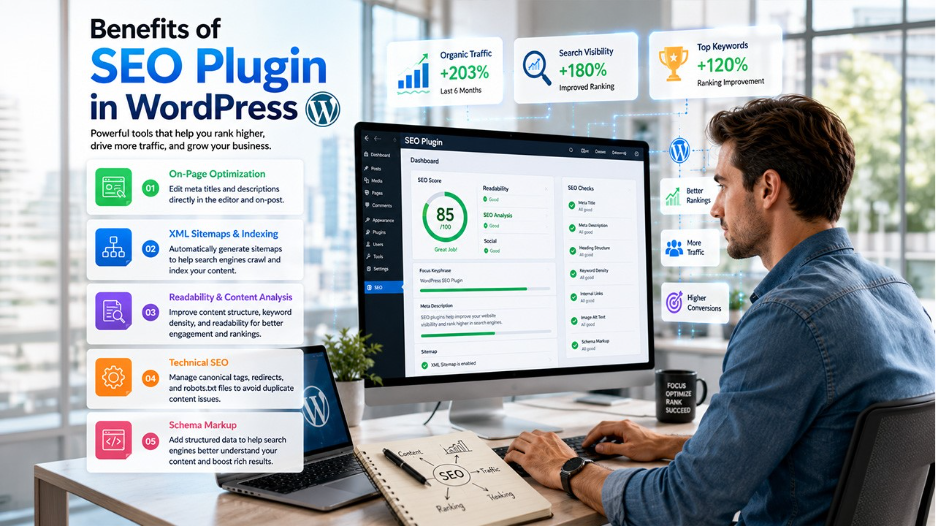
Benefits of SEO Plugin in WordPress 

A SEO plugin for WordPress offers various key benefits and functions in optimizing a website, like improving readability, advanced content analysis, and adding schema markups. These plugins also help in improving organic traffic without the need to understand the underlying code of the website.  

The key benefits and functions of SEO Plugins in WordPress include:  

  • On-Page Optimization: The SEO plugins for WordPress help in editing meta titles and descriptions directly into the page editor or on-post. 
  • XML Sitemaps and Indexing: The SEO plugins help in automatically generating sitemaps, which helps with search engine crawls and content indexing. 
  • Readability & Content Analysis: These plugins help in improving the content structure of the website, along with improving keyword density and readability of the content.  
  • Technical SEO: The SEO plugins also help in managing canonical tags, along with redirects and robots.txt files, to avoid any duplicate content issues.  
  • Schema Markup: It also helps the search engines to better understand the context of the content. 

Types of SEO Plugins in WordPress 

Performing SEO in WordPress without a plugin is possible, but it requires technical and coding knowledge, and is not recommended for beginners. This is where SEO plugins for WordPress come into play.  

The SEO plugins in WordPress are categorized into eight main types, which include all-in-one SEO suites, technical SEO & schema markup, performance & speed optimization, link management & internal linking, and AI-powered SEO, among others. These tools are generally specialized for specific tasks, like internal linking, speed, or schema generation.  

The different types of SEO plugins for WordPress include: 

  • All-in-One SEO Suites: This is a comprehensive tool that manages all major on-page optimization, like XML sitemaps, breadcrumbs, and meta tags. 
  • Technical SEO & Schema Markup: The technical plugins generate structured data, which helps search engines to understand the context of the content.  

For users specifically looking to improve structured data and rich snippets, tools like the SchemaWriter WordPress Plugin can further simplify schema implementation in WordPress. 

  • Performance & Speed Optimization: The performance and speed optimization plugin is crucial for Core Web Vitals. 
  • Link Management & Internal Linking: The link management and internal linking plugins are used to automate internal linking in the content and fix 404 errors.  
  • AI-Powered SEO: These tools provide AI-driven and real-time feedback on content optimization.  
  • Image Optimization: These are the plugins that compress images and add alt tags for image search.  
  • Analytics & Integration: These connect Search Console, Analytics, and AdSense directly to the dashboard, along with providing critical analytics related to the website.  
  • Redirections: These tools help in managing 301 redirects. 

Top SEO Plugins in WordPress 

In 2026, the best SEO plugin for WordPress offers comprehensive on-page optimization, along with schema markup and sitemaps. The best SEO plugin also helps in improving the ranking, speed, and technical SEO of the website. Some of the most popular SEO plugins for WordPress in 2026 include YoastSEO, Rank Math SEO, All-in-One SEO (AIOSEO), SEOPress, and The SEO Framework, among others. 


SEO Plugin Key Features Benefit Limitation 
YoastSEO SEO analytics, XML sitemap generation Easy setup wizard Heavy on a large website 
Rank Math SEO Keyword optimization, advanced schema generator Lightweight and Fast Overwhelming for beginners 
All-in-One SEO (AIOSEO) Smart XML sitemap, SEO audit checklist Beginner friendly Key features available in the paid plan 
SEOPress XML and HTML sitemaps and Schema markup White-label support smaller community support 
The SEO Framework Automated SEO settings Lightweight and fast performance Fewer beginner tutorials 

Yoast SEO 

It is among the most popular and best SEO plugins for WordPress. Yoast SEO offers a beginner-friendly interface, along with all the essential SEO tools. It offers key features like SEO analysis, Readability checker, XML sitemap generation, and Breadcrumb support.  

Benefits 

  • Easy setup wizard 
  • Beginner-friendly interface 
  • Regular updates 

Limitations 

  • Can feel heavy on large websites 
  • Advanced features require a premium version. 

Rank Math SEO 

It is among the fastest-growing SEO plugins. It offers key premium features for free. It offers keyword optimization, an advanced schema generator, Google Search Console integration, and a 404 monitor, among other key features.  

Users comparing the two most popular SEO plugins can also explore a detailed comparison of Rank Math vs Yoast SEO to understand which tool better suits their optimization strategy. 

Benefits 

  • Lightweight and fast 
  • Feature-rich free version 
  • User-friendly setup wizard 

Limitations 

  • Overwhelming for beginners.  

All in One SEO (AIOSEO) 

The AIOSEO is designed for improved performance and simplicity. It offers key features like smart XML sitemaps, SEO audit checklists, social media integration, and local SEO tools, among others.  

Benefits 

  • Beginner-friendly 
  • Strong WooCommerce support 
  • Local SEO features 

Limitations 

  • Key features available for paid plans only. 

SEOPress 

The SEOPress is a lightweight and affordable SEO plugin that features advanced customization options. It also offers key features, like the redirect manager, Google Analytics integrations, and XML & HTML sitemaps.  

Benefits 

  • Supports white label 
  • affordable premium pricing 
  • lightweight performance 

Limitations 

  • Smaller community support 

The SEO Framework 

The plugin is popular for speed, automation, and clean performance. It offers various key features like local SEO extension, schema markup, spam comment protection, and automated SEO settings.  

Benefits 

  • Minimal interface 
  • No ads or upsells 
  • Lightweight 

Limitations 

  • Fewer beginner tutorials. 
  1. Google Site Kit 

It is the official analytics and search performance data plugin of Google. It offers key features like Search Console, Analytics, AdSense, and PageSpeed Insights.  

Benefits 

  • Free to use 
  • Official Google integration 

Limitation 

  • Limited direct SEO 

Schema Pro 

A dedicated schema markup plugin, which offers rich snippets. It also features advanced structured data and automation rules.  

Benefits 

  • Excellent schema customization 

Limitations 

  • Does not support full SEO 

Squirrly SEO 

An AI-powered SEO assistant that offers real-time optimization guidance. It also offers keyword research and audits.  

Benefits 

  • Beginner Friendly 
  • Helpful SEO guidance 

Limitations 

  • Crowded interface 

Slim SEO 

It is a lightweight SEO plugin, which is designed to offer automation and simplicity. It features key elements like auto meta tags, schema, redirects, and sitemap tools. 

Benefits 

  • Fast 
  • Zero setup 

Limitations 

  • Limited advanced customization 

WP Meta SEO 

WP Meta SEO plugin is focused on bulk editing and metadata management. It also features image SEO and sitemap tools.  

Benefits 

  • Saves time on large sites 

Limitations 

  • Outdated UI 

Essential Elements of SEO Plugins 

The essential elements of SEO plugins are mainly designed to automate and simplify on-page and technical optimization within WordPress. The best SEO plugin in WordPress helps in bridging the gap between the technical search engine requirements and content creation.  

Some of the essential elements of SEO include: 

  • Keyword Optimization: Tools set to focus on keywords, monitor keyword density, and offer actionable recommendations for content improvements.  
  • XML Sitemap Generation: With this feature, the plugin automatically creates sitemaps to guide search engines in crawling and automates indexing the website. 
  • Readability Analysis: The element evaluates if the content is easy to read. It also checks the paragraph structure and sentence length to reduce bounce rates.  
  • Meta Tag Management: This automatically generates meta titles and meta descriptions and offers easy editing of the same.  
  • Google Analytics/Search Console Integration: This helps connect the dashboard directly to Google tools, which display performance data and tracking. 

What SEO Plugin to Choose  

Choosing the right SEO plugin for WordPress majorly depends on the type of website, along with the experience level, budget, and SEO goals. The top SEO plugins for WordPress generally handle the basic tasks, like meta titles, XML sitemaps, and schema markup, efficiently. The real difference in the best SEO plugin for WordPress depends on the ease of use, advanced features, and performance. 

SEO Plugin Ideal For 
YoastSEO Bloggers, beginners, and content-heavy sites. 
Rank Math SEO Advanced users, affiliate marketers, and agencies. 
All-in-One SEO (AIOSEO) Businesses and e-commerce stores. 
SEOPress Agencies and Developers 
The SEO Framework Performance-focused websites. 
Google Site Kit Beginners 
Schema Pro Site that needs advanced schema. 
Squirrly SEO Non-technical users. 
Slim SEO Small websites and beginners. 
WP Meta SEO Large websites with multiple pages. 

Before installing multiple SEO tools together, it is also important to understand how to troubleshoot situations where a plugin is not working properly in WordPress. 


Conclusion 

The SEO plugins play a critical role in managing and optimizing a WordPress website. These plugins help simplify the complex SEO tasks, along with improving content optimization and supporting technical SEO. The best SEO plugin for WordPress helps in generating XML sitemaps, optimizing meta tags, and managing redirects. 

In WordPress, there are various specialized SEO plugins available. Among these, selecting the best SEO plugin for a WordPress website depends on the goal of the user, budget, and technical requirements. To select the right plugin, the user needs to align their requirements with the features and benefits of the SEO plugins available in WordPress.