


惯性聚合 高效追踪和阅读你感兴趣的博客、新闻、科技资讯
阅读原文 在惯性聚合中打开

推荐订阅源

Hacker News: Ask HN
Hacker News: Ask HN
D
DataBreaches.Net
Microsoft Security Blog
U
Unit 42
V
Visual Studio Blog
GbyAI
GbyAI
云风的 BLOG
云风的 BLOG
博客园 - Franky
C
CXSECURITY Database RSS Feed - CXSecurity.com
大猫的无限游戏
大猫的无限游戏
P
Privacy & Cybersecurity Law Blog
T
The Exploit Database - CXSecurity.com
Simon Willison's Weblog
L
LangChain Blog
I
Intezer
V2EX - 技术
V2EX - 技术
Google DeepMind News
T
Threat Research - Cisco Blogs
Apple Machine Learning Research
V
V2EX
腾讯CDC
博客园 - 【当耐特】
Know Your Adversary
Know Your Adversary
TaoSecurity Blog
TaoSecurity Blog
cs.AI updates on arXiv.org
F
Fortinet All Blogs
Project Zero
Project Zero
Blog — PlanetScale
Blog — PlanetScale
S
Security @ Cisco Blogs
量子位
M
MIT News - Artificial intelligence
美团技术团队
C
Cisco Blogs
S
Schneier on Security
Recent Commits to openclaw:main
G
Google Developers Blog
N
News and Events Feed by Topic
MongoDB | Blog
MongoDB | Blog
The Hacker News
The Hacker News
H
Help Net Security
S
Secure Thoughts
Scott Helme
Scott Helme
SecWiki News
SecWiki News
T
Troy Hunt's Blog
cs.CV updates on arXiv.org
博客园 - 叶小钗
O
OpenAI News
Application and Cybersecurity Blog
博客园 - 司徒正美
T
Tenable Blog

The JetBrains Blog

Kotlin Turns 15: Celebrate the Kotlin Effect - The JetBrains Blog PhpStorm 2026.2 is Now Out - The JetBrains Blog Key Takeaways From PHPverse 2026 - The JetBrains Blog What's New in IntelliJ IDEA 2026.2 - The JetBrains Blog What’s fixed in IntelliJ IDEA 2026.2 - The JetBrains Blog CLion 2026.2 Is Here - The JetBrains Blog DataGrip 2026.2: AI Agent Skills, MCP Tools and CLI Commands for Data Source Management, Bundled JDBC Drivers, and Improved Session Control - The JetBrains Blog Download WebStorm 2026.2: TypeScript 7 Support, AI, and more GoLand 2026.2 Is Now Available! - The JetBrains Blog Code in Space: Redefining Tech Creation with AI and XR - The JetBrains Blog Rider 2026.2 Release Candidate Is Out! - The JetBrains Blog ReSharper 2026.2 Release Candidate Released! - The JetBrains Blog JetBrains GameDev Days 2026 – Call for Speakers - The JetBrains Blog MPS 2026.1 Has Been Released! - The JetBrains Blog IntelliJ Scala Plugin 2026.2 Is Out! - The JetBrains Blog What's New in ReSharper 2026.2 for VS Code-compatible editors  - The JetBrains Blog Debugging for .NET in VS Code and Cursor: The #1 Requested Feature Is Here - The JetBrains Blog dotInsights | July 2026 - The JetBrains Blog The History of Kodee, Kotlin’s Mascot - The JetBrains Blog JetBrains Academy – June Digest - The JetBrains Blog Introducing the Kotlin Benchmark for AI Coding Agents - The JetBrains Blog Best Object Detection Models for Machine Learning in 2026 - The JetBrains Blog What's Next for TeamCity – CI/CD by JetBrains - The JetBrains Blog The Benchmark Meaning Gap - The JetBrains Blog JetBrains AI for Teams and Organizations: From Fragmented AI Usage to Coordinated Software Development - The JetBrains Blog Java Annotated Monthly – July 2026  - The JetBrains Blog Shift-Left with JetBrains Qodana Natvis Comes to Linux and macOS: Visualize Your C++ Types Without Writing a Single Data Formatter - The JetBrains Blog Speaking to AI Agents like Cavemen Saves 65% of Tokens. We Test. In Conversation With the Golden Kodee Winners - The JetBrains Blog Toolbox App 3.6: Smarter Storage Cleanup, Windows installation diagnostics, and More - The JetBrains Blog IntelliJ IDEA 2026.1.4 Is Out! - The JetBrains Blog TeamCity 2026.1.2 and 2025.11.6 Are Now Available - The JetBrains Blog JetBrains Engineering Hiring Process Guide Kotlin Comes to BlueJ - The JetBrains Blog Improving Embedded Software Quality With Parasoft C/C++test, CLion, and AI - The JetBrains Blog Kodee’s Kotlin Roundup: Kotlin Turns 15, Kotlin 2.4.0, and the Kotlin Toolchain - The JetBrains Blog GitHub Copilot now an Integrated Agent in JetBrains IDEs - The JetBrains Blog JetBrains Air lands on Windows - The JetBrains Blog The Role of Static Code Analysis in Fintech Compliance Kotlin Notebook Sunset - The JetBrains Blog Open-Sourcing the LSP Client API in IntelliJ IDEA 2026.2 - The JetBrains Blog The Dev Containers Story: Introducing EelApi for Plugin Authors - The JetBrains Blog Cursor's $60B Acquisition - Qodana Codex is now the recommended agent in JetBrains IDEs - The JetBrains Blog SSH Connections Are Moving to JetBrains Daemon in the Toolbox App 3.6 EAP - The JetBrains Blog Your AI Agent Keeps Missing The Real Bottleneck. JetBrains Rider Can Fix It Now. - The JetBrains Blog Rust Web Development 2026: The Problems Nobody Talks About Our Research on Membership Inference Attacks and Preventing Privacy Leaks - The JetBrains Blog Explicit Lazy Imports Are Coming to Python 3.15 - The JetBrains Blog Kotlin Toolchain 0.11: The Next Step for Amper - The JetBrains Blog YouTrack Helpdesk Now Includes Customer Groups - The JetBrains Blog How to Win a Hackathon: Notes From the Judging Table - The JetBrains Blog How We Measure the ROI of JetBrains IDEs - The JetBrains Blog PHP Version Migration | Jetbrains Qodana Bamboo End of Life: How to Prepare and Choose the Right CI/CD Replacement - The JetBrains Blog Structuring IntelliJ Plugins with Optional Content Modules - The JetBrains Blog YouTrack Security Update: Upgrade Required for YouTrack Server - The JetBrains Blog Qodana Is a Finalist in the 2026 CODiE Awards for Best DevOps Tool - The JetBrains Blog JetBrains Marketplace Ecosystem Security Update: Addressing Malicious Third-Party AI Plugins - The JetBrains Blog Your JetBrains IDE Expertise, Now on LinkedIn - The JetBrains Blog The JetBrains AI Coding Agent moves to general availability Step Rejection Fine-Tuning: Squeezing More Signal from Noisy Agent Trajectories - The JetBrains Blog The Anthropic Debate - The Qodana Blog dotInsights | June 2026 | The .NET Tools Blog Inside JetPride: How JetBrains Employees Built an LGBTQIA+ Community | The Life at JetBrains Blog MPS 2026.1 Release Candidate Arrives | The MPS Blog Best Python AI Frameworks in 2026 | The PyCharm Blog Contribute to the State of PHP Survey | The PhpStorm Blog The Rules of Zero, Three and Five - The Qodana Blog Modern C++ Support in CLion: What’s New | The CLion Blog Agentic AI Governance: Designing for Accountability and Control | The JetBrains AI Blog JetBrains Plugin Developer Conf 2026 – Call for Speakers | The JetBrains Platform Blog Fewer False Positives in RustRover 2026.2|The RustRover Blog Rider 2026.2 EAP 5: Code Quality Checks for Your AI Agents, and More. | The .NET Tools Blog Why Zig Isn’t 1.0 (Yet) | The JetBrains Blog Java Annotated Monthly – June 2026  | The IntelliJ IDEA Blog IntelliJ IDEA 2026.1.3 Is Out! | The IntelliJ IDEA Blog RustRover at RustWeek 2026 | The RustRover Blog WPF Hot Reload Is Here: Edit Your XAML and Watch It Update Live in Rider | The .NET Tools Blog Kotlin 2.4.0 Released | The Kotlin Blog IntelliJ IDEA 2025.3.6 Is Out! | The IntelliJ IDEA Blog Async VFS Content Writes - What Plugin Authors Need to Know | The JetBrains Platform Blog Top Agentic Frameworks for Building Applications 2026 | The PyCharm Blog Toolbox App 3.5: Better Remote Development Observability, More Reliable Enterprise Configuration, and Smoother Everyday Interactions | The Toolbox App Blog Stop Pasting Tokens: OAuth2 Login for JetBrains IDE Plugins | The JetBrains Platform Blog Fix Common TypeScript Issues | The Qodana Blog Mellum2 Goes Open Source: A Fast Model for AI Workflows | The JetBrains AI Blog What Does It Actually Take for an IDE to Understand Rust? Hibernate 7.4 New Features | The IntelliJ IDEA Blog How We Use AlphaEvolve to Make Complex IDE Algorithms Faster | The JetBrains AI Blog JetBrains Academy – May Digest | The JetBrains Academy Blog TeamCity 2026.1.1 Is Now Available | The TeamCity Blog The Upcoming Sunset of DataSpell | The DataSpell Blog Deprecating dotMemory Unit | The .NET Tools Blog Koog 1.0 Is Out: Stable Core, Better Interop, and Multiplatform Observability | The JetBrains AI Blog Introducing the Cloud9 JetStream Theme for JetBrains IDEs | The JetBrains Blog Build a Live Object Detection App for the Reachy Mini With TensorFlow and PyCharm | The PyCharm Blog IntelliJ IDEA 2026.2 EAP Is Open | The IntelliJ IDEA Blog How AI Agents Can Work with TeamCity | The TeamCity Blog
AWS Image Builder Plugin for TeamCity - The JetBrains Blog
Dmitrii Korovin · 2026-06-22 · via The JetBrains Blog
Teamcity logo

Powerful CI/CD for DevOps-centric teams

AWS Image Builder Plugin for TeamCity

Cloud build agents are one of those CI/CD features that feel almost magical when everything works well. Your TeamCity server can scale build capacity up when the queue gets busy, then wind it back down when the rush is over. You get extra power exactly when you need it, without keeping machines idle the rest of the time.

They also make builds cleaner and more predictable. Each cloud agent starts as a fresh VM from a cloud image, so every build gets an isolated environment rather than inheriting the state left behind by a previous build. Scalable, cost-efficient, and reliable, cloud build agents are a perfect fit for a truly robust and streamlined TeamCity setup.

Of course, cloud build agents are not without trade-offs. The most obvious one is maintenance. Agents are launched from a static machine image, and that image starts aging the moment your tooling changes or the TeamCity server is updated. Suddenly, every new agent has to spend valuable time catching up… or you have to repeat the familiar cycle: Start an instance, install updates, create a new snapshot, and update the TeamCity cloud profile.

Large repositories add another wrinkle. Since every cloud agent starts from a fresh VM, it also starts with an empty checkout directory. The bigger the repository, the more time each build can spend just pulling sources. One workaround is to bake repository mirrors into the image alongside your tools, so agents only need to fetch the latest commits. But that, too, is temporary: As changes accumulate, the mirrors become stale, and the image needs another update.

If you run AMI-based cloud build agents on Amazon Web Services, there’s a better way to handle this – the AWS Image Builder plugin. It turns image maintenance from a manual, repetitive chore into a regular TeamCity build configuration.

Prerequisites

To automate AMI updates, download and install the AWS Image Builder TeamCity plugin from JetBrains Marketplace. You can do this directly in TeamCity: navigate to Admin | Plugins, then click Browse plugins repository. Don’t forget to enable this plugin after installing it.

You will also need a suitable AWS connection configured in TeamCity. The connection’s IAM principal needs EC2 permissions to launch instances, create images, and read VPC metadata.

Create a build configuration

  1. Once the plugin is installed and enabled, create a new build configuration under the project that has access to the AWS connection mentioned in the previous section.
  2. Add the Image Builder AWS AMI build step.
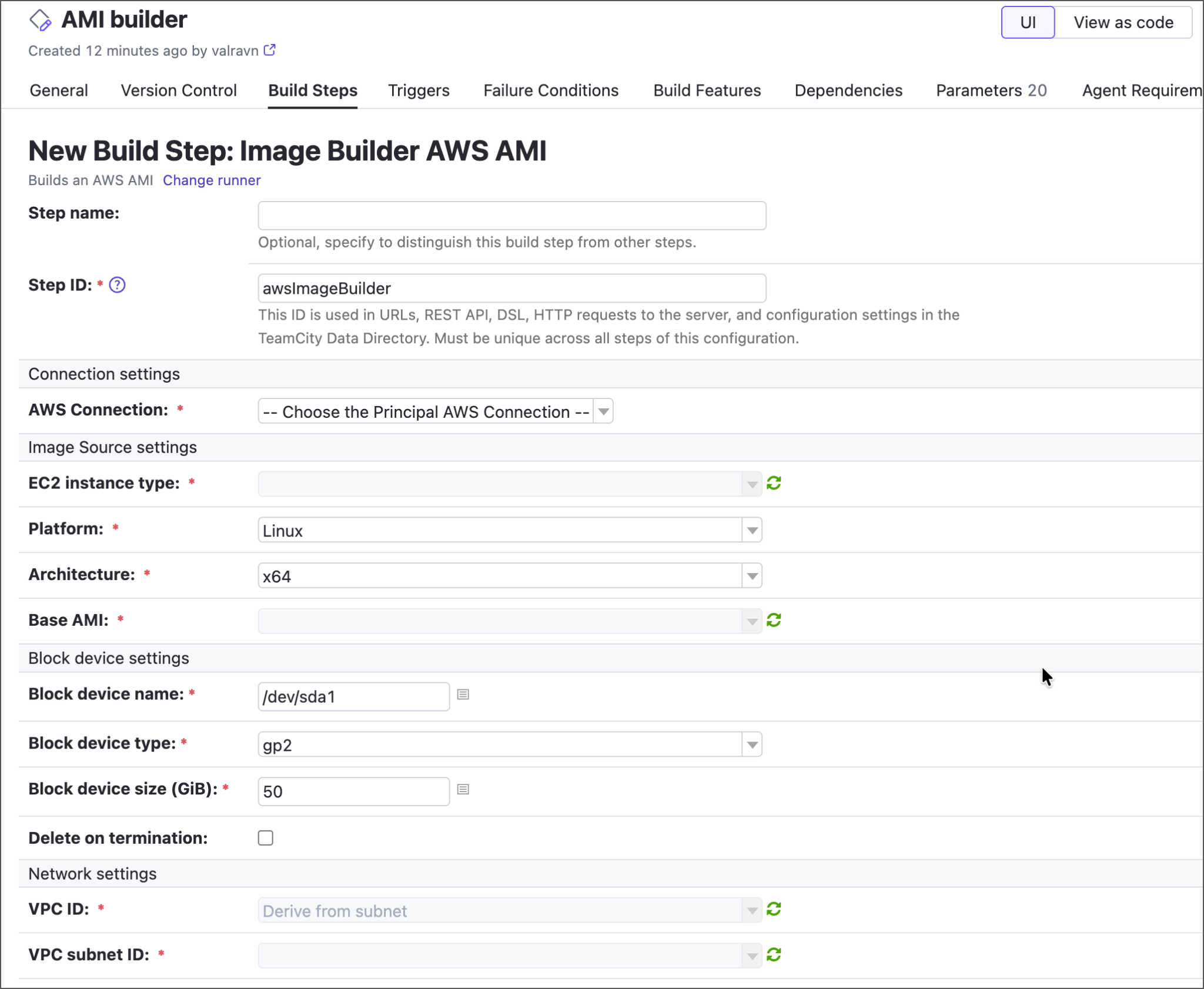
  1. Specify core step settings:
  • AWS Connection – Choose the connection that TeamCity will use to communicate with AWS.
  • Base AMI – Select the AMI this configuration will rebuild.
  • Network settings – Required to access AWS resources.
  • Tags – The list of name=value tags that will be assigned to a newly built AMI. This step is important if you want TeamCity to automatically update its cloud profiles (see below).
  • Image access – Enter account IDs, organization ARNs, or OU ARNs to specify who will be able to access your newly built image.
  1. Tick Install TeamCity agent to bake the build agent into the AMI. The full agent distribution will be taken directly from the TeamCity instance, so your agents will always match the server version. After major TeamCity updates, run this build configuration to supply your AMI with the corresponding agent version.
  2. Specify optional scripts to run during the build (TeamCity first-run script files; the inline script will be executed last). You can use these scripts to install runtimes, SDKs, agent plugins, or perform any environment setup that would otherwise run on every agent boot.
  3. Enable VCS mirrors to speed up the build checkout phase. The plugin will pre-populate the image with Git object mirrors based on the VCS roots attached to this configuration. The roots contain all the required information (connection details, credentials, submodule checkout policy, and so on), making them the perfect tool for the job.

To specify which mirrors should be baked in:

  • Save the build step to go back to the build configuration settings.
  • Navigate to the Version Control tab and click Attach VCS Root.
  • If your AMI builder configuration is owned by the same project that has regular configurations that build, test, and deploy required repositories, you can attach an existing VCS root. Otherwise, create a new one.
  • For a newly created Git VCS root, specify the fetch URL and authorization settings.
  • Switch the root’s Checkout policy to Use mirrors.

Run the builder configuration

Once you’ve filled in all build-step and VCS root settings, run the configuration and verify the results.

  • Check the value of the teamcity.build.awsImageBuilder.amiId build parameter that stores the AMI ID of your new image.
  • Navigate to the Artifacts tab and view the hidden .teamcity/image_builder/ artifact. This directory stores a generated HashiCorp Packer template that the AWS Image Builder plugin uses to upload the final AMI.
  • Log in to your AWS console to verify the new AMI is published and tagged.
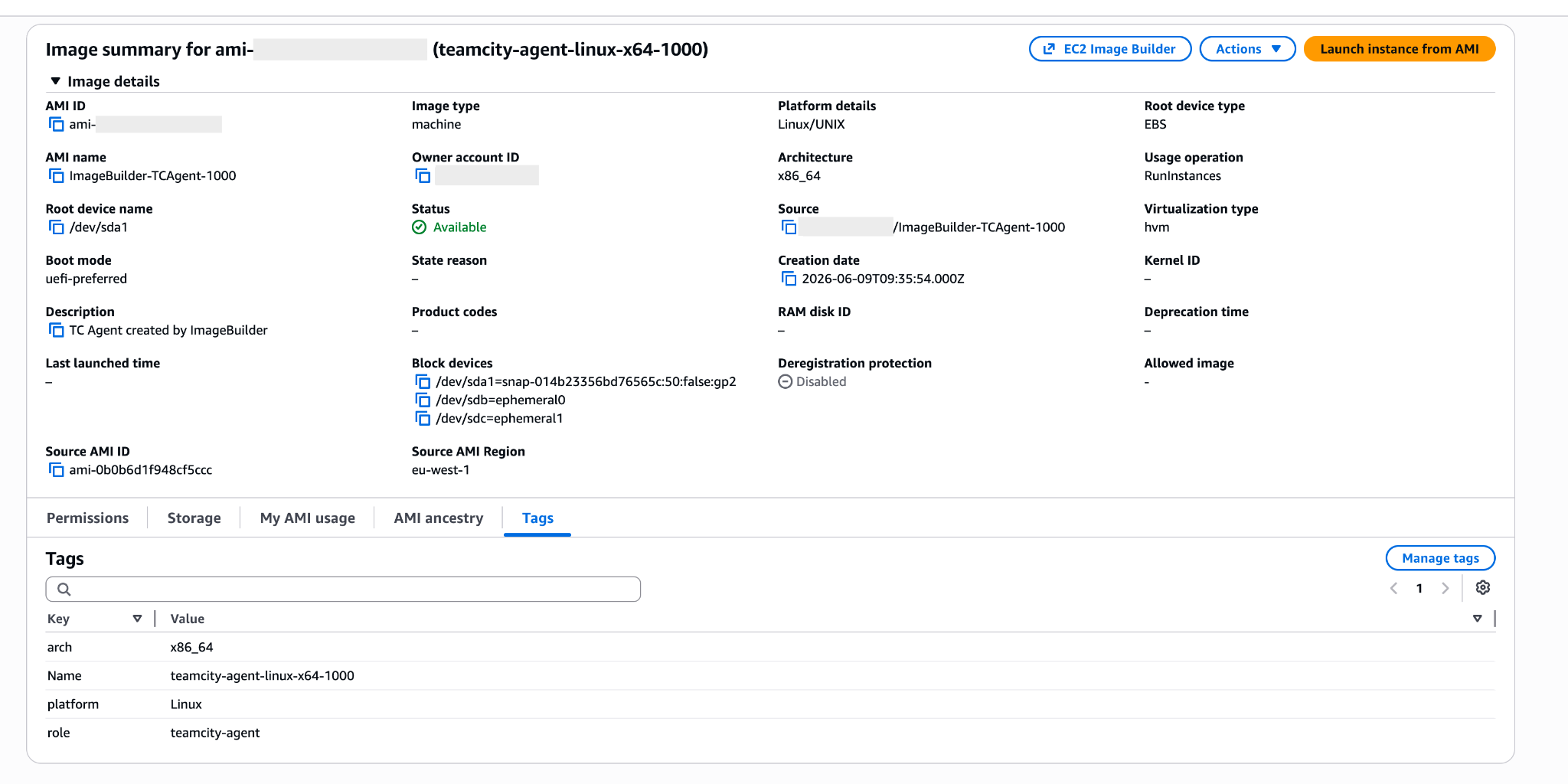
Update TeamCity cloud profiles

Building an updated AMI is only half the automation story. The next step is making sure TeamCity starts using it automatically as soon as it’s ready.

To do this, go to Project settings | Cloud profiles, open the profile you want to update, and check each cloud image in it. Set the Instance toggle to AMI by tags so TeamCity selects images by tag instead of a fixed AMI ID. Use the same AMI tags that you configured in the image builder build step.

Over time, repeated image builder runs will produce multiple AMIs with the same tags, but that will not become an issue. When a cloud image uses the AMI by tags policy, TeamCity periodically checks AWS for matching AMIs and chooses the one with the most recent creation date. This means your cloud agents can keep launching from the latest AMI without any manual profile updates.

Kotlin DSL

If you prefer to configure your TeamCity workflows in Kotlin DSL rather than TeamCity UI, here’s how to configure the AMI builder step in code:

awsImageBuilderBuild {

    name = "Build Agent AMI"

    awsConnectionId = "AmazonWebServicesAws"

    baseAmi = "ami-0xxxxxxxxxxxxxxxxx"

    instanceType = "t3.medium"

    subnetId = "subnet-0xxxxxxxxxxxxxxxxx"

    tags = """

        role=teamcity-agent

        env=prod

    """.trimIndent()

    includeAgent = true

    inlineScript = "systemctl enable teamcity-agent"

}

Tell us what you think

We love building features that solve real, everyday DevOps challenges. The AWS Image Builder plugin is designed to do exactly that by making cloud build agent maintenance much easier, so you can spend less time tinkering with the images and more looking at your builds.

As always, your feedback matters. If you run into issues or feel that an important customization option is missing, please let us know in the comments on the JetBrains Marketplace plugin page or in the corresponding YouTrack ticket.

Subscribe to TeamCity Blog updates

Discover more