




惯性聚合 高效追踪和阅读你感兴趣的博客、新闻、科技资讯
阅读原文 在惯性聚合中打开

推荐订阅源

Security Archives - TechRepublic
I
InfoQ
阮一峰的网络日志
阮一峰的网络日志
云风的 BLOG
云风的 BLOG
Threat Intelligence Blog | Flashpoint
AWS News Blog
AWS News Blog
S
SegmentFault 最新的问题
T
Tailwind CSS Blog
The Hacker News
The Hacker News
GbyAI
GbyAI
P
Palo Alto Networks Blog
博客园 - 三生石上(FineUI控件)
Y
Y Combinator Blog
Stack Overflow Blog
Stack Overflow Blog
博客园 - Franky
Cyber Security Advisories - MS-ISAC
Cyberwarzone
Cyberwarzone
H
Help Net Security
S
Securelist
月光博客
月光博客
博客园 - 【当耐特】
T
Threatpost
T
Tenable Blog
G
GRAHAM CLULEY
博客园 - 司徒正美
I
Intezer
MyScale Blog
MyScale Blog
T
Threat Research - Cisco Blogs
P
Privacy & Cybersecurity Law Blog
The GitHub Blog
The GitHub Blog
C
CERT Recently Published Vulnerability Notes
T
Tor Project blog
Google DeepMind News
C
Cybersecurity and Infrastructure Security Agency CISA
罗磊的独立博客
腾讯CDC
P
Privacy International News Feed
博客园_首页
The Cloudflare Blog
Cisco Talos Blog
Cisco Talos Blog
A
About on SuperTechFans
V
Vulnerabilities – Threatpost
A
Arctic Wolf
B
Blog RSS Feed
Recorded Future
Recorded Future
奇客Solidot–传递最新科技情报
奇客Solidot–传递最新科技情报
Google DeepMind News
S
Security Affairs
Microsoft Security Blog
L
LangChain Blog

The JetBrains Blog

Kotlin Turns 15: Celebrate the Kotlin Effect - The JetBrains Blog PhpStorm 2026.2 is Now Out - The JetBrains Blog Key Takeaways From PHPverse 2026 - The JetBrains Blog What's New in IntelliJ IDEA 2026.2 - The JetBrains Blog What’s fixed in IntelliJ IDEA 2026.2 - The JetBrains Blog CLion 2026.2 Is Here - The JetBrains Blog DataGrip 2026.2: AI Agent Skills, MCP Tools and CLI Commands for Data Source Management, Bundled JDBC Drivers, and Improved Session Control - The JetBrains Blog Download WebStorm 2026.2: TypeScript 7 Support, AI, and more GoLand 2026.2 Is Now Available! - The JetBrains Blog Code in Space: Redefining Tech Creation with AI and XR - The JetBrains Blog Rider 2026.2 Release Candidate Is Out! - The JetBrains Blog ReSharper 2026.2 Release Candidate Released! - The JetBrains Blog JetBrains GameDev Days 2026 – Call for Speakers - The JetBrains Blog MPS 2026.1 Has Been Released! - The JetBrains Blog IntelliJ Scala Plugin 2026.2 Is Out! - The JetBrains Blog What's New in ReSharper 2026.2 for VS Code-compatible editors  - The JetBrains Blog Debugging for .NET in VS Code and Cursor: The #1 Requested Feature Is Here - The JetBrains Blog dotInsights | July 2026 - The JetBrains Blog The History of Kodee, Kotlin’s Mascot - The JetBrains Blog JetBrains Academy – June Digest - The JetBrains Blog Introducing the Kotlin Benchmark for AI Coding Agents - The JetBrains Blog Best Object Detection Models for Machine Learning in 2026 - The JetBrains Blog What's Next for TeamCity – CI/CD by JetBrains - The JetBrains Blog The Benchmark Meaning Gap - The JetBrains Blog JetBrains AI for Teams and Organizations: From Fragmented AI Usage to Coordinated Software Development - The JetBrains Blog Java Annotated Monthly – July 2026  - The JetBrains Blog Shift-Left with JetBrains Qodana Natvis Comes to Linux and macOS: Visualize Your C++ Types Without Writing a Single Data Formatter - The JetBrains Blog Speaking to AI Agents like Cavemen Saves 65% of Tokens. We Test. In Conversation With the Golden Kodee Winners - The JetBrains Blog Toolbox App 3.6: Smarter Storage Cleanup, Windows installation diagnostics, and More - The JetBrains Blog IntelliJ IDEA 2026.1.4 Is Out! - The JetBrains Blog TeamCity 2026.1.2 and 2025.11.6 Are Now Available - The JetBrains Blog JetBrains Engineering Hiring Process Guide Kotlin Comes to BlueJ - The JetBrains Blog Improving Embedded Software Quality With Parasoft C/C++test, CLion, and AI - The JetBrains Blog Kodee’s Kotlin Roundup: Kotlin Turns 15, Kotlin 2.4.0, and the Kotlin Toolchain - The JetBrains Blog GitHub Copilot now an Integrated Agent in JetBrains IDEs - The JetBrains Blog JetBrains Air lands on Windows - The JetBrains Blog The Role of Static Code Analysis in Fintech Compliance Kotlin Notebook Sunset - The JetBrains Blog Open-Sourcing the LSP Client API in IntelliJ IDEA 2026.2 - The JetBrains Blog The Dev Containers Story: Introducing EelApi for Plugin Authors - The JetBrains Blog Cursor's $60B Acquisition - Qodana Codex is now the recommended agent in JetBrains IDEs - The JetBrains Blog SSH Connections Are Moving to JetBrains Daemon in the Toolbox App 3.6 EAP - The JetBrains Blog Your AI Agent Keeps Missing The Real Bottleneck. JetBrains Rider Can Fix It Now. - The JetBrains Blog Rust Web Development 2026: The Problems Nobody Talks About Our Research on Membership Inference Attacks and Preventing Privacy Leaks - The JetBrains Blog Explicit Lazy Imports Are Coming to Python 3.15 - The JetBrains Blog Kotlin Toolchain 0.11: The Next Step for Amper - The JetBrains Blog YouTrack Helpdesk Now Includes Customer Groups - The JetBrains Blog How to Win a Hackathon: Notes From the Judging Table - The JetBrains Blog How We Measure the ROI of JetBrains IDEs - The JetBrains Blog AWS Image Builder Plugin for TeamCity - The JetBrains Blog PHP Version Migration | Jetbrains Qodana Bamboo End of Life: How to Prepare and Choose the Right CI/CD Replacement - The JetBrains Blog YouTrack Security Update: Upgrade Required for YouTrack Server - The JetBrains Blog Qodana Is a Finalist in the 2026 CODiE Awards for Best DevOps Tool - The JetBrains Blog JetBrains Marketplace Ecosystem Security Update: Addressing Malicious Third-Party AI Plugins - The JetBrains Blog Your JetBrains IDE Expertise, Now on LinkedIn - The JetBrains Blog The JetBrains AI Coding Agent moves to general availability Step Rejection Fine-Tuning: Squeezing More Signal from Noisy Agent Trajectories - The JetBrains Blog The Anthropic Debate - The Qodana Blog dotInsights | June 2026 | The .NET Tools Blog Inside JetPride: How JetBrains Employees Built an LGBTQIA+ Community | The Life at JetBrains Blog MPS 2026.1 Release Candidate Arrives | The MPS Blog Best Python AI Frameworks in 2026 | The PyCharm Blog Contribute to the State of PHP Survey | The PhpStorm Blog The Rules of Zero, Three and Five - The Qodana Blog Modern C++ Support in CLion: What’s New | The CLion Blog Agentic AI Governance: Designing for Accountability and Control | The JetBrains AI Blog JetBrains Plugin Developer Conf 2026 – Call for Speakers | The JetBrains Platform Blog Fewer False Positives in RustRover 2026.2|The RustRover Blog Rider 2026.2 EAP 5: Code Quality Checks for Your AI Agents, and More. | The .NET Tools Blog Why Zig Isn’t 1.0 (Yet) | The JetBrains Blog Java Annotated Monthly – June 2026  | The IntelliJ IDEA Blog IntelliJ IDEA 2026.1.3 Is Out! | The IntelliJ IDEA Blog RustRover at RustWeek 2026 | The RustRover Blog WPF Hot Reload Is Here: Edit Your XAML and Watch It Update Live in Rider | The .NET Tools Blog Kotlin 2.4.0 Released | The Kotlin Blog IntelliJ IDEA 2025.3.6 Is Out! | The IntelliJ IDEA Blog Async VFS Content Writes - What Plugin Authors Need to Know | The JetBrains Platform Blog Top Agentic Frameworks for Building Applications 2026 | The PyCharm Blog Toolbox App 3.5: Better Remote Development Observability, More Reliable Enterprise Configuration, and Smoother Everyday Interactions | The Toolbox App Blog Stop Pasting Tokens: OAuth2 Login for JetBrains IDE Plugins | The JetBrains Platform Blog Fix Common TypeScript Issues | The Qodana Blog Mellum2 Goes Open Source: A Fast Model for AI Workflows | The JetBrains AI Blog What Does It Actually Take for an IDE to Understand Rust? Hibernate 7.4 New Features | The IntelliJ IDEA Blog How We Use AlphaEvolve to Make Complex IDE Algorithms Faster | The JetBrains AI Blog JetBrains Academy – May Digest | The JetBrains Academy Blog TeamCity 2026.1.1 Is Now Available | The TeamCity Blog The Upcoming Sunset of DataSpell | The DataSpell Blog Deprecating dotMemory Unit | The .NET Tools Blog Koog 1.0 Is Out: Stable Core, Better Interop, and Multiplatform Observability | The JetBrains AI Blog Introducing the Cloud9 JetStream Theme for JetBrains IDEs | The JetBrains Blog Build a Live Object Detection App for the Reachy Mini With TensorFlow and PyCharm | The PyCharm Blog IntelliJ IDEA 2026.2 EAP Is Open | The IntelliJ IDEA Blog How AI Agents Can Work with TeamCity | The TeamCity Blog
Structuring IntelliJ Plugins with Optional Content Modules - The JetBrains Blog
Róbert Novotný · 2026-06-19 · via The JetBrains Blog

IntelliJ Platform Plugins

What if one part of your plugin should load only when a specific IDE functionality is available? Plugin Model v2 is now available as an experimental way to structure, package, and build plugins, and to support such scenarios in a future-proof way. Its primary use case is in Split Mode (Remote Development) plugins.

In this post, let’s create a plugin that moves the CSS PSI-related functionality into an optional plugin content module.

The IDE includes a bundled plugin content module that provides CSS support, and our optional plugin content module depends on it. In IntelliJ IDEA 2026.1, where CSS PSI became available for free, without a subscription, this content module will be automatically available. In IntelliJ IDEA 2025.3, it is loaded only when the user has a subscription.
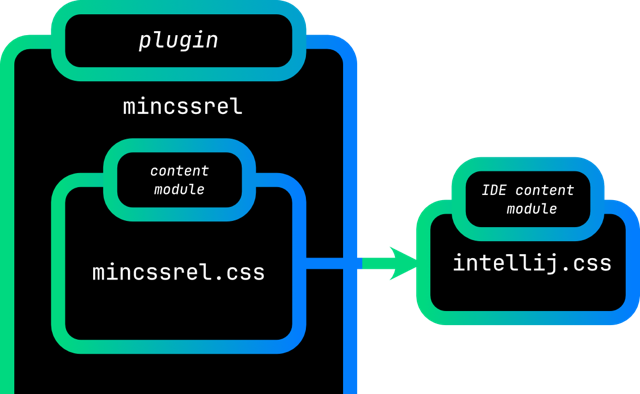
Plugin with a single plugin content module that depends on the IDE plugin content module

New plugin

Create a plugin by using the IDE Plugin generator, which is available in File | New Project starting with IntelliJ IDEA 2026.1 if the Plugin DevKit is installed. Remove the boilerplate code, such as comments and dependencies, and set the proper plugin descriptor metadata.

More importantly, set the Gradle build script to depend on IntelliJ IDEA 2025.3. This is the version in which Plugin Model v2 is still experimental, but generally available for third-party plugins.

dependencies {
    intellijPlatform {
        intellijIdea("2025.3")
    }
}

Preparing the Gradle build script for modular builds

The IntelliJ Platform Gradle Plugin 2.16.0 and newer provides a streamlined configuration for Gradle submodules that correspond to IntelliJ plugin content modules.

Each such Gradle submodule needs two Gradle plugins: Kotlin and Plugin content module support.

Enable this in the build.gradle.kts.

subprojects {
    apply(plugin = "org.jetbrains.kotlin.jvm")
    apply(plugin = "org.jetbrains.intellij.platform.module")
}

Preparing the plugin descriptor for modular builds

In modular plugins, the plugin descriptor plugin.xml is minimal. Even the com.intellij.modules.platform dependency is no longer necessary, as it is provided automatically.

Actions, extensions, and listeners do not belong here anymore. They are declared in the corresponding plugin content module descriptors.

Creating a plugin content module

In the IDE, create an empty Kotlin module css, built with Gradle. It maps to both a Gradle subproject and a plugin content module. Initially, its build script should be reduced to an empty file. All the necessary configuration will be provided by the parent build script and its Gradle plugins.

To make it work, declare this Gradle subproject as a dependency in the main build script.

dependencies {
    intellijPlatform {
        // ...
    }
    implementation(project(":css"))
}

Then, set up the plugin content module descriptor. Take care of its naming and location. Unlike the usual plugin.xml, the plugin content module descriptor belongs in src/main/resources, at the root of the classpath. The descriptor name is derived from the parent project name. In other words, create src/main/resources/mincssrel.css.xml with an empty <idea-plugin> element.

With this plugin content module descriptor ready, the last configuration step is to declare the plugin content module in the plugin descriptor. In plugin.xml, declare this module as optional in the loading attribute.

<idea-plugin>
    <!-- omitted for brevity -->
    <content>
        <module name="mincssrel.css" loading="optional" />
    </content>
</idea-plugin>

The loading attribute can be omitted, but it is recommended to specify it explicitly to avoid confusion.

Depending on PSI functionality

CSS PSI functionality lives in the IDE plugin content module intellij.css. Add this dependency to the css plugin content module in two places: first, in the plugin content module Gradle build script, and second, in the plugin content module descriptor. There are two aspects to these declarations: Gradle decides what compiles, and the plugin content module descriptor decides what loads.

The css/build.gradle.kts file now gets proper content. Add the dependency in the intellijPlatform block by using the bundledModule notation provided by the IntelliJ Platform Gradle Plugin.

dependencies {
    intellijPlatform {
        bundledModule("intellij.css")
    }
}

The src/main/resources/mincssrel.css.xml descriptor will no longer be empty. Declare a dependency on this bundled plugin content module by referring to the full module name, including its prefix.

<idea-plugin>
    <dependencies>
        <module name="intellij.css" />
    </dependencies>
</idea-plugin>

Plugin content module dependencies are part of Plugin Model v2. Each <module> element declares a mandatory, non-optional dependency. If this dependency is not available, the mincssrel.css module will not load.

As a general rule, if the plugin has no available plugin content modules, it will be disabled.

CSS PSI

To demonstrate that the functionality works, create a CssAction action and declare it in the plugin content module descriptor, mincssrel.css.xml.

<actions>
    <action id="org.intellij.sdk.css.CssAction"
            class="org.intellij.sdk.css.CssAction"
            text="Invoke CSS Action"
    />
</actions>

Then, provide the source. Create an in-memory CSS file from a static stylesheet string, read the PSI under readAction on a background thread, walk the ruleset, collect CSS selector names, and show them in a dialog on the event dispatch thread (EDT).

import com.intellij.lang.css.CSSLanguage
import com.intellij.openapi.actionSystem.AnActionEvent
import com.intellij.openapi.application.*
import com.intellij.openapi.progress.currentThreadCoroutineScope
import com.intellij.openapi.project.*
import com.intellij.openapi.ui.Messages
import com.intellij.psi.PsiFileFactory
import com.intellij.psi.css.*
import com.intellij.util.concurrency.annotations.RequiresReadLock
import kotlinx.coroutines.*
import org.intellij.lang.annotations.Language

@Language("CSS")
private const val SAMPLE_STYLESHEET = """
body {
  font-family: sans-serif;
}

h1 {
  font-size: 2.5em;
}    
"""

class CssAction : DumbAwareAction() {
    override fun actionPerformed(e: AnActionEvent) {
        val project = e.project ?: return
        currentThreadCoroutineScope().launch {
            val selectorNames = readAction {
                project.createSampleCssPsiFile()?.getSelectorNames() ?: emptyList()
            }
            val selectorsMessage = selectorNames.joinToString(", ")
            withContext(Dispatchers.EDT) {
                Messages.showInfoMessage(selectorsMessage, "CSS Selector List")
            }
        }
    }

    private fun Project.createSampleCssPsiFile(): CssFile? {
        val psiFile = PsiFileFactory
            .getInstance(this)
            .createFileFromText(CSSLanguage.INSTANCE, SAMPLE_STYLESHEET)
        return psiFile as? CssFile
    }

    @RequiresReadLock
    private fun CssFile.getSelectorNames() = stylesheet.rulesetList.rulesets.flatMap {
        it.selectors.toList()
    }.map {
        it.presentableText
    }
}

Running the plugin

If the intellij.css plugin content module is present in the IDE, the CSS action can access the CSS PSI. If it is missing, this mincssrel.css plugin content module does not load.

In IntelliJ IDEA 2025.3, this CSS PSI functionality is available with a subscription. In IntelliJ IDEA 2026.1 and newer, the CSS PSI is available even without a subscription.

To demonstrate it, add a dedicated Gradle run task to the main build script build.gradle.kts.

import org.jetbrains.intellij.platform.gradle.IntelliJPlatformType.IntellijIdea
// ...
// Gradle build script content omitted
// ...
val runIde261 by intellijPlatformTesting.runIde.registering {
    type = IntellijIdea
    version = "2026.1"
}

Run the runIde261 task, open Search Everywhere, and invoke the CSS action. This demonstrates optional functionality backed by the intellij.css IDE plugin content module and CSS PSI.

Summary

The plugin can declare an optional plugin content module to isolate platform-specific functionality whose dependencies determine exactly when it can load. There is no limit on the number of plugin content modules. For a more complex example, see the multi-module-plugin repository, which showcases two plugin content modules: one mandatory and one optional, with an API dependency between them.

For a visual summary of this post, watch Gradle Setup Powering Multi-module IntelliJ Plugins. To continue with the Remote Development story, read Make Your Plugin Remote Development-Ready as a follow-up.

Subscribe to JetBrains Platform updates

Discover more