









Focus on what matters
Fewer False Alarms, Better Coding Flow in RustRover 2026.2
False positives interrupt your workflow. In RustRover 2026.1, we reduced them by up to 25% in real projects, so you’ll see fewer misleading warnings, more relevant suggestions, and smoother completion. Read on to learn what causes false positives and how we’ve been fixing them.
What are false positives?
The term false positive is used in many fields, including healthcare, finance, cybersecurity, and software development. A false positive occurs when a system incorrectly reports a problem that does not actually exist. In software development, this usually means that a tool reports an error, warning, or threat even though the code or system is functioning correctly.
What are false positives in RustRover?
In RustRover, a false positive happens when the IDE highlights something as an error even though the project compiles and runs successfully. For example, you may see red code in the editor while cargo build and cargo check report no issues. This can make it harder to trust IDE diagnostics and may interrupt your development flow.
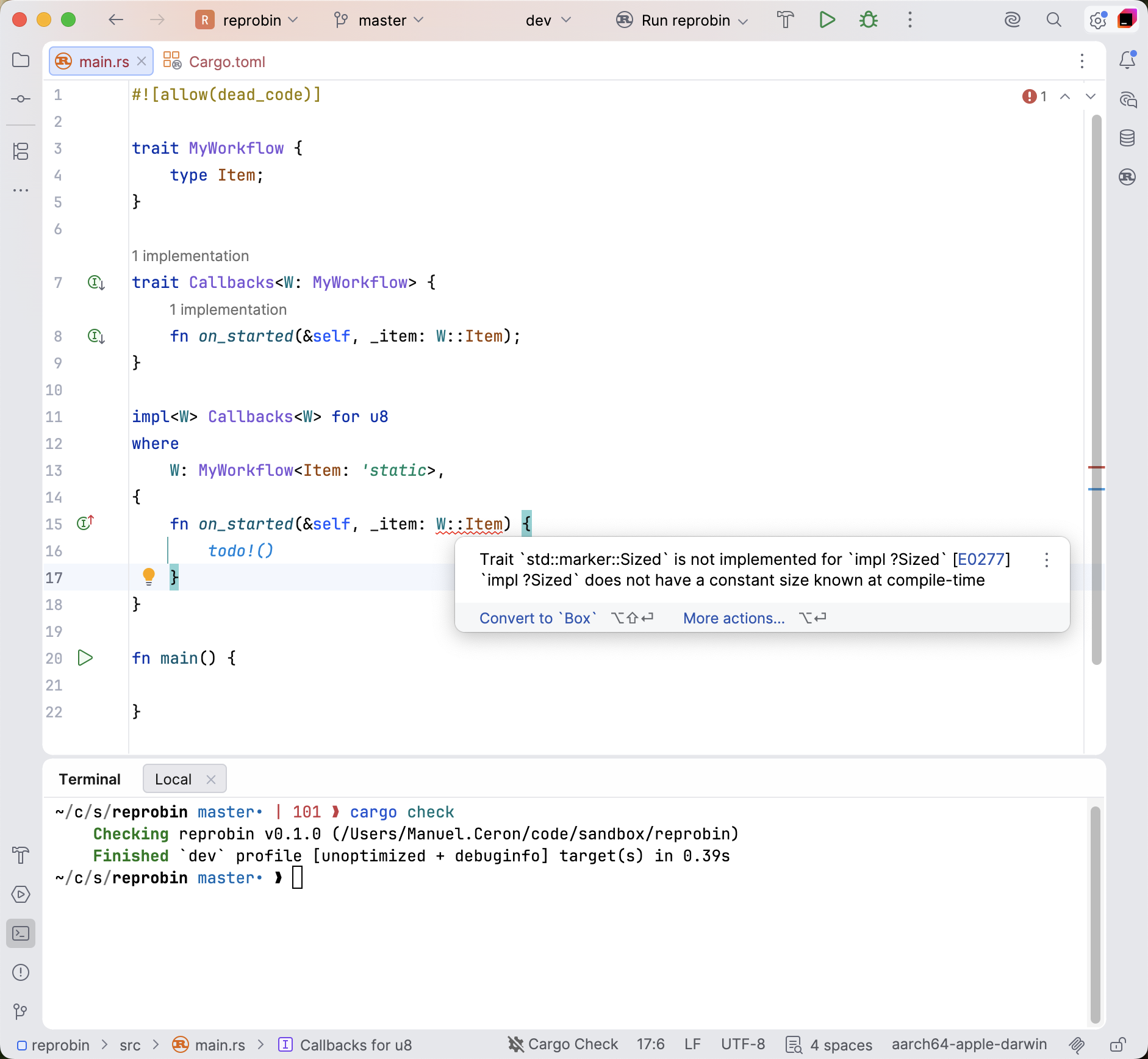
Why does RustRover have false positives?
By default, RustRover highlights problems in two different ways:
- After editing code, RustRover runs
cargo check(or optionallycargo clippy) to detect compiler errors and warnings. - RustRover also has its own code analysis engine. This engine parses the code, performs name resolution and type inference, and provides editor features such as highlighting, completion, navigation, inspections, and quick-fixes.
Sometimes RustRover’s internal analysis engine behaves differently from the compiler. When its logic does not perfectly match the compiler’s behavior, false positives can appear.
Why does RustRover have its own code analysis engine?
If RustRover’s code analysis can produce false positives, why not rely entirely on cargo check? There are several important reasons.
IDE features require deep code understanding
RustRover needs code analysis for much more than error highlighting. Features such as code completion, Go to Definition, Find Usages, refactorings, quick-fixes, type hints, and macro expansion support all require a deep understanding of the code structure.
To provide these features, RustRover parses the source code into a syntax tree, resolves identifiers, and infers types. The Rust compiler can report errors and warnings, but it’s not designed to power interactive IDE features. That’s why IDEs such as RustRover and rust-analyzer require their own analysis engines. RustRover’s analysis engine is developed independently and is not based on rust-analyzer.
The IDE must work on broken code
The compiler often stops after encountering an error and may not continue analyzing unrelated parts of the project. IDE analysis must be more resilient. It needs to continue understanding the codebase even when some parts are incomplete or incorrect.
IDEs and compilers have different priorities
RustRover’s analysis needs to react instantly while you type. To achieve this, the IDE often analyzes only the affected parts of the project instead of rebuilding entire crates. This difference in priorities explains why IDE analysis and compiler behavior are sometimes not perfectly aligned.
How do we find false positives?
False positives are essentially bugs in the IDE’s analysis engine. We identify them in several ways:
User reports
Many false positives are reported by users in our issue tracker. This is extremely valuable because it helps us identify problems affecting real-world workflows. However, some reports can be difficult to reproduce, which makes debugging more challenging.
Anonymous usage statistics
RustRover can compare the output of our analysis engine with the output of cargo. This helps us measure how often false positives appear, although it does not provide enough information to reproduce the issues directly.
Running the Rust compiler’s test suite
We run the Rust compiler’s test suite against our own analysis engine. These tests are often small and isolated, making them useful for identifying specific problems. However, many compiler tests focus on edge cases that rarely appear in production code.
Testing open-source crates
One of the most effective approaches is running RustRover’s analysis on large collections of open-source crates and comparing the results with cargo. This allows us to:
- Reproduce real issues.
- Estimate the impact of each bug.
- Test popular ecosystems.
- Verify that fixes do not introduce regressions.
Fixing false positives in RustRover
Reducing false positives is one of the most common requests we receive from users. After the release of RustRover 2025.2, we assembled a dedicated task force focused specifically on identifying and fixing false positives. We concentrated on two main sources: user-reported issues and large-scale open-source crate analysis.
Inspired by the Rust compiler’s crater project, we built an internal system that runs RustRover’s analysis against thousands of open-source crates and reports mismatches between IDE diagnostics and compiler output. This system helps us identify high-impact problems much faster and continuously improve the accuracy of RustRover’s code insight.
Our goal is simple – make IDE diagnostics more trustworthy so developers can stay focused on writing Rust code.
How you can help
While we’ve made good progress, there is still a long way to go, and our work on reducing false positives will continue in future releases. If you notice any false positives, please report them in our issue tracker so we can continue improving RustRover’s code insight.
Subscribe to Rust Blog updates