



惯性聚合 高效追踪和阅读你感兴趣的博客、新闻、科技资讯
阅读原文 在惯性聚合中打开

推荐订阅源

B
Blog RSS Feed
量子位
Recent Announcements
T
The Blog of Author Tim Ferriss
美团技术团队
Cyber Security Advisories - MS-ISAC
Blog — PlanetScale
Blog — PlanetScale
H
Help Net Security
freeCodeCamp Programming Tutorials: Python, JavaScript, Git & More
博客园 - Franky
让小产品的独立变现更简单 - ezindie.com
宝玉的分享
宝玉的分享
大猫的无限游戏
大猫的无限游戏
V
Visual Studio Blog
博客园 - 聂微东
aimingoo的专栏
aimingoo的专栏
Microsoft Security Blog
U
Unit 42
J
Java Code Geeks
钛媒体:引领未来商业与生活新知
钛媒体:引领未来商业与生活新知
IT之家
IT之家
Hugging Face - Blog
Hugging Face - Blog
腾讯CDC
L
LangChain Blog

The JetBrains Blog

Kotlin Turns 15: Celebrate the Kotlin Effect - The JetBrains Blog PhpStorm 2026.2 is Now Out - The JetBrains Blog Key Takeaways From PHPverse 2026 - The JetBrains Blog What's New in IntelliJ IDEA 2026.2 - The JetBrains Blog What’s fixed in IntelliJ IDEA 2026.2 - The JetBrains Blog CLion 2026.2 Is Here - The JetBrains Blog DataGrip 2026.2: AI Agent Skills, MCP Tools and CLI Commands for Data Source Management, Bundled JDBC Drivers, and Improved Session Control - The JetBrains Blog Download WebStorm 2026.2: TypeScript 7 Support, AI, and more GoLand 2026.2 Is Now Available! - The JetBrains Blog Code in Space: Redefining Tech Creation with AI and XR - The JetBrains Blog Rider 2026.2 Release Candidate Is Out! - The JetBrains Blog ReSharper 2026.2 Release Candidate Released! - The JetBrains Blog JetBrains GameDev Days 2026 – Call for Speakers - The JetBrains Blog MPS 2026.1 Has Been Released! - The JetBrains Blog IntelliJ Scala Plugin 2026.2 Is Out! - The JetBrains Blog What's New in ReSharper 2026.2 for VS Code-compatible editors  - The JetBrains Blog Debugging for .NET in VS Code and Cursor: The #1 Requested Feature Is Here - The JetBrains Blog dotInsights | July 2026 - The JetBrains Blog The History of Kodee, Kotlin’s Mascot - The JetBrains Blog JetBrains Academy – June Digest - The JetBrains Blog Introducing the Kotlin Benchmark for AI Coding Agents - The JetBrains Blog Best Object Detection Models for Machine Learning in 2026 - The JetBrains Blog What's Next for TeamCity – CI/CD by JetBrains - The JetBrains Blog The Benchmark Meaning Gap - The JetBrains Blog JetBrains AI for Teams and Organizations: From Fragmented AI Usage to Coordinated Software Development - The JetBrains Blog Java Annotated Monthly – July 2026  - The JetBrains Blog Shift-Left with JetBrains Qodana Natvis Comes to Linux and macOS: Visualize Your C++ Types Without Writing a Single Data Formatter - The JetBrains Blog Speaking to AI Agents like Cavemen Saves 65% of Tokens. We Test. In Conversation With the Golden Kodee Winners - The JetBrains Blog
Rider 2026.2 EAP 5: Code Quality Checks for Your AI Agent...
Sasha Ivanova · 2026-06-08 · via The JetBrains Blog
Dotnet logo

Essential productivity kit for .NET and game developers

.NET Tools Rider

Rider 2026.2 EAP 5: Code Quality Checks for Your AI Agents, and More.

Rider 2026.2 EAP 5 is now available, bringing a faster startup flow with the new non-modal Welcome screen and quality-check hooks for AI agents.

If you’re catching up on the 2026.2 EAP cycle, be sure to check out the blog posts we’ve already published about other updates unveiled so far, including WPF Hot Reload, the finding-tests skill for AI-assisted test generation, and the earlier EAP builds.

Quality-check hooks for Claude Code and Codex

Rider 2026.2 EAP 5 introduces bundled quality-check hooks for external AI agents, starting with Claude Code and Codex. In agent workflows, a hook is an automated step that runs at a specific point in the agent’s process. Here, Rider uses a PostToolUse hook: after an agent edits a file, Rider automatically runs IDE-level validation before the agent continues.

This means agent-generated code is no longer just accepted as-is. These checks can detect code issues identified by Rider’s built-in analysis and inspections, as well as formatting inconsistencies.
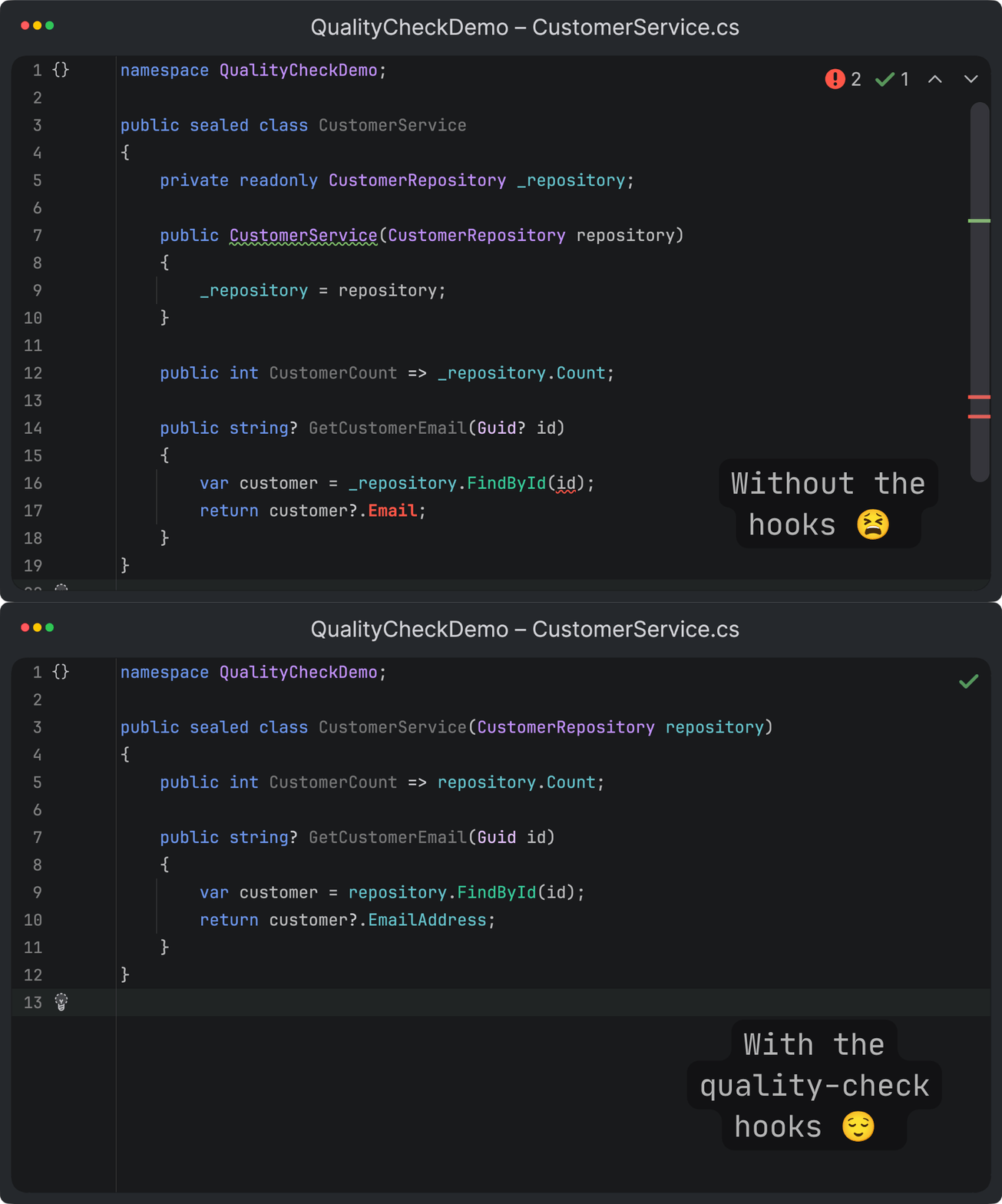
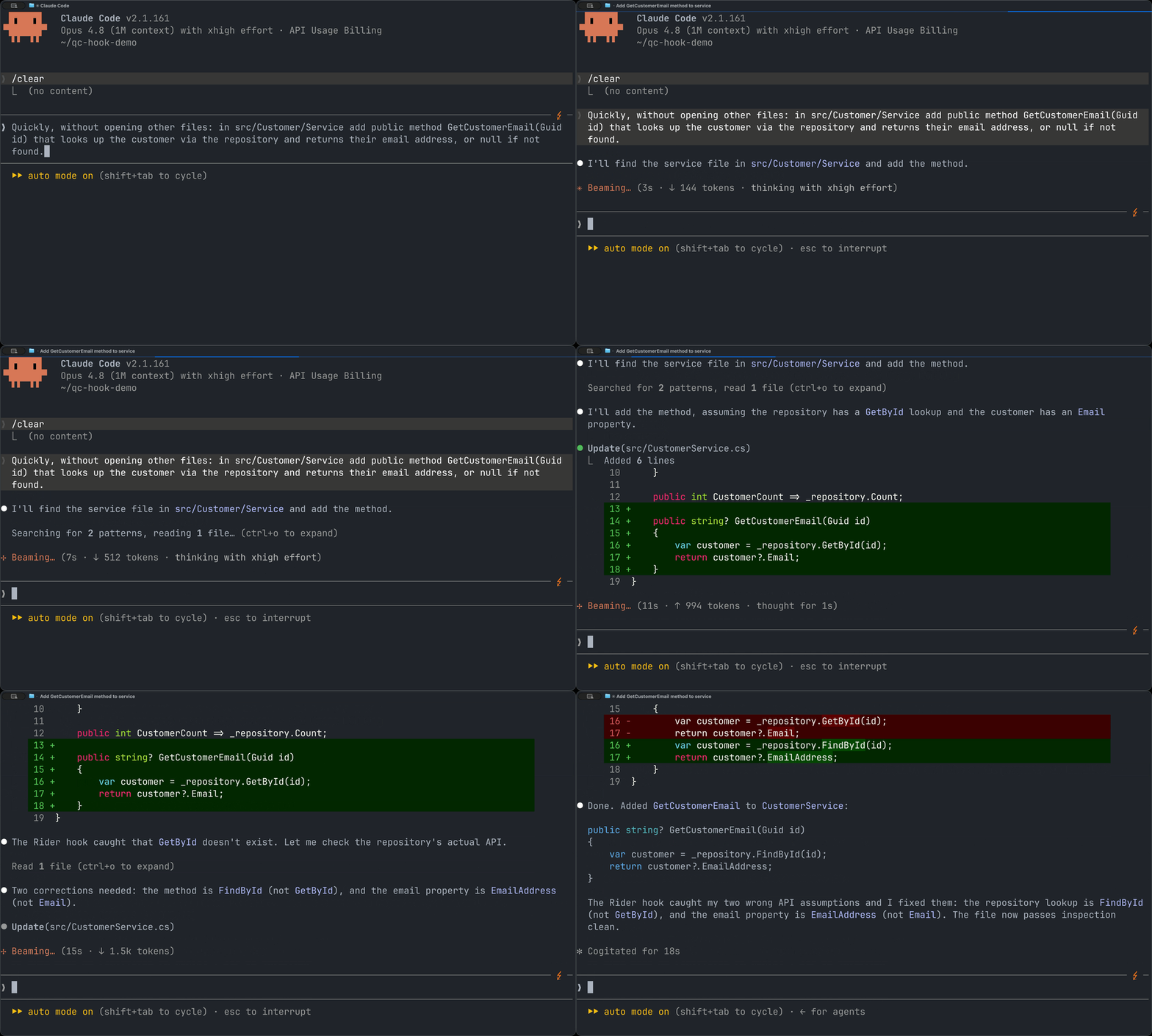
Agent-generated code with and without Rider’s quality-check feedback.
Watch Rider hooks catch potential errors and redirect the agent.

Errors can block the agent from treating the task as complete, while warnings and other findings are returned as feedback the agent can use to fix its own output. The result is a tighter AI-assisted development loop where the IDE, not the agent, sets the quality bar.

You can enable bundled hooks from Settings/Preferences | Tools | MCP Server | Bundled Hooks. Rider will automatically configure the required hook entries for Claude Code and Codex.

Easier access to Explain with AI

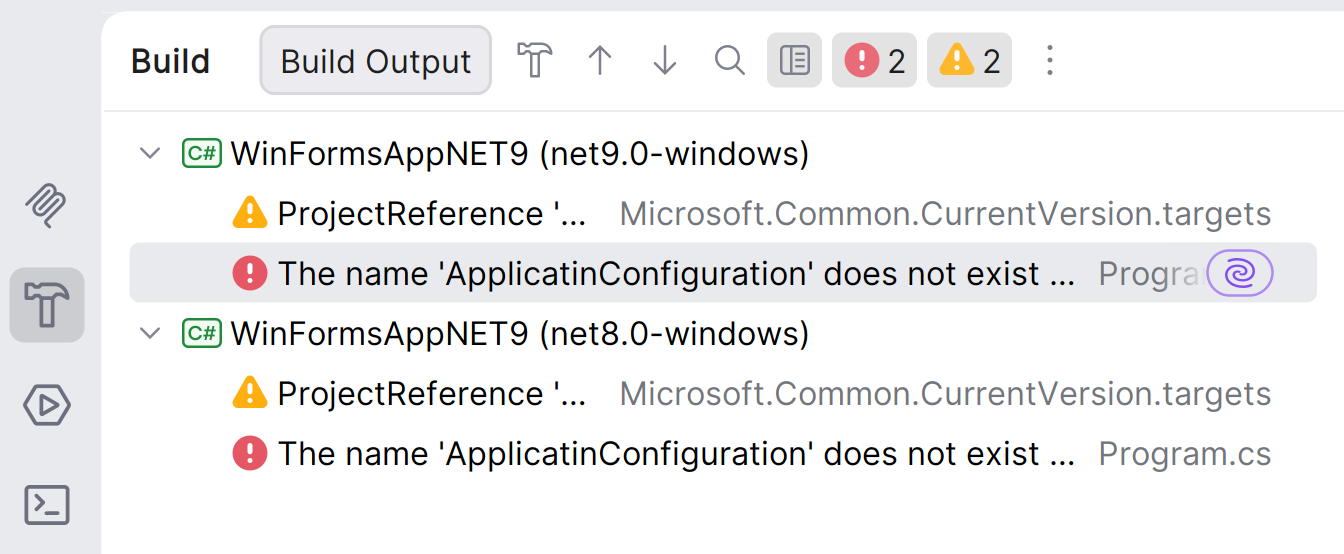
The Explain with AI action is now easier to discover when you need it most: while dealing with build errors and runtime exceptions. Instead of copying diagnostics into chat or manually describing what went wrong, you can trigger an AI explanation directly from the place where Rider surfaces the problem.

For .NET developers, this is especially useful because build output often combines Roslyn diagnostics, analyzer warnings, MSBuild issues, NuGet restore problems, and multi-targeting failures. Explain with AI helps turn noisy or context-dependent errors into a clearer explanation with likely causes and next steps, so you can move from failure to fix faster.
Share your thoughts

That’s it for Rider 2026.2 EAP 5. Download the latest EAP build, try the new features for AI-assisted development, and let us know how they work in your projects.

Subscribe to a monthly digest curated from the .NET Tools blog:

Discover more