








To help businesses develop generative AI applications securely within their private data centers, VCF Private AI Services is built directly into VMware Cloud Foundation (VCF). This embedded suite of services abstracts away the complexity of AI infrastructure, providing an end-to-end platform that includes a Model Gallery, Model Runtime, Agent Builder, and Data Indexing capabilities for Retrieval-Augmented Generation (RAG), API Gateway, and MCP Tools Registry.
The architectural foundation that powers this platform is the vSphere Supervisor. When configuring the Supervisor for your AI workloads, VCF 9 offers the flexibility of two distinct networking architectures: a VMware NSX-backed model and a vSphere Distributed Switch (VDS)-backed model.
Both approaches provide a robust foundation for VCF Private AI Services, allowing organizations to align their infrastructure with their specific operational readiness. Whether your objective is to launch a streamlined, rapid proof-of-concept or to establish a fully automated, multi-tenant AI cloud for your developers, your networking choice will shape the consumption and scalability of your environment. Let’s explore how the Supervisor enables VCF Private AI Services and the architectural considerations of deploying with and without NSX.
At a technical level, VCF Private AI Services utilizes the vSphere Supervisor to transform your ESXi hypervisors into a native Kubernetes control plane. Activating the Supervisor provides the essential API and resource management layer required to seamlessly install and run your VCF Private AI Services.
(Note: When sizing your Supervisor control plane VMs for Small, Medium, or Large, plan your capacity carefully, as you can only scale the control plane up, never down).
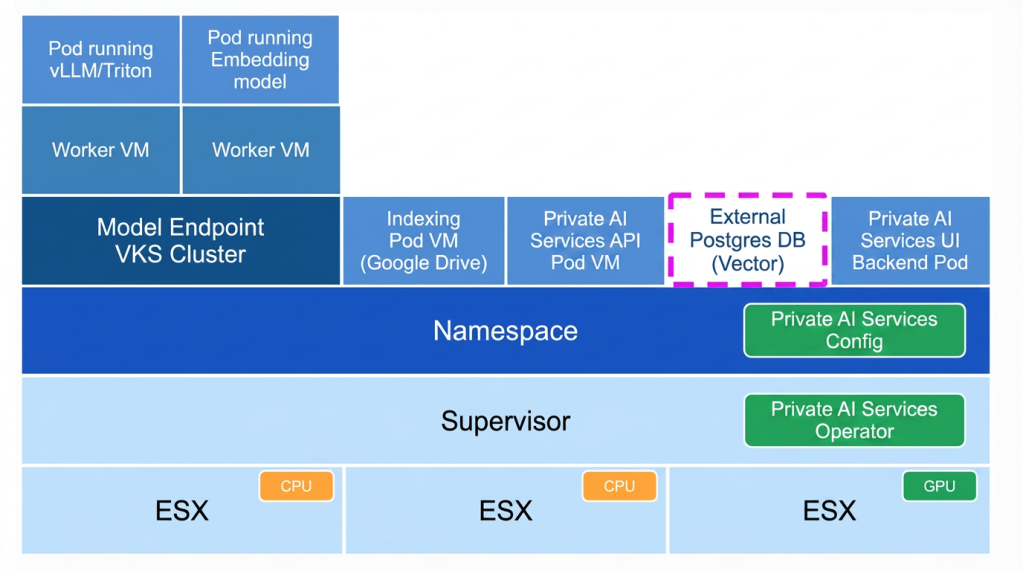
As shown in the architecture diagram above, VCF Private AI Services operates through a declarative Kubernetes model utilizing two key components:
When the kubernetes operator for the VCF Private AI Services Operator detects a new configuration for VCF Private AI Services, it automatically springs into action to provision the requested architecture within that namespace. It deploys the foundational management pods, such as the VCF Private AI Services API Pod, the UI Backend Pod, and data indexing workers.
For the actual AI inference (shown on the left of the diagram), the operator orchestrates the deployment of underlying vSphere Kubernetes Service (VKS) cluster. The model endpoints run as pods within these VKS Worker VMs, securely attaching to the physical GPUs available on the ESXi hosts below.
(Note the dashed box around the External Postgres DB: This illustrates that while VCF Private AI Services connects to the vector database for RAG workloads, the database itself is provisioned externally as a prerequisite, rather than being spun up by the operator for the VCF Private AI Services).
When enabling the Supervisor in VCF 9, administrators must choose a networking stack to provide connectivity to the control plane and your AI model endpoints.
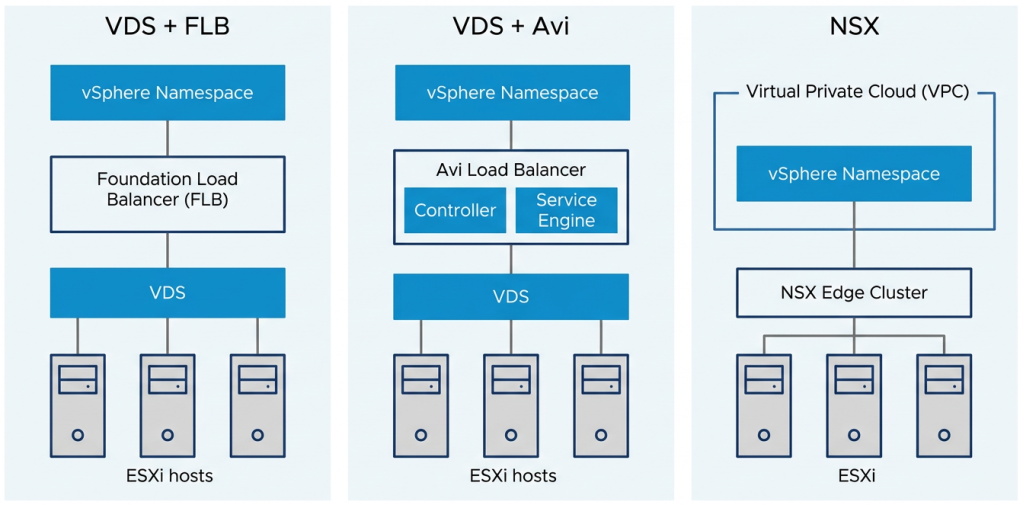
There are two primary deployment models:
1. Supervisor Networking with NSX: This is the most feature-rich topology. It utilizes software-defined overlay networking, where the platform automatically handles the creation of segments, Virtual Private Clouds (VPCs), distributed firewalling, and load balancing via NSX Edge clusters.
2. Supervisor Networking with VDS (Without NSX): For environments not utilizing NSX overlays, the Supervisor can be backed by your existing vSphere Distributed Switch (VDS). Because the Supervisor still requires ingress and egress routing for the Kubernetes API and workload traffic, VCF 9 pairs the VDS with an external load balancer. Administrators have two choices here:
One of the most critical architectural considerations when choosing between NSX and VDS-based networking is how your users will consume the infrastructure.
In VCF, VCF Automation is the true consumption layer for the private cloud, delivering robust multi-tenancy, governance, and workflow automation. Through VCF Automation, IT can assign isolated vSphere Namespaces to specific tenants and apply strict resource guardrails (CPU, memory, and GPU quotas). Within these governed environments, data scientists get a self-service catalog to deploy Deep Learning VMs and AI Kubernetes clusters on demand. Furthermore, using the “Build & Deploy” tab in the VCF Automation UI, users can easily deploy LLM model endpoints via a guided wizard.
However, VCF Automation has a strict dependency on NSX. To provide this seamless, multi-tenant self-service experience, it relies heavily on NSX Virtual Private Clouds (VPCs). If you do not have NSX, you cannot create VPCs, and therefore cannot use VCF Automation.
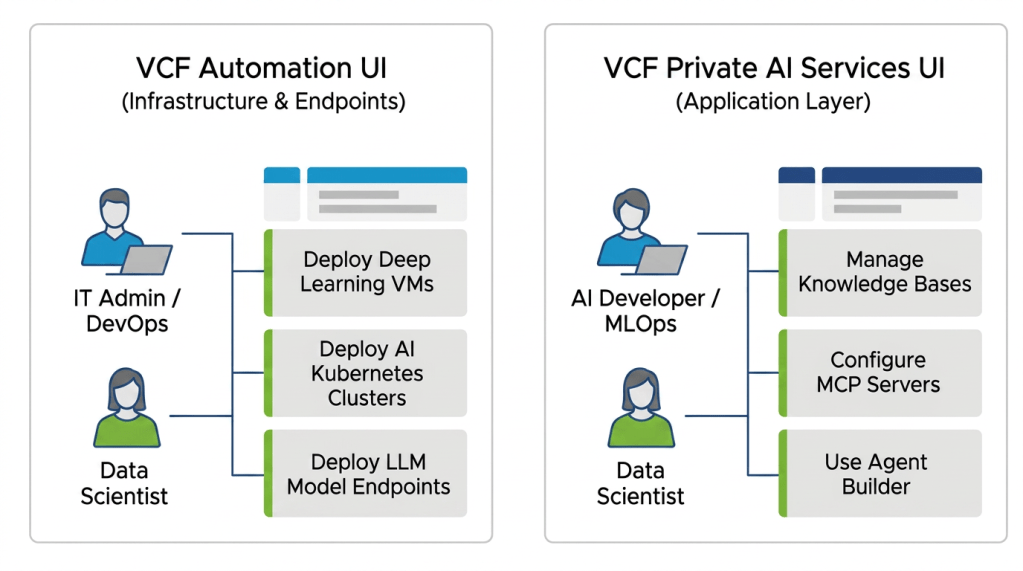
It is important to understand what this does and does not mean for your users:
Choosing whether to deploy your Supervisor with or without NSX drastically changes your network security, automation capabilities, and infrastructure footprint.
Supervisor with VDS + Foundation Load Balancer
Supervisor with NSX
VCF is designed to give you choices, allowing you to deploy VCF Private AI Services on the networking stack that best aligns with your current operational readiness.
If you start with the VDS model, you may eventually decide to transition to NSX to unlock the advanced multi-tenancy and self-service capabilities of VCF Automation. Because VDS and NSX utilize fundamentally different networking fabrics (physical VLAN-backed port groups versus software-defined overlay segments), transitioning between the two involves a planned redeployment of the Supervisor rather than a simple configuration change.
By carefully evaluating your long-term goals for AI automation and security, you can choose the architecture that best sets your teams up for success from day one, ensuring your infrastructure is ready to scale smoothly alongside your AI initiatives.
VCF provides the flexibility to tailor your VCF Private AI Services environment to your organization’s immediate needs and long-term goals. While the VDS and Foundation Load Balancer model offers a streamlined path to get AI endpoints running quickly, deploying the Supervisor with NSX unlocks the full potential of VCF Automation, delivering the security, multi-tenancy, and self-service capabilities required for a mature AI cloud.
As you plan your Private AI deployment, consider not just your current networking footprint, but how your data science teams intend to consume infrastructure in the future. By carefully evaluating these architectural models today, you can build a secure, scalable foundation that empowers your developers to innovate with generative AI.
Subscribe to get the latest posts sent to your email.
此内容由惯性聚合(RSS阅读器)自动聚合整理,仅供阅读参考。 原文来自 — 版权归原作者所有。