
惯性聚合 高效追踪和阅读你感兴趣的博客、新闻、科技资讯
阅读原文 在惯性聚合中打开

推荐订阅源

博客园 - 三生石上(FineUI控件)
Martin Fowler
Martin Fowler
月光博客
月光博客
AI
AI
B
Blog
钛媒体:引领未来商业与生活新知
钛媒体:引领未来商业与生活新知
C
CXSECURITY Database RSS Feed - CXSecurity.com
WordPress大学
WordPress大学
GbyAI
GbyAI
L
Lohrmann on Cybersecurity
O
OpenAI News
Schneier on Security
P
Palo Alto Networks Blog
Cyber Security Advisories - MS-ISAC
T
Troy Hunt's Blog
V2EX - 技术
V2EX - 技术
W
WeLiveSecurity
L
LINUX DO - 最新话题
人人都是产品经理
人人都是产品经理
S
Security Affairs
OSCHINA 社区最新新闻
OSCHINA 社区最新新闻
A
Arctic Wolf
Recorded Future
Recorded Future
Microsoft Security Blog
Threat Intelligence Blog | Flashpoint
G
GRAHAM CLULEY
N
Netflix TechBlog - Medium
TaoSecurity Blog
TaoSecurity Blog
C
Check Point Blog
Scott Helme
Scott Helme
cs.CV updates on arXiv.org
Apple Machine Learning Research
PCI Perspectives
PCI Perspectives
www.infosecurity-magazine.com
Vercel News
Vercel News
The Hacker News
The Hacker News
Y
Y Combinator Blog
Latest news
Latest news
SecWiki News
SecWiki News
Hugging Face - Blog
Hugging Face - Blog
cs.AI updates on arXiv.org
Google Online Security Blog
Webroot Blog
Webroot Blog
Google DeepMind News
Recent Commits to openclaw:main
C
Cisco Blogs
博客园_首页
H
Hackread – Cybersecurity News, Data Breaches, AI and More
宝玉的分享
宝玉的分享
L
LINUX DO - 热门话题

VMware Blogs

Diagnostics for VMware Cloud Foundation (VCF) 9.1 with Old Versions of VCF Components Mastering Infrastructure Policies in VMware Cloud Foundation Automation 9.1 Modernizing the Private Cloud: Why VCF 9.1 Lifecycle Management is a Game Changer Announcing the VMware Cloud Foundation 9.1 Upgrade Planning Tool VCF Breakroom Chats Episode 86 – Containers Made Easy: The New “Container-as-a-Service” in VCF 9.1 Securing Your VCF 9.1 Infrastructure with the Symantec Identity Security Platform Virtually Speaking: The AI Reality Check with Dave Linthicum Zero Touch Provisioning: Activating Edge Sites with VMware Cloud Foundation Edge 9.1 VCF Breakroom Chats Episode 85 – Cloning Success at Scale: Inside VCF 9.1’s App Stack Formation VMware Cloud on AWS の使用状況を確認できる API Unlocking the Full Potential of Programmable Infrastructure with VMware Cloud Foundation 9.1 – New Features and Capabilities Smarter Patching at Scale: Vulnerability Assessment and Remediation with VMware Tanzu Platform Encrypted vMotion Offload to Intel QAT in VMware Cloud Foundation 9.1 Deepen Your Expertise: Four Key Benefits of Attending Increase Deployment Flexibility with VCF Edge Automation 1.0.3 Avi Advantage: Automating Certificate Management of VCF Workloads More Memory, Less Effort: Configuring Memory Tiering in VCF 9.1 VCF 9.1 Licensing: Programmatic, Centralized, and Built to Scale Why APJ Networking Professionals Need Private Cloud Expertise VCF 9.1 Networking: Simpler VPC Connectivity Control VCF 9.1 Networking: Exploring Network Services for Virtual Private Clouds VCF Networking 9.1: Seamless DDI Integration with Infoblox The Open Source Advantage: Building from Source for Ultimate Security Expand Shared VMDKs with Clustered Applications in VMware vSAN for VCF 9.1 Monetizing Zero-Trust Security with VCF 9.1 and VMware vDefend VMware vSAN Protection and Recovery Enhancements for VCF 9.1 Deliver Production SQL Server DBaaS with VMware Data Services Manager 9.1 Maximizing Profitability: VCF 9.1 Cost-Focused Approach for VMware Cloud Service Providers Modernizing Your Infrastructure: Introducing VMware Cloud Foundation 9.1 to VCSPs VCF 9.1 is Available: Explore the New Features in Hands-on Labs What’s New with vSphere in VMware Cloud Foundation 9.1? Resizing VMware vCenter in VMware Cloud Foundation 9 Non-Disruptive VMware vCenter Patching in VMware Cloud Foundation 9.1 VMware vCenter Virtual Hardware Gets an Upgrade in vSphere with VCF 9.1 AI Has Changed the Threat Landscape. Is Your Infrastructure Ready? Simplifying Storage with the New Effective Capacity View in VMware vSAN for VCF 9.1 Auto-RAID in VMware vSAN for VCF 9.1 – Comprehensive System-Managed Data Resilience Introducing VMmark 4.1: Enhanced Power Efficiency Benchmarking for Private Cloud Infrastructure Advanced Memory Tiering Enhancements in VMware Cloud Foundation 9.1 VCF 9.1 Is Here. See It in Action. 博通發布 VMware Cloud Foundation 9.1 How Broadcom Is Helping Enterprises Win the AI Security Sprint How to Prepare for the World of AI Driven Exploits Avi Innovations for VCF 9.1: Powering Kubernetes, Agentic AI and VPC Workloads VCF 9.1: The Secure, Cost-Effective Private Cloud Platform for Production AI Announcing VCF 9.1: Modern Private Cloud Built for Efficiency and Resilience Announcing VMware Cloud Foundation Edge 9.1: A Scalable, Autonomous Edge Platform Accelerate, Streamline, and Control Your Self-Service Private Cloud with VMware Cloud Foundation 9.1 Deploy Modern Apps Faster, Scale Smarter, and Lower Your TCO with VMware vSphere Kubernetes Service in VCF 9.1 Scale Smarter, Save More: Redefining Infrastructure Economics with VMware vSphere in VCF 9.1 AI with VCF 9.1 on AMD GPUs: Build with open frameworks and simplify management, at a lower TCO Streamline, Simplify and Protect all your AI workloads with VCF 9.1 Simplify Workload Connectivity and Enhance Network Scale and Performance with VCF 9.1 VMware and CrowdStrike Deliver New Integration for Cyber Recovery Workflows How Many Users Can Your LLM Server Really Handle? From Infrastructure to Agents: A Hands-On Guide to Secure Private AI with Broadcom – Part 2 The New Frontier: Leading the Cloud-Native Evolution Replicating VMware vSphere Configuration Profile Desired State Webinar Recap: Design and Architecture Considerations for VMware vSphere Kubernetes Service on VMware Cloud Foundation Kubernetes 1.36: What Actually Changed for Enterprise Platforms Enhance Lateral Security and Ingress Load Balancing for Kubernetes Workloads Avi Load Balancer Analytics: Root Cause Application Performance Issues in Minutes Analyst Insight Series #3: Policy-Driven Governance and Multi-Tenant Control Post-Quantum Readiness on VMware Cloud Foundation Registration Is Live for Las Vegas | $ave with Early-Bird May 21, 2026: What’s New in VMware Tanzu Data Intelligence 10.4 From Infrastructure to Agents: A Hands-On Guide to Secure Private AI with Broadcom – Part 1 Stop Guessing: Advanced Monitoring and Troubleshooting for Data Services CPU, Disk, Network, and Memory Workload Profiles for DVD Store Database Testing How VMware Salt Automates Compliance Across Private Cloud Analyst Insight Series #2: Operational Scalability and Lifecycle Management MCP vs. APIs: Why You Need Both for AI Applications The Real Constraint on Enterprise AI isn’t GPUs; It’s Power Deploying Harbor Service in Air-Gapped VMware Cloud Foundation 9.0 Why Enhanced DirectPath Wins for High-Performance Apps Bridging the (.Local) Gap: A Split-Domain Design for VMware Cloud Foundation Deployment Observability on VMware vSphere Kubernetes Service VMware Cloud on AWS: Introducing the Usage Report APIs Converging VMware vSphere to VMware Cloud Foundation 9.0: The Top 10 Questions Answered May 6, 2026: What’s New in Tanzu Platform 10.4: Powering Agentic Apps at Scale VMware Tanzu RabbitMQ Powers the Modern Data Lakehouse with New Spark Integration and Enterprise Tooling Tanzu Data Intelligence 10.4 Delivers AI-Driven Analytics, Unified Real-Time Operations, and Sovereign Resilience Enterprise-Ready Agents Made Simple & Safe with VMware Tanzu Platform Agent Foundations Introducing Tanzu Platform 10.4: Extending Platform as a Service to Agentic Applications How AI-Assisted Analytics in Tanzu Data Intelligence Can Help Remove the SQL Bottleneck From Prototype to Production: Securing Database MCP at Enterprise Scale The Compelling Case for a Private Cloud Data Intelligence Platform The Unification Dividend: Consolidating Database Operations on VMware Cloud Foundation The Modern Spring Workflow Is Enterprise-Ready and AI-Boosted Accelerate Lateral Security and Ingress Load Balancing for Kubernetes Workloads From Platform to Data: Building a Cloud-Native Developer Experience On-Prem with VMware Cloud Foundation How VMware Cloud Foundation (VCF) Training Helps Keep Top Tech Talent in APJ Build Your Case for Attending VMware Explore 2026 Spring 開発元が提供する商用サポート「VMware Tanzu® Spring Essentials」とは VMware Cloud on AWS より i7i.metal-24xl インスタンスの提供開始 VMware Advanced Memory Tiering Tips for Success VMware Cloud Foundation Edge 9.0: Two-Host Edge Site Deployment with Brownfield Import Your Database Is About to Become an AI Tool. Is It Ready? Applying GitOps Principles to Maintain Desired State Configuration using VMware vSphere Configuration Profile – Part 3 Webinar Recap: Converging VMware vSphere to VMware Cloud Foundation 9.0
[TAM Blog] セキュアブート証明書の有効期限切れに関する注意点と対応について
Naotsugu Nakamura · 2026-04-13 · via VMware Blogs

こんにちは。Broadcom VCF TAM の中村です。
現在、多くの PC やサーバーで利用されているセキュアブート機能において、Microsoft 社の証明書が有効期限を迎えることが話題となっています。
本記事では、この事象の概要と VMware® ESX® 環境上の仮想マシンに与える影響、および対応方針について解説します。

— 2026/4/30 追記 —
本件に関する KB 423893 に、PK 更新後のアクションに関する重要な追加情報が掲載されました。実作業をご検討中の方は、作業前に必ず最新の KB の詳細をご確認ください。

また、今回のアップデートにより、証明書更新の基本方針が以下の通り明確化されています。

  • KEK などの後続更新は OS ベンダーの仕組みを利用(推奨)
    PK を正常なものに更新した後の KEK、DB、DBX の更新については、各 OS ベンダー(Microsoft 社や Red Hat 社など)が提供する標準の仕組み(Windows Update や標準パッケージ管理など)に従って実施することが基本となります。
  • EFI 画面からの手動更新は代替手段
    本ブログでも紹介した仮想マシンの EFI セットアップ画面から KEK を手動で読み込ませる手順は、要件等により OS 側から更新が行えない場合のあくまで代替手順(ワークアラウンド)としての位置づけとなりますのでご留意ください。

Contents

  1. セキュアブートとは
  2. Microsoft KEK の有効期限と期限切れの影響
  3. ESX 上の仮想マシンも対象
  4. KEK 更新における PK の重要性
  5. PK および KEK 更新のポイントと手順概要
  6. まずは現在の環境を確認しましょう
  7. 関連情報リンク

1. セキュアブートとは

セキュアブートは、PC やサーバーの起動時に、悪意のあるソフトウェア(ルートキットなど)が読み込まれるのを防ぐためのセキュリティ機能です。
ハードウェアのファームウェア(UEFI)が、OS の起動ローダーが信頼できるデジタル署名を持っているかを検証し、安全と確認された場合のみ起動を許可します。
この検証には、プラットフォームキー(PK)、キー交換鍵(KEK)、許可リスト(DB)、失効リスト(DBX)といった階層化された証明書や鍵が使用されます。
詳細な仕組みについては、以下の Microsoft 社の公開ドキュメントをご参照ください。
参考 URL:Windows セキュア ブート キーの作成と管理のガイダンス
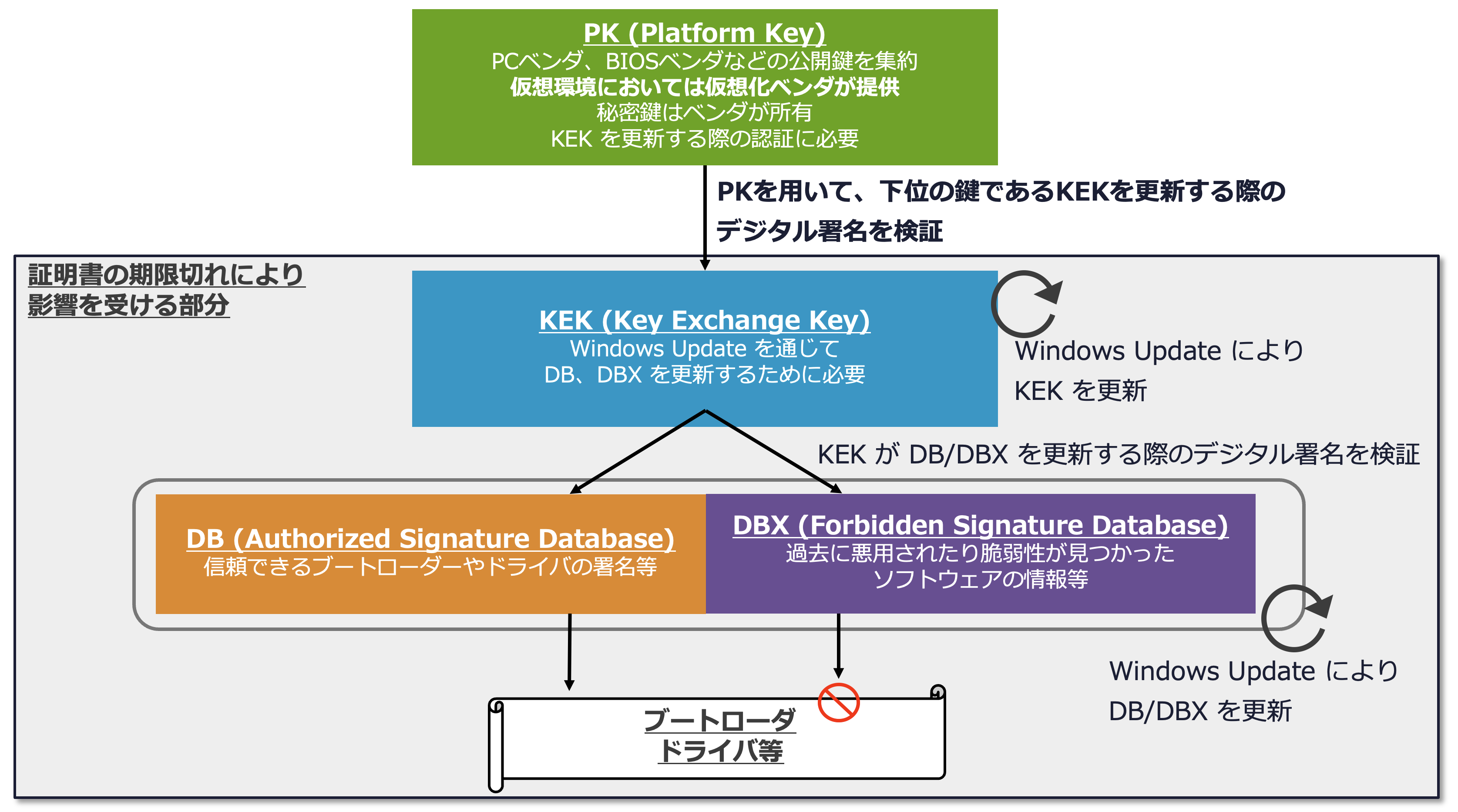
セキュアブートの仕組み
セキュアブートの仕組み

2. Microsoft KEK の有効期限と期限切れの影響

セキュアブートの信頼の基盤として広く利用されている Microsoft Corporation KEK CA 2011 などの証明書が、2026 年 6 月に有効期限を迎えます。
証明書の有効期限が切れた場合、直ちにシステムが起動できなくなるわけではありません。しかし、セキュアブートのデータベース(DB や DBX)を最新状態に更新することができなくなります。
これにより、新たな脆弱性に対するセキュリティパッチ(新しい失効リストなど)が適用できなくなる運用上のリスクが生じます。また、将来的に発行元(Microsoft 社)によって古い証明書が失効(Revoke)リストに追加された場合は、起動不可に陥る可能性があります。
参考 URL:Secure Boot Certificate updates: Guidance for IT professionals and organizations

また、Redhat Enterprise Linux など Microsoft 社以外の OS でも Microsoft KEK を利用している場合がありますので、ご利用の OS ベンダーからのリリース情報を参照するようお願いいたします。
参考 URL:2026 年のセキュアブート証明書の変更:RHEL 環境向けガイダンス
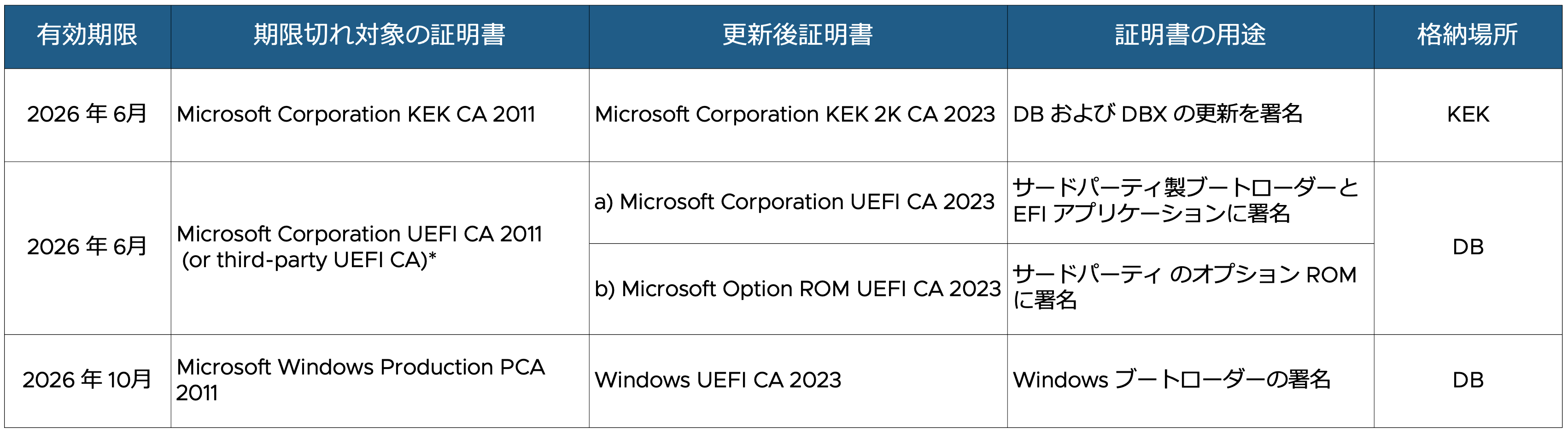
有効期限切れとなる証明書および証明書の用途

3. ESX 上の仮想マシンも対象

この証明書問題は、物理サーバーだけでなく、ESX 上で稼働している仮想マシンにも影響します。
UEFI ファームウェアを使用し、セキュアブートが有効に設定されている仮想マシン(Windows および Linux)は、物理マシンと同様に証明書の更新対象となります。
ESX 上で仮想マシンを新規作成する際、セキュアブートが規定で有効となる場合が多く、意図した設定をしないと無効にはならないことにご注意ください。

セキュアブートが規定で有効になる OS の例

  • Windows Server 2016 以降
  • Redhat Enterprise Linux 8 以降

また、少なくとも ESX 8.0U2 未満で作成された仮想マシンでは古い証明書が使われていますので、必ず実機をご確認ください。
参考 KB:Secure Boot Custom Certificates

4. KEK 更新における PK の重要性

仮想マシンの KEK を新しい証明書に更新するためには、その上位の鍵であるプラットフォームキー(PK)が有効な状態である必要があります。
ESX 9.0 より前のバージョンで作成された仮想マシンでは、過去の設計上の理由から PK が NULL 署名で構成されています。 NULL 署名の PK では KEK の更新を承認できないため、OS 側から自動更新を行おうとしてもブロックされ、後続の DB や DBX の更新も失敗するという事象が発生します。
また、弊社は Microsoft 社と連携し、影響を受ける仮想マシンの PK を更新するための自動化ソリューションを将来のリリースで提供すべく開発を進めていることを公表しています。急ぎの対応が不要な環境であれば、今後の機能実装を待って適用することも選択肢となります。
PK および KEK の有効期限切れの影響や確認方法については下記 KB 423893 を参照ください。
参考 KB:Secure Boot Certificate Expirations and Update Failures in VMware Virtual Machines

Microsoft Corporation KEK 2K CA 2023 の有効期限は 2038 年とされています。
PK が NULL 署名であっても KEK がすでに Microsoft Corporation KEK 2K CA 2023 であれば、2038 年までは DB や DBX の更新が可能であるため、すぐさま問題が発生することはありません。
# 参考 URL:セキュア ブート移行に関するよくあるご質問(FAQ)

5. PK および KEK 更新のポイントと手順概要

作業実施する際のポイント

  • 仮想ハードウェア(vHW)バージョンの確認:
    バージョン 14 以上である必要があります。
    バージョン 13 以下の場合、鍵の登録作業時に更新に失敗するため、事前にバージョン 14 以上へアップグレードを実施してください。
  • バックアップの推奨:
    作業前に仮想マシンのスナップショットを取得することを強く推奨します。
  • vTPM 利用時の注意:
    Windows の BitLocker や Linux の LUKS などでディスク暗号化を行っている場合、更新作業によって回復キーが求められる場合があります。
    必ず事前に回復キーをバックアップしたり、一時的に保護を中断するなどの準備を行ってください。

PK と KEK 更新の大まかな流れは下記の通りです。
詳細手順は KB 423919 を必ず参照し、最新の情報に従ってください。
参考 KB:Manual Update of the Secure Boot Platform Key in Virtual Machines

PK 更新概要

  1. Microsoft の PK 証明書をダウンロードし、一時的に作成した仮想ディスクに保存して、仮想マシンに接続します。
  2. 仮想マシンの詳細設定にオプションを追加します。
  3. 仮想マシンをパワーオンし、仮想マシンの EFI セットアップ画面に入ります。
  4. PK 登録画面で接続したディスクから PK ファイルを選択して変更をコミットし、終了します。
  5. 追加した詳細設定の削除と追加したディスクを取り外して元に戻します。(KEK の更新もする場合はそのままにする)
  6. 仮想マシンを再起動し、OS 上から PK が正常に更新されたかを確認します。

KEK 更新概要

  1. Microsoft の KEK 証明書をダウンロードし、DER フォーマットに変換します。
  2. 変換した DER フォーマットの KEK 証明書を、PK 更新と同じように一時的な仮想ディスクに保存します。
  3. 仮想マシンをパワーオンし、仮想マシンの EFI セットアップ画面に入ります。
  4. KEK 登録画面で接続したディスクから KEK ファイルを選択して変更をコミットし、終了します。
  5. PK 更新手順で追加した詳細設定の削除と追加したディスクを取り外して元に戻します。
  6. 仮想マシンを再起動し、OS 上から KEK が正常に更新されたかを確認します。

6. まずは現在の環境を確認しましょう

対応が必要かどうかを把握するため、まずは下記の項目を確認しましょう。

  1. 仮想マシン一覧とセキュアブート有効有無、仮想ハードウェアバージョン
    VCF PowerCLI を利用できる端末から VMware vCenter® に接続後、下記コマンドで取得できます。

    Get-VM | Select-Object Name, HardwareVersion, @{Name="SecureBoot"; Expression={$_.ExtensionData.Config.BootOptions.EfiSecureBootEnabled}} | Format-Table -AutoSize

  2. 利用している PK と KEK の確認
    1. でセキュアブートが有効な仮想マシンがあった場合、次に対象の仮想マシンで利用されている PK と KEK を確認します。
    確認方法は下記 KB 423893 を参照ください。
    いずれも仮想マシン内でコマンド実行することで確認可能です。
    参考 KB:Secure Boot Certificate Expirations and Update Failures in VMware Virtual Machines

おわりに

以上、セキュアブート証明書の有効期限切れに関する注意点と対応について記載しました。
証明書の有効期限が切れたからといって直ちにシステムが停止するわけではありませんが、セキュアブートを正しく活用するためには PK および KEK の適切なアップデートが不可欠です。
手動での更新作業には事前の準備や確認が必要となりますので、お使いの環境の仮想ハードウェアバージョンや vTPM の利用状況を確認しつつ、今後提供が予定されている自動化機能の活用も含めて、計画的な対応をご検討ください。
仮想化環境の課題解決支援は、ぜひ担当 TAM にご相談ください。

関連情報リンク