惯性聚合 高效追踪和阅读你感兴趣的博客、新闻、科技资讯
阅读原文 在惯性聚合中打开

推荐订阅源

Hacker News: Ask HN
Hacker News: Ask HN
Recent Commits to openclaw:main
cs.CV updates on arXiv.org
C
Check Point Blog
S
Security Affairs
Hacker News - Newest:
Hacker News - Newest: "LLM"
S
Secure Thoughts
Recorded Future
Recorded Future
cs.AI updates on arXiv.org
T
The Blog of Author Tim Ferriss
B
Blog
C
Cybersecurity and Infrastructure Security Agency CISA
Google DeepMind News
CTFtime.org: upcoming CTF events
A
Arctic Wolf
T
The Exploit Database - CXSecurity.com
Stack Overflow Blog
Stack Overflow Blog
T
Threat Research - Cisco Blogs
GbyAI
GbyAI
AWS News Blog
AWS News Blog
MongoDB | Blog
MongoDB | Blog
Y
Y Combinator Blog
Google Online Security Blog
T
Troy Hunt's Blog
I
InfoQ
L
LINUX DO - 热门话题
WordPress大学
WordPress大学
C
Cisco Blogs
G
GRAHAM CLULEY
The Register - Security
A
About on SuperTechFans
让小产品的独立变现更简单 - ezindie.com
Schneier on Security
Project Zero
Project Zero
H
Hackread – Cybersecurity News, Data Breaches, AI and More
P
Privacy & Cybersecurity Law Blog
Cloudbric
Cloudbric
H
Hacker News: Front Page
小众软件
小众软件
雷峰网
雷峰网
The Hacker News
The Hacker News
www.infosecurity-magazine.com
T
Tor Project blog
博客园 - 聂微东
N
Netflix TechBlog - Medium
V
Vulnerabilities – Threatpost
The GitHub Blog
The GitHub Blog
腾讯CDC
P
Palo Alto Networks Blog
Scott Helme
Scott Helme

VMware Blogs

Diagnostics for VMware Cloud Foundation (VCF) 9.1 with Old Versions of VCF Components Mastering Infrastructure Policies in VMware Cloud Foundation Automation 9.1 Modernizing the Private Cloud: Why VCF 9.1 Lifecycle Management is a Game Changer Announcing the VMware Cloud Foundation 9.1 Upgrade Planning Tool VCF Breakroom Chats Episode 86 – Containers Made Easy: The New “Container-as-a-Service” in VCF 9.1 Securing Your VCF 9.1 Infrastructure with the Symantec Identity Security Platform Virtually Speaking: The AI Reality Check with Dave Linthicum Zero Touch Provisioning: Activating Edge Sites with VMware Cloud Foundation Edge 9.1 VCF Breakroom Chats Episode 85 – Cloning Success at Scale: Inside VCF 9.1’s App Stack Formation VMware Cloud on AWS の使用状況を確認できる API Unlocking the Full Potential of Programmable Infrastructure with VMware Cloud Foundation 9.1 – New Features and Capabilities Smarter Patching at Scale: Vulnerability Assessment and Remediation with VMware Tanzu Platform Encrypted vMotion Offload to Intel QAT in VMware Cloud Foundation 9.1 Deepen Your Expertise: Four Key Benefits of Attending Increase Deployment Flexibility with VCF Edge Automation 1.0.3 Avi Advantage: Automating Certificate Management of VCF Workloads More Memory, Less Effort: Configuring Memory Tiering in VCF 9.1 VCF 9.1 Licensing: Programmatic, Centralized, and Built to Scale Why APJ Networking Professionals Need Private Cloud Expertise VCF 9.1 Networking: Simpler VPC Connectivity Control VCF 9.1 Networking: Exploring Network Services for Virtual Private Clouds VCF Networking 9.1: Seamless DDI Integration with Infoblox The Open Source Advantage: Building from Source for Ultimate Security Expand Shared VMDKs with Clustered Applications in VMware vSAN for VCF 9.1 Monetizing Zero-Trust Security with VCF 9.1 and VMware vDefend VMware vSAN Protection and Recovery Enhancements for VCF 9.1 Deliver Production SQL Server DBaaS with VMware Data Services Manager 9.1 Maximizing Profitability: VCF 9.1 Cost-Focused Approach for VMware Cloud Service Providers Modernizing Your Infrastructure: Introducing VMware Cloud Foundation 9.1 to VCSPs VCF 9.1 is Available: Explore the New Features in Hands-on Labs What’s New with vSphere in VMware Cloud Foundation 9.1? Resizing VMware vCenter in VMware Cloud Foundation 9 Non-Disruptive VMware vCenter Patching in VMware Cloud Foundation 9.1 VMware vCenter Virtual Hardware Gets an Upgrade in vSphere with VCF 9.1 AI Has Changed the Threat Landscape. Is Your Infrastructure Ready? Simplifying Storage with the New Effective Capacity View in VMware vSAN for VCF 9.1 Auto-RAID in VMware vSAN for VCF 9.1 – Comprehensive System-Managed Data Resilience Introducing VMmark 4.1: Enhanced Power Efficiency Benchmarking for Private Cloud Infrastructure Advanced Memory Tiering Enhancements in VMware Cloud Foundation 9.1 VCF 9.1 Is Here. See It in Action. 博通發布 VMware Cloud Foundation 9.1 How Broadcom Is Helping Enterprises Win the AI Security Sprint How to Prepare for the World of AI Driven Exploits Avi Innovations for VCF 9.1: Powering Kubernetes, Agentic AI and VPC Workloads VCF 9.1: The Secure, Cost-Effective Private Cloud Platform for Production AI Announcing VCF 9.1: Modern Private Cloud Built for Efficiency and Resilience Announcing VMware Cloud Foundation Edge 9.1: A Scalable, Autonomous Edge Platform Accelerate, Streamline, and Control Your Self-Service Private Cloud with VMware Cloud Foundation 9.1 Deploy Modern Apps Faster, Scale Smarter, and Lower Your TCO with VMware vSphere Kubernetes Service in VCF 9.1 Scale Smarter, Save More: Redefining Infrastructure Economics with VMware vSphere in VCF 9.1 AI with VCF 9.1 on AMD GPUs: Build with open frameworks and simplify management, at a lower TCO Streamline, Simplify and Protect all your AI workloads with VCF 9.1 Simplify Workload Connectivity and Enhance Network Scale and Performance with VCF 9.1 VMware and CrowdStrike Deliver New Integration for Cyber Recovery Workflows How Many Users Can Your LLM Server Really Handle? From Infrastructure to Agents: A Hands-On Guide to Secure Private AI with Broadcom – Part 2 The New Frontier: Leading the Cloud-Native Evolution Replicating VMware vSphere Configuration Profile Desired State Webinar Recap: Design and Architecture Considerations for VMware vSphere Kubernetes Service on VMware Cloud Foundation Kubernetes 1.36: What Actually Changed for Enterprise Platforms Enhance Lateral Security and Ingress Load Balancing for Kubernetes Workloads Avi Load Balancer Analytics: Root Cause Application Performance Issues in Minutes Analyst Insight Series #3: Policy-Driven Governance and Multi-Tenant Control Post-Quantum Readiness on VMware Cloud Foundation Registration Is Live for Las Vegas | $ave with Early-Bird May 21, 2026: What’s New in VMware Tanzu Data Intelligence 10.4 From Infrastructure to Agents: A Hands-On Guide to Secure Private AI with Broadcom – Part 1 Stop Guessing: Advanced Monitoring and Troubleshooting for Data Services CPU, Disk, Network, and Memory Workload Profiles for DVD Store Database Testing How VMware Salt Automates Compliance Across Private Cloud Analyst Insight Series #2: Operational Scalability and Lifecycle Management MCP vs. APIs: Why You Need Both for AI Applications The Real Constraint on Enterprise AI isn’t GPUs; It’s Power Deploying Harbor Service in Air-Gapped VMware Cloud Foundation 9.0 Why Enhanced DirectPath Wins for High-Performance Apps Bridging the (.Local) Gap: A Split-Domain Design for VMware Cloud Foundation Deployment Observability on VMware vSphere Kubernetes Service VMware Cloud on AWS: Introducing the Usage Report APIs Converging VMware vSphere to VMware Cloud Foundation 9.0: The Top 10 Questions Answered May 6, 2026: What’s New in Tanzu Platform 10.4: Powering Agentic Apps at Scale VMware Tanzu RabbitMQ Powers the Modern Data Lakehouse with New Spark Integration and Enterprise Tooling Tanzu Data Intelligence 10.4 Delivers AI-Driven Analytics, Unified Real-Time Operations, and Sovereign Resilience Enterprise-Ready Agents Made Simple & Safe with VMware Tanzu Platform Agent Foundations Introducing Tanzu Platform 10.4: Extending Platform as a Service to Agentic Applications How AI-Assisted Analytics in Tanzu Data Intelligence Can Help Remove the SQL Bottleneck From Prototype to Production: Securing Database MCP at Enterprise Scale The Compelling Case for a Private Cloud Data Intelligence Platform The Unification Dividend: Consolidating Database Operations on VMware Cloud Foundation The Modern Spring Workflow Is Enterprise-Ready and AI-Boosted [TAM Blog] セキュアブート証明書の有効期限切れに関する注意点と対応について Accelerate Lateral Security and Ingress Load Balancing for Kubernetes Workloads From Platform to Data: Building a Cloud-Native Developer Experience On-Prem with VMware Cloud Foundation How VMware Cloud Foundation (VCF) Training Helps Keep Top Tech Talent in APJ Build Your Case for Attending VMware Explore 2026 Spring 開発元が提供する商用サポート「VMware Tanzu® Spring Essentials」とは VMware Cloud on AWS より i7i.metal-24xl インスタンスの提供開始 VMware Advanced Memory Tiering Tips for Success Your Database Is About to Become an AI Tool. Is It Ready? Applying GitOps Principles to Maintain Desired State Configuration using VMware vSphere Configuration Profile – Part 3 Webinar Recap: Converging VMware vSphere to VMware Cloud Foundation 9.0
VMware Cloud Foundation Edge 9.0: Two-Host Edge Site Deployment with Brownfield Import
Dhruv Tyagi · 2026-04-07 · via VMware Blogs

In our previous blog post, we explored how VMware Cloud Foundation (VCF) Edge 9.0 enables organizations to deploy single-host edge sites that support both VM and container workloads, dramatically reducing edge footprint and capital expenditure. While single-host deployments excel in space-constrained environments, many organizations require additional resilience and capacity at their edge locations.

This post builds on that foundation by demonstrating a two-host edge site deployment pattern. We will also showcase how to leverage VCF’s brownfield import capability to bring in this two-host edge site under VCF management. This approach delivers significant operational benefits for organizations that need to standardize their edge infrastructure management while preserving their existing investments and configurations.

Why Choose Two-Host VCF Edge Sites?

A two-host deployment provides several advantages over single-host configurations:

  • High Availability: With two hosts, vSphere HA can restart VMs on the surviving host during hardware failures, minimizing downtime for critical edge workloads
  • Maintenance Flexibility: Perform rolling updates and maintenance without service interruption using vMotion to migrate workloads between hosts
  • Enhanced Performance: Distribute workload demands across two physical hosts, reducing resource contention
  • Growth Capacity: Start with two hosts and scale workloads without immediate hardware expansion

Industries such as manufacturing facilities with 24/7 operations, retail locations requiring continuous point-of-sale availability, and healthcare facilities providing critical patient services benefit significantly from this deployment pattern.

VCF Edge Brownfield Import: Key Advantages

VCF’s brownfield import capability addresses a common enterprise challenge: integrating existing infrastructure into standardized management frameworks. Rather than requiring complete infrastructure rebuild, brownfield import:

  • Preserves Existing Configurations: Maintains your current cluster setup and deployed workloads
  • Reduces Migration Risk: Eliminates the need for workload migration and reconfiguration
  • Accelerates VCF Adoption: Brings existing infrastructure under VCF management in hours, not weeks
  • Enables Standardization: Applies consistent lifecycle management, security policies, and operational practices across all edge sites

This approach proves particularly valuable for organizations with distributed edge locations where downtime for infrastructure conversion is not acceptable.

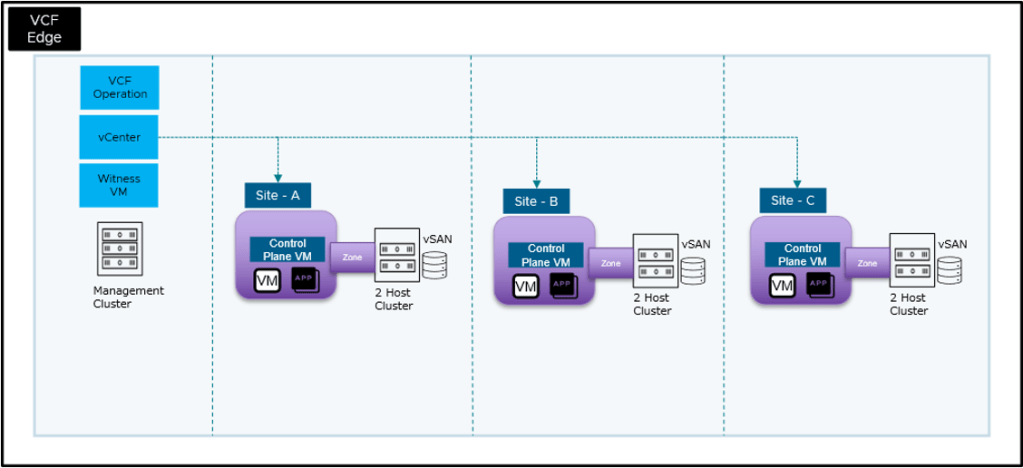
Two-Host VCF Edge Architecture Overview

The two-host edge site architecture builds upon the single-host design with enhanced resilience:

VCF Edge two-host architecture diagram showing vSphere HA, vSAN witness, and brownfield import components

Key Components:

  • Two ESX Hosts: Provide HA capability and workload distribution at the edge site
  • vSphere Distributed Switch (vDS) or NSX: Consistent network configuration across both hosts
  • Shared Storage: We’ll make use of VMware vSAN in this example
  • vSphere HA & DRS: Automated failover and resource optimization
  • Supervisor Cluster: Optional Kubernetes control plane for container workloads
  • VCF Management: Centralized lifecycle management, compliance, and operations

Prerequisites for VCF Edge Brownfield Import

Before beginning, ensure you have:

  • VCF 9.0.2 Environment: VCF 9.0.2 Management Domain deployed in the primary data center
  • Two ESX Hosts: VCF 9.0.2 compatible hardware meeting minimum specifications with ESX 9.0.2 installed
  • Network Configuration: Appropriate VLANs and IP addressing for management, vMotion, and vSAN networks
  • Storage: Either shared storage (SAN/NAS) or local disks for VMFS/vSAN configuration

Part 1: Cluster Setup in vCenter

This section demonstrates creating a two-host vSAN cluster with witness VM in vCenter before importing it into VCF management.

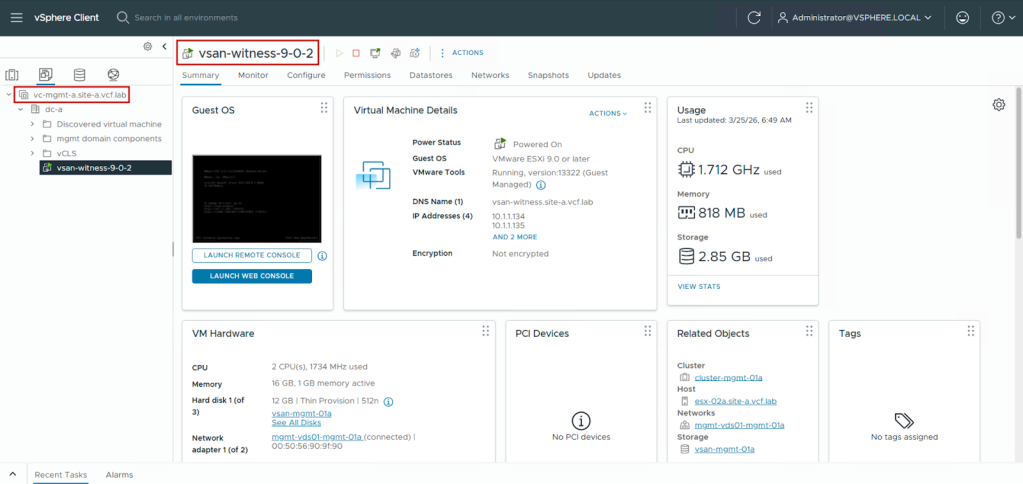
Step 1: Deploy vSAN Witness VM in the management domain

  1. Download the vSAN Witness OVA from the Broadcom Support Portal for the specific version of VCF you are running (9.0.2 in this case) and deploy it on the management domain vCenter. Ensure that the network provided to the vSAN witness will be able to reach the edge site. 

Note: In this demo, we are deploying the vSAN witness VM in our central DC where the management domain is located to allow the same witness VM to be used by multiple edge sites to form the vSAN cluster. While this design works for our demo, placing the witness VM in the management domain or the central DC is not a strict requirement. Based on the architecture design, the vSAN witness VM placement can be changed as long as the latency between vSAN witness VM and the edge site hosts remains under 500 ms.

Deploy vSAN Witness VM in VCF management domain vCenter

Step 2: Set up ESX Hosts, vCenter, and vSphere cluster at the edge site

  1. Deploy ESX 9.0.2 on the two physical servers you wish to use for the edge site
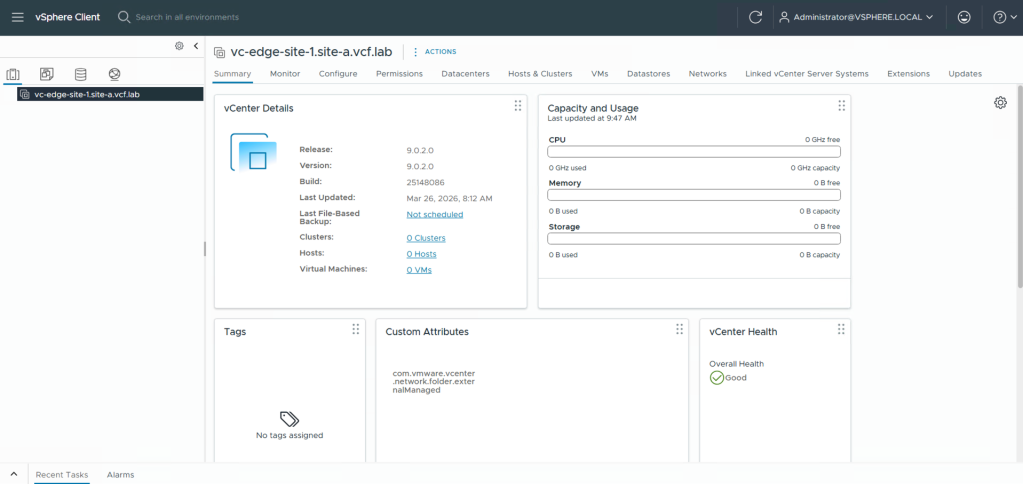
  2. Download the vCenter 9.0.2 ISO and install it on one of the ESX servers. In this example, we select the option to use an existing datastore during vCenter deployment. We created a VMFS datastore on the ESX host for this. This allows us the flexibility to configure vSAN manually. Once deployed, we get access to the vCenter where we will start the cluster configuration.
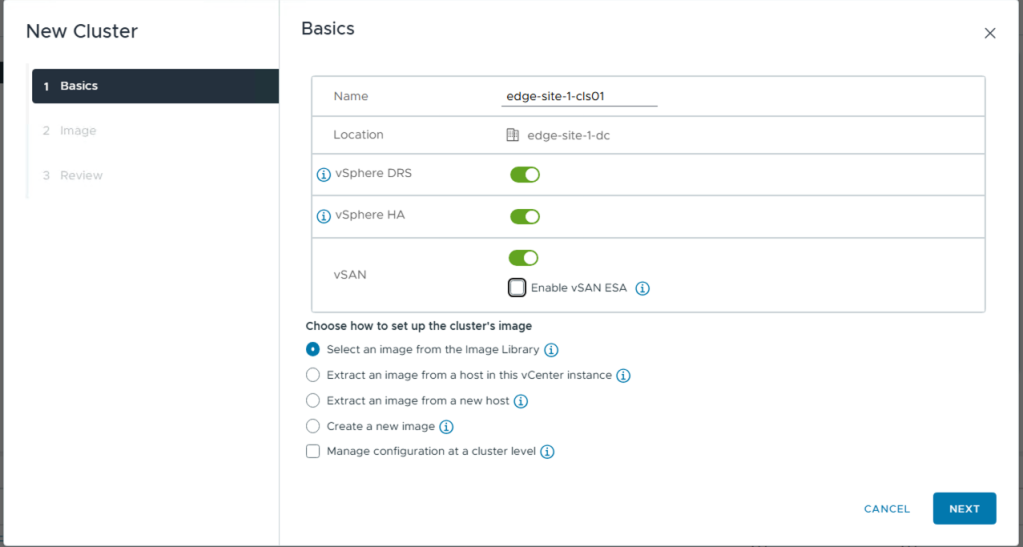
Create two-host vSphere cluster with DRS and HA enabled for VCF Edge brownfield import
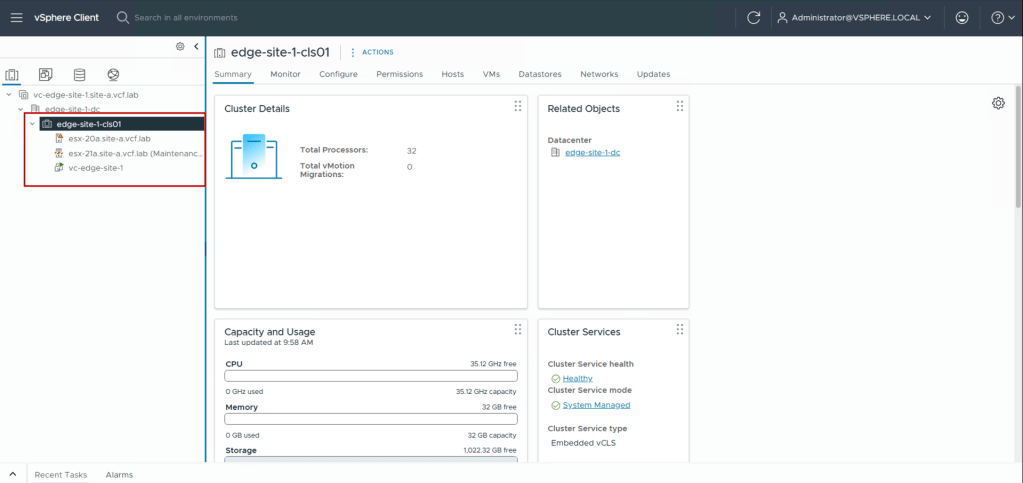
  1. Now in the edge site vCenter, we create the data center object, a cluster with DRS, HA, and vSAN enabled, and add the two ESX hosts into it.
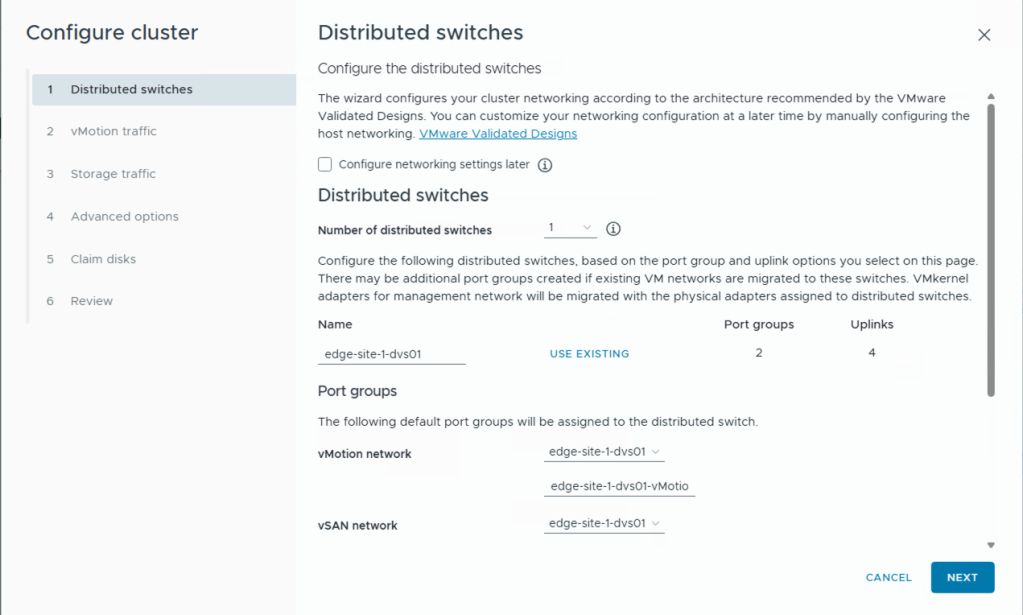
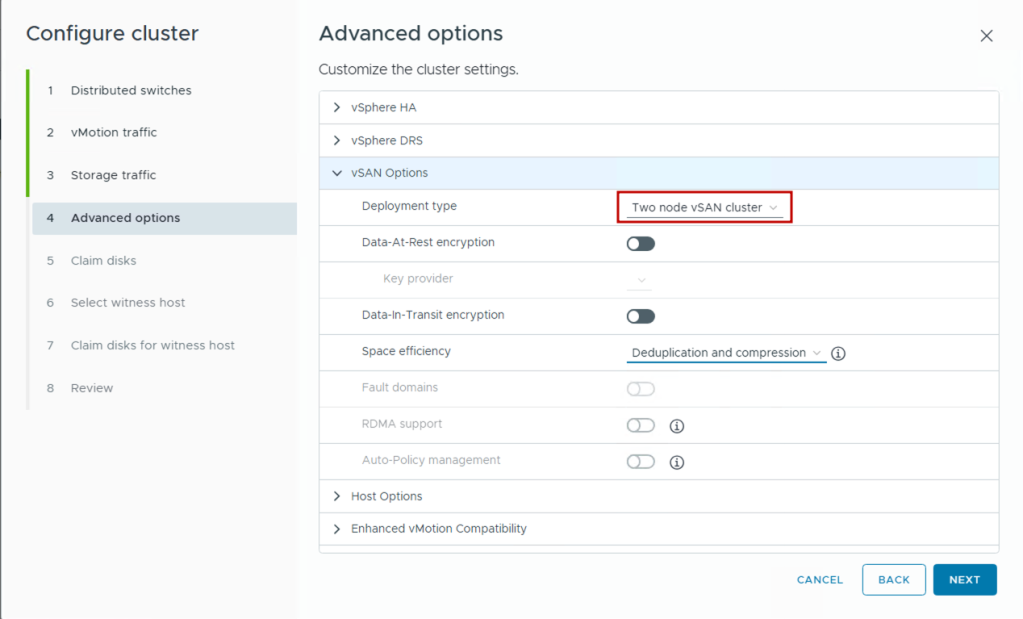
VCF Edge cluster quickstart wizard configuration for vDS and vSAN setup
Edge Site Cluster created in vCenter
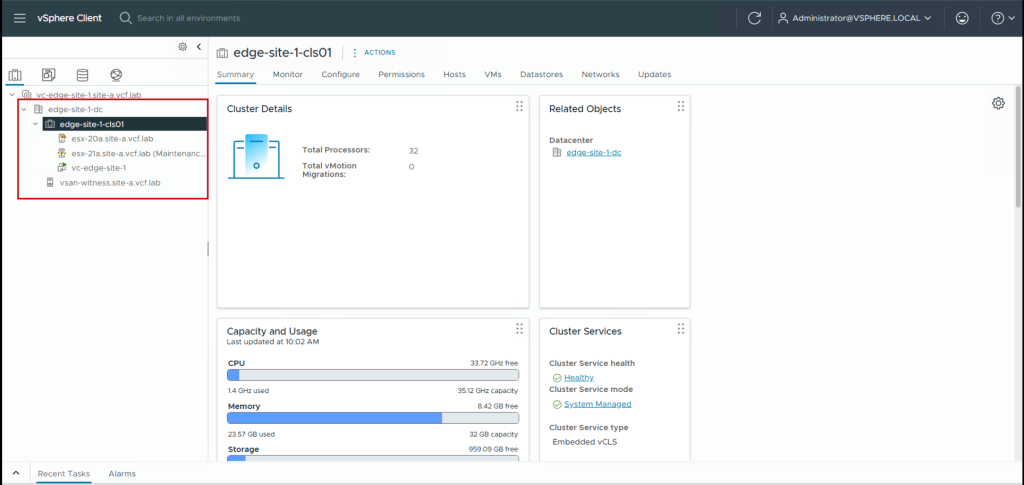
  1. Next we add the vSAN Witness appliance as a host in the edge site at the data center level (not in the cluster directly) and move it out of maintenance mode.
Add vSAN Witness VM as Host in the edge site vCenter
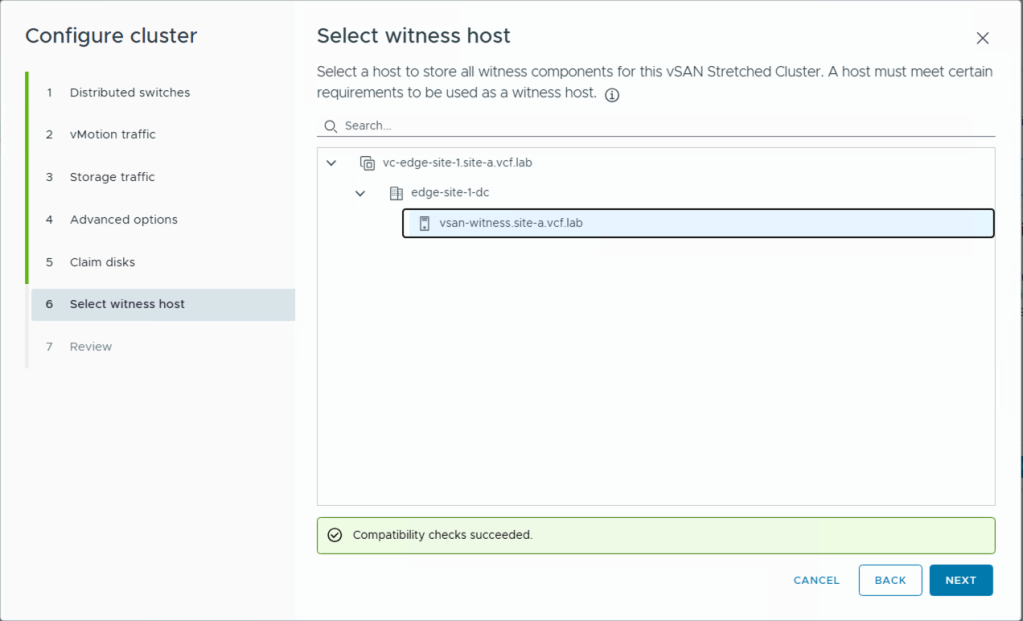
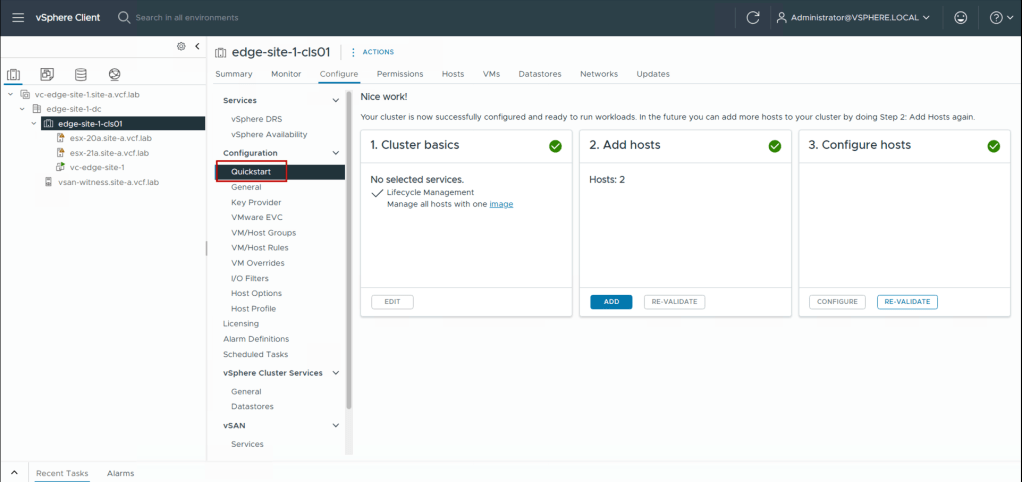
  1. Next we use the Cluster Quickstart wizard (vCenter Inventory > Cluster > Configure > QuickStart) to set up the cluster networking. This automates the creation of vDS, vmkernel ports, and migrating the two ESX hosts in the cluster from virtual Standard Switches (vSS) to virtual Distributed Switches (vDS). This is also the wizard where we select the vSAN two-host cluster deployment mode.
VCF Edge cluster quickstart wizard configuration for vDS and vSAN setup

Important: In two-host clusters, setting admission control to tolerate one host failure reserves approximately 50% of cluster resources. This helps ensure sufficient capacity exists on the remaining host during failures.

Completed cluster quickstart wizard

The cluster is now fully configured with two hosts, networking, storage, and high availability. In the next section, we’ll bring this cluster under VCF management using brownfield import.

Part 2: VCF Edge Brownfield Import Process

VCF’s brownfield import allows us to bring the manually configured cluster under VCF management without disrupting existing workloads. This process validates the cluster configuration, imports it into VCF Operations, and enables full VCF lifecycle management capabilities.

Understanding Brownfield Import

Brownfield import performs several key operations:

  1. Discovery: VCF Operations connects to the edge site vCenter and discovers the existing cluster configuration
  2. Validation: Verifies the edge site cluster meets the VCF configuration standards
  3. Import: Registers the edge site cluster in VCF Operation’s inventory
  4. Enablement: Activates VCF management capabilities including lifecycle management, compliance validation, and automated operations
  5. NSX: Deploys a new NSX instance if an existing associated NSX instance does not exist. Users have the option to bring in an existing NSX instance tied to that vCenter as well.

Initiate Brownfield Import

  1. Log in to VCF Operations as administrator
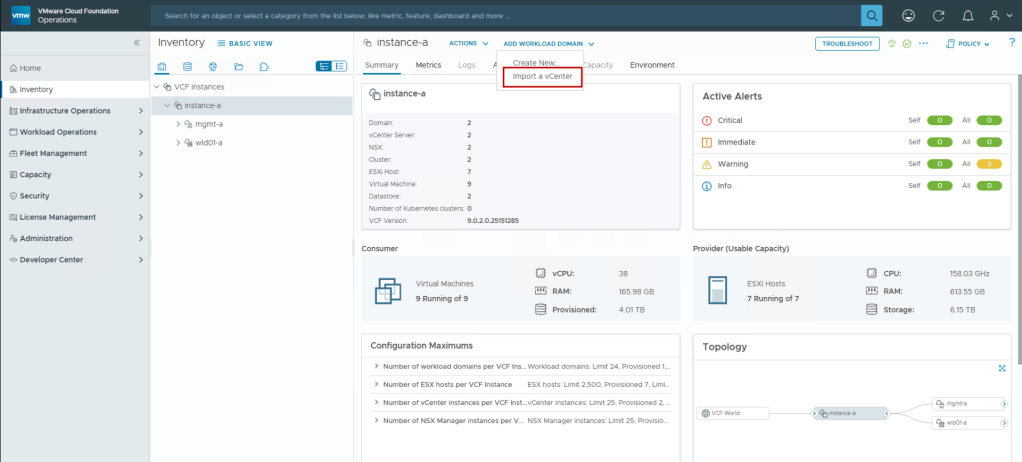
  2. Navigate to Inventory > Instance > Add Workload Domain > Import a vCenter
VCF Operations brownfield import workflow for edge vCenter integration
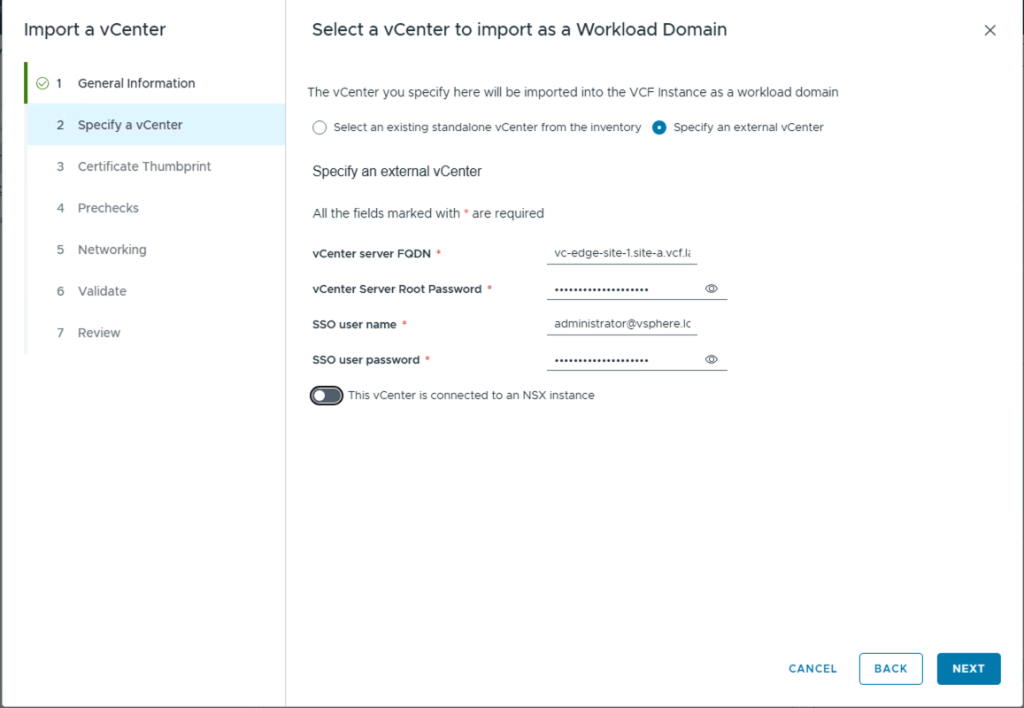
  1. Provide the edge site vCenter details and toggle the “This vCenter is connected to an NSX instance” switch to turn it off. This will allow deploying a new NSX instance during the import.
VCF Operations brownfield import workflow for edge vCenter integration
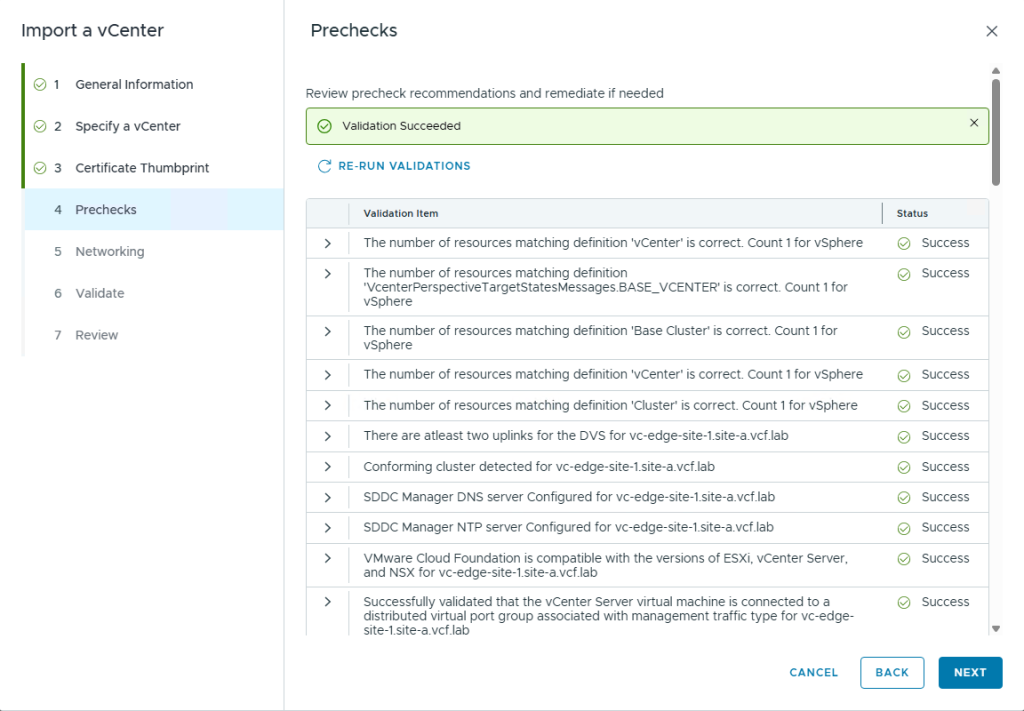
  1. Ensure all precheck validations pass.
VCF Operations brownfield import workflow for edge vCenter integration

Note: The prechecks also ensure that the edge site vCenter latency is within the acceptable limits to the primary data center where VCF Operations and SDDC Manager are deployed. Latency requirements for VCF can be found here. In this case, the max. latency allowed between SDDC Manager and the edge vCenter is 100 ms.

Edge Site latency validation
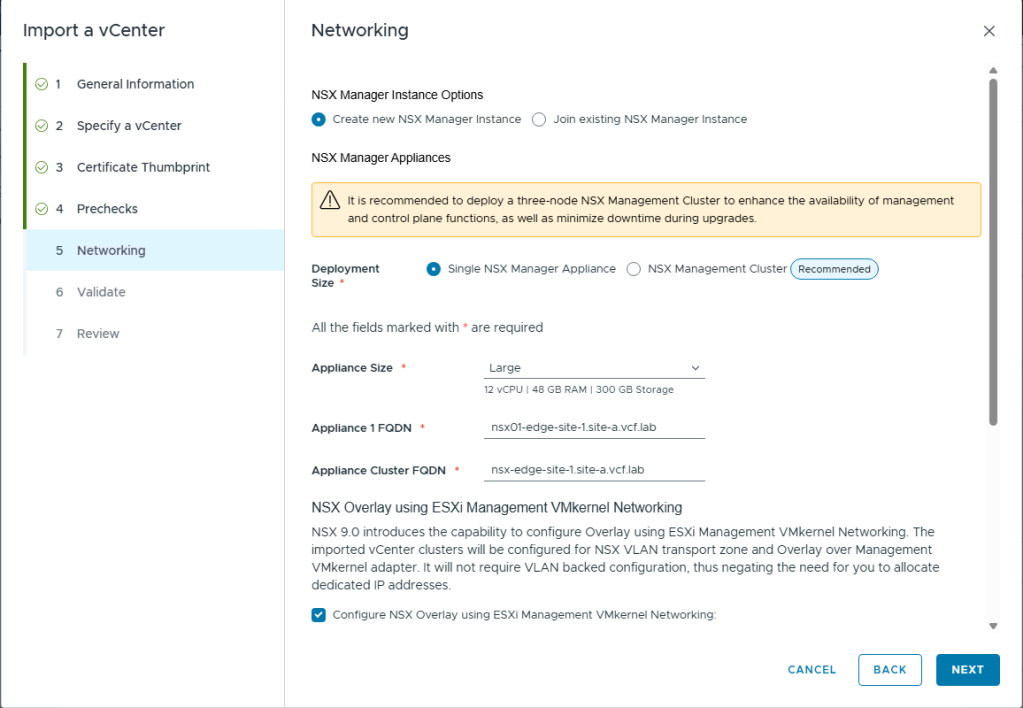
  1. Provide details for deploying the new NSX instance
Deploy NSX instance during VCF Edge brownfield import process
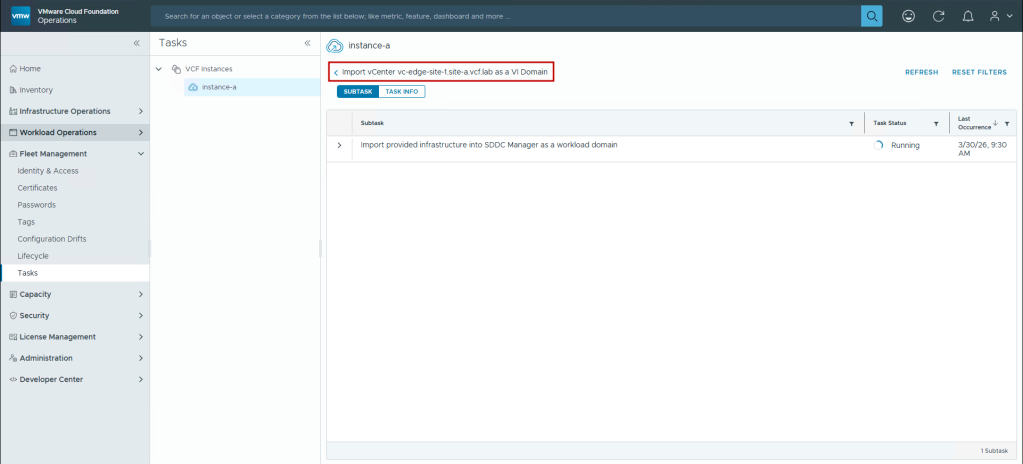
  1. Monitor the import in the Tasks pane on VCF Operations
Import task in progerss in VCF Operations

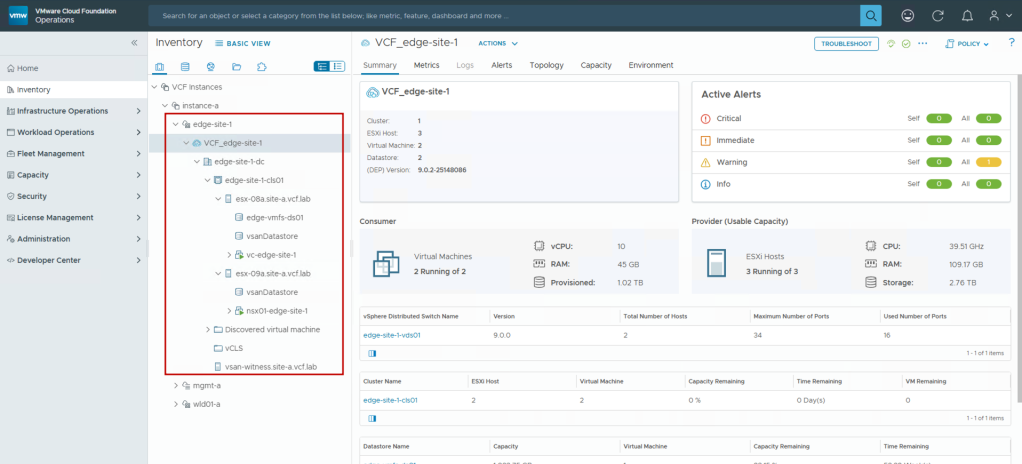
Once the import is successful and the initial sync completes in VCF Operations, you will be able to see the edge site added as a workload domain in the VCF Operations Inventory page, including the newly deployed NSX instance.

VCF Operations inventory showing imported edge site workload domain

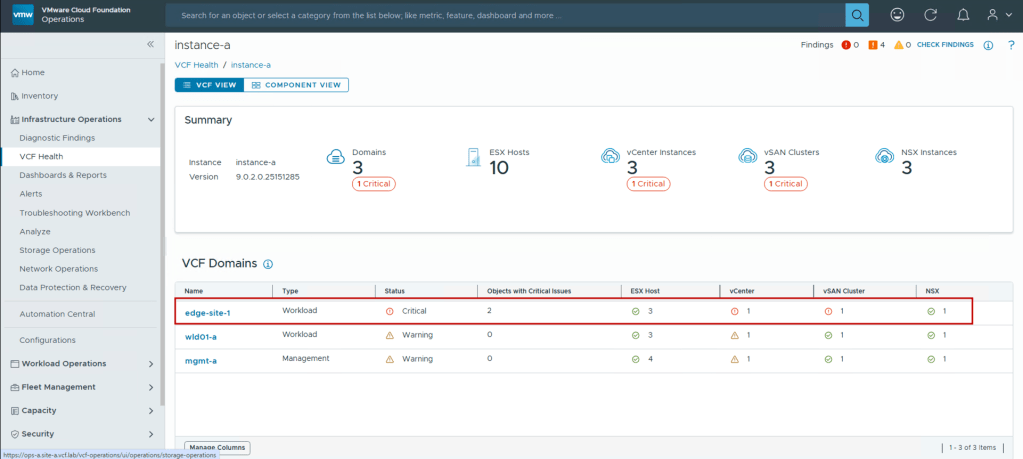
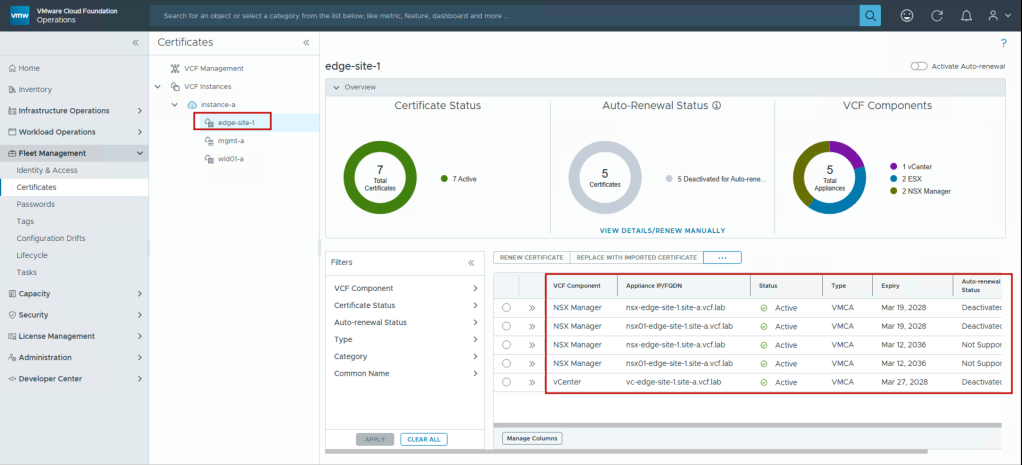
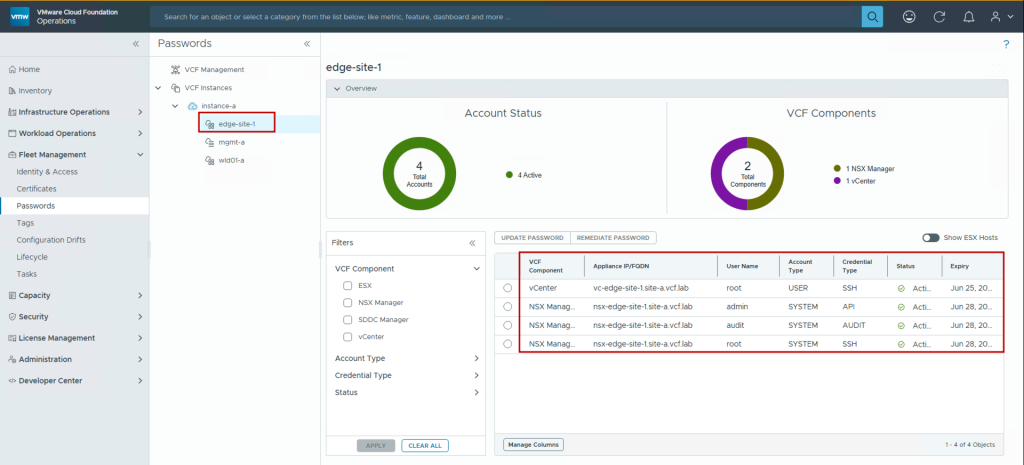
After the edge site is integrated into VCF, you can take advantage of managing the edge site along with all your other VCF components and edge sites from a single pane of glass through VCF Operations by performing tasks such as:

  • Health status monitoring
Health Status Monitoring in VCF Operations
  • Certificate management
Certificate management in VCF Operations
  • Password management
Password Management in VCF Operations

These are just a few of the many advantages VCF brings to edge sites. A lot more features can be found in the VCF 9.0 documentation.

Conclusion

Organizations requiring resilient edge infrastructure no longer face the choice between manual management complexity and complete infrastructure replacement. VMware Cloud Foundation Edge 9.0’s brownfield import capability bridges this gap, enabling you to standardize operations while preserving existing investments.

The two-host edge deployment pattern delivers production-grade high availability for critical edge workloads across retail, manufacturing, healthcare, and other industries. Combined with VCF’s unified management, this approach provides:

  • Operational Consistency: Manage edge sites with the same tools and processes as the data center
  • Reduced Risk: Import existing configurations without workload disruption
  • Accelerated Standardization: Bring all edge sites under VCF management incrementally
  • Enhanced Capabilities: Enable automated lifecycle management, security, and compliance

This foundation positions organizations to confidently expand their edge footprint while maintaining operational excellence and controlling costs.

Resources:


Discover more from VMware Cloud Foundation (VCF) Blog

Subscribe to get the latest posts sent to your email.