


VMware Cloud Foundation 9.1 is here! In this article, we explore many of the great new features and enhancements with vSphere in VMware Cloud Foundation 9.1. Be sure to check out the release notes and product support notices for important information.
vCenter quick patch allows for rapid patching of vCenter with minimal, sometimes zero, downtime. The level of downtime depends on the service(s) being patched. vCenter quick patch targets rapid deployment of important security fixes for vCenter.
Traditional in-place patching updates every RPM on the vCenter, regardless if that service or component has had a code change. vCenter quick patch changes only those specific RPMs or binaries that have a code change in the patch payload. This method dramatically reduces the overall maintenance window and reduces the vCenter downtime to under 1 minute and in some cases reduces the downtime to zero.
vCenter quick patch means important security patches can be applied without interrupting productivity. For example, virtual machine and Kubernetes cluster deployments are not interrupted. Automation and API workflows continue to run. Less time is spent scheduling maintenance windows and more time is spent being up to date with the latest patches.
For more, see the blog article about vCenter quick patch.
In addition to vCenter quick patch, other aspects of vCenter maintenance improve in version 9.1.
Reduced downtime upgrade of vCenter can use online depot connectivity. This makes using the RDU method easier for online connected vCenter instances. Offline method using the mounted ISO is available. Future vCenter 9.1.x and later patches, updates and upgrades can be applied using the RDU method and the online depot. This simplifies the use of RDU for online connected instances.
vCenter exposes a new API that other components can query to be notified if vCenter maintenance is planned or currently underway. Envoy reverse proxy will display a 503 Header indicating that vCenter maintenance is in progress and the estimated time of completion.
During major upgrades (8.x to 9.1.0) or minor updates (9.0.x to 9.1.0) using the reduced downtime upgrade method, the vCenter VM hardware version is upgraded automatically from VM hardware version 10 to hardware version 17 because a new vCenter VM is created. After performing an in-place update (9.0.x to 9.1.0) of vCenter, the vCenter VM hardware version needs to be upgraded. This process requires the vCenter VM to be powered off.
For more information, see the blog article VMware vCenter Virtual Hardware Gets an Upgrade in vSphere with VCF 9.1.
VCF 9.1 introduces a new API that makes it even easier to resize the vCenter. A single API call and a reboot is all that is needed to scale up vCenter compute and disk sizes.
You can initiate the API using the Developer Center API Explorer within vCenter. The API is named deployment/size and uses the PATCH method to invoke the API.
For more, see the blog article Resizing VMware vCenter in VMware Cloud Foundation 9.
Images created and managed by vSphere Lifecycle Manager include a SHA256 checksum. This checksum allows images that are exported and imported into other vCenter instances to be verified for integrity. The administrator can compare the checksum at the source and destination to confirm the integrity of the image definition. This is not a checksum of the ESX VIBs but simply a checksum of the image definition.
In previous versions, vSphere Lifecycle Manager validates device firmware and drivers against the HCL when a third-party Hardware Support Manager (HSM) is present. In version 9.1, vSphere Lifecycle Manager reports the current running driver and firmware of a device and validates against the HCL for vSAN clusters even when a HSM is not present. Some devices may not report their firmware without an appropriate HSM. This provides a first-level validation of devices used in a vSAN cluster.
Zero touch provisioning builds on the existing foundation of vSphere Auto-Deploy. It uses newer boot protocol technologies, UEFI HTTP/S Boot, and supports modern server configurations such as secure boot and TPM. Zero touch provisioning does not require an external TFTP server. Configure the UEFI boot URL to point to the vCenter and boot the host over the network. A DHCP server is required if the UEFI cannot be configured with a static IP for boot.
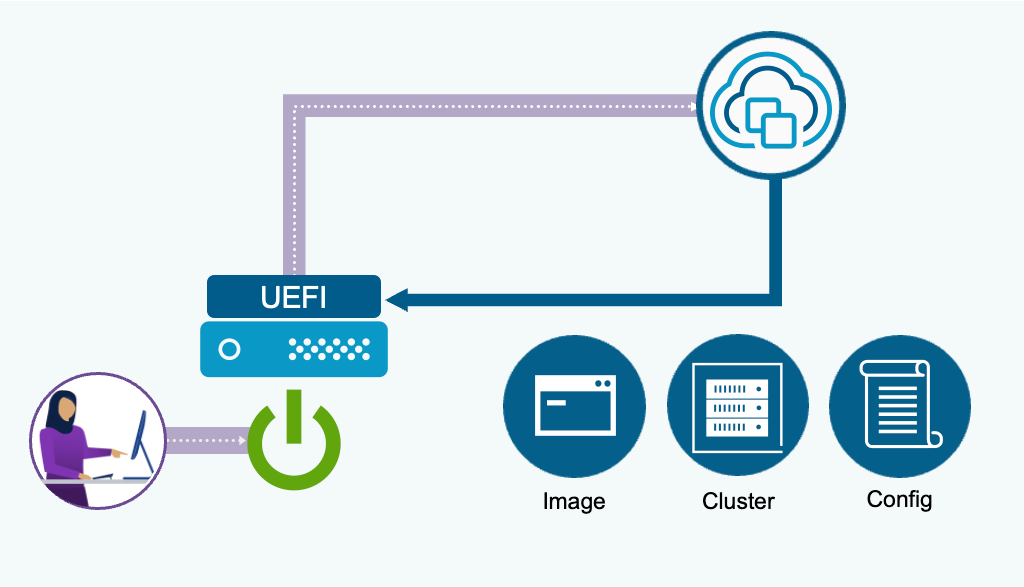
The ESX image and configuration is determined by the cluster location chosen when defining the deploy rule. If you do not have a vSphere Configuration Profile (VCP) complete on the destination cluster, you can boot to a non-VCP enabled cluster and the cluster will boot and join the cluster with a default configuration.
ESX live patch is enabled by default on all clusters and configured to use live patch automatically if a capable patch is being applied. If the patch is not live patch capable, the default response is to fall back to normal maintenance mode and reboot patch method.
The setting can be modified to enforce live patch. Enforce allows live patch remediation only and will block remediation on hosts that require normal maintenance mode and reboot. These settings can be configured at a cluster level or at a vCenter level. The vCenter level settings apply to all clusters unless overridden at the cluster level.
ESX live patch supports TPM enabled servers. Customers do not need to disable TPM or forgo using live patch with ESX 9.1 and later.
ESX live patch supports more of the vmkernel and improves the performance of live patching the vmkernel. ESX live patch supports additional user space daemons and services including vSAN daemons, core storage daemons and libraries.
For more information about ESX live patch, see the blog article Live patch gets even better in vSphere with VMware Cloud Foundation 9.0 /
vSphere Configuration Profiles ensure that configuration and remediation changes do not negatively impact vSAN. vSAN maintenance mode policies and object accessibility policies are honored when remediating vSAN clusters. Advanced vSAN configuration can be applied cluster-wide.
vSphere Configuration Profiles is used to configure memory tiering for hosts in the cluster. The NVME devices can be claimed for memory tiering. An additional NVME device can be optionally claimed as a mirror device for software mirroring.
vSphere Configuration Profiles provides host configuration when installing hosts using Zero Touch Provisioning and supports vSphere Distributed Switch configuration being bootstrapped during host deployment.
When new hosts are added to vSphere Configuration Profile enabled clusters, the desired state configuration is automatically remediated for the incoming host. Host specific attributes (eg. IP addresses) are extracted from the incoming host and automatically added to the host-specific section of the cluster profile.
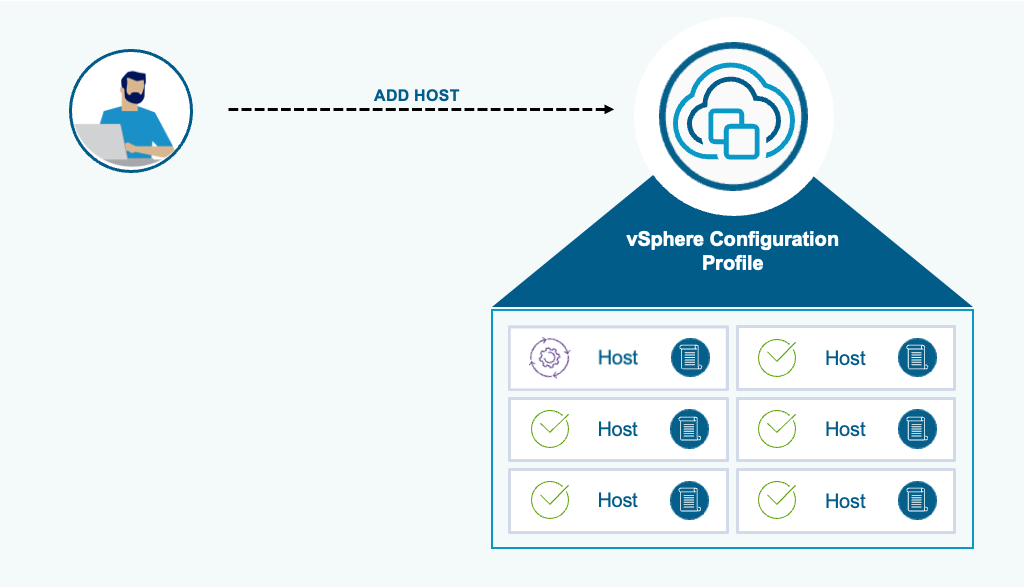
Automatic remediation is disable by default and can be enabled at a vCenter level of at an individual cluster level. See How to Configure the vSphere Lifecycle Manager Remediation Settings.
The vCenter TLS certificate is automatically renewed 5 days prior to expiration. ESX certificate is renewed 30 days prior to expiration. The ESX threshold is configurable in Advanced vCenter Server Setting using the setting vpxd.certmgmt.certs.autoRenewThreshold.
In both cases, automatic renewal takes place for VMCA managed certificates. Certificates issued by an external certificate authority are not automatically renewed, It is the responsibility of the administrator to manage externally issued certificates.
If the VMCA root certificate expiration is less than 1 year away, the VMCA root, and subsequent leaf solution user certificates, are renewed during an upgrade of vCenter. vCenter TLS and ESX TLS certificates are not renewed during this operation.
Up to 25% increase in operations per minute can be expected in large & extra-large sized vCenter deployments. This includes many VM and host operations and configuration changes. Large numbers of VM backup operations scale for more simultaneous operations (500-1000) depending on vCenter size. VM backup operations are safeguarded to no longer consume all available vCenter resources. File transfers use dedicated threads which means other vCenter operations are not impacted. Backup operation advanced vCenter settings can customize scalability depending on the environment.
A new vCenter utilization monitoring API allows active connections to vCenter to be better monitored and compared with max allowed limits. You can track the number of requests across all vCenter Services and verify that service requests remain within allowed thresholds to avoid bottlenecks.
Two new alarms, High Session Count and Increased request load, are introduced to alert on one or more vCenter services. The High Session Count alarm notifies the user when the number of sessions is reaching the limit (3000 by default). The message contains information about the IPs and usernames of the top 5 users overloading the system that have more than 100 sessions. If the order of the top 5 users change, a new event will be fired to inform the user. Any user who can create a session is eligible to be listed in the alarm, including all service accounts. The Increased request load alarm notifies the user when a service endpoint is reaching its active request limit (1024 for most endpoints).The alarm message contains information about the impacted services and which endpoints are impacted.
To support the migration from VMware Cloud Director(vCD) to VMware Cloud Foundation Automation(VCFA), Guest OS Customization(GOSC) VIM API is enhanced to achieve parity with vCD customization features and capabilities such as;
Administrators can now explicitly disable IPv4 and configure IPv6-only networking in guest customization via both the UI and API. This eliminates the previous requirement to maintain a parallel IPv4 configuration.
Virtual machines can have only the networking configuration customized. This can be done for powered-off or powered-on virtual machines, allowing for real-time networking changes for powered-on virtual machines.
DRS optimized vMotion Evacuation ensures that the VMs on the host will only migrate if there is enough remaining compute capacity to accommodate the VMs without contention. vSphere DRS may re-balance the remaining hosts to create non-contentious capacity for the evacuating VMs.
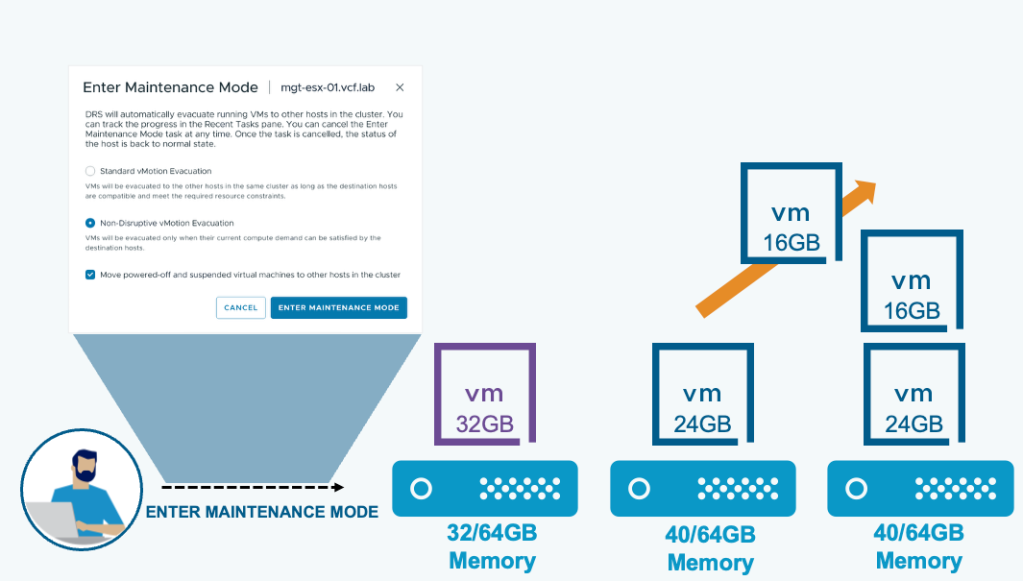
Enter maintenance mode operations presents two options for DRS enabled clusters.
Standard vMotion Evacuation: VMs will be evacuated to the other hosts in the same cluster as long as the destination hosts are compatible and meet the required resource constraints.
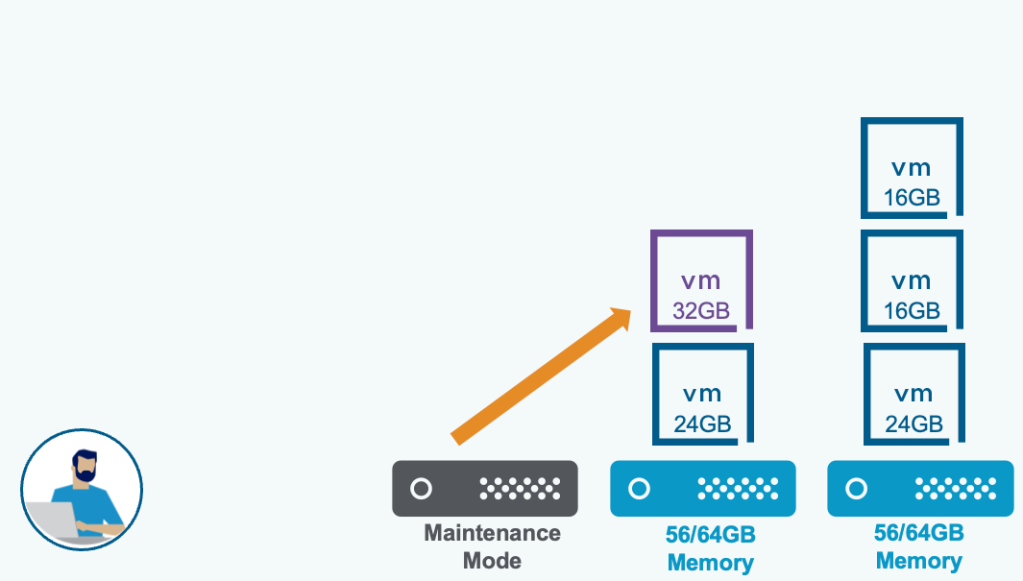
Non-Disruptive vMotion Evacuation: VMs will be evacuated only when their current compute demand can be satisfied by the destination hosts.
Note: The term non-disruptive for this new maintenance mode evacuation does not mean that standard maintenance mode evacuation is in any way disruptive. It simply means that maintenance mode evacuation will avoid resource contention for the VMs being evacuated.
The default maximum number of concurrent vMotion tasks is 8. In previous releases, if 8 vMotion tasks are in progress, as a batch operation, no additional vMotion task will begin until all previous 8 have completed. In vSphere 9.1, once one vMotion task has completed and a vMotion slot has been released, an additional vMotion task can begin.
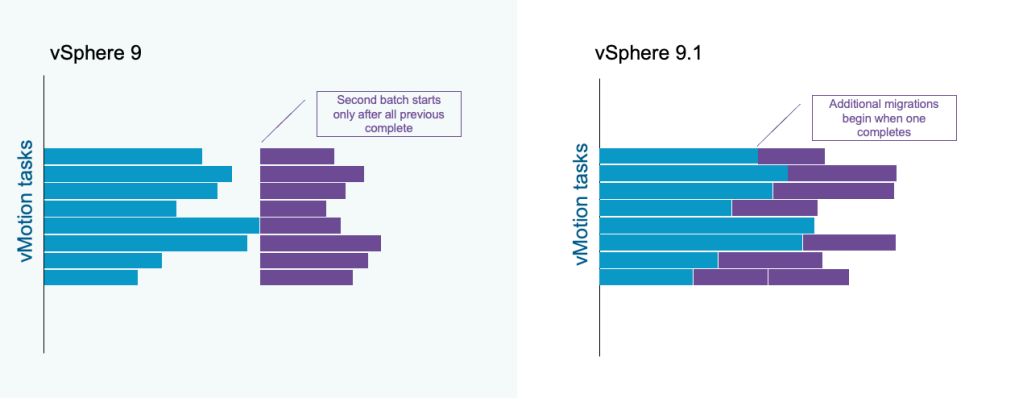
This improved processing of vMotion tasks provides better resource utilization with a more even distribution of vMotion load across cluster hosts. Fewer hosts experience peak concurrent vMotion load and better network and storage resource distribution is achieved.
VCF 9.1 introduces the capability to offload encrypted vMotion operations to Intel® QAT (QuickAssist Technology). Freeing up valuable CPU resources and returning those cores back to the workloads.
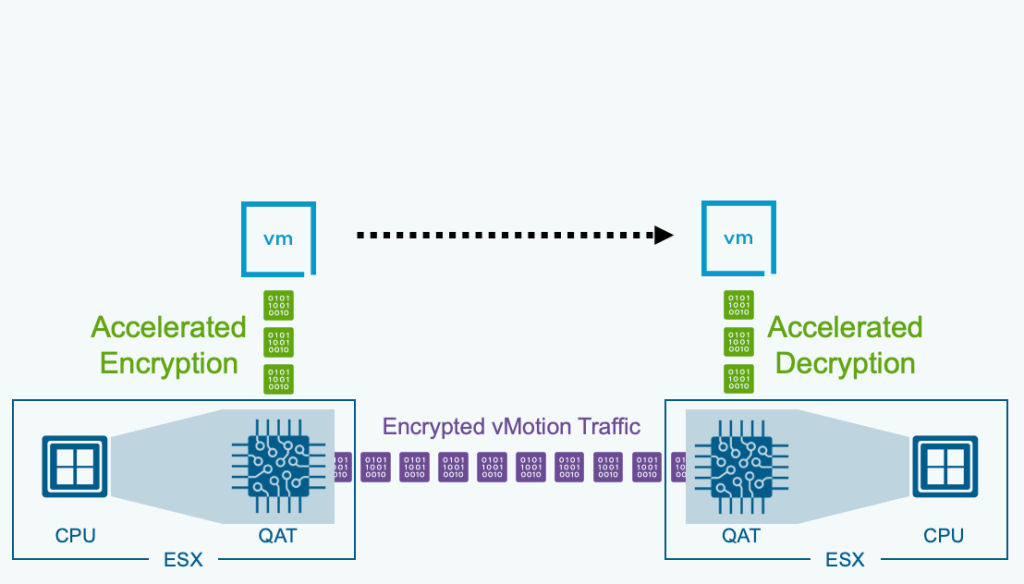
This means that customers are looking to fully utilize their resources the best way possible. To meet these demands, we are leveraging Intel® QAT (QuickAssist Technology) to accelerate infrastructure operations.
By moving the heavy lifting of vMotion tasks to dedicated hardware, we can return valuable CPU cores back to the actual workloads running on VCF. Intel® QAT takes on the job of encrypting the data for vMotion operations.
Topology Aware Scheduler adopts an event-driven, inline update mechanism, resulting in more consistent and balanced NUMA placements.
NUMA (Non-uniform Memory Access) architecture is used to improve scalability and performance of servers equipped with multiple CPU sockets. The scheduler is an ESX kernel component responsible for managing placement and load balancing of virtual machines (VMs) across NUMA nodes, to minimize memory access latencies and to improve CPU and memory resources utilization by the workloads running in the VMs.
The Topology Aware Scheduler is optimized for a new generation of high-density processors with an improved CPU and memory goodness model. The existing scheduler mainly considers the CPU contention (ready time) when making placement decisions. The Topology Aware Scheduler not only considers the CPU contention, but also the cache and memory bandwidth contention.
For systems with asymmetric NUMA topology, where the distance between some node pairs is significantly higher than others, Topology Aware Scheduler can place sibling NUMA clients of the same VM on a subset of nodes that are closer to each other.
Enhanced DirectPath I/O ecosystem is expanded with VCF 9.1.
We aren’t just “passing through” hardware; we are virtualizing it. This allows for better resource utilization and the ability to perform maintenance and scaling operations without tearing down your AI workload. The support of new hardware devices in VCF 9.1 includes a lot of virtualization benefits you’ve come to love such as stun-based operations and fast-suspend-resume operations. Some of those benefits include features such as:
For more information, see the blog article Why Enhanced DirectPath Wins for High-Performance Apps.
ESX 9.1 expands its capabilities by introducing IOMMU virtualization support for AMD CPUs. Administrators can now leverage PCI passthrough devices on AMD-based systems, enhancing performance and direct hardware access for virtual machines.
AMD vIOMMU (Virtual I/O Memory Management Unit) is a hardware-assisted technology enabling secure, high-performance direct memory access (DMA) for virtual machines by allowing guests to directly access MMIO registers.
Flow Processing Offload (FPO) and hardware steering maximize data center efficiency by moving complex network rule processing from the CPU directly onto dedicated hardware. This shift enables wire-speed performance and rapid scalability for virtualized environments while freeing up critical CPU resources for actual business applications.
Enhanced DirectPath I/O allows for direct GPU-to-GPU communication via RDMA over Converged Ethernet (ROCE). Enhanced DirectPath I/O is for organizations running massive AI workloads or high-speed data processing. It allows them to get near-native hardware performance (required for AI) without sacrificing the management tools that make virtualized data centers easy to run.
NVIDIA GPUs being used for vGPU can be configured for both time slicing and MIG mode to share resources even more efficiently, improving consolidation.
For more information about the VCF 9.1 announcements, see the VMware Cloud Foundation 9.1 announcement and the VMware vSphere in VCF 9.1 announcement.
For everything new with Memory Tiering in VCF 9.1, see the blog article Advanced Memory Tiering Enhancements in VCF 9.1.
Subscribe to get the latest posts sent to your email.
此内容由惯性聚合(RSS阅读器)自动聚合整理,仅供阅读参考。 原文来自 — 版权归原作者所有。