




惯性聚合 高效追踪和阅读你感兴趣的博客、新闻、科技资讯
阅读原文 在惯性聚合中打开

推荐订阅源

L
LangChain Blog
Recent Announcements
GbyAI
GbyAI
H
Hackread – Cybersecurity News, Data Breaches, AI and More
Microsoft Azure Blog
N
Netflix TechBlog - Medium
人人都是产品经理
人人都是产品经理
MongoDB | Blog
MongoDB | Blog
D
DataBreaches.Net
freeCodeCamp Programming Tutorials: Python, JavaScript, Git & More
WordPress大学
WordPress大学
U
Unit 42
腾讯CDC
D
Docker
The GitHub Blog
The GitHub Blog
阮一峰的网络日志
阮一峰的网络日志
Vercel News
Vercel News
I
InfoQ
Jina AI
Jina AI
爱范儿
爱范儿
宝玉的分享
宝玉的分享
博客园 - Franky
G
Google Developers Blog
P
Proofpoint News Feed

VMware Blogs

Diagnostics for VMware Cloud Foundation (VCF) 9.1 with Old Versions of VCF Components Mastering Infrastructure Policies in VMware Cloud Foundation Automation 9.1 Modernizing the Private Cloud: Why VCF 9.1 Lifecycle Management is a Game Changer VCF Breakroom Chats Episode 86 – Containers Made Easy: The New “Container-as-a-Service” in VCF 9.1 Securing Your VCF 9.1 Infrastructure with the Symantec Identity Security Platform Virtually Speaking: The AI Reality Check with Dave Linthicum Zero Touch Provisioning: Activating Edge Sites with VMware Cloud Foundation Edge 9.1 VCF Breakroom Chats Episode 85 – Cloning Success at Scale: Inside VCF 9.1’s App Stack Formation VMware Cloud on AWS の使用状況を確認できる API Unlocking the Full Potential of Programmable Infrastructure with VMware Cloud Foundation 9.1 – New Features and Capabilities Smarter Patching at Scale: Vulnerability Assessment and Remediation with VMware Tanzu Platform Encrypted vMotion Offload to Intel QAT in VMware Cloud Foundation 9.1 Deepen Your Expertise: Four Key Benefits of Attending Increase Deployment Flexibility with VCF Edge Automation 1.0.3 Avi Advantage: Automating Certificate Management of VCF Workloads More Memory, Less Effort: Configuring Memory Tiering in VCF 9.1 VCF 9.1 Licensing: Programmatic, Centralized, and Built to Scale Why APJ Networking Professionals Need Private Cloud Expertise VCF 9.1 Networking: Simpler VPC Connectivity Control VCF 9.1 Networking: Exploring Network Services for Virtual Private Clouds VCF Networking 9.1: Seamless DDI Integration with Infoblox The Open Source Advantage: Building from Source for Ultimate Security Expand Shared VMDKs with Clustered Applications in VMware vSAN for VCF 9.1 Monetizing Zero-Trust Security with VCF 9.1 and VMware vDefend VMware vSAN Protection and Recovery Enhancements for VCF 9.1 Deliver Production SQL Server DBaaS with VMware Data Services Manager 9.1 Maximizing Profitability: VCF 9.1 Cost-Focused Approach for VMware Cloud Service Providers Modernizing Your Infrastructure: Introducing VMware Cloud Foundation 9.1 to VCSPs VCF 9.1 is Available: Explore the New Features in Hands-on Labs What’s New with vSphere in VMware Cloud Foundation 9.1?
Announcing the VMware Cloud Foundation 9.1 Upgrade Planni...
William Lam · 2026-05-28 · via VMware Blogs

One of the biggest advantages of VMware Cloud Foundation (VCF) 9.1 is its flexibility and broad support for existing customer environments, meeting customers where they are at in their Private Cloud journey. From existing standalone vSphere deployments with VCF Operations to environments with different combinations of vSAN, NSX and Aria Automation, all the way to a full stack VCF deployment.

With this added flexibility in VCF 9.1, depending on the components and features deployed within an environment, customers may need to account for specific component upgrade sequences, additional operational workflows and resource requirements, which can make understanding the overall upgrade workflow a real challenge. Historically, customers would have to piece together information from product documentation, KB articles and interoperability matrices before they could confidently plan and perform an upgrade.

To help improve the upgrade experience for our customers, why not simply start with where they are currently at based on the products and features they already have deployed, rather than requiring them to understand all the different deployment permutations and upgrade workflows? Using that as input, we can then provide the applicable destination scenarios they can upgrade to and, most importantly, generate a tailored upgrade plan specific to their environment.

Today, we are excited to announce the release of the VCF 9.1 Upgrade Planning Tool which provides a custom tailored upgrade planning experience to help customers confidently navigate their VCF upgrade journey.
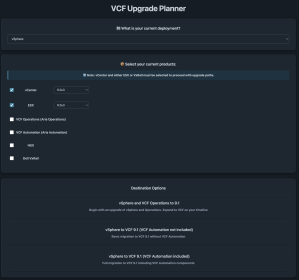
After specifying your current deployment which can either be a vSphere or VCF-based environment along with the specific versions you are running, users will then be presented with a set of applicable designations that they can then choose from.

Once the destination has been selected, the VCF Upgrade Planning Tool will provide a comprehensive upgrade plan that includes:
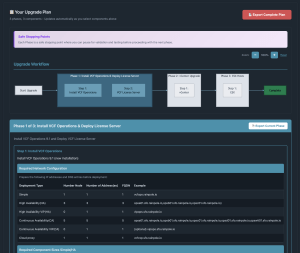
  • Overall upgrade workflow that is also broken down into discreet upgrade phases to help with maintenance window planning
  • Resource & Networking Requirements
  • Key considerations and potential pitfalls to avoid
  • Relevant references to VCF product documentation

While the VCF Upgrade Planning Tool can be used interactively, users can also export the entire upgrade workflow and/or specific upgrade phases to PDF for offline use.

We hope this tool will provide you with a better VCF upgrade experience and if you have any feedback, issues or areas for improvement, feel free to file Github Issue or even contribute back!

Editorial Note: all or parts of this content originally published on my blog here


Discover more from VMware Cloud Foundation (VCF) Blog

Subscribe to get the latest posts sent to your email.