

惯性聚合 高效追踪和阅读你感兴趣的博客、新闻、科技资讯
阅读原文 在惯性聚合中打开

推荐订阅源

量子位
D
DataBreaches.Net
Microsoft Security Blog
V
Visual Studio Blog
GbyAI
GbyAI
美团技术团队
云风的 BLOG
云风的 BLOG
大猫的无限游戏
大猫的无限游戏
小众软件
小众软件
博客园 - 叶小钗
Engineering at Meta
Engineering at Meta
博客园 - 三生石上(FineUI控件)
N
Netflix TechBlog - Medium
奇客Solidot–传递最新科技情报
奇客Solidot–传递最新科技情报
G
Google Developers Blog
博客园 - 【当耐特】
OSCHINA 社区最新新闻
OSCHINA 社区最新新闻
宝玉的分享
宝玉的分享
阮一峰的网络日志
阮一峰的网络日志
T
The Blog of Author Tim Ferriss
Y
Y Combinator Blog
U
Unit 42
P
Proofpoint News Feed
V
V2EX

Visual Studio Blog

AI Is Changing How We Code. It’s Also Changing How We Learn.  - Visual Studio Blog Today I will... improve test coverage - Visual Studio Blog Today I will... find hidden latency across a distributed .NET application - Visual Studio Blog Stop alt-tabbing into the wrong Visual Studio - Visual Studio Blog Today I will... review GitHub PRs - Visual Studio Blog VSLive! @ Microsoft HQ: Developer Takeaways and Must-Watch Sessions - Visual Studio Blog The Visual Studio Debugger Agentic Workflow Gets a Test-Driven Upgrade - Visual Studio Blog Visual Studio August Update — Work Smarter Across Models and Branches - Visual Studio Blog Unlocking the Power of AI for Every Developer in Visual Studio with Bring your Own Model - Visual Studio Blog Today I will... Modernize a .NET application - Visual Studio Blog Build Azure Skills Faster with Cloud Academy, a Visual Studio Subscriber Benefit - Visual Studio Blog Tell your model when to think harder  - Visual Studio Blog Visual Studio July Update — Meet the New Agent, Powered by the GitHub Copilot SDK - Visual Studio Blog Visual Studio Administrator? Join our Private Marketplace Preview! - Visual Studio Blog Pick, manage, and get the most from your models - Visual Studio Blog Built-in Agent Skills Bring .NET and Azure Expertise into Visual Studio - Visual Studio Blog The Visual Studio Dev/Test Benefit: Freedom to Build, Test, and Experiment in Azure - Visual Studio Blog Visual Studio June Update - Track Your Usage, Trust Your Tools - Visual Studio Blog Automating your Visual Studio extension builds with GitHub Actions - Visual Studio Blog Make Visual Studio look the way you want - Visual Studio Blog Review pull requests without leaving Visual Studio What’s Coming Next in Visual Studio: Our Microsoft Build 2026 Announcements Visual Studio May Update – Plan, Review, Refine Plan Before You Build: Introducing the Plan agent in Visual Studio VSLive! Microsoft AI Hackathon 2026: Send Your Team Home With Working Code Agent Skills in Visual Studio: Teach Copilot How Your Team Works TypeScript 7 Beta Now Enabled by Default in Visual Studio 2026 18.6 Insiders 3 SDK-Style Support for Extension Projects Visual Studio April Update – Cloud Agent Integration - Visual Studio Blog From AI to .NET: 20 VS Live! Las Vegas Sessions You Can Watch Now - Visual Studio Blog
Today I will... manage Git Submodules without leaving the...
Harshada Hole · 2026-08-12 · via Visual Studio Blog

If you’ve worked with Git submodules for any length of time, you probably have a love-hate relationship with them. They’re genuinely useful for pulling a shared library, an SDK, or common build scripts into your project. But actually working with them usually means tabbing over to a terminal and trying to remember whether it’s git submodule update --init or --init --recursive this time all while a perfectly good IDE sits right in front of you, shrugging.

That’s the part we wanted to fix. Starting in Visual Studio 18.9, Git submodules are a first-class part of the IDE no more bouncing out to the command line just to keep your dependencies in order. It’s been one of the most-requested Git features for a long time, and honestly, it’s about time.

They finally feel like part of Git in the IDE

Submodules aren’t a mystery folder anymore. There’s a dedicated Submodules section in the Git Repository window, they show up properly in Git Changes, and the branch and repository pickers actually understand how your parent repo and its submodules relate.
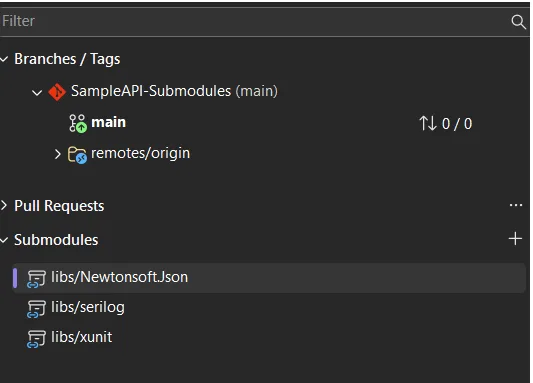
submodule in git repo image
    [Image: Submodules section in the Git Repository window)    
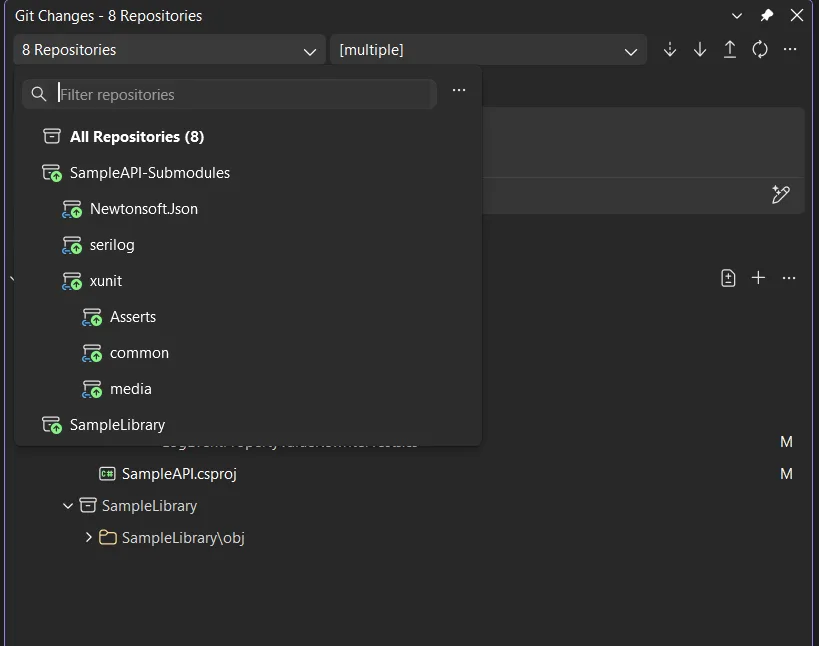
image image

[Image: Submodules in the Git changes window)    

Add, update, and delete without leaving your seat

From that Submodules section, you can add, update, or remove a submodule right there no memorized flags, no terminal detour. Open a solution or folder and Visual Studio discovers and activates your submodules automatically, while keeping them out of the main local repositories list so your repo picker doesn’t turn into a cluttered mess.
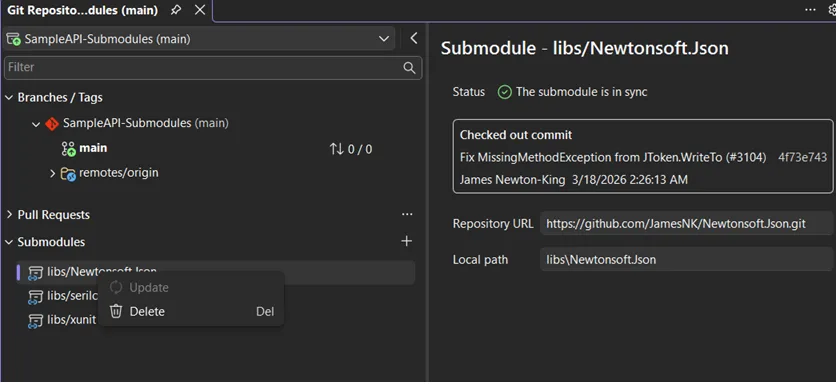
Selecting a submodule image

[Image: Selecting a submodule repository in Visual Studio]

Read-only by default

Most of the time you’re just *using* a submodule, not editing it, so Visual Studio treats them as read-only by default. That saves you from accidentally committing changes into a dependency you only meant to reference. When you do want to work *inside* one, it’s a single setting: Tools > Options > Source Control > Git, find Automatically activate multiple repositories, and pick Yes, include submodules.

This is just the start

This is the first milestone, not the finish line. It covers the core of what you need day to day, and there’s more coming in future releases depending on what you tell us.

We’d love to hear from you

This feature exists because so many of you kept asking for it, so keep the feedback coming. Drop your thoughts on the Feature Ticket , and if something breaks, please use the Report a Problem tool in Visual Studio is the fastest way to reach us. You can also find the team on Twitter @VisualStudio, YouTube, and LinkedIn. 

Thanks, as always, for coding with us.

Category

Topics

Author

Harshada Hole

Harshada Hole is a Product Manager on the Visual Studio.