


Visual Studio now includes built-in Agent Skills, created by experts from the .NET and Azure teams, to help you better customize your agentic workflow and complete development tasks more efficiently, starting with the 18.8 Release. Agent Skills are reusable capabilities that enable your agent to perform structured tasks more reliably (to learn more about what are Agent Skills, see this previous post).
We’ve heard that getting started with skills can feel unclear, especially when deciding which ones to use and how to apply them. To simplify this experience, we’ve introduced a set of built-in skills for common .NET and Azure scenarios, so you can immediately benefit from them in your workflow.
You can find these skills in the Built-in category in the tool picker. Hover over each skill to view its description and path, or use the three-dot menu to open the full skill or its folder location. These skills will only appear when the corresponding .NET and Azure development workloads are installed in Visual Studio.
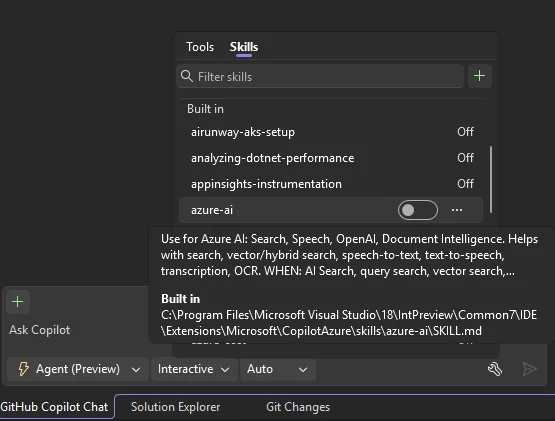
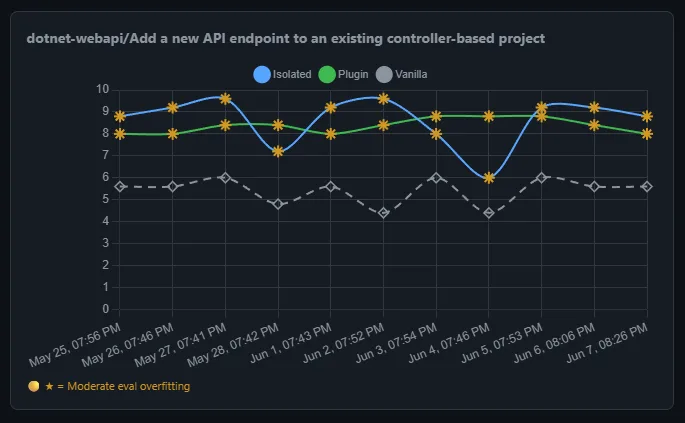
Currently, built-in skills are off by default, so you can review and enable only the ones that suit your tasks. We are actively evaluating the effectiveness and cost of enabling these skills by default. As we transition into the new usage-based billing model for Copilot, we want to make sure every token you spend is meaningful and are tracking efficacy through a dashboard. We will turn on the skills when we find evidence that these skills would improve your agent performance.
If you want to learn more about Agent skills and built-in skills in Visual Studio through live demos, please watch our VS Live Toolbox show featuring this topic!
.NET Skills
The dotnet/skills provides skills that help agents be more successful no matter what type of .NET app you are working to develop, taking you from scaffolding new applications to adding new features, to diagnosing issues with existing applications, whether you are working in ASP.NET Core or MAUI or developing AI-based applications.
Included with Visual Studio, we are first providing you with dotnet-webapi and analyzing-dotnet-performance.
1. Get more from your API development
When you are working with ASP.NET Core HTTP APIs, the dotnet-webapi skill guides creation and modification of endpoints with correct HTTP semantics, OpenAPI metadata, and error handling. This helps you get clean, modern .NET code from the agent on the first pass.
Try it: “Add an endpoint to the API to handle moving the entries from current to archived. Include proper error handling.”
2. Review the performance of your application
For every .NET developer, performance of the application you’re building is extremely important. With the analyziing-dotnet-performance skill, agents can more easily scan .NET code for ~50 performance anti-patterns across async, memory, strings, collections, LINQ, regex, serialization, and I/O with tiered severity classification.
Try it: “Review this application for performance optimization opportunities and provide me with the top 3 changes I should make for the biggest improvement.”
Azure Skills to Try First
The Azure skills covers the whole journey of getting an app onto Azure—from scaffolding infrastructure to securing, analyzing, and extending it with AI. If you’re not sure where to start, here are a few built-in skills that fit naturally into a Visual Studio developer’s workflow. Each one packages real Azure expertise—workflows, decision trees, and guardrails—so your agent does genuine Azure work instead of handing back generic cloud advice.
1. Go from app to deployed: azure-prepare → azure-validate → azure-deploy
These three skills form one deployment chain that hands off automatically:
- azure-prepare generates the infrastructure your app needs—Bicep or Terraform, azure.yaml, Dockerfiles, and managed identity.
- azure-validate runs preflight checks before anything deploys—configuration, Bicep/Terraform, RBAC and managed identity permissions, and a what-if/build verification—so problems surface before they hit Azure.
- azure-deploy executes the deployment (azd up, azd deploy, Bicep, or terraform apply) with built-in error recovery instead of leaving you stuck on a cryptic message.
The result: a single path from “it builds locally” to “it’s running in the cloud.”
Try it: “Deploy my ASP.NET Core app to Azure Container Apps with managed identity.”
2. Analyze logs and telemetry with azure-kusto
Once your app is live, query its data in Azure Data Explorer (Kusto/ADX) with KQL for log analytics, telemetry, and time-series analysis. Describe what you want in plain language and let the agent write and run the query—the fast way to answer “what happened, when, and how often.”
Try it: “Query my logs for the error rate per endpoint over the last 24 hours and show the spikes.”
3. Build and ship AI features with microsoft-foundry
Adding AI to your app? This skill takes you end-to-end with Microsoft Foundry: discover and deploy models, create and invoke agents, run evaluations, and fine-tune—removing the guesswork around which model fits, how to deploy it, and how to wire up an agent.
Try it: “Deploy my hosted agent to Foundry.”
We hope these built-in skills could further improve your agentic workflow. Please give them a try, and let us know if they were helpful for your workflow. Also let us know what additional built-in skills you would like to see, or how we can future support your agentic workflow in Visual Studio!


