


惯性聚合 高效追踪和阅读你感兴趣的博客、新闻、科技资讯
阅读原文 在惯性聚合中打开

推荐订阅源

The GitHub Blog
The GitHub Blog
IT之家
IT之家
B
Blog RSS Feed
罗磊的独立博客
GbyAI
GbyAI
博客园 - Franky
Y
Y Combinator Blog
Cyber Security Advisories - MS-ISAC
Google DeepMind News
博客园 - 聂微东
N
Netflix TechBlog - Medium
博客园 - 三生石上(FineUI控件)
人人都是产品经理
人人都是产品经理
U
Unit 42
博客园 - 叶小钗
Jina AI
Jina AI
MyScale Blog
MyScale Blog
雷峰网
雷峰网
B
Blog
Hugging Face - Blog
Hugging Face - Blog
Blog — PlanetScale
Blog — PlanetScale
Recent Announcements
腾讯CDC
酷 壳 – CoolShell
酷 壳 – CoolShell

Visual Studio Blog

AI Is Changing How We Code. It’s Also Changing How We Learn.  - Visual Studio Blog Today I will... find hidden latency across a distributed .NET application - Visual Studio Blog Stop alt-tabbing into the wrong Visual Studio - Visual Studio Blog Today I will... review GitHub PRs - Visual Studio Blog VSLive! @ Microsoft HQ: Developer Takeaways and Must-Watch Sessions - Visual Studio Blog The Visual Studio Debugger Agentic Workflow Gets a Test-Driven Upgrade - Visual Studio Blog Visual Studio August Update — Work Smarter Across Models and Branches - Visual Studio Blog Unlocking the Power of AI for Every Developer in Visual Studio with Bring your Own Model - Visual Studio Blog Today I will... Modernize a .NET application - Visual Studio Blog Today I will... manage Git Submodules without leaving the IDE - Visual Studio Blog Build Azure Skills Faster with Cloud Academy, a Visual Studio Subscriber Benefit - Visual Studio Blog Tell your model when to think harder  - Visual Studio Blog Visual Studio July Update — Meet the New Agent, Powered by the GitHub Copilot SDK - Visual Studio Blog Visual Studio Administrator? Join our Private Marketplace Preview! - Visual Studio Blog Pick, manage, and get the most from your models - Visual Studio Blog Built-in Agent Skills Bring .NET and Azure Expertise into Visual Studio - Visual Studio Blog The Visual Studio Dev/Test Benefit: Freedom to Build, Test, and Experiment in Azure - Visual Studio Blog Visual Studio June Update - Track Your Usage, Trust Your Tools - Visual Studio Blog Automating your Visual Studio extension builds with GitHub Actions - Visual Studio Blog Make Visual Studio look the way you want - Visual Studio Blog Review pull requests without leaving Visual Studio What’s Coming Next in Visual Studio: Our Microsoft Build 2026 Announcements Visual Studio May Update – Plan, Review, Refine Plan Before You Build: Introducing the Plan agent in Visual Studio VSLive! Microsoft AI Hackathon 2026: Send Your Team Home With Working Code Agent Skills in Visual Studio: Teach Copilot How Your Team Works TypeScript 7 Beta Now Enabled by Default in Visual Studio 2026 18.6 Insiders 3 SDK-Style Support for Extension Projects Visual Studio April Update – Cloud Agent Integration - Visual Studio Blog From AI to .NET: 20 VS Live! Las Vegas Sessions You Can Watch Now - Visual Studio Blog
Today I will... improve test coverage - Visual Studio Blog
Aaron Powell · 2026-09-16 · via Visual Studio Blog

Today I want to look at how we can improve on the test coverage that we have in the Interview Coach application. This application has some unit tests in it already, but I’m sure there is room for improvement.

Defining our baseline

Before we start writing tests, it’s a good idea to have a baseline of what our coverage is so that we can find out where the gaps are, rather than just writing tests “for the sake of writing tests”.

We can do this using the Analyze Code Coverage for All Tests, from either the Command Palette (CTRL + SHIFT + P) or the Tests menu.
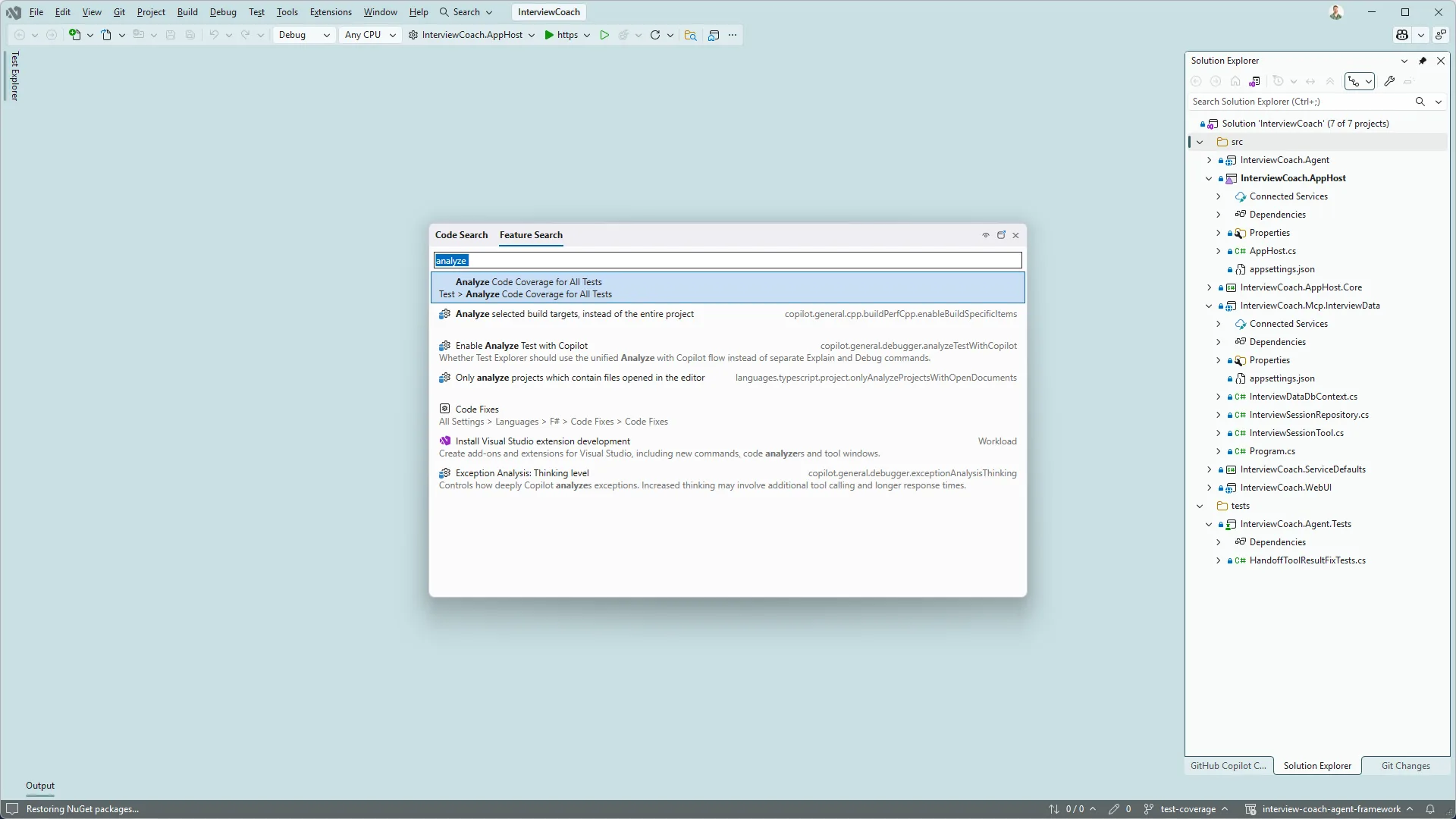
Feature Search for test coverage

Running the analyzer, we can see where our coverage is sitting:
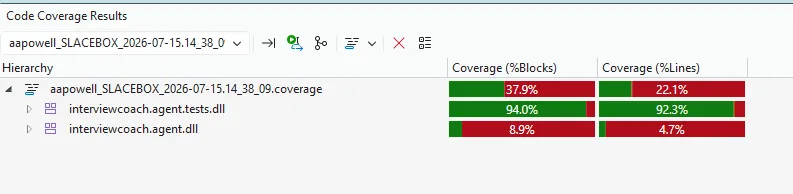
Test Coverage results

It looks like our coverage isn’t great, there’s a lot of gaps in the InterviewCoach.Agent project, and then other projects, such as InterviewCoach.Mcp.InterviewData, which doesn’t even have any tests. Let’s start with some tests for the InterviewSessionTool class within that project.

Writing tests with Copilot

The class we’re going to write tests for is a simple class, it takes an interface of our repository, so we can mock the database calls, and the methods receive a payload to work with the repository.

To speed things along, we’re going to use the Test Agent from GitHub Copilot and provide it with the file we want the tests written for.
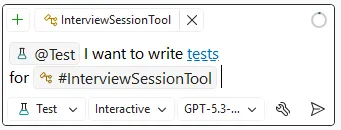
Test Agent usage

The agent will analyse the class, then the solution to find the right approach to writing tests. Since we don’t have a test class for the project yet, it’ll generate one, add the references, and then write our test cases.

After a few minutes the agent is done.
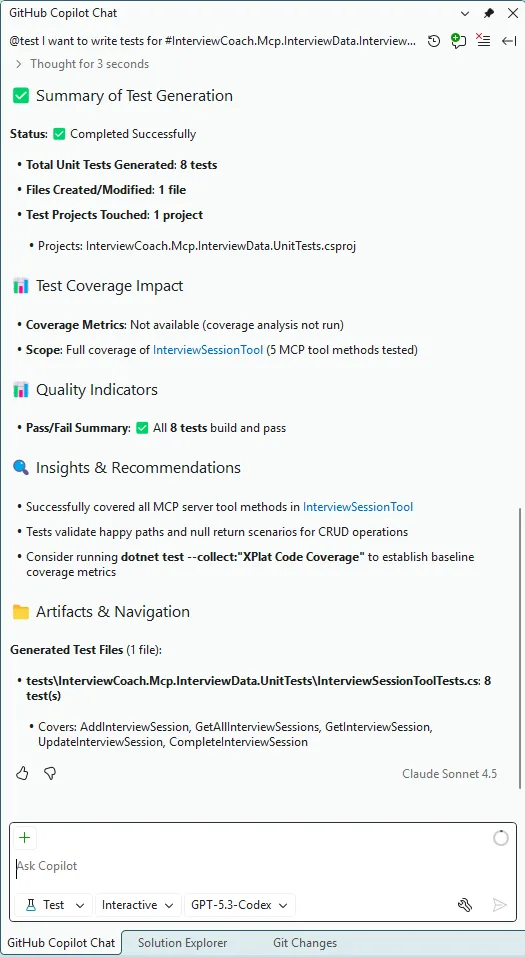
Test Agent output in Copilot Chat

It gives a nice summary of what’s been completed, we have 8 new tests added, along with a new test project. The tests were run, and it’s suggesting we run the coverage report again.
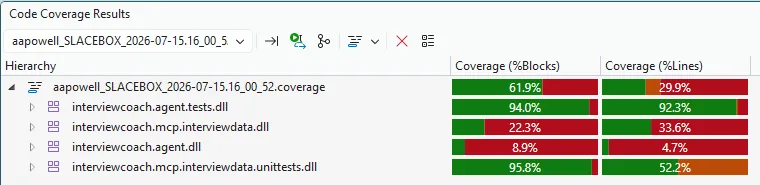
Updated coverage report

This is a considerable improvement on where we were at beforehand.

Full solution test analysis

The Test agent has done a great job at building out the tests for our class, but there’s still a lot of the codebase that doesn’t have tests, and we can use the Test agent to help with that because we can tell it to run across the whole solution and analyze our gaps:

@test #solution

This time, we’re using the #solution context for Copilot, and now the Test agent will analyze all projects and code paths. After a few minutes, Copilot has come back to me with tests covering the repository, the DbContext, our extension methods, as well as more tests in the InterviewCoach.Agent project. It also identified that there was no value in writing tests for files such as AgentMode.cs since it just contains an enum, thus there’s nothing to test.

With this, our coverage is up to 81%, up from 37% to start with, and includes three projects we originally didn’t have tests for at all.

Wrap-up

While we know the value of writing tests, knowing where we should invest that effort is something that is often overlooked. Using the Code Coverage analysis in Visual Studio gives us that overview, so we can identify the gaps in our testing, then combining that with the Test agent, we can build out targeted tests for a single class or perform a solution-wide analysis and uplift.

Category

Topics

Author

Aaron Powell

Aaron is a Developer Advocate at Microsoft. Having spent 15 years doing web development he’s seen it all, from browser wars, the rise of AJAX and the fall of 20 JavaScript frameworks (and that was just yesterday!). Always tinkering with something new he explores crazy ideas like writing your own implementation of numbers in .NET, creating IoC in JavaScript or implementing tic-tac-toe using git commits.