



惯性聚合 高效追踪和阅读你感兴趣的博客、新闻、科技资讯
阅读原文 在惯性聚合中打开

推荐订阅源

L
LangChain Blog
The GitHub Blog
The GitHub Blog
Recent Announcements
MyScale Blog
MyScale Blog
P
Proofpoint News Feed
S
Security @ Cisco Blogs
N
News and Events Feed by Topic
H
Hacker News: Front Page
Attack and Defense Labs
S
Secure Thoughts
Microsoft Security Blog
N
Netflix TechBlog - Medium
U
Unit 42
Stack Overflow Blog
Stack Overflow Blog
T
Threat Research - Cisco Blogs
Google Online Security Blog
Spread Privacy
Spread Privacy
Threat Intelligence Blog | Flashpoint
Exploit-DB.com RSS Feed
L
LINUX DO - 热门话题
T
Tenable Blog
博客园 - 叶小钗
D
DataBreaches.Net
freeCodeCamp Programming Tutorials: Python, JavaScript, Git & More
博客园_首页
人人都是产品经理
人人都是产品经理
aimingoo的专栏
aimingoo的专栏
C
Check Point Blog
博客园 - 三生石上(FineUI控件)
量子位
P
Proofpoint News Feed
H
Help Net Security
Blog — PlanetScale
Blog — PlanetScale
宝玉的分享
宝玉的分享
Recorded Future
Recorded Future
The Register - Security
F
Fortinet All Blogs
Engineering at Meta
Engineering at Meta
钛媒体:引领未来商业与生活新知
钛媒体:引领未来商业与生活新知
Last Week in AI
Last Week in AI
S
Schneier on Security
V
Vulnerabilities – Threatpost
雷峰网
雷峰网
Microsoft Azure Blog
G
GRAHAM CLULEY
G
Google Developers Blog
月光博客
月光博客
V
V2EX
T
Troy Hunt's Blog
A
Arctic Wolf

Comments for The Eclectic Light Company

Should you try Golden Gate beta? Solutions to Saturday Mac riddles 367 In the shadow: Diego Velázquez Comment on Last Week on My Mac: Freshen up your documents by David Comment on Happy 250th birthday America 2 by mac Happy 250th birthday America 1 Brushstrokes: Portraits 1760-1877 Spotlight and Core Spotlight are different Comment on Sort order, collation and the Finder by eyelessjerry Comment on Apple has just released macOS 26.5.2 Tahoe by Derek Currie Great Ladies of Impressionism: Marie Bracquemond Comment on Get more from your Mac’s log by extending its duration by John Gilbert Comment on Keep your Mac cool using physics by F Portraits of trees: Coppices and pollards Comment on Firmware has become complicated again by John Woods Comment on Logistician 1.2 fixes a couple of bugs by info395288a4d1d Comment on What does Activity Monitor measure? by hoakley Last Week on My Mac: Spotlight on semantics An American in Paris: paintings of Henry Ossawa Tanner 1902-1930 An American in Paris: paintings of Henry Ossawa Tanner 1880-1902 Great Ladies of Impressionism: Berthe Morisot 1874-1891 What to do with a hot Mac Deprecations and removals from Golden Gate Brushstrokes: From El Greco to Rembrandt Portraits of trees: Dutch Golden Age How to get the most from SilentKnight 3 Comment on Hero or hooligan: Achilles becomes the warrior by Deborah J. Brasket Solutions to Saturday Mac riddles 365 Comment on SilentKnight 3.0 for Apple silicon Macs running Sequoia and later (full release) by michaelriccioli Comment on Last Week on My Mac: Uncompressed compressed files by fds Comment on Explainer: Memory by jzonedotcom Comment on Colin Campbell Cooper painting America: 1896-1910 by House of Heart Brushstrokes: 16th century What can you do when an app uses too much memory? SilentKnight 3 second beta adds text and JSON reporting In the shadow: Caravaggism What to do with your encrypted HFS+ disks First beta-test version of SilentKnight 3 for Apple silicon Macs Hero or hooligan: Jason and Medea Comment on Fix documents that won’t open as expected using Quarant2 by EcleX Last Week on My Mac: The mystery of Safari’s Web Archives Last Week on My Mac: Why is it so hard to open a document? Explainer: Disk encryption In the shadow: Caravaggio Brushstrokes: innovators of the first century Changing Paintings: 36 Theseus and the Minotaur macOS virtualisation is leaping forward in Golden Gate Why can’t Preview open that PDF? Crossing the Golden Gate, Intel support, and an update to SystHist Reading the Finder’s Get Info dialog In memoriam Mary Cassatt: 2, 1880-81 Last Week on My Mac: What’s in a name? Explainer: Getting a location Get more from Get Info and the Finder’s contextual menu Stop your photos revealing your location Have you saved thousands of versions? Versatility 1.2 might be what you need Apple has released an update to XProtect for all macOS Apple has released macOS Tahoe 26.5.1 Comment on What Location Services do in macOS by Tristan Hubsch Comment on Protect files with the Locked or Immutable flag by markbot2zero Portraits of trees: Introduction Which tasks require mains power? Comment on Online reference to external displays for Apple silicon Macs by Brian What’s in that phishing email? How to search document versions Rubens’ Peace and War Comment on Last Week on My Mac: Syncing metadata in iCloud Drive by hoakley A weekend with Misia: 2 How to search Time Machine backups? Medium and message: Pottery Hero or hooligan: Theseus and the sandals How QuickLook provides thumbnails and previews Hunting extended attributes with an update to xattred Saturday Mac riddles 360 Comment on How to preserve versions, and how to create versioned PDFs by markbot2zero Comment on What gets synced in iCloud Drive? by hoakley Solutions to Saturday Mac riddles 359 Last Week on My Mac: snapshots, the elephant in APFS How to check whether Spotlight is getting the right metadata macOS Tahoe no longer fully supports Time Capsules The bicentenary of Frederic Edwin Church: 1857-77 macOS virtual machines and audio-video syncing Comment on Use Finder tags for categories by Chuck Last Week on My Mac: Dependency and skill fade Comment on Virtualisation on Apple silicon Macs is different by AndyS Painting Pandora and her box: 1883-1919 Mac Easter eggs Painting Spring blossom 2 Comment on The macOS Natural Language framework and Nalaprop by Ingo Comment on The MACL extended attribute by hoakley On Reflection: Cézanne Privacy: Which folders are protected in Tahoe? Last Week on My Mac: Root cause analysis and ClickFix Last Week on My Mac: Root cause analysis and ClickFix Last Week on My Mac: Root cause analysis and ClickFix Last Week on My Mac: Root cause analysis and ClickFix Why you can’t trust Privacy & Security How to survive the loss of Rosetta Use Fallback Recovery on Apple silicon Macs Clean install macOS
How can I now have two apps named Pages?
hoakley · 2026-03-24 · via Comments for The Eclectic Light Company

If you’ve installed Apple’s new Creator Studio versions of what used to be its iWork apps, I’m sure you noticed something odd in your Applications folder. For there, side by side, are apps with exactly the same names, two Keynote.apps, two Numbers.apps, and two Pages.apps. This article explains the trickery that went into that.
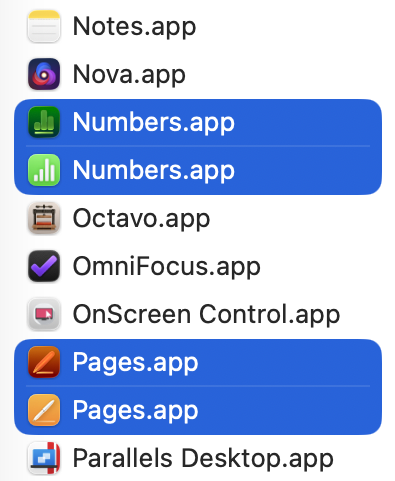
We take it for granted that what we see in the Finder is truthful, despite obvious trickery like hidden folders, and iCloud Drive which doesn’t really exist at all. When it comes to bundles like applications, the Finder doesn’t actually show the true folder name, but the bundle name set in that bundle’s Info.plist.

You can get an inkling of what’s going on by selecting the two Pages apps and opening Get Info on each.
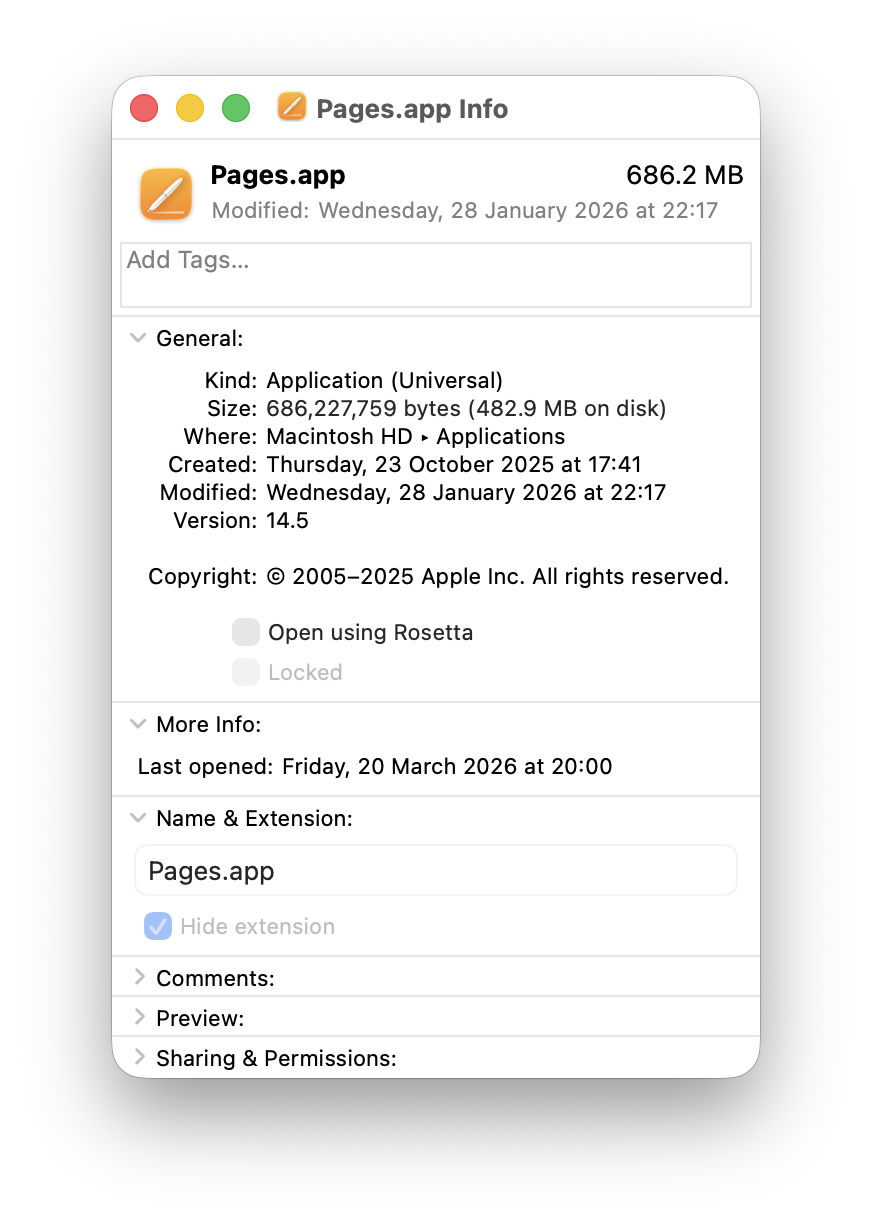
The old Pages.app looks straight, giving its Name & Extension as Pages.app as you’d expect.
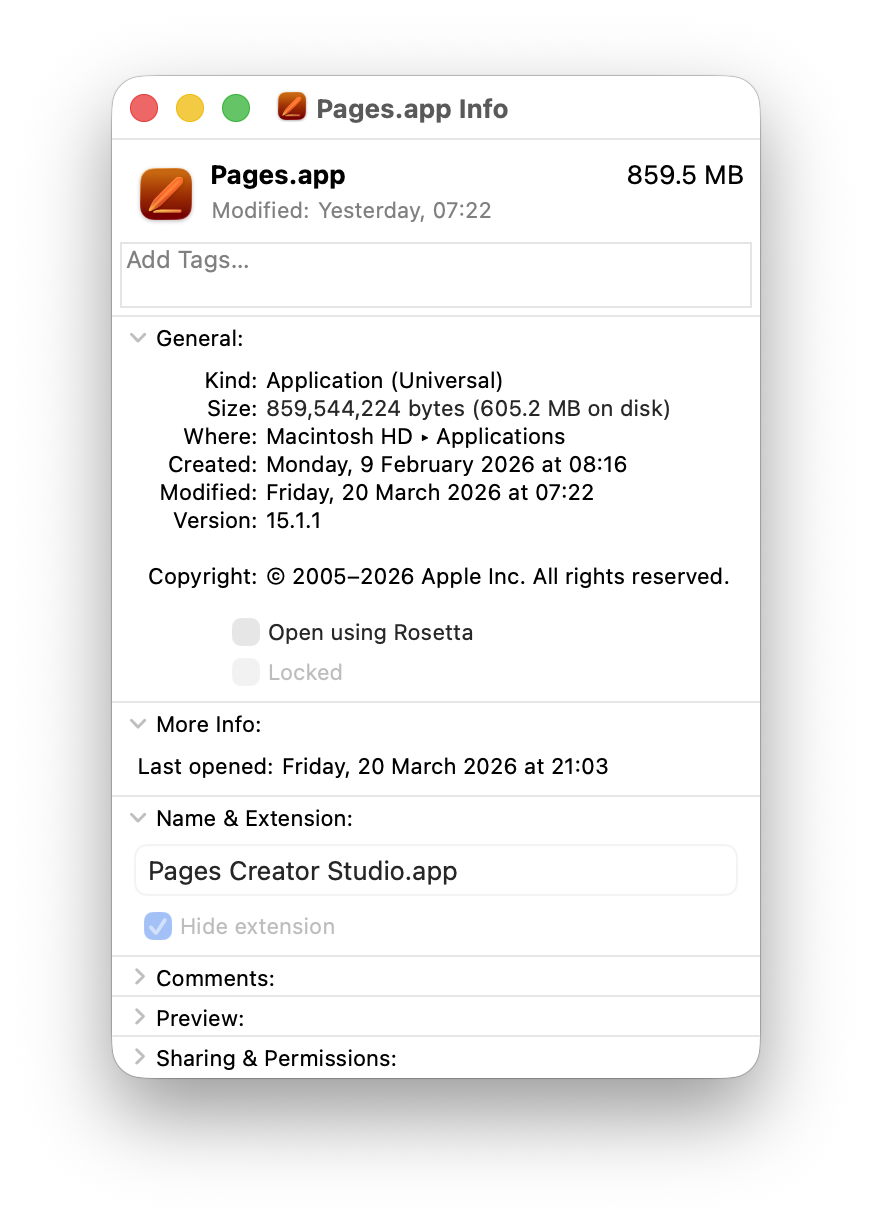
But the Name & Extension given for the new Pages.app turns out to be Pages Creator Studio.app, and that’s the real name of its app folder.

Check both using my free utility Precize and you’ll see they are completely different, with their own inode numbers and paths. Drag them into Terminal and that shows their true names in the file system, of Pages.app (old) and Pages Creator Studio.app (new).

If you have a property list or text editor handy, copy the Info.plist from inside each app bundle and inspect them side by side.

The old Pages app is still playing this straight:
CFBundleDisplayName = Pages
CFBundleName = Pages
CFBundleIdentifier = com.apple.iWork.Pages

By comparison, the new app is up to no good:
CFBundleAlternateNames = Pages
CFBundleDisplayName = Pages Creator Studio
CFBundleName = Pages
CFBundleIdentifier = com.apple.Pages

Apple provides further details of the contents of Info.plist in this developer article.

There’s a great deal more to accomplishing this with finesse as Apple has done here. Other locations in the app such as its About window and menus also need tweaking to ensure that nowhere breathes a word about the trick that has been pulled. And just to add a bit of spice, apps still using AppKit are quite different from those now using SwiftUI.

My only remaining question is why Apple would want to give the two apps identical names. The primary purpose of setting the CFBundleDisplayName is to accommodate better to the limited display area on devices. An app that has a long full name, like The Time Machine Mechanic, obviously needs to be shortened, and ellipses are a clumsy solution. By giving the app developer the opportunity to display something shorter it makes our iPhones look much neater.

Although it’s a clever trick to pull in macOS, I suspect it’s going to confuse more than it amazes.

Many thanks to Joe who asked this question.