

惯性聚合 高效追踪和阅读你感兴趣的博客、新闻、科技资讯
阅读原文 在惯性聚合中打开

推荐订阅源

L
LINUX DO - 最新话题
G
Google Developers Blog
J
Java Code Geeks
The GitHub Blog
The GitHub Blog
F
Full Disclosure
H
Help Net Security
OSCHINA 社区最新新闻
OSCHINA 社区最新新闻
Vercel News
Vercel News
酷 壳 – CoolShell
酷 壳 – CoolShell
Recent Announcements
Help Net Security
Help Net Security
The Hacker News
The Hacker News
IT之家
IT之家
Y
Y Combinator Blog
Martin Fowler
Martin Fowler
L
Lohrmann on Cybersecurity
C
CERT Recently Published Vulnerability Notes
V
Visual Studio Blog
博客园 - 聂微东
Hacker News: Ask HN
Hacker News: Ask HN
H
Hacker News: Front Page
Know Your Adversary
Know Your Adversary
Security Latest
Security Latest
Security Archives - TechRepublic
Simon Willison's Weblog
www.infosecurity-magazine.com
T
Troy Hunt's Blog
Last Week in AI
Last Week in AI
Schneier on Security
N
News and Events Feed by Topic
博客园 - 【当耐特】
有赞技术团队
有赞技术团队
AWS News Blog
AWS News Blog
Blog — PlanetScale
Blog — PlanetScale
博客园_首页
Google DeepMind News
Cloudbric
Cloudbric
N
News | PayPal Newsroom
A
About on SuperTechFans
S
Schneier on Security
K
KPMG report finds enterprise disconnect between AI and its ROI | CIO
Hugging Face - Blog
Hugging Face - Blog
M
MIT News - Artificial intelligence
CTFtime.org: upcoming CTF events
雷峰网
雷峰网
T
The Exploit Database - CXSecurity.com
罗磊的独立博客
K
Kaspersky official blog
The Cloudflare Blog
I
Intezer

Comments for The Eclectic Light Company

Should you try Golden Gate beta? Solutions to Saturday Mac riddles 367 In the shadow: Diego Velázquez Comment on Last Week on My Mac: Freshen up your documents by David Comment on Happy 250th birthday America 2 by mac Happy 250th birthday America 1 Brushstrokes: Portraits 1760-1877 Spotlight and Core Spotlight are different Comment on Sort order, collation and the Finder by eyelessjerry Comment on Apple has just released macOS 26.5.2 Tahoe by Derek Currie Great Ladies of Impressionism: Marie Bracquemond Comment on Get more from your Mac’s log by extending its duration by John Gilbert Comment on Keep your Mac cool using physics by F Portraits of trees: Coppices and pollards Comment on Firmware has become complicated again by John Woods Comment on Logistician 1.2 fixes a couple of bugs by info395288a4d1d Comment on What does Activity Monitor measure? by hoakley Last Week on My Mac: Spotlight on semantics An American in Paris: paintings of Henry Ossawa Tanner 1902-1930 An American in Paris: paintings of Henry Ossawa Tanner 1880-1902 Great Ladies of Impressionism: Berthe Morisot 1874-1891 What to do with a hot Mac Deprecations and removals from Golden Gate Brushstrokes: From El Greco to Rembrandt Portraits of trees: Dutch Golden Age How to get the most from SilentKnight 3 Comment on Hero or hooligan: Achilles becomes the warrior by Deborah J. Brasket Solutions to Saturday Mac riddles 365 Comment on SilentKnight 3.0 for Apple silicon Macs running Sequoia and later (full release) by michaelriccioli Comment on Last Week on My Mac: Uncompressed compressed files by fds Comment on Explainer: Memory by jzonedotcom Comment on Colin Campbell Cooper painting America: 1896-1910 by House of Heart Brushstrokes: 16th century What can you do when an app uses too much memory? SilentKnight 3 second beta adds text and JSON reporting In the shadow: Caravaggism What to do with your encrypted HFS+ disks Hero or hooligan: Jason and Medea Comment on Fix documents that won’t open as expected using Quarant2 by EcleX Last Week on My Mac: The mystery of Safari’s Web Archives Last Week on My Mac: Why is it so hard to open a document? Explainer: Disk encryption In the shadow: Caravaggio Brushstrokes: innovators of the first century Changing Paintings: 36 Theseus and the Minotaur macOS virtualisation is leaping forward in Golden Gate Why can’t Preview open that PDF? Crossing the Golden Gate, Intel support, and an update to SystHist Reading the Finder’s Get Info dialog In memoriam Mary Cassatt: 2, 1880-81 Last Week on My Mac: What’s in a name? Explainer: Getting a location Get more from Get Info and the Finder’s contextual menu Stop your photos revealing your location Have you saved thousands of versions? Versatility 1.2 might be what you need Apple has released an update to XProtect for all macOS Apple has released macOS Tahoe 26.5.1 Comment on What Location Services do in macOS by Tristan Hubsch Comment on Protect files with the Locked or Immutable flag by markbot2zero Portraits of trees: Introduction Which tasks require mains power? Comment on Online reference to external displays for Apple silicon Macs by Brian What’s in that phishing email? How to search document versions Rubens’ Peace and War Comment on Last Week on My Mac: Syncing metadata in iCloud Drive by hoakley A weekend with Misia: 2 How to search Time Machine backups? Medium and message: Pottery Hero or hooligan: Theseus and the sandals How QuickLook provides thumbnails and previews Hunting extended attributes with an update to xattred Saturday Mac riddles 360 Comment on How to preserve versions, and how to create versioned PDFs by markbot2zero Comment on What gets synced in iCloud Drive? by hoakley Solutions to Saturday Mac riddles 359 Last Week on My Mac: snapshots, the elephant in APFS How to check whether Spotlight is getting the right metadata macOS Tahoe no longer fully supports Time Capsules The bicentenary of Frederic Edwin Church: 1857-77 macOS virtual machines and audio-video syncing Comment on Use Finder tags for categories by Chuck Last Week on My Mac: Dependency and skill fade Comment on Virtualisation on Apple silicon Macs is different by AndyS Painting Pandora and her box: 1883-1919 Mac Easter eggs Painting Spring blossom 2 Comment on The macOS Natural Language framework and Nalaprop by Ingo Comment on The MACL extended attribute by hoakley On Reflection: Cézanne Privacy: Which folders are protected in Tahoe? Last Week on My Mac: Root cause analysis and ClickFix Last Week on My Mac: Root cause analysis and ClickFix Last Week on My Mac: Root cause analysis and ClickFix Last Week on My Mac: Root cause analysis and ClickFix Why you can’t trust Privacy & Security How can I now have two apps named Pages? How to survive the loss of Rosetta Use Fallback Recovery on Apple silicon Macs Clean install macOS
First beta-test version of SilentKnight 3 for Apple silicon Macs
steph.fr · 2026-06-17 · via Comments for The Eclectic Light Company

I’m delighted (and a little proud) to offer you the first beta-release of my successor to SilentKnight 2, named somewhat unimaginatively SilentKnight 3. This will only run on Apple silicon Macs with macOS 15.6 Sequoia or later, including 27.0 Golden Gate.

I released the first version of SilentKnight, then known as EFIcienC, on 4 July 2019, as an intended successor to LockRattler (2016) that also checked EFI firmware versions. That soon became SilentKnight 1, and on 10 October 2022 was updated to version 2 to cater exclusively for macOS Catalina and later.

SilentKnight 1.21 will continue to cater for those with Intel Macs running El Capitan to Mojave, version 2.11 for Catalina, and 2.14 for Big Sur to Tahoe on Intel or Apple silicon Macs. But if you have an Apple silicon Mac running Sequoia or later, I want version 3 to become your first choice.

SilentKnight 3 is intended to be lightweight but comprehensive, detailed but clean and accessible. Its interface is written using SwiftUI, and presents its results in sections with disclosure controls, so you can fold each away or expand it in full. It currently has just three tools:

  • Check All, to perform its checks on four categories from malware protection to general information.
  • List Updates, to obtain a list of all available updates from Apple’s servers.
  • Install Updates, to download and install all available updates except those for macOS itself.

Unlike previous versions, SilentKnight 3 analyses the list of available updates, and separates out those for macOS, which it leaves well alone, for Software Update settings where they can be managed properly. It then downloads those other updates, saving you from doing that manually.

It copes better with XProtect Remediator scans that are terminated early. Rather than reporting them as potential problems and sending you on a wild goose chase with XProCheck, those are simply reported as being cancelled.

Throughout its comparisons between versions found and those expected, SilentKnight 3 recognises that higher version numbers aren’t a problem. While it does report both, it doesn’t fret over your Mac’s version being more recent than expected. It also accepts Macs running older versions of macOS, for those who might prefer to stay with Sequoia instead of grappling with Tahoe or, when the time comes, Golden Gate.

Here’s a sequence of screenshots from a test run on macOS 26.1 in a VM. This starts by clicking the single tool offered, to Check All.
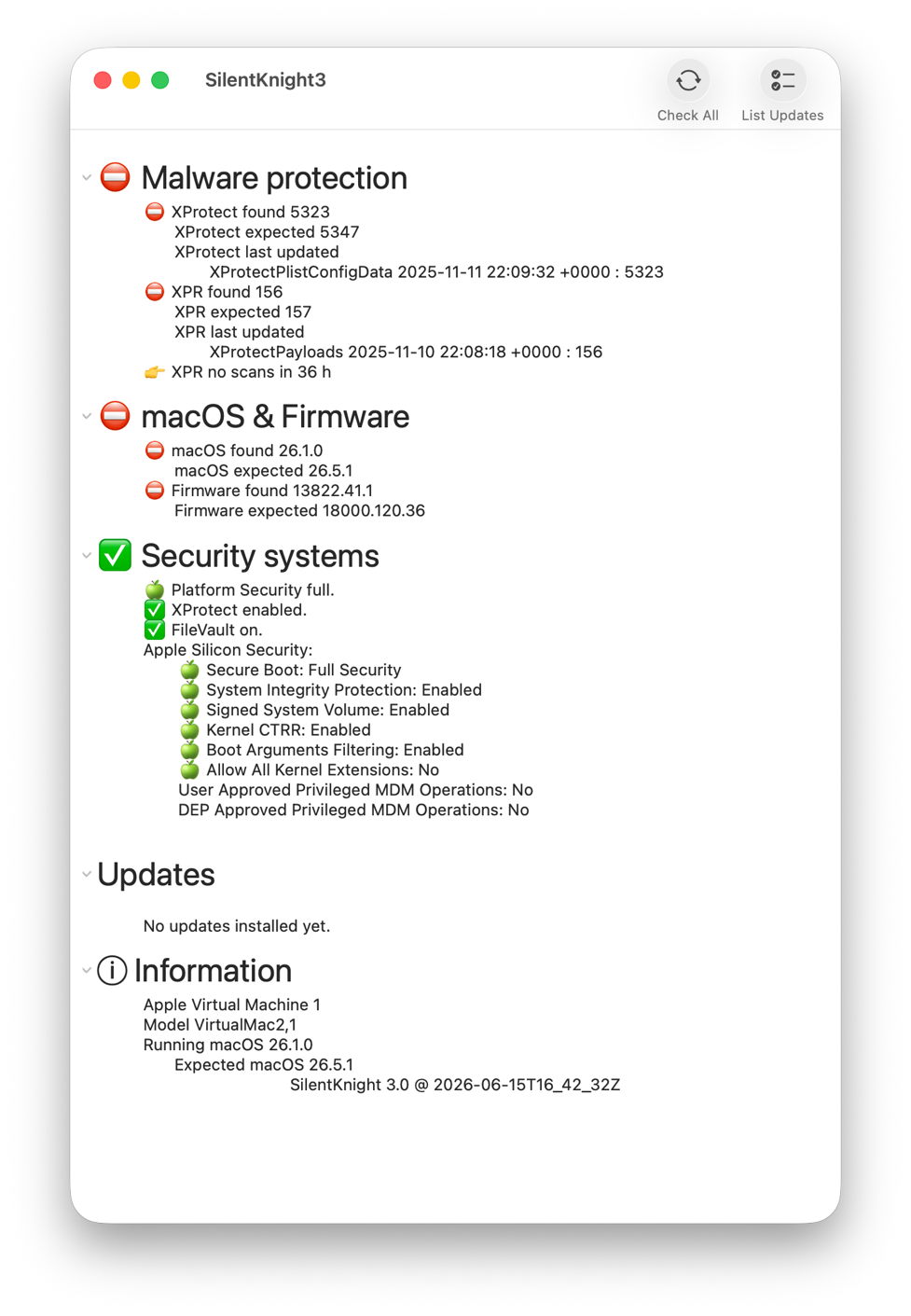
Once the results are in, there are clear disparities in malware protection, and macOS & firmware.
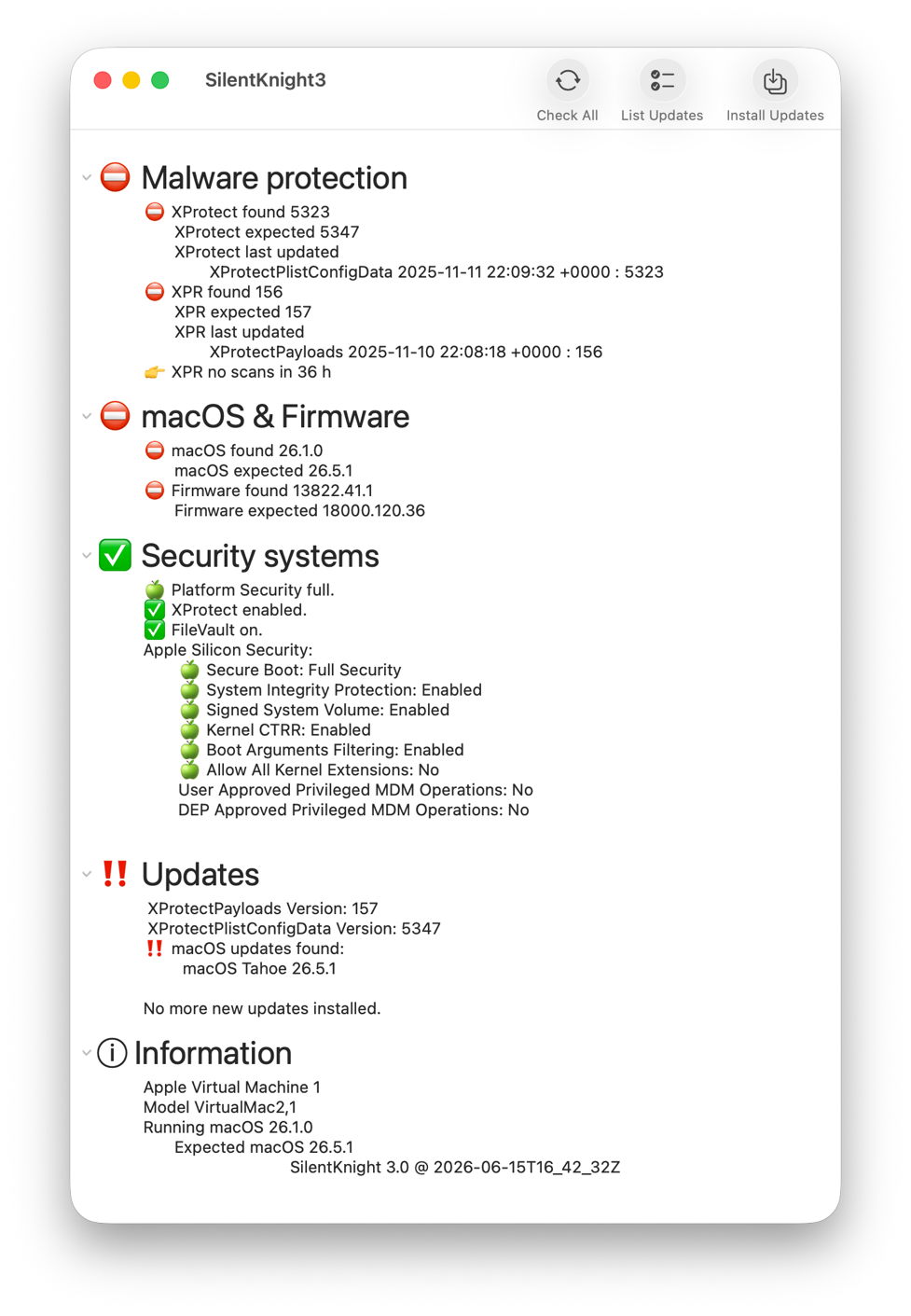
Click on the List Updates tool and there are updates available to XProtect and XPR as shown, as well as an update to Tahoe 26.5.1.
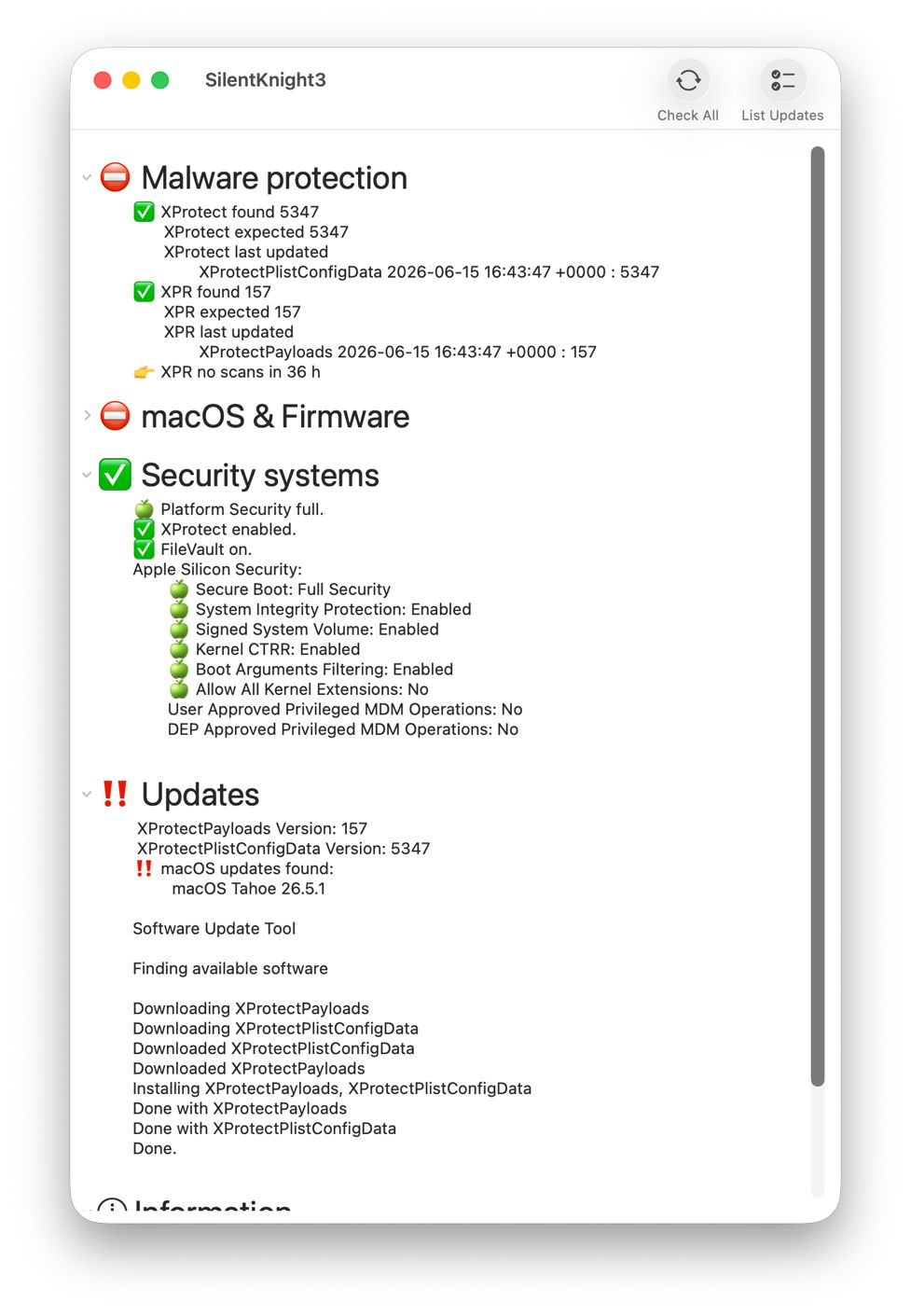
After clicking Install Updates, XProtect Remediator has been updated to version 157. XProtect has been updated manually using Terminal, and Check All then confirms they have been updated correctly, but the macOS update has been left well alone.

Although only the first beta, this comes with extensive help information, including beta-release notes. One important limitation of this version is that List Updates and Install Updates aren’t run in the background, so you will see a spinning beachball briefly while awaiting their results.

SilentKnight version 3.0 first beta (build 20) is now available from here: skbeta1

I’m very grateful to all who test it, and look forward to your comments.