



惯性聚合 高效追踪和阅读你感兴趣的博客、新闻、科技资讯
阅读原文 在惯性聚合中打开

推荐订阅源

奇客Solidot–传递最新科技情报
奇客Solidot–传递最新科技情报
S
Secure Thoughts
V2EX - 技术
V2EX - 技术
大猫的无限游戏
大猫的无限游戏
钛媒体:引领未来商业与生活新知
钛媒体:引领未来商业与生活新知
O
OpenAI News
D
DataBreaches.Net
The Cloudflare Blog
L
LangChain Blog
Last Week in AI
Last Week in AI
酷 壳 – CoolShell
酷 壳 – CoolShell
The Register - Security
MyScale Blog
MyScale Blog
Help Net Security
Help Net Security
Jina AI
Jina AI
T
The Blog of Author Tim Ferriss
T
The Exploit Database - CXSecurity.com
D
Darknet – Hacking Tools, Hacker News & Cyber Security
博客园 - 叶小钗
The Last Watchdog
The Last Watchdog
Exploit-DB.com RSS Feed
www.infosecurity-magazine.com
TaoSecurity Blog
TaoSecurity Blog
博客园 - 司徒正美
aimingoo的专栏
aimingoo的专栏
C
Cyber Attacks, Cyber Crime and Cyber Security
A
Arctic Wolf
T
Tenable Blog
Know Your Adversary
Know Your Adversary
Google DeepMind News
量子位
The Hacker News
The Hacker News
AWS News Blog
AWS News Blog
Apple Machine Learning Research
Vercel News
Vercel News
Hacker News: Ask HN
Hacker News: Ask HN
Scott Helme
Scott Helme
小众软件
小众软件
Recent Commits to openclaw:main
T
Threat Research - Cisco Blogs
G
GRAHAM CLULEY
H
Heimdal Security Blog
C
CXSECURITY Database RSS Feed - CXSecurity.com
博客园_首页
B
Blog
GbyAI
GbyAI
P
Palo Alto Networks Blog
美团技术团队
Hacker News - Newest:
Hacker News - Newest: "LLM"
博客园 - Franky

Comments for The Eclectic Light Company

Should you try Golden Gate beta? Solutions to Saturday Mac riddles 367 In the shadow: Diego Velázquez Comment on Last Week on My Mac: Freshen up your documents by David Comment on Happy 250th birthday America 2 by mac Happy 250th birthday America 1 Brushstrokes: Portraits 1760-1877 Spotlight and Core Spotlight are different Comment on Sort order, collation and the Finder by eyelessjerry Comment on Apple has just released macOS 26.5.2 Tahoe by Derek Currie Great Ladies of Impressionism: Marie Bracquemond Comment on Get more from your Mac’s log by extending its duration by John Gilbert Comment on Keep your Mac cool using physics by F Portraits of trees: Coppices and pollards Comment on Firmware has become complicated again by John Woods Comment on Logistician 1.2 fixes a couple of bugs by info395288a4d1d Comment on What does Activity Monitor measure? by hoakley Last Week on My Mac: Spotlight on semantics An American in Paris: paintings of Henry Ossawa Tanner 1902-1930 An American in Paris: paintings of Henry Ossawa Tanner 1880-1902 Great Ladies of Impressionism: Berthe Morisot 1874-1891 What to do with a hot Mac Deprecations and removals from Golden Gate Brushstrokes: From El Greco to Rembrandt Portraits of trees: Dutch Golden Age How to get the most from SilentKnight 3 Comment on Hero or hooligan: Achilles becomes the warrior by Deborah J. Brasket Solutions to Saturday Mac riddles 365 Comment on SilentKnight 3.0 for Apple silicon Macs running Sequoia and later (full release) by michaelriccioli Comment on Last Week on My Mac: Uncompressed compressed files by fds Comment on Explainer: Memory by jzonedotcom Comment on Colin Campbell Cooper painting America: 1896-1910 by House of Heart Brushstrokes: 16th century What can you do when an app uses too much memory? SilentKnight 3 second beta adds text and JSON reporting In the shadow: Caravaggism What to do with your encrypted HFS+ disks First beta-test version of SilentKnight 3 for Apple silicon Macs Hero or hooligan: Jason and Medea Comment on Fix documents that won’t open as expected using Quarant2 by EcleX Last Week on My Mac: The mystery of Safari’s Web Archives Explainer: Disk encryption In the shadow: Caravaggio Brushstrokes: innovators of the first century Changing Paintings: 36 Theseus and the Minotaur macOS virtualisation is leaping forward in Golden Gate Why can’t Preview open that PDF? Crossing the Golden Gate, Intel support, and an update to SystHist Reading the Finder’s Get Info dialog In memoriam Mary Cassatt: 2, 1880-81 Last Week on My Mac: What’s in a name? Explainer: Getting a location Get more from Get Info and the Finder’s contextual menu Stop your photos revealing your location Have you saved thousands of versions? Versatility 1.2 might be what you need Apple has released an update to XProtect for all macOS Apple has released macOS Tahoe 26.5.1 Comment on What Location Services do in macOS by Tristan Hubsch Comment on Protect files with the Locked or Immutable flag by markbot2zero Portraits of trees: Introduction Which tasks require mains power? Comment on Online reference to external displays for Apple silicon Macs by Brian What’s in that phishing email? How to search document versions Rubens’ Peace and War Comment on Last Week on My Mac: Syncing metadata in iCloud Drive by hoakley A weekend with Misia: 2 How to search Time Machine backups? Medium and message: Pottery Hero or hooligan: Theseus and the sandals How QuickLook provides thumbnails and previews Hunting extended attributes with an update to xattred Saturday Mac riddles 360 Comment on How to preserve versions, and how to create versioned PDFs by markbot2zero Comment on What gets synced in iCloud Drive? by hoakley Solutions to Saturday Mac riddles 359 Last Week on My Mac: snapshots, the elephant in APFS How to check whether Spotlight is getting the right metadata macOS Tahoe no longer fully supports Time Capsules The bicentenary of Frederic Edwin Church: 1857-77 macOS virtual machines and audio-video syncing Comment on Use Finder tags for categories by Chuck Last Week on My Mac: Dependency and skill fade Comment on Virtualisation on Apple silicon Macs is different by AndyS Painting Pandora and her box: 1883-1919 Mac Easter eggs Painting Spring blossom 2 Comment on The macOS Natural Language framework and Nalaprop by Ingo Comment on The MACL extended attribute by hoakley On Reflection: Cézanne Privacy: Which folders are protected in Tahoe? Last Week on My Mac: Root cause analysis and ClickFix Last Week on My Mac: Root cause analysis and ClickFix Last Week on My Mac: Root cause analysis and ClickFix Last Week on My Mac: Root cause analysis and ClickFix Why you can’t trust Privacy & Security How can I now have two apps named Pages? How to survive the loss of Rosetta Use Fallback Recovery on Apple silicon Macs Clean install macOS
Last Week on My Mac: Why is it so hard to open a document?
peterkillick · 2026-06-14 · via Comments for The Eclectic Light Company

Double-clicking a document has always been one of the most exciting experiences on a Mac, no matter how mundane it might seem. It’s that moment you see the bond between an individual file and the app that should edit it. In the years before Mac OS X, that was all up to the hidden desktop database, responsible for associating document types and creators. These days it depends on an elaborate artifice involving UTI types and LaunchServices. But behind those lurk the modern trappings of security and privacy protection.

Last week I looked at a problem that has plagued macOS for the last nearly seven years: how perfectly good apps can refuse to open perfectly good documents, failing to do what Macs have been so good at for the previous 35 years. In this article I walk through what happens.

So I have created in Pages an illustrated guide to cycling around the Isle of Wight, and exported it to PDF. Although its entire contents have remained on that Mac throughout, that PDF has a quarantine extended attribute added to it, its flag set to indicate that it’s in quarantine, just as it would if I had downloaded it from a suspicious website. The only difference is that its origin is given as the Pages app rather than Safari.

Normally I don’t use Preview as my default app for reading PDFs, but on this occasion I want to add annotations, so I change that document’s default app to Preview in the Finder’s Get Info dialog. I then double-click that PDF to open it in Preview, only to be told Apple (should that perhaps be macOS?) could not verify my PDF is free of malware, and offering to trash my hard-won work.
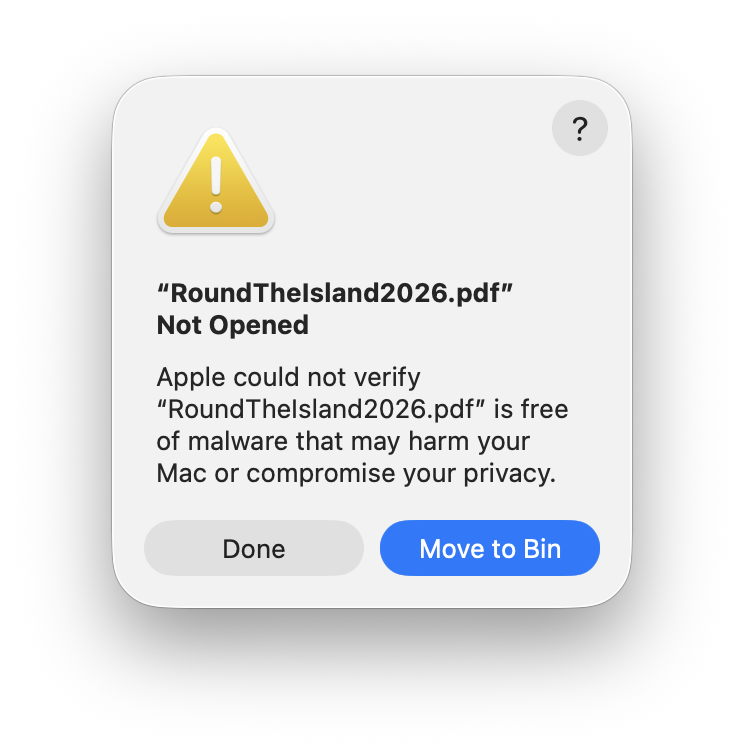
Mark those words carefully. Apple is informing me that it’s unable to tell whether a document created on a Mac using Apple’s own software contains malicious code, and is safe to open with an app it has developed and macOS runs in a sandbox. What point is there in running macOS and using Apple’s apps if the documents they create aren’t safe to use?

Click on the help button, and Tips opens a page about malware protection that has nothing to do with opening PDF documents, but tells me about hidden dangers in “scripts, web archives and Java archives”. Not ordinary everyday PDFs.

Examining what happened in the log is even more disturbing. My PDF is first checked against XProtect’s short blacklist in XProtect.meta.plist, then scanned against the Yara rules in XProtect.yara, neither of which report any adverse findings. But the file’s signature is also checked, and like every other PDF it’s unsigned. On the strength of it being in quarantine and not being signed, macOS then deems it isn’t safe to open.

Expecting to find a valid signature on a PDF document is frankly one of the most absurd behaviours I have seen in any operating system. Although a signature could be attached to the file in an extended attribute, a technique sometimes used when signing executable code, the signature itself could only be ad hoc, thus worthless as a guarantor of the file’s integrity. The signature would also have to be replaced every time the file was saved, a feature that simply doesn’t exist in Preview or any other PDF editor. Surely there’s some mistake in checking a PDF document for a signature?

It’s also strange that this dialog should mention that opening my PDF might compromise my privacy. That enters even murkier waters, given that I have expressed my intent unambiguously by double-clicking the document in the Finder, it’s in my Documents folder, to which Preview has full access, and was created by me.

Undeterred by Apple’s self-confessed shortcomings, I set my PDF’s default app back to the original, then use the Finder’s contextual Open With command to try opening it in Preview.
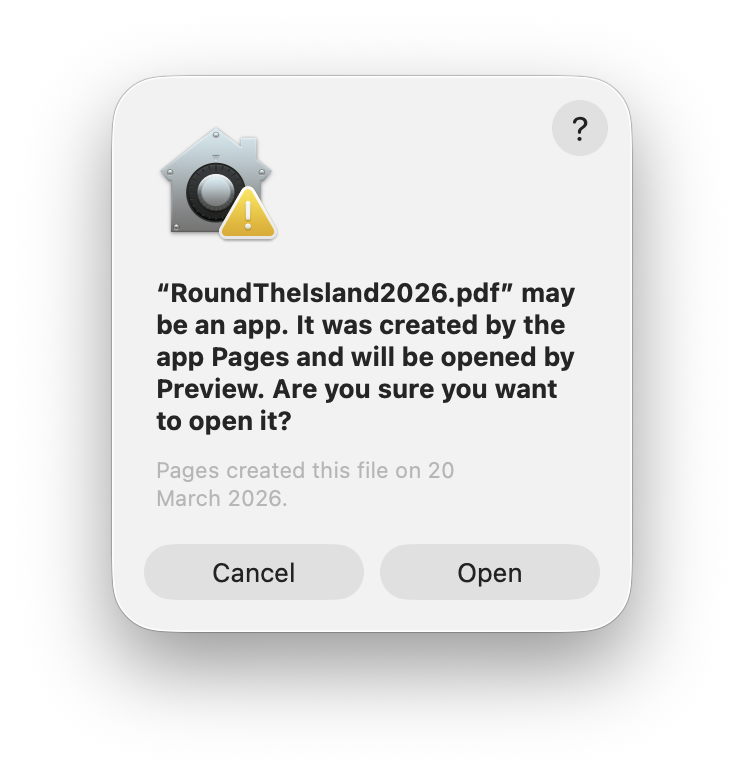
I’m now confronted with a different excuse, although at least I’m here given the option to press ahead and ignore these dire warnings. But in some ways this dialog is even more incoherent than the first. The icon shown reminds me of the Home app, not Preview, and tells me that my PDF document could be an app after all. I’m now wondering what sort of operating system can’t tell the difference between a single-file PDF document and an app bundle.

Comparing this dialog with the previous one, I’m mystified. The previous excuse, that Apple couldn’t verify whether my PDF is free of malware, has now been forgotten altogether. Does that imply Apple can verify that it’s safe to open if I use a different route to open it? If so, why didn’t Apple use this method of verification when I double-clicked the document the first time?

For this dialog, Tips explains to me “ways to avoid malware and harmful apps on Mac” in a set of tips all completely irrelevant to this problem. Ironically, it gives the advice, which it stresses is important, “If you see a warning that a file you received is an app – for example, a file sent to you in an email – and you don’t expect the file to be an app, don’t open the file. Delete it from your Mac.” Does this mean that I should delete my PDF on the grounds that it “may be an app” as this dialog informs me?

Being curious, I click on the Cancel button here, and instead open Preview and use the Open command in its file menu to select my PDF. Now there’s no dialog at all, my unsigned quarantined PDF that couldn’t be checked for malware and could be an app finally does what I want.

It has taken over forty years to progress from the Mac’s distinctive double-clickable documents to a file that Apple can’t verify that it’s free from malware, could be an app rather than a document, and might or might not open in the app of my choosing. Help may be on its way at last, though.