




惯性聚合 高效追踪和阅读你感兴趣的博客、新闻、科技资讯
阅读原文 在惯性聚合中打开

推荐订阅源

云风的 BLOG
云风的 BLOG
Security Archives - TechRepublic
V
Vulnerabilities – Threatpost
C
CXSECURITY Database RSS Feed - CXSecurity.com
P
Proofpoint News Feed
G
GRAHAM CLULEY
P
Privacy International News Feed
The Hacker News
The Hacker News
Forbes - Security
Forbes - Security
U
Unit 42
N
News and Events Feed by Topic
D
Darknet – Hacking Tools, Hacker News & Cyber Security
C
Cyber Attacks, Cyber Crime and Cyber Security
C
Cisco Blogs
A
About on SuperTechFans
cs.CV updates on arXiv.org
D
Docker
I
Intezer
Spread Privacy
Spread Privacy
The Last Watchdog
The Last Watchdog
V2EX - 技术
V2EX - 技术
S
Security @ Cisco Blogs
F
Full Disclosure
S
Secure Thoughts
M
MIT News - Artificial intelligence
Microsoft Security Blog
G
Google Developers Blog
aimingoo的专栏
aimingoo的专栏
W
WeLiveSecurity
cs.CL updates on arXiv.org
Project Zero
Project Zero
Recorded Future
Recorded Future
Cyberwarzone
Cyberwarzone
S
Security Affairs
AWS News Blog
AWS News Blog
H
Help Net Security
The GitHub Blog
The GitHub Blog
Hacker News: Ask HN
Hacker News: Ask HN
Vercel News
Vercel News
P
Proofpoint News Feed
Cyber Security Advisories - MS-ISAC
The Register - Security
S
Schneier on Security
F
Fortinet All Blogs
C
CERT Recently Published Vulnerability Notes
L
LINUX DO - 最新话题
T
Tor Project blog
T
The Exploit Database - CXSecurity.com
MongoDB | Blog
MongoDB | Blog
Webroot Blog
Webroot Blog

Comments for The Eclectic Light Company

Should you try Golden Gate beta? Solutions to Saturday Mac riddles 367 In the shadow: Diego Velázquez Comment on Last Week on My Mac: Freshen up your documents by David Comment on Happy 250th birthday America 2 by mac Happy 250th birthday America 1 Brushstrokes: Portraits 1760-1877 Spotlight and Core Spotlight are different Comment on Sort order, collation and the Finder by eyelessjerry Comment on Apple has just released macOS 26.5.2 Tahoe by Derek Currie Great Ladies of Impressionism: Marie Bracquemond Comment on Get more from your Mac’s log by extending its duration by John Gilbert Comment on Keep your Mac cool using physics by F Portraits of trees: Coppices and pollards Comment on Firmware has become complicated again by John Woods Comment on Logistician 1.2 fixes a couple of bugs by info395288a4d1d Comment on What does Activity Monitor measure? by hoakley Last Week on My Mac: Spotlight on semantics An American in Paris: paintings of Henry Ossawa Tanner 1902-1930 An American in Paris: paintings of Henry Ossawa Tanner 1880-1902 Great Ladies of Impressionism: Berthe Morisot 1874-1891 What to do with a hot Mac Deprecations and removals from Golden Gate Brushstrokes: From El Greco to Rembrandt Portraits of trees: Dutch Golden Age How to get the most from SilentKnight 3 Comment on Hero or hooligan: Achilles becomes the warrior by Deborah J. Brasket Solutions to Saturday Mac riddles 365 Comment on SilentKnight 3.0 for Apple silicon Macs running Sequoia and later (full release) by michaelriccioli Comment on Last Week on My Mac: Uncompressed compressed files by fds Comment on Explainer: Memory by jzonedotcom Comment on Colin Campbell Cooper painting America: 1896-1910 by House of Heart Brushstrokes: 16th century What can you do when an app uses too much memory? SilentKnight 3 second beta adds text and JSON reporting In the shadow: Caravaggism What to do with your encrypted HFS+ disks First beta-test version of SilentKnight 3 for Apple silicon Macs Hero or hooligan: Jason and Medea Comment on Fix documents that won’t open as expected using Quarant2 by EcleX Last Week on My Mac: The mystery of Safari’s Web Archives Last Week on My Mac: Why is it so hard to open a document? Explainer: Disk encryption In the shadow: Caravaggio Brushstrokes: innovators of the first century Changing Paintings: 36 Theseus and the Minotaur macOS virtualisation is leaping forward in Golden Gate Why can’t Preview open that PDF? Crossing the Golden Gate, Intel support, and an update to SystHist Reading the Finder’s Get Info dialog In memoriam Mary Cassatt: 2, 1880-81 Last Week on My Mac: What’s in a name? Explainer: Getting a location Get more from Get Info and the Finder’s contextual menu Stop your photos revealing your location Have you saved thousands of versions? Versatility 1.2 might be what you need Apple has released an update to XProtect for all macOS Apple has released macOS Tahoe 26.5.1 Comment on What Location Services do in macOS by Tristan Hubsch Comment on Protect files with the Locked or Immutable flag by markbot2zero Portraits of trees: Introduction Which tasks require mains power? Comment on Online reference to external displays for Apple silicon Macs by Brian What’s in that phishing email? How to search document versions Rubens’ Peace and War Comment on Last Week on My Mac: Syncing metadata in iCloud Drive by hoakley A weekend with Misia: 2 How to search Time Machine backups? Medium and message: Pottery Hero or hooligan: Theseus and the sandals How QuickLook provides thumbnails and previews Hunting extended attributes with an update to xattred Saturday Mac riddles 360 Comment on How to preserve versions, and how to create versioned PDFs by markbot2zero Comment on What gets synced in iCloud Drive? by hoakley Solutions to Saturday Mac riddles 359 Last Week on My Mac: snapshots, the elephant in APFS How to check whether Spotlight is getting the right metadata macOS Tahoe no longer fully supports Time Capsules The bicentenary of Frederic Edwin Church: 1857-77 macOS virtual machines and audio-video syncing Comment on Use Finder tags for categories by Chuck Last Week on My Mac: Dependency and skill fade Comment on Virtualisation on Apple silicon Macs is different by AndyS Painting Pandora and her box: 1883-1919 Mac Easter eggs Painting Spring blossom 2 Comment on The macOS Natural Language framework and Nalaprop by Ingo Comment on The MACL extended attribute by hoakley On Reflection: Cézanne Privacy: Which folders are protected in Tahoe? Last Week on My Mac: Root cause analysis and ClickFix Last Week on My Mac: Root cause analysis and ClickFix Last Week on My Mac: Root cause analysis and ClickFix Last Week on My Mac: Root cause analysis and ClickFix How can I now have two apps named Pages? How to survive the loss of Rosetta Use Fallback Recovery on Apple silicon Macs Clean install macOS
Why you can’t trust Privacy & Security
2026-04-10 · via Comments for The Eclectic Light Company

In this Friday’s magic demonstration, I’m going to show how what you see in Privacy & Security settings can be misleading, when it tells you that an app doesn’t have access to a protected folder, but it really does.

Although it appears you can achieve this using several ordinary apps, to make things simpler and clearer I’ve written a little app for this purpose, Insent, available from here: insent11

I’m working in macOS Tahoe 26.4, but I suspect you should see much the same in any version from macOS 13.5 onwards, as supported by Insent.
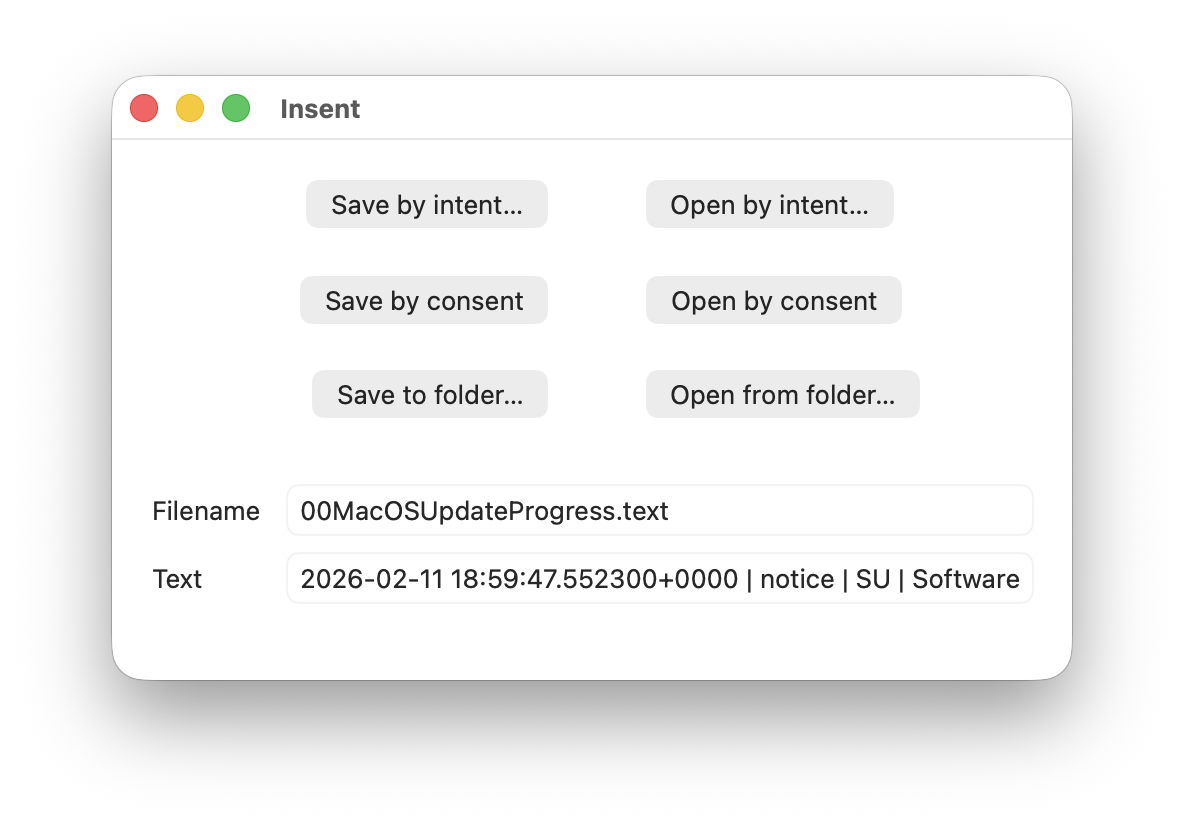
For this magic demo, I’m only going to use two of Insent’s six buttons:

  • Open by consent, which results in Insent choosing a random text file from the top level of your Documents folder, and displaying its name and the start of its contents below. As it does this without involving the user in the process, the macOS privacy system TCC requires it to obtain the user’s consent to list and access the contents of that protected folder.
  • Open from folder, which opens an Open and Save Panel where you select a folder. Insent then picks a random text file from the top level of that folder, and displays its name and the start of its contents below. Because you expressed your intent to access that protected folder, TCC considers that is good enough to give access without requiring any consent.

Demonstration

Once you have downloaded Insent, extracted it from its archive, and dragged the app from that folder into one of your Applications folders, follow this sequence of actions:
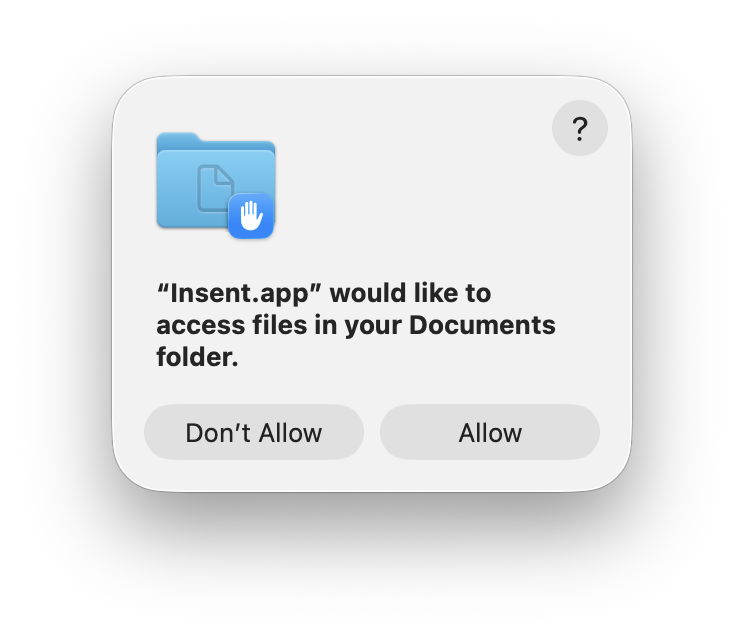
  1. Open Insent, click on Open by consent, and consent to the prompt to allow it to access your Documents folder. Shortly afterwards, Insent will display the opening of one of the text files in Documents. Quit Insent.
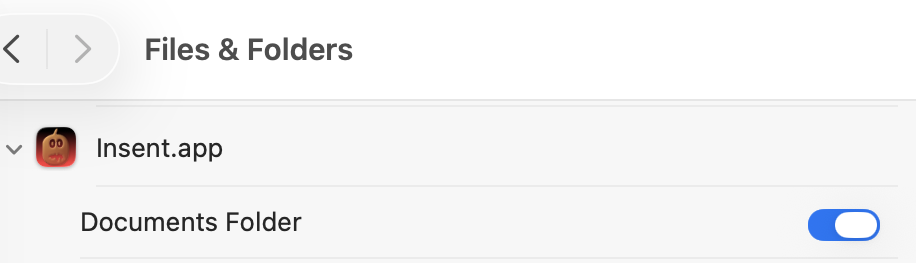
  2. Open Privacy & Security settings, select Files & Folders, and confirm that Insent has been given access to Documents.
  3. Open Insent, click on Open by consent, and confirm it now gains access to a text file without asking for consent. Quit Insent.
  4. Open Privacy & Security settings, select Files & Folders, and disable Documents access in Insent’s entry there using the toggle.
  5. Open Insent, click on Open by consent, and confirm that it can no longer open a text file, but displays [Couldn't get contents of Documents folder].
  6. Click on Open from folder and select your Documents folder there. Confirm that works as expected and displays the name and contents of one of the text files in Documents.
  7. Click on Open by consent, and confirm that now works again.
  8. Confirm that Documents access for Insent is still disabled in Files & Folders.
  9. Whatever you do now, the app retains full access to Documents, no matter what is shown or set in Files & Folders.

Indeed, the only way you can protect your Documents folder from access by Insent is to run the following command in Terminal:
tccutil reset All co.eclecticlight.Insent
then restart your Mac. That should set Insent’s privacy settings back to their default.

You can also demonstrate that this behaviour is specific to one protected folder at a time. If you select a different protected folder like Desktop or Downloads using the Open from folder button, then Insent still won’t be able to list the contents of the Documents folder, as its TCC settings will function as expected.

How does this work?

Insent is an ordinary notarised app, and doesn’t run in a sandbox or pull any clever tricks. When System Integrity Protection (SIP) is enabled some of its operations are sandboxed, though, including attempts to list or access the contents of locations that are protected by TCC.

When you click on its Open by consent button, sandboxd intercepts the File Manager call to list the contents of Documents, as a protected folder. It then requests approval for that from TCC, as seen in the following log entries:
1.204592 Insent sendAction:
1.205160 Insent: trying to list files in ~/Documents
1.205828 sandboxd request approval
1.205919 sandboxd tcc_send_request_authorization() IPC

TCC doesn’t have authorisation for that access by Insent, either by Full Disk Access or specific access to Documents, so it prompts the user for their consent. If that’s given, the following log entries show that being passed back to the sandbox, and the change being notified to com.apple.chrono, followed by Insent actioning the original request:
3.798770 com.apple.sandbox kTCCServiceSystemPolicyDocumentsFolder granted by TCC for Insent
3.802225 com.apple.chrono appAuth:co.eclecticlight.Insent] tcc authorization(s) changed
3.809558 Insent: trying to look in ~/Documents for text files
3.809691 Insent: trying to read from: /Users/hoakley/Documents/asHelp.text
3.842101 Insent: read from: /Users/hoakley/Documents/asHelp.text

If you then disable Insent’s access to Documents in Privacy & Security settings, TCC denies access to Documents, and Insent can’t get the list of its contents:
1.093533 com.apple.TCC AUTHREQ_RESULT: msgID=440.109, authValue=0, authReason=4, authVersion=1, desired_auth=0, error=(null),
1.093669 com.apple.sandbox kTCCServiceSystemPolicyDocumentsFolder denied by TCC for Insent
1.094007 Insent: couldn't get contents of ~/Documents

If you then access Documents by intent through the Open and Save Panel, sandboxd no longer intercepts the request, and TCC therefore doesn’t grant or deny access:
0.897244 Insent sendAction:
0.897318 Insent: trying to list files in ~/Documents
0.900828 Insent: trying to look in ~/Documents for text files
0.901112 Insent: trying to read from: /Users/hoakley/Documents/T2M2_2026-01-06_13_03_00.text
0.904101 Insent: read from: /Users/hoakley/Documents/T2M2_2026-01-06_13_03_00.text

Thus, access to a protected folder by user intent, such as through the Open and Save Panel, changes the sandboxing applied to the caller by removing its constraint to that specific protected folder. As the sandboxing isn’t controlled by or reflected in Privacy & Security settings, that allows TCC, in Files & Folders, to continue showing access restrictions that aren’t applied because the sandbox isn’t applied.

Conclusion

Access restrictions shown in Privacy & Security settings, specifically those to protected locations in Files & Folders, aren’t an accurate or trustworthy reflection of those that are actually applied. It’s possible for an app to have unrestricted access to one or more protected folders while its listing in Files & Folders shows it being blocked from access, or for it to have no entry at all in that list.

Is this likely to occur?

Most apps that want access to protected folders like Documents appear to seek that during their initialisation, and before any user interaction that could result in intent overriding the need for consent. However, many users report that apps appear to have access to Documents but aren’t listed in Files & Folders, suggesting that at some time that sequence of events does occur.

To be effectively exploited this would need careful sequencing, and for the user to select the protected folder in an Open and Save Panel, so drawing attention to the manoeuvre.

Most concerning is the apparent permanence of the access granted, requiring an arcane command in Terminal and a restart in order to reset the app’s privacy settings. It’s hard to believe that this was intended to trap the user into surrendering control over access to protected locations. But it can do.

I’m very grateful to Richard for drawing my attention to this.