


惯性聚合 高效追踪和阅读你感兴趣的博客、新闻、科技资讯
阅读原文 在惯性聚合中打开

推荐订阅源

SecWiki News
SecWiki News
Vercel News
Vercel News
博客园 - 聂微东
奇客Solidot–传递最新科技情报
奇客Solidot–传递最新科技情报
月光博客
月光博客
N
News and Events Feed by Topic
Application and Cybersecurity Blog
www.infosecurity-magazine.com
博客园 - 【当耐特】
WordPress大学
WordPress大学
Google Online Security Blog
博客园 - Franky
Attack and Defense Labs
Help Net Security
Help Net Security
V
Visual Studio Blog
Jina AI
Jina AI
H
Heimdal Security Blog
小众软件
小众软件
O
OpenAI News
腾讯CDC
The Last Watchdog
The Last Watchdog
雷峰网
雷峰网
Cloudbric
Cloudbric
量子位
博客园_首页
The GitHub Blog
The GitHub Blog
L
LangChain Blog
K
KPMG report finds enterprise disconnect between AI and its ROI | CIO
T
The Blog of Author Tim Ferriss
cs.AI updates on arXiv.org
Last Week in AI
Last Week in AI
V2EX - 技术
V2EX - 技术
Security Archives - TechRepublic
Microsoft Azure Blog
博客园 - 司徒正美
M
MIT News - Artificial intelligence
大猫的无限游戏
大猫的无限游戏
T
Tor Project blog
C
CERT Recently Published Vulnerability Notes
W
WeLiveSecurity
B
Blog
C
Check Point Blog
TaoSecurity Blog
TaoSecurity Blog
T
Threatpost
Hugging Face - Blog
Hugging Face - Blog
Recent Announcements
Project Zero
Project Zero
Hacker News: Ask HN
Hacker News: Ask HN
U
Unit 42
Simon Willison's Weblog

Comments for The Eclectic Light Company

Should you try Golden Gate beta? Solutions to Saturday Mac riddles 367 In the shadow: Diego Velázquez Comment on Last Week on My Mac: Freshen up your documents by David Comment on Happy 250th birthday America 2 by mac Happy 250th birthday America 1 Brushstrokes: Portraits 1760-1877 Spotlight and Core Spotlight are different Comment on Sort order, collation and the Finder by eyelessjerry Comment on Apple has just released macOS 26.5.2 Tahoe by Derek Currie Great Ladies of Impressionism: Marie Bracquemond Comment on Get more from your Mac’s log by extending its duration by John Gilbert Comment on Keep your Mac cool using physics by F Portraits of trees: Coppices and pollards Comment on Firmware has become complicated again by John Woods Comment on Logistician 1.2 fixes a couple of bugs by info395288a4d1d Comment on What does Activity Monitor measure? by hoakley Last Week on My Mac: Spotlight on semantics An American in Paris: paintings of Henry Ossawa Tanner 1902-1930 An American in Paris: paintings of Henry Ossawa Tanner 1880-1902 Great Ladies of Impressionism: Berthe Morisot 1874-1891 What to do with a hot Mac Deprecations and removals from Golden Gate Brushstrokes: From El Greco to Rembrandt Portraits of trees: Dutch Golden Age How to get the most from SilentKnight 3 Comment on Hero or hooligan: Achilles becomes the warrior by Deborah J. Brasket Solutions to Saturday Mac riddles 365 Comment on SilentKnight 3.0 for Apple silicon Macs running Sequoia and later (full release) by michaelriccioli Comment on Last Week on My Mac: Uncompressed compressed files by fds Comment on Explainer: Memory by jzonedotcom Comment on Colin Campbell Cooper painting America: 1896-1910 by House of Heart Brushstrokes: 16th century What can you do when an app uses too much memory? SilentKnight 3 second beta adds text and JSON reporting In the shadow: Caravaggism What to do with your encrypted HFS+ disks First beta-test version of SilentKnight 3 for Apple silicon Macs Hero or hooligan: Jason and Medea Comment on Fix documents that won’t open as expected using Quarant2 by EcleX Last Week on My Mac: The mystery of Safari’s Web Archives Last Week on My Mac: Why is it so hard to open a document? Explainer: Disk encryption In the shadow: Caravaggio Brushstrokes: innovators of the first century Changing Paintings: 36 Theseus and the Minotaur macOS virtualisation is leaping forward in Golden Gate Why can’t Preview open that PDF? Reading the Finder’s Get Info dialog In memoriam Mary Cassatt: 2, 1880-81 Last Week on My Mac: What’s in a name? Explainer: Getting a location Get more from Get Info and the Finder’s contextual menu Stop your photos revealing your location Have you saved thousands of versions? Versatility 1.2 might be what you need Apple has released an update to XProtect for all macOS Apple has released macOS Tahoe 26.5.1 Comment on What Location Services do in macOS by Tristan Hubsch Comment on Protect files with the Locked or Immutable flag by markbot2zero Portraits of trees: Introduction Which tasks require mains power? Comment on Online reference to external displays for Apple silicon Macs by Brian What’s in that phishing email? How to search document versions Rubens’ Peace and War Comment on Last Week on My Mac: Syncing metadata in iCloud Drive by hoakley A weekend with Misia: 2 How to search Time Machine backups? Medium and message: Pottery Hero or hooligan: Theseus and the sandals How QuickLook provides thumbnails and previews Hunting extended attributes with an update to xattred Saturday Mac riddles 360 Comment on How to preserve versions, and how to create versioned PDFs by markbot2zero Comment on What gets synced in iCloud Drive? by hoakley Solutions to Saturday Mac riddles 359 Last Week on My Mac: snapshots, the elephant in APFS How to check whether Spotlight is getting the right metadata macOS Tahoe no longer fully supports Time Capsules The bicentenary of Frederic Edwin Church: 1857-77 macOS virtual machines and audio-video syncing Comment on Use Finder tags for categories by Chuck Last Week on My Mac: Dependency and skill fade Comment on Virtualisation on Apple silicon Macs is different by AndyS Painting Pandora and her box: 1883-1919 Mac Easter eggs Painting Spring blossom 2 Comment on The macOS Natural Language framework and Nalaprop by Ingo Comment on The MACL extended attribute by hoakley On Reflection: Cézanne Privacy: Which folders are protected in Tahoe? Last Week on My Mac: Root cause analysis and ClickFix Last Week on My Mac: Root cause analysis and ClickFix Last Week on My Mac: Root cause analysis and ClickFix Last Week on My Mac: Root cause analysis and ClickFix Why you can’t trust Privacy & Security How can I now have two apps named Pages? How to survive the loss of Rosetta Use Fallback Recovery on Apple silicon Macs Clean install macOS
Crossing the Golden Gate, Intel support, and an update to SystHist
Paul R · 2026-06-10 · via Comments for The Eclectic Light Company

Over the last couple of days a lot of water has flowed under the bridge, to be more precise macOS 27 Golden Gate, as announced in the Keynote at WWDC on Monday.

macOS Golden Gate

As Apple had effectively pre-announced, Golden Gate is the first version of macOS to require an Apple silicon Mac. It supports all models, though, from the original M1 MacBook Air of 2020 right up to the latest M5 Max, but not all equally. Some of the most advanced new on-chip AI features will only run on M3 and higher chips (M4, M5) with at least 12 GB of memory, and M5 Pro or Max chips are required for some accelerated performance in Metal 4.1.

In addition to the improvements promised in AI, many of which will be introduced gradually during Golden Gate’s early versions, several other areas were highlighted:

  • New semantic indexing in Spotlight, used in conjunction with Siri and AI.
  • Enhancements to Safari, including the ability to organise tabs into topic groups automatically, and Notify Me, where Safari can watch a page for a specified change and notify you when that occurs.
  • Deep performance improvements. In preparation for the switch to Arm-only, Apple’s engineers have been rewriting key sections of low-level software, such as that for the Secure Enclave Processor. Early indications are that some everyday tasks and actions are now spectacularly improved as a result.
  • Performance improvements in SwiftUI in particular. Prepare to be blown away by some of these.
  • Incremental improvements in human interface. Among those demonstrated are less extreme and more uniform rounding of corners, and improved contrast in tools. Although these don’t appear to address all of the problems in Tahoe, they are heading in the right direction, and merit further assessment during beta testing.
  • Improved protection for children. These couldn’t have been timed better, as UK legislators have just launched a campaign for this, and Apple has recently completed verifying UK adult users with a minimum of fuss. For most that was based on the date they opened their Apple Account, which spared us from having to produce separate evidence of what was obvious.

Further details are given in the release notes for the first developer beta of Golden Gate.

There are three potentially important changes that might affect you:

  • Encrypted HFS+ (using CoreStorage) is officially deprecated, and will not be supported in a future version of macOS. If you still back up to or otherwise rely on encrypted HFS+ volumes, you should plan to switch to encrypted APFS or, if you must remain with HFS+, to remove encryption.
  • Golden Gate now provides a Swift API for Apple Sparse Image Format (ASIF) and raw disk image formats. These should make them more accessible in virtualisers, and general purpose disk image utilities. This is a small but important step forward.
  • Logarchive format has changed in macOS 27, and the new format can’t be read on versions of macOS earlier than 26.2. I will be looking at that in more detail, in due course.

Apple has confirmed that Rosetta’s general ability to translate Intel code will be removed in macOS 28, although some will be retained to support some games. To help users prepare for that, the About section in General settings now lists Intel-based apps that will be incompatible with macOS 28, and may try to suggest where you can find an Apple silicon native replacement.

It has also confirmed the stricter network security requirements it warned about earlier, although there’s no mention of the removal of support for AFP.

Virtualising Golden Gate betas

I’m delighted to report that the first developer beta can be virtualised very nicely indeed using my utilities Viable, ViableS and Vimy. Provided you build a VM in Golden Gate, it’s straightforward, and exactly the same as for Tahoe and earlier.
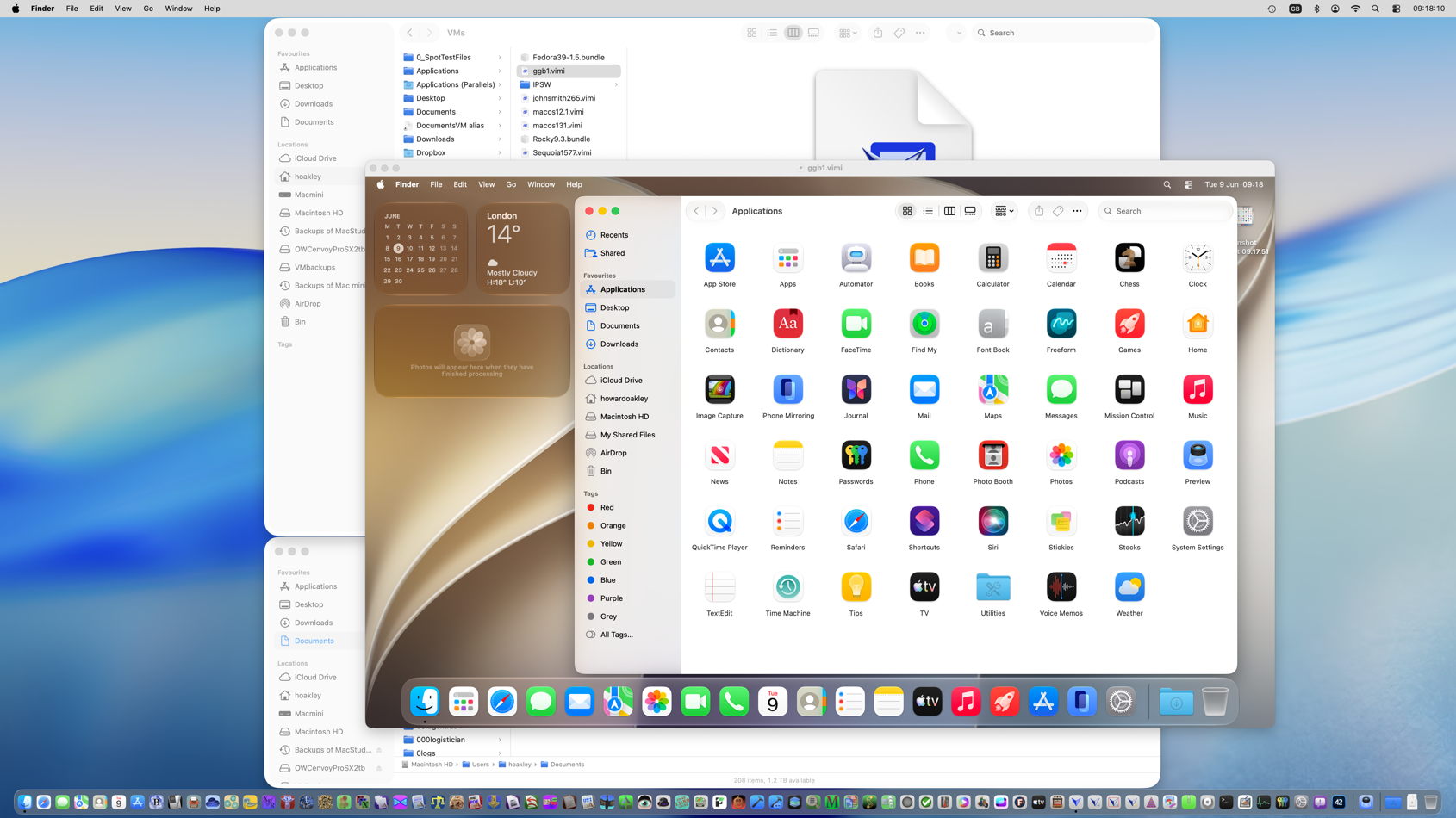
However, as now happens regularly, building a Golden Gate VM isn’t so easy in Tahoe, and is likely to fail without some magic components that we’re not provided with.

I have tried with the new beta-release of Xcode installed on that Mac, which has been a solution in the past, but that doesn’t help. You could try signing into your Apple Account, so enabling Golden Gate betas, and upgrading a Tahoe VM from there. Hopefully someone with more persistence will find a better workaround. I gave up, built the VM from the macOS 27 IPSW on my beta-test Mac, and once it had been properly configured and run, copied the VM across to my Tahoe Mac.

Intel support

Lost a little in Golden Gate’s dust is Apple’s announcement of extended support for Intel Macs. This promises “software security updates for Intel-based Mac computers for three years”, rather than the two that we had been expecting. However, I don’t yet know whether support will also be extended for Sequoia or Sonoma.

My apps

I haven’t had time yet to carry out full compatibility testing on all my current supported apps from Alifix to XProCheck, but I have verified that none crash on launch, and appear able to work as well as they have done in Tahoe. I have been using Mints and LogUI more extensively, though, and haven’t seen any irregularities in their behaviour in Golden Gate.

So if one of my apps is supported in Tahoe, I expect it to work as well in the current beta of Golden Gate. There are three exceptions to that, in SilentKnight, Skint/SkintM and SystHist, each of which has complex system dependencies.

I have been working on a completely new version of SilentKnight, which I intend offering here as a beta once it becomes sufficiently useful. Rather than patch the current version, I’d prefer to produce this new version that is better suited to Golden Gate. I’m hoping that it can also replace Skint and SkintM. As for SystHist…

SystHist update

SystHist version 1.22 now works fully with all versions of macOS from 11.5, including the first beta of Golden Gate. It also records the history of Rapid Security Responses and Background Security Improvements. This new version is available from here: systhist122
from Downloads above, from its Product Page, and via its auto-update mechanism.

On an older Mac, like my iMac Pro, SystHist can be quite a trip down memory lane. As I haven’t erased its internal SSD since it was new, SystHist still records when I updated it to macOS 10.14.1 Mojave on 18 November 2018. I find myself wiping away a tear, just as Tim Cook did when he ended his final keynote on Monday.