


惯性聚合 高效追踪和阅读你感兴趣的博客、新闻、科技资讯
阅读原文 在惯性聚合中打开

推荐订阅源

Forbes - Security
Forbes - Security
OSCHINA 社区最新新闻
OSCHINA 社区最新新闻
L
LangChain Blog
量子位
GbyAI
GbyAI
B
Blog RSS Feed
月光博客
月光博客
人人都是产品经理
人人都是产品经理
腾讯CDC
Recent Announcements
Microsoft Azure Blog
I
InfoQ
The Cloudflare Blog
D
Docker
Cyberwarzone
Cyberwarzone
U
Unit 42
NISL@THU
NISL@THU
C
Check Point Blog
B
Blog
大猫的无限游戏
大猫的无限游戏
Cisco Talos Blog
Cisco Talos Blog
Recorded Future
Recorded Future
H
Hackread – Cybersecurity News, Data Breaches, AI and More
J
Java Code Geeks
G
GRAHAM CLULEY
Engineering at Meta
Engineering at Meta
酷 壳 – CoolShell
酷 壳 – CoolShell
博客园 - 叶小钗
P
Proofpoint News Feed
F
Fortinet All Blogs
V
V2EX
T
Threat Research - Cisco Blogs
T
Threatpost
S
SegmentFault 最新的问题
Know Your Adversary
Know Your Adversary
雷峰网
雷峰网
CTFtime.org: upcoming CTF events
博客园 - 司徒正美
P
Privacy & Cybersecurity Law Blog
Cyber Security Advisories - MS-ISAC
TaoSecurity Blog
TaoSecurity Blog
Latest news
Latest news
Apple Machine Learning Research
cs.AI updates on arXiv.org
Y
Y Combinator Blog
P
Privacy International News Feed
L
Lohrmann on Cybersecurity
AWS News Blog
AWS News Blog
G
Google Developers Blog
美团技术团队

AWS for Industries

How Axel Springer transformed ad monetization by migrating from client-side bidding to AWS RTB Fabric | Amazon Web Services How Peloton Engineers the World’s Largest Live Fitness Events on AWS | Amazon Web Services Henry Schein One goes AI-native with AI Product Discovery and Strategy | Amazon Web Services Cloud Adoption Update for Financial Market Infrastructure Providers 1H26 | Amazon Web Services How AWS helps Hong Kong banks deliver on HKMA DART Framework | Amazon Web Services GreenBridge.AI redefines renewable energy operations with agentic AI on AWS | Amazon Web Services Build a voice-enabled Automotive and Manufacturing assistant using Amazon Nova Sonic and Amazon Bedrock AgentCore | Amazon Web Services Managing AI agent sprawl across business units | Amazon Web Services Dynamic Inbound Routing for BYOIP Workloads Using Amazon VPC Route Server | Amazon Web Services How Autel Transformed Charging Station Management with AI Agents on AWS | Amazon Web Services How Danone Simplified Kubernetes at Scale with Amazon EKS Auto Mode | Amazon Web Services Build a Multi-Agent Assessment Workbench with Amazon Bedrock AgentCore | Amazon Web Services Sovereign by design: How AWS helps Nigeria’s financial services industry protect data and drive innovation | Amazon Web Services Scaling ML in production: how BBVA accelerated delivery with MLOps | Amazon Web Services Inside BBVA’s MLOps transformation: from data platform to scalable ML on AWS | Amazon Web Services Blazing a Trail: How Peloton Rebuilt the SDLC for the Agentic Era with Amazon Bedrock | Amazon Web Services Accelerate RISC-V Software Development Before Silicon: Virtual Prototyping with MachineWare’s SIM-V on AWS | Amazon Web Services How retailers deliver hyper-personalization in-store with Personalisation Hub, UST, and AWS | Amazon Web Services Coins in Motion: Building agentic blockchain payments for in-vehicle experiences | Amazon Web Services Reduce P&ID analysis time by 80% with hybrid AI maintenance planning | Amazon Web Services Deploying industrial AI on AWS: Building the autonomous factory | Amazon Web Services How Atlantic Health cut legal document search time by 42% with Amazon Bedrock metadata filtering | Amazon Web Services Edge-to-Cloud Architecture for Real-Time Surgical Intelligence with AWS and NVIDIA | Amazon Web Services Reimagining B-Pillar DFMEA: Why Ontology-Grounded AI Is the Future of Automotive Engineering | Amazon Web Services Transforming energy trading by managing complexity and driving growth with Cloud ETRM | Amazon Web Services How Multi-Agent AI Turns Supply Chain Data into Decisions and Actions | Amazon Web Services ​​​Deploy Agentic Bidding Without Sacrificing Speed: ARTF Containers with NVIDIA GPU Acceleration on AWS​​ | Amazon Web Services Next-generation programmatic advertising: How AWS RTB Fabric redefines the game | Amazon Web Services Flexible Telecom AI Workload Deployment Across AWS Hybrid Cloud | Amazon Web Services Building a HIPAA-ready generative AI architecture for healthcare on AWS | Amazon Web Services Highlights from the 2026 AWS Life Sciences Symposium: MedTech Track | Amazon Web Services Multi-Agent Systems for Financial Services on Amazon EKS and AgentCore | Amazon Web Services How AI can help developers migrate embedded codebases between Arm SoCs | Amazon Web Services From Connected to Resilient: Cloud-Native Payment Connectivity on AWS | Amazon Web Services Ultra-low-latency cross-Region crypto trading with Avelacom and AWS | Amazon Web Services Build an AI-powered 5G Signaling Trace Analyzer Using Amazon Bedrock | Amazon Web Services Medical Legal Regulatory Review Orchestration with AI Agents on AWS | Amazon Web Services AWS showcases the agentic AI future of advertising and entertainment at Cannes Lions 2026 | Amazon Web Services The Road to 180M GRefs/s: Sizing Epic on AWS with R8ib and Enhanced EBS | Amazon Web Services BridgeWise builds responsible AI in FSI with Amazon Bedrock | Amazon Web Services Rethink Everything: Highlights from the 2026 AWS Financial Services Symposium | Amazon Web Services Improving Defect Analysis and Quality Control with AI Diagnostics | Amazon Web Services Building a cloud-based EV charging monitoring platform with real-time AI analytics | Amazon Web Services Introducing the AWS guide to the ECB Guide on outsourcing cloud services to cloud service providers | Amazon Web Services How a Luxury Retailer Accelerates Customer Experience with Amazon CloudFront | Amazon Web Services The Art of the Possible: Building an Intelligent Wealth Management Platform – Part 1 | Amazon Web Services How We Built Healthcare AI You Can Trust: The Science Behind Amazon Connect Health | Amazon Web Services How Everllence Scaled P&ID Intelligence to Improve Plant Operations | Amazon Web Services Rivian accelerates production with second-generation AWS Outposts: Improving resiliency and reducing costs | Amazon Web Services AI-Driven Development Lifecycle for Financial Services | Amazon Web Services How Agentic AI and Digital Twins on AWS Drive Operational Excellence | Amazon Web Services Modernizing Core Banking Systems: A Strategic Guide for Financial Leaders | Amazon Web Services Highlights from the 2026 AWS Life Sciences Symposium: Research and Drug Discovery | Amazon Web Services Discount Tire Uses Cloud WAN and Buffer VPC to Create a Scalable Enterprise Network Centralized third-party connectivity in AWS: Architecture patterns for highly regulated environments | Amazon Web Services FHIR-powered Care Continuum on AWS HealthLake From code to chemistry: using Kiro to tackle ADME-Tox, a key drug discovery challenge | Amazon Web Services How Toyota securely deployed HiveMQ with mTLS on AWS to power Smart Manufacturing | Amazon Web Services From record to intelligence: How EMR systems on AWS become the foundation for generative AI in healthcare | Amazon Web Services How to Connect AWS HealthOmics to Public and Private Network Sources at Runtime | Amazon Web Services Accelerating Android Builds on AWS: From 3 Hours to Under 5 Minutes with SourceFS | Amazon Web Services Closing the Loop with Amazon Bio Discovery’s Integrated Lab Partners | Amazon Web Services Massive Parallel Processing of Financial Transactions with Amazon EKS and Amazon MSK | Amazon Web Services Submit up to 100,000 Bioinformatics Workflow Runs with a Single API Call in AWS HealthOmics | Amazon Web Services Energy HPC Orchestrator powers collaborative, scalable energy computing | Amazon Web Services Automate Investment Research Using Strands Agents on Bedrock AgentCore | Amazon Web Services How OCC Built a Governed Cloud Foundation and Then Stress-Tested It Executive Insights from the 2026 AWS Life Sciences Symposium How Carlsberg’s Traitomic business leveraged AWS HealthOmics to power genetic trait development | Amazon Web Services CME Group MDP multicast data access on AWS using Transit Gateway | Amazon Web Services How retailers solve the customer identity puzzle with Amperity and AWS | Amazon Web Services Exact Sciences Transforms Bioinformatics Infrastructure with AWS HealthOmics | Amazon Web Services Building a Serverless Supply Chain Management Solution for Automotive Customers with AWS AppSync and Amazon Aurora Serverless | Amazon Web Services Accelerating physical AI with AWS and NVIDIA: building production-ready applications with simulation and real-world learning | Amazon Web Services Modernizing life-saving workloads with AWS serverless | Amazon Web Services Transforming Industrial Operations: How AVEVA and AWS drive Cloud Innovation | Amazon Web Services Introducing Amazon Bio Discovery | Amazon Web Services Accelerate Project Delivery with AI-Native Execution System on Amazon Quick | Amazon Web Services Reinvent Telecom Mediation Systems with Amazon Bedrock AgentCore, Strands Agents, and the Model Context Protocol | Amazon Web Services AWS Cloud Connectivity Patterns for Financial Market Infrastructures | Amazon Web Services Event-Driven Digital Pathology: Governed Whole Slide Image Ingestion to Scalable Inference with Amazon SageMaker | Amazon Web Services How Telefonica Germany achieved a centralized tracing solution with VPC Traffic Mirroring | Amazon Web Services AWS Teams Up with Wingstop to Deliver Wings to Millions During March Hoops Tournament | Amazon Web Services How Amazon Connect Health brings agentic AI to the point of care | Amazon Web Services How Liftoff improved conversion performance and reduced infrastructure costs with Cortex using AWS Graviton | Amazon Web Services From Prompt to Pipeline: AI-Powered Bioinformatics Workflow Development with Kiro and AWS HealthOmics | Amazon Web Services Driving Intelligent Quality in the Software-Defined Vehicle Era | Amazon Web Services How Amazon Devices Eliminated Credential Risk to Scale AI across Engineering Tools | Amazon Web Services The Evolution of BMW Group’s 3D Streaming Experience | Amazon Web Services Build ChatGPT Apps with MCP Servers and AWS Infrastructure | Amazon Web Services
Deploy diagnostic-quality imaging globally with MedDream and AWS HealthImaging | Amazon Web Services
Alex Lemm · 2026-07-06 · via AWS for Industries

When you need to review a complex breast tomosynthesis study containing hundreds of medical images, every second counts. Traditional PACS infrastructure often struggles with storing petabyte-scale imaging data while delivering instant access across distributed care teams. If your organization faces mounting pressure to modernize imaging infrastructure as study volumes grow, you know that legacy systems require significant capital investment, complex maintenance, and often fail to deliver consistent performance across multiple locations.

MedDream and Amazon Web Services (AWS) have collaborated to address these challenges with a cloud-native solution. By combining MedDream’s FDA-cleared diagnostic viewer with AWS HealthImaging and automated AWS Cloud Development Kit (AWS CDK) deployment, you can deploy a complete, production-ready medical imaging solution in under an hour—achieving sub-second loading times and reducing storage costs by up to 40% compared to on-premises infrastructure.

Solution components

The MedDream-AWS HealthImaging integration delivers a complete medical imaging workflow through several interconnected components:
  • AWS HealthImaging: Petabyte-scale DICOM storage with HTJ2K (High-Throughput JPEG 2000) optimization, reducing storage requirements by 20–40% while enabling faster image retrieval
  • Amazon CloudFront: Global content delivery network providing sub-second image delivery through 410+ edge locations worldwide
  • MedDream HTML5 Viewer: Zero-footprint diagnostic viewer with FDA clearance for diagnostic use and CE Class IIb certification
  • MedDream Proxy Service: Secure authentication layer ensuring only authorized users can access imaging data from AWS HealthImaging without exposing AWS credentials to the browser
  • Custom DICOM Uploader: React-based interface enabling validated file uploads directly to AWS HealthImaging
  • AWS CDK Deployment: Infrastructure as code approach automating the provisioning of approximately 40 AWS resources with consistent, repeatable configuration

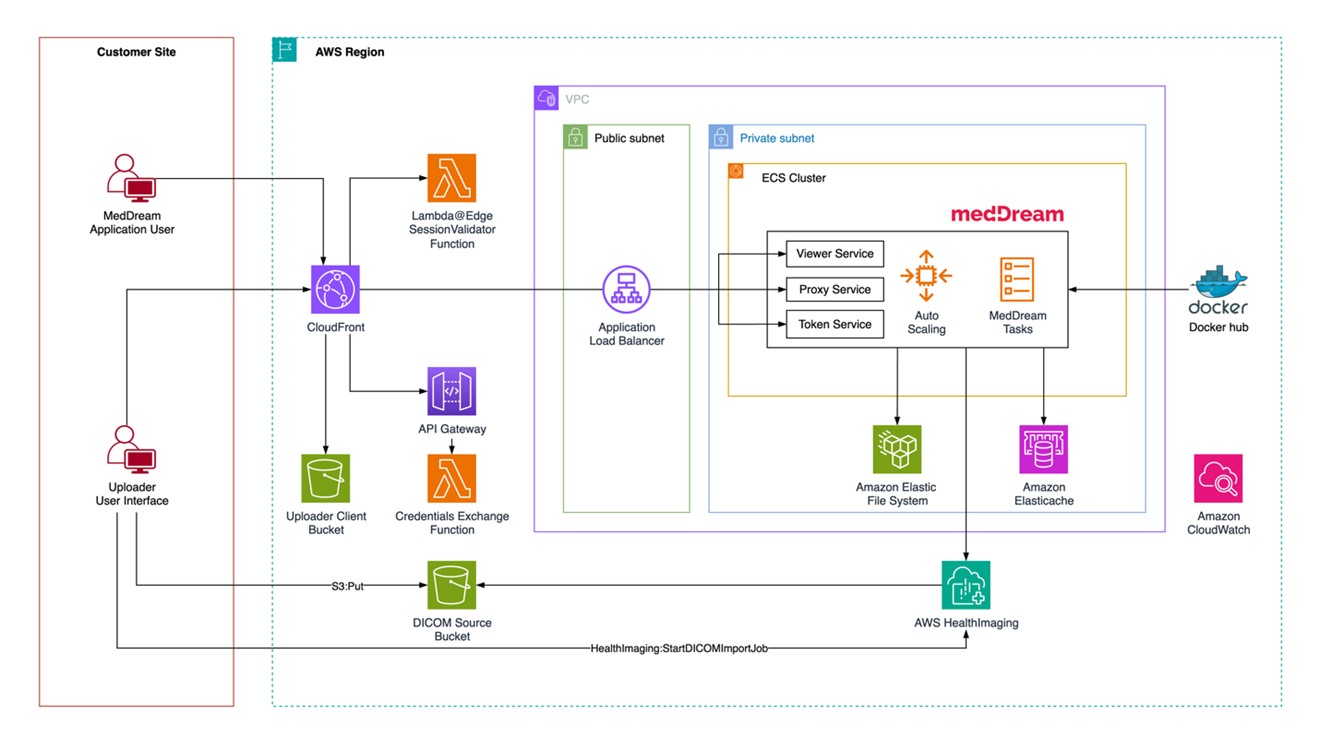
Solution architecture diagram for MedDream deployed on AWS HealthImaging. On the left, the Customer Site contains two user types: a MedDream Application User and an Uploader User Interface. Users connect to Amazon CloudFront, which invokes a Lambda@Edge SessionValidator Function for authentication. CloudFront routes requests to an Application Load Balancer in a public subnet within a VPC. The private subnet contains an ECS Cluster running three MedDream container services—Viewer Service, Proxy Service, and Token Service—with Auto Scaling. MedDream tasks pull container images from Docker Hub. The ECS services connect to Amazon Elastic File System for shared storage and Amazon ElastiCache for session state.

Figure 1: MedDream solution implementation diagram

Architecture innovation: Direct HTJ2K streaming

A key architectural advancement in this integration is the elimination of traditional image pre-processing. Many DICOM viewers rely on caching layers that pre-process images into web-friendly formats, or use protocols not optimized for progressive loading over the internet. MedDream takes a different approach—streaming HTJ2K-encoded frames directly from AWS HealthImaging to the browser.

AWS HealthImaging stores DICOM images natively in HTJ2K format, which is inherently optimized for web streaming. When you open a study, the MedDream viewer makes multiple parallel API calls to AWS HealthImaging, requesting specific image frames. These frames arrive directly in the browser without intermediate processing, enabling:

  • Sub-second initial image display through progressive loading
  • Efficient bandwidth utilization by transferring only requested frames
  • Parallel frame retrieval maximizing throughput for large studies
  • Consistent performance without dependency on cache state

Multiple viewer instances can stream from AWS HealthImaging independently without competing for shared resources. Every image request delivers consistent performance, whether the study was last accessed seconds or months ago. For complex studies like breast tomosynthesis with hundreds of frames, this parallel streaming architecture enables smooth, responsive viewing with initial frames displaying in under a second—performance that matches or exceeds traditional PACS systems.

Intelligent storage management

AWS HealthImaging provides automatic data lifecycle management through intelligent tiering, delivering cost optimization without operational overhead. After import, image sets begin in the Frequent Access Tier. After 30 consecutive days without access, they automatically transition to the Archive Instant Access Tier.

Critically, there is no performance difference between these tiers—both provide the same sub-second latency for image retrieval. This eliminates the traditional trade-off between cost optimization and clinical accessibility. You get instant access to all imaging data regardless of age or access patterns, while benefiting from automatic cost reduction on infrequently accessed studies.

This intelligent tiering operates transparently based on API usage patterns, requiring no manual intervention, capacity planning, or lifecycle policy management.

Solution architecture

The architecture combines serverless components, container orchestration, and global content delivery to provide diagnostic-quality image viewing with enterprise-grade security and high availability.

Core architecture components

User-facing layer — The solution delivers the MedDream HTML5 viewer through Amazon CloudFront, providing low-latency access from any location. A custom React-based DICOM uploader interface enables secure file validation and direct upload to AWS HealthImaging. AWS Lambda@Edge validates user sessions before serving content, ensuring security without compromising performance.

Application servicesAmazon Elastic Container Service (Amazon ECS) orchestrates three containerized MedDream services across multiple availability zones: the Viewer Service (HTML5 diagnostic interface), the Proxy Service (communication with AWS HealthImaging APIs), and the Token Service (authentication and authorization). An Application Load Balancer distributes traffic with health checking, while Amazon ElastiCache for Valkey maintains centralized session state.

Storage and image management — AWS HealthImaging serves as the core service for storing and serving DICOM images as optimized image sets. Amazon Simple Storage Service (Amazon S3) buckets support data import functions, including event-based integration with AWS Lambda to trigger import jobs. Amazon Elastic File System (Amazon EFS) provides shared file storage for the MedDream application running on ECS, enabling concurrent access across all container instances.

Security architecture — The solution implements security at multiple layers: an Amazon VPC isolates services across public, private, and isolated subnets; security groups control traffic with least-privilege access; AWS Secrets Manager stores credentials securely; and AWS Identity and Access Management (IAM) roles enforce least-privilege permissions for each component. All data is encrypted in transit (TLS 1.2+) and at rest using AWS-managed encryption keys.

Data flow

Image viewing — You access the application through the CloudFront distribution URL. Lambda@Edge validates your session, then CloudFront routes requests to the Application Load Balancer. The MedDream Proxy Service communicates with AWS HealthImaging APIs to retrieve image metadata and frames, delivering optimized HTJ2K-encoded frames through the viewer. The MedDream Viewer renders diagnostic-quality images in the browser with full DICOM compliance.

Image upload — After authenticating through the MedDream viewer interface, you access the uploader and select DICOM files or folders. Files are validated client-side and uploaded to S3 via pre-signed URLs. A Lambda function triggers an AWS HealthImaging import job, which processes and optimizes DICOM data into image sets. Imported studies become immediately available in the viewer without additional indexing or cache warming.
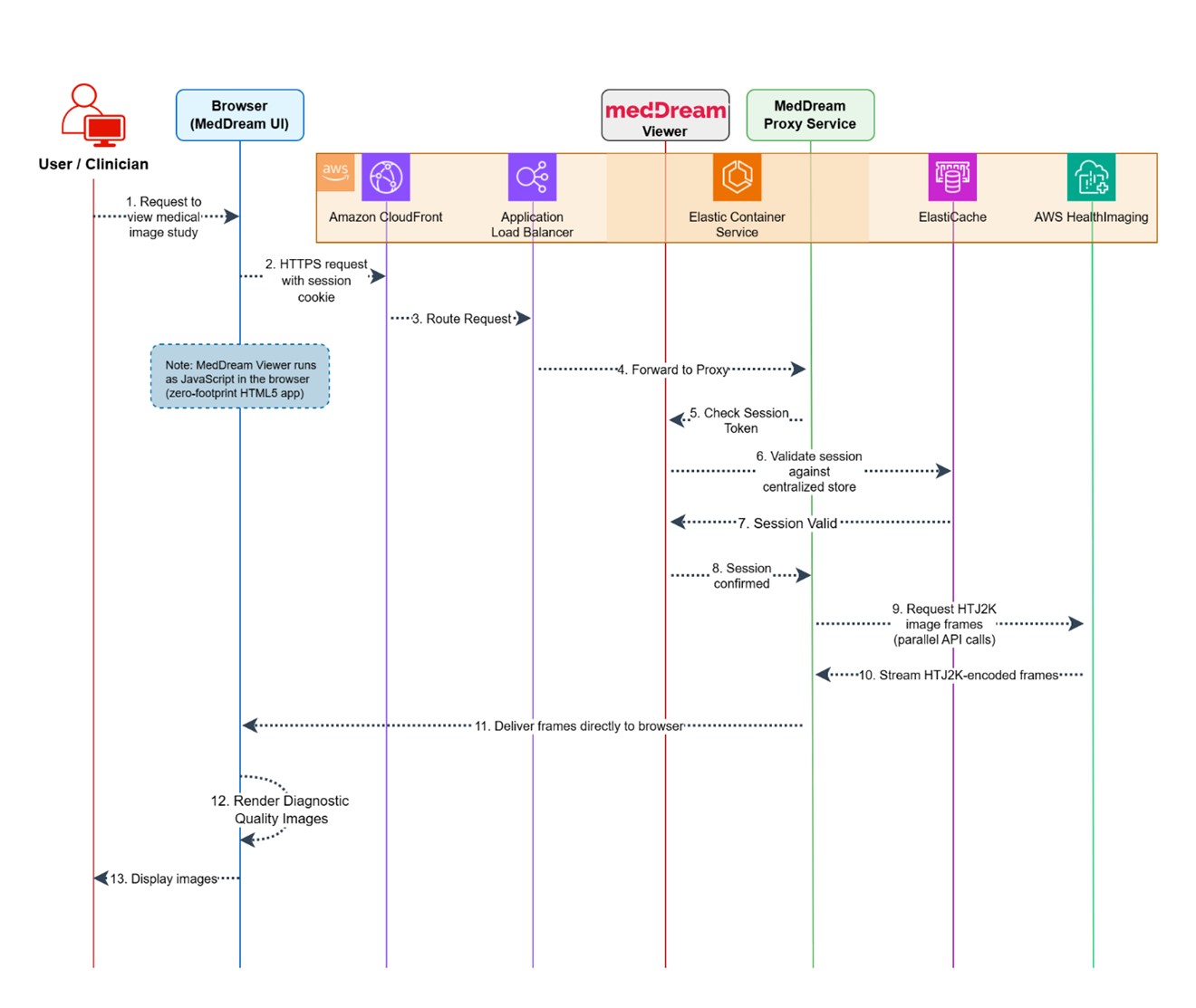
Figure 2 Web access to medical images

Figure 2: Web access to medical images

High availability configuration

The solution supports both single-AZ deployment (for development and testing) and multi-AZ deployment (for production). The multi-AZ configuration distributes 6 ECS tasks across availability zones (2 per service), configures an ElastiCache Valkey cluster with automatic failover, enables EFS with automatic backups, and provides fault tolerance against zone failures with automatic recovery.

ECS services scale horizontally based on CPU and memory utilization, CloudFront absorbs traffic spikes globally, AWS HealthImaging scales automatically to petabyte capacity, and Amazon API Gateway with Lambda functions scale elastically for authentication traffic.

Implementation walkthrough

Deploying the MedDream-AWS HealthImaging integration is streamlined through AWS CDK, enabling you to implement the solution with minimal effort.

Prerequisites

Before deployment, your environment should meet these requirements:

AWS account access

  • Administrator or PowerUser access to an AWS account
  • AWS CLI installed and configured with appropriate credentials
  • AWS CDK CLI installed (v2.x): npm install -g aws-cdk
  • Node.js 18.x or later

CDK bootstrap — Your AWS account must be bootstrapped for CDK in both your target region AND us-east-1 (required for Lambda@Edge):

# Bootstrap your target region
cdk bootstrap aws://ACCOUNT-NUMBER/us-east-1

# If deploying to a different region, also bootstrap that region
cdk bootstrap aws://ACCOUNT-NUMBER/your-target-region

Region selection — AWS HealthImaging is available in US East (N. Virginia), US West (Oregon), Asia Pacific (Sydney), Europe (Ireland), and Europe (London). Choose a supported region for your deployment.

Deployment steps

Step 1: Clone and setup

git clone https://github.com/meddream/aws-healthimaging-dicom-viewer
cd aws-healthimaging-dicom-viewer

# Install root dependencies
npm install

# Install infrastructure dependencies
cd infrastructure
npm install

Step 2: Configure deployment

Edit infrastructure/bin/cdk.ts to set your deployment parameters:

const STACK_NAME = "meddream89";          // Unique name, under 47 characters
const ENABLE_MULTI_AZ = false;             // Set to true for production
const IMPORT_SAMPLE_DATA = false;          // Set to true to import sample DICOM data
const DEPLOY_UPLOADER = true;              // Deploy the uploader interface

Step 3: Deploy

Run the following commands in the infrastructure/ directory:

# Preview what will be deployed (optional)
cdk diff --all

# Deploy all stacks
cdk deploy --all

Expected deployment time: 25–35 minutes.

Step 4: Verify and access

After deployment, the CDK outputs provide your CloudFront URL (application endpoint) and Admin Secret ARN (retrieve the admin password from AWS Secrets Manager). Navigate to the CloudFront URL and log in with the admin credentials to access the MedDream viewer.

Production considerations

For production deployments, we recommend:

  • Enable multi-AZ: Set ENABLE_MULTI_AZ = true for high availability
  • Configure HTTPS: Set up TLS between CloudFront and the Application Load Balancer using your own domain and certificate
  • Update environment tags: Change the Environment tag from “Development” to “Production”
  • Enable VPC Flow Logs: Set ENABLE_VPC_FLOW_LOGS = true for network monitoring

Performance and benefits

The MedDream-AWS HealthImaging integration delivers measurable improvements across key operational dimensions:

  • Sub-second image loading for standard studies through parallel HTJ2K streaming and CloudFront edge delivery
  • Up to 40% storage cost reduction through HTJ2K compression and HealthImaging automatic tiering
  • Under 35 minutes to deploy a complete production-ready environment via CDK automation
  • Zero infrastructure management — AWS HealthImaging scales automatically from gigabytes to petabytes
  • Global accessibility — CloudFront’s 410+ edge locations provide consistent performance worldwide

Security and compliance

The solution addresses healthcare security requirements through multiple layers: network isolation via VPC, least-privilege IAM policies, encryption at rest and in transit, and session validation at the edge. MedDream’s FDA clearance and CE Class IIb certification support regulatory compliance for diagnostic use.

Use cases and applications

This integration supports several clinical and operational scenarios:

Multi-site radiology — Distributed imaging networks benefit from centralized cloud storage with edge-delivered viewing. Radiologists at any location get consistent sub-second performance without maintaining local PACS infrastructure at each site.

Teleradiology — Remote reading workflows benefit from the zero-footprint HTML5 viewer and CloudFront’s global delivery. Studies load quickly regardless of the reader’s location relative to the data center.

Research and AI pipelines — AWS HealthImaging’s API-native architecture enables direct integration with research workflows and AI/ML pipelines, providing programmatic access to imaging data without complex DICOM networking configurations.

Digital pathology — Beyond radiology, MedDream viewer and AWS HealthImaging also support digital pathology workflows, storing whole slide images with sub-second access and enabling AI-powered analysis pipelines. To learn more, see Revolutionizing healthcare with AI-driven digital pathology.

Cleaning up

To avoid incurring future charges, delete the deployed resources when you no longer need them:

cd infrastructure
cdk destroy --all

This removes all AWS resources created by the CDK stack, including the HealthImaging datastore and all stored images. Make sure to export any data you want to keep before running this command.

Conclusion and next steps

In this post, we showed how MedDream and AWS HealthImaging together deliver a cloud-native medical imaging solution that you can deploy in under an hour. The combination of FDA-cleared diagnostic viewing, automated CDK deployment, and intelligent cloud storage addresses the core challenges of modern medical imaging infrastructure.

To get started:

We’d love to hear about your experience. If you have questions or feedback, leave a comment on this post.