



惯性聚合 高效追踪和阅读你感兴趣的博客、新闻、科技资讯
阅读原文 在惯性聚合中打开

推荐订阅源

宝玉的分享
宝玉的分享
Know Your Adversary
Know Your Adversary
T
The Exploit Database - CXSecurity.com
P
Palo Alto Networks Blog
Cloudbric
Cloudbric
Scott Helme
Scott Helme
C
CERT Recently Published Vulnerability Notes
Latest news
Latest news
P
Privacy International News Feed
S
Schneier on Security
Simon Willison's Weblog
S
Security @ Cisco Blogs
N
News | PayPal Newsroom
Exploit-DB.com RSS Feed
AI
AI
MyScale Blog
MyScale Blog
T
Threat Research - Cisco Blogs
cs.CL updates on arXiv.org
Cisco Talos Blog
Cisco Talos Blog
AWS News Blog
AWS News Blog
Webroot Blog
Webroot Blog
C
Cisco Blogs
博客园 - 聂微东
S
Security Affairs
Hacker News - Newest:
Hacker News - Newest: "LLM"
C
CXSECURITY Database RSS Feed - CXSecurity.com
The Cloudflare Blog
Hugging Face - Blog
Hugging Face - Blog
P
Privacy & Cybersecurity Law Blog
D
DataBreaches.Net
博客园_首页
让小产品的独立变现更简单 - ezindie.com
Project Zero
Project Zero
Threat Intelligence Blog | Flashpoint
T
The Blog of Author Tim Ferriss
雷峰网
雷峰网
V2EX - 技术
V2EX - 技术
钛媒体:引领未来商业与生活新知
钛媒体:引领未来商业与生活新知
I
InfoQ
Engineering at Meta
Engineering at Meta
Y
Y Combinator Blog
V
V2EX
I
Intezer
美团技术团队
TaoSecurity Blog
TaoSecurity Blog
Hacker News: Ask HN
Hacker News: Ask HN
Cyberwarzone
Cyberwarzone
Google DeepMind News
Microsoft Security Blog
G
GRAHAM CLULEY

博客园 - Andy Yang

SharePoint中Event Handler的触发 扩展SharePoint链接字段 树莓派的连接 树莓派版的家用NAS服务器 修改树莓派更新源及设置代理配置 开启树莓派的硬件看门狗功能 树莓派上安装2.8寸TFT触摸屏 树莓派上使用蚂蚁矿机挖矿 如何编译树莓派内核 代码导出Reporting Services报表文件 Bit-Coin收入的一分钱 如何在树莓派上运行雷神之锤III 新树莓派入手 如何通过PowerShell在Visual Studio的Post-build中预热SharePoint站点 将SharePoint 2010的快速启动改成弹出菜单样式 SharePoint 2010搜索起步(下) SharePoint 2010搜索起步(上) 2009上班第一天 软件开发与心理张力
在SharePoint 2010的Team Site首页上显示Flash文件
Andy Yang · 2011-12-02 · via 博客园 - Andy Yang

问题:

在SharePoint 2010 Team Site的首页,如果添加Flash文件,预览没问题,点击保存后页面重新空空如也

(直接写HTML或加Content Editor或加Page Viewer,抑或使用SharePoint Designer,皆不行)

原因:

SharePoint 2010的Wiki页面在保存的时候,会把页面中它认为没用的HTML标记自动移除掉(为什么是Flash标记,而不是Silverlight标记,呵呵~~)

解决方法:

还得从头说起,先得到服务器端的SharePoint管理中心,路径如下

Central Administration \ Application Management \ Manage web applications,选定需要修改的Web Application,点击General Settings
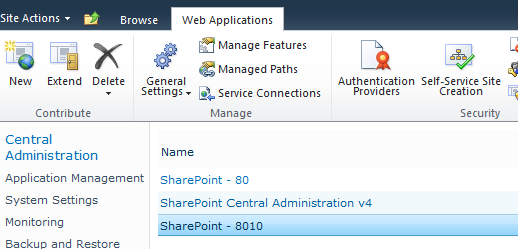
找到Browser File Handling,选定如下,OK保存选项

回到客户端站点,新建一个Webpart page,在页面上添加一个Content Editor,编辑html源代码,添加Flash脚本,例如

<embed name="banner" width="1100" height="400" pluginspage="http://www.macromedia.com/go/getflashplayer" src="/Shared%20Documents/Flash/swfName.swf" type="application/x-shockwave-flash"></embed>

不需要加<object>这样的东东,要不SharePoint会把刚添加标签改的乱七八糟,无聊~~~

修改其他需要修改的属性,如:名称,边框等

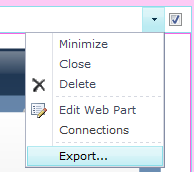
保存以后将这个Webpart导出来,如图
回到根站点的Site Settings,找到Galleries下的Web Parts选项后将刚下载的Webpart上传上去

后续,在Wiki页面就可以使用这个"定制"的Content Editor了,接着无聊~~~

BTW:如果Wiki页面中使用的Banner需要repeat图片,也可以依葫芦画瓢做,呵呵~~

Have a nice day!

Andy