
惯性聚合 高效追踪和阅读你感兴趣的博客、新闻、科技资讯
阅读原文 在惯性聚合中打开

推荐订阅源

博客园_首页
I
InfoQ
The Register - Security
L
LangChain Blog
H
Help Net Security
The GitHub Blog
The GitHub Blog
S
Schneier on Security
博客园 - 【当耐特】
W
WeLiveSecurity
Attack and Defense Labs
IT之家
IT之家
CTFtime.org: upcoming CTF events
Google DeepMind News
The Cloudflare Blog
H
Heimdal Security Blog
让小产品的独立变现更简单 - ezindie.com
Y
Y Combinator Blog
雷峰网
雷峰网
N
Netflix TechBlog - Medium
Security Archives - TechRepublic
cs.AI updates on arXiv.org
Cyber Security Advisories - MS-ISAC
L
Lohrmann on Cybersecurity
OSCHINA 社区最新新闻
OSCHINA 社区最新新闻
T
The Exploit Database - CXSecurity.com
P
Privacy & Cybersecurity Law Blog
G
GRAHAM CLULEY
Exploit-DB.com RSS Feed
V
Visual Studio Blog
博客园 - 聂微东
PCI Perspectives
PCI Perspectives
Last Week in AI
Last Week in AI
A
Arctic Wolf
宝玉的分享
宝玉的分享
T
The Blog of Author Tim Ferriss
S
Secure Thoughts
T
Threat Research - Cisco Blogs
GbyAI
GbyAI
云风的 BLOG
云风的 BLOG
D
Darknet – Hacking Tools, Hacker News & Cyber Security
S
SegmentFault 最新的问题
SecWiki News
SecWiki News
月光博客
月光博客
大猫的无限游戏
大猫的无限游戏
Schneier on Security
P
Proofpoint News Feed
博客园 - Franky
奇客Solidot–传递最新科技情报
奇客Solidot–传递最新科技情报
AI
AI
Engineering at Meta
Engineering at Meta

博客园 - Andy Yang

SharePoint中Event Handler的触发 扩展SharePoint链接字段 树莓派的连接 树莓派版的家用NAS服务器 修改树莓派更新源及设置代理配置 开启树莓派的硬件看门狗功能 树莓派上安装2.8寸TFT触摸屏 树莓派上使用蚂蚁矿机挖矿 如何编译树莓派内核 代码导出Reporting Services报表文件 Bit-Coin收入的一分钱 如何在树莓派上运行雷神之锤III 新树莓派入手 如何通过PowerShell在Visual Studio的Post-build中预热SharePoint站点 在SharePoint 2010的Team Site首页上显示Flash文件 SharePoint 2010搜索起步(下) SharePoint 2010搜索起步(上) 2009上班第一天 软件开发与心理张力
将SharePoint 2010的快速启动改成弹出菜单样式
Andy Yang · 2011-12-13 · via 博客园 - Andy Yang

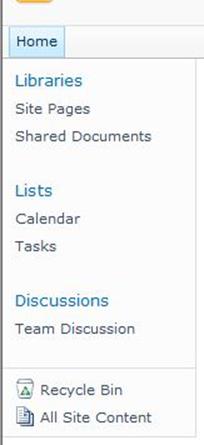
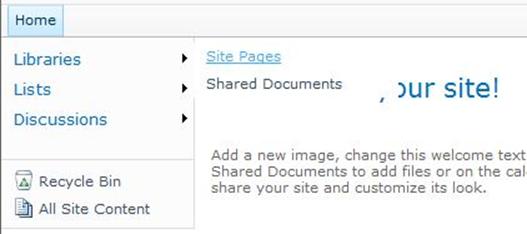
修改前修改后

修改方法

其实很简单,在SharePoint Designer打开站点,找到Master page文件夹,复制及重命名v4.master

打开重命名后的master page,切换到代码视图,找到<SharePoint:AspMenu id="V4QuickLaunchMenu",将其中的StaticDisplayLevelsMaximumDynamicDisplayLevels设置成1(选项含义参考这里这里),保存。

将该master page设置成站点的默认母版页

不过修改完以后有点小问题,如下

弹出来的菜单由于底色透明,显示的文字被页面其他元素遮挡,效果不是很好

这个嘛~~~ 好处理,直接将master page页面中菜单使用的样式重载一下

上代码

<style type="text/css">ul.dynamic {background-color:White!important;}</style>

上图片

参考链接

Have a fun!

Andy