惯性聚合 高效追踪和阅读你感兴趣的博客、新闻、科技资讯
阅读原文 在惯性聚合中打开

推荐订阅源

T
Threatpost
AI
AI
T
Threat Research - Cisco Blogs
Know Your Adversary
Know Your Adversary
C
CERT Recently Published Vulnerability Notes
V
Vulnerabilities – Threatpost
S
Securelist
cs.CL updates on arXiv.org
T
Tenable Blog
C
Cybersecurity and Infrastructure Security Agency CISA
AWS News Blog
AWS News Blog
Cisco Talos Blog
Cisco Talos Blog
Cloudbric
Cloudbric
P
Privacy & Cybersecurity Law Blog
N
News and Events Feed by Topic
D
Docker
博客园 - 司徒正美
Last Week in AI
Last Week in AI
Google DeepMind News
O
OpenAI News
人人都是产品经理
人人都是产品经理
腾讯CDC
博客园 - 三生石上(FineUI控件)
奇客Solidot–传递最新科技情报
奇客Solidot–传递最新科技情报
Scott Helme
Scott Helme
freeCodeCamp Programming Tutorials: Python, JavaScript, Git & More
The GitHub Blog
The GitHub Blog
Microsoft Security Blog
Threat Intelligence Blog | Flashpoint
cs.CV updates on arXiv.org
博客园 - 叶小钗
N
News and Events Feed by Topic
J
Java Code Geeks
D
DataBreaches.Net
爱范儿
爱范儿
N
Netflix TechBlog - Medium
OSCHINA 社区最新新闻
OSCHINA 社区最新新闻
IT之家
IT之家
H
Heimdal Security Blog
F
Full Disclosure
L
LINUX DO - 最新话题
W
WeLiveSecurity
Blog — PlanetScale
Blog — PlanetScale
V
V2EX
M
MIT News - Artificial intelligence
Apple Machine Learning Research
博客园 - Franky
K
KPMG report finds enterprise disconnect between AI and its ROI | CIO
钛媒体:引领未来商业与生活新知
钛媒体:引领未来商业与生活新知
U
Unit 42

博客园 - Andy Yang

SharePoint中Event Handler的触发 扩展SharePoint链接字段 树莓派的连接 树莓派版的家用NAS服务器 修改树莓派更新源及设置代理配置 开启树莓派的硬件看门狗功能 树莓派上安装2.8寸TFT触摸屏 树莓派上使用蚂蚁矿机挖矿 如何编译树莓派内核 代码导出Reporting Services报表文件 Bit-Coin收入的一分钱 如何在树莓派上运行雷神之锤III 新树莓派入手 将SharePoint 2010的快速启动改成弹出菜单样式 在SharePoint 2010的Team Site首页上显示Flash文件 SharePoint 2010搜索起步(下) SharePoint 2010搜索起步(上) 2009上班第一天 软件开发与心理张力
如何通过PowerShell在Visual Studio的Post-build中预热SharePoint站点
Andy Yang · 2013-08-11 · via 博客园 - Andy Yang

问题现象

Visual Studio在开发SharePoint的时候,发布部署包后,首次打开及调试站点页面的时候会非常的慢

解决方案

使用PowerShell脚本,加载SharePoint插件后遍历所有的网站集,用以模拟用户自动点击页面

具体步骤

  • 制作"64位版本"的PowerShell

由于SharePoint运行的是64位的PowerShell,而Visual Studio的Post-build event中默认运行的32位的PowerShell,需要找到一个变通的方式

新建一个Console程序,其中代码如下

using System;

using System.Diagnostics;

namespace ConsoleApplicationExample

{

class Program

{

static int Main(string[] args)

{

Process process = Process.Start("PowerShell.exe", String.Join(" ", args));

process.WaitForExit();

return process.ExitCode;

}

}

}

同时找到VS目录下64位的CMD,运行如下命令生成PowerShell的64位版本
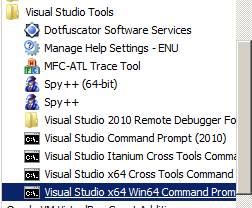
csc Path to cs file\Program.cs /platform:x64

到目录c:\Program Files (x86)\Microsoft Visual Studio 10.0\VC中找到Program.exe,并重命名为PowerShell64.exe

  • 制作遍历脚本

机器上运行PowerShell需要开启权限,运行以下脚本(注意:需要开启64位的权限)

%SystemRoot%\system32\WindowsPowerShell\v1.0\powershell.exe

%SystemRoot%\sysWOW64\WindowsPowerShell\v1.0\powershell.exe

Set-ExecutionPolicy Unrestricted

在PowerShell中操作SharePoint对象(遍历网站)

if ( (Get-PSSnapin -Name Microsoft.SharePoint.PowerShell -ErrorAction SilentlyContinue) -eq $null )

{

Add-PSSnapin Microsoft.SharePoint.PowerShell

}

function Get-WebPage([string]$url)

{

$wc = new-object net.webclient;

$wc.credentials = [System.Net.CredentialCache]::DefaultCredentials;

$pageContents = $wc.DownloadString($url);

$wc.Dispose();

return $pageContents;

}

Get-SPAlternateUrl -Zone Default | foreach-object {

write-host $_.IncomingUrl;

$html = Get-WebPage -url $_.IncomingUrl;

}

  • 配置Visual Studio

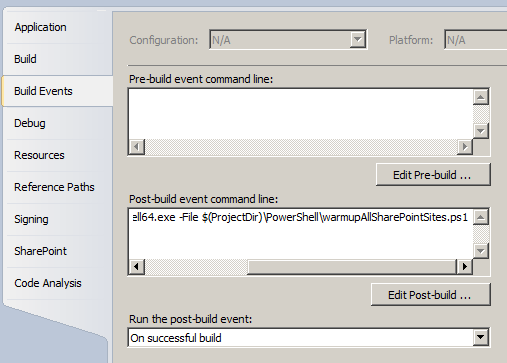
$(ProjectDir)\PowerShell\PowerShell64.exe -File $(ProjectDir)\PowerShell\warmupAllSharePointSites.ps1