








Stop and Restart now wait for a booting server, your PC stays awake while you host, the Easy Address stops clipping, and account pages name your real dates.
This release covers about twelve days of work, and most of it is in one place: what the app does when you press Stop or Restart on a server that is not sitting still. The rest is spread across the Easy Address, the startup screen, and your account pages on the web. Here is what changed and why it mattered.
The gap between pressing Start and a server actually being ready to play on is a busy few seconds, and until now that was where the Server Controls card was least honest with you.
Four things went wrong in that window. Pressing Stop during a start raced the start, so the card settled while the server carried on coming up. A restart arriving while a server was still starting, whether you pressed the button, whether you had scheduled it, or whether we triggered it ourselves, force-killed the server mid-start. A Stop pressed in the first seconds after Start, before the server process even existed, was quietly dropped and left the card reading “Asking the server to stop…” for as long as you were willing to look at it. And a Stop pressed during a start showed you “Starting…” for the whole wait, because the start’s own progress overwrote the thing you had just asked for.
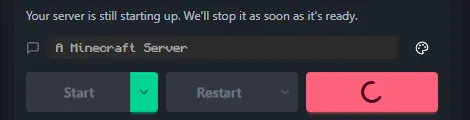
All of those now wait. A stop or a restart asked for during a start waits for the server to finish coming up and then stops it properly, and on the button path the card says so: “Your server is still starting up. We’ll stop it as soon as it’s ready.” If a server never manages to finish starting, we shut it down and say that instead.
Four more fixes on the same card. Stop stays pressable while a stop is in progress, which is exactly when you most want it, and pressing it again joins the stop already running rather than being refused. The restart spinner now stays up until a genuinely new server is running, instead of disappearing almost immediately and re-enabling the Restart button on a server that had not restarted. While a server is still starting, the Restart button now waits until the server is actually ready instead of lighting up early and inviting a restart mid-boot. And a restart that runs on a schedule now says so: the card reads “Restarting on schedule” while it happens, so a restart you did not press no longer looks like a mystery.
A scheduled restart that fired while a server was still starting could also leave “still starting up” on the card after the server had stopped, and could fire several times in a row. It now runs once, and the card clears when the wait ends.
If you close SpawnBox while a server is still starting, a Stop you had already pressed still goes through.
Two smaller things on the same card that our own checking turned up. During a scheduled restart the card could briefly say we had lost track of the server while the restart was going perfectly, and the “still starting up” explanation could arrive up to half a minute after the wait began. Both are fixed: the card keeps track through a scheduled restart, and the explanation now appears within a couple of seconds of the wait beginning.
After you stopped a server, the console could lose its last few lines when the log history refreshed. The refresh brought back an older snapshot of the log and replaced what you were looking at with it, so the shutdown lines you had just watched scroll past were gone. It now keeps what it has already shown you and only adds lines it has not seen.
On Paper servers running the SpawnBox Telemetry Plugin, the console’s Hide background noise switch (on unless you turned it off) now also hides the plugin’s own check-in chatter, which used to be most of what you saw there. The server’s one-line replies to those check-ins still show; hiding those needs a change to the plugin itself, and that one is on the list.
Switching between servers quickly could leave the Activity feed showing a handful of rows from the server you had just left, because a slow reply from that server landed after you had moved on. A reply that arrives late for a server you are no longer looking at is now ignored.
Restart when empty waits for everyone to leave your server and then restarts it during the quiet. Arming it on a server that was already empty used to do nothing at all. You could watch the uptime climb for hours with the control still showing as armed, because the timer it was waiting on only ever started when the last player left, and on an empty server nobody ever left.
Now, arming it on an empty server restarts on the next check. Arming it while people are still playing works exactly as it did before, and still waits out the full quiet period after the last player leaves.
This one is new, and it came from someone in the community who lost a session to it.
If the machine hosting your server went to sleep, every player was dropped, nobody was told why, and there was nothing in the app to explain it. The person hosting is usually not sitting at that machine when it happens.
Now, while a server is actually running, or a backup is in progress, we ask Windows not to sleep. Your screen is still free to turn off, which is the part most people actually want. And we tell Windows why, so if you ever wonder what is keeping the machine up, it will say “SpawnBox is keeping this computer awake because a Minecraft server is running” rather than leaving you guessing. When the last server stops, we let go.
When a server shuts down it needs a moment to write your world to disk. Most of the paths that stop a server were only giving it a short, fixed window before shutting things down the hard way, and a large world could be cut off part way through saving.
Every path that stops a world-bearing server now gives it substantially more time to finish saving, and the hard shutdown happens after the save gives up rather than in the middle of it. We have not measured an actual lost world, and we are not claiming to have rescued one. We are saying that the window that could have truncated a big save is no longer that narrow.
The Easy Address is the shareable name we set up so friends can join without typing your IP address. On a long server name it was being cut off, and it was cut off in the worst possible place: on the Server Info card the address lost characters at both ends, so paper-test-server.mc.spawnbox.app rendered as st-server.mc.spaw and the half that says which server it is was off screen. This happened on a maximised window, so making the window bigger never helped.
The address now gets a full line to itself on the Server Controls card, stays on one line on the Server Info card, and is lined up so the part you chose always reads. The copy button gives you the whole address either way, whatever is visible on screen.
If a single server folder was missing its settings file, we painted a full-screen “Couldn’t load server data.” over an app whose other servers had all loaded fine, and it stayed there. Pressing Retry looked like it worked, but only because Retry cleared the message rather than trying the load again.
One bad folder can no longer do that. The server that failed shows its own error and everything else works. This is easier to hit than it sounds: copying a server folder in by hand is enough.
The plan card at the top of your account had a line for the date your plan ends, and that line had never once been filled in. If you were holding a code, a time-limited gift, or a plan you had already cancelled, the one fact that decides whether you need to do anything was the one fact the page withheld. It now carries the right date for your situation, and if you are on a live subscription it reads “Renews on” and then your billing date, which that group had never been shown at all.
We also went through what the page said about your code. One sentence used to be shown to nearly everyone holding one, telling them their code had moved their next billing date, when for most of them nothing had moved and the date shown was up to eleven months away from their real payment date. Each situation now gets its own sentence, and only the people whose billing date genuinely moved are told so.
Two more on these pages. The badge naming your plan now shows what you actually hold, rather than your old plan if you had redeemed a code for a higher one. And a page headed Choose your plan no longer opens for someone already on our top plan and then offers them no choice.
This is the one that mattered most in money terms. Switching your billing term restarts the billing cycle, and the remaining time you had already covered was quietly discarded. We measured one real switch that destroyed nearly four months of coverage. The confirmation page, whose own heading promises “Here is exactly what happens if you go ahead”, named no date at all on that particular change.
Now it does. The confirmation names the date you are giving up, says plainly that the period starts over from today, and if you are holding days that came from a code it tells you how many of them carry over and roughly the date they run to. Then it actually puts them back after the switch. We have watched both branches of that arithmetic run against real accounts and land where the page said they would.
Elsewhere on that flow, the last screen before money moves now names the money. It used to print no figure at all, and told everybody they would be charged today for the difference, including people whose difference was zero.
If you were already paying for a plan, we used to refuse your code outright and tell you the block was ours and temporary. That block is gone. A code you redeem while subscribed is now honoured at full value: either your next payment date moves out by the length of the code, or the code’s time is saved and starts when your paid time ends. Either way it starts from the same day, so you never spend code days on time you already bought.
Alongside that, a set of protections that should always have been there. A code can only ever raise your plan, never lower it. If a code is worth less than what you already hold, we refuse it without spending it, so you keep something you can still give away. Neither a code nor a one-time pass switches off a running trial any more. And buying a pass while you already have a subscription is now refused calmly, before any money moves, rather than producing a red page that looked like our servers had fallen over.
One genuinely new thing: a shareable code can now carry a memorable name, something like SUMMERFEST, that a creator can say out loud on stream instead of spelling out a long random string. Dashes, spaces and capitals do not matter.
The delete page used to tell every single visitor that we would cancel their subscription for them, including people who did not have one. It never showed you the date you had paid through, so someone who had paid for a year could forfeit it without ever being shown what they were giving up. And it promised to remove “everything we store online for you”, which was not true.
The page now reads your account and says one of four things, shows real counts of what goes in plain English, and states plainly what deleting does not reach. It also names what stays: “the servers, worlds, and settings on your computer are not touched. Your servers keep working - you just lose the online extras.” The confirmation you have to type is now a blank inside the warning sentence rather than a separate box below it, so completing the acknowledgement is completing the warning.
The most serious fix here you will hopefully never see. If deletion hit a network failure part way through, the page said “nothing in your account was deleted and nothing changed” after your cloud backups had already been permanently removed and your subscription had already been cancelled. Everything destructive now happens after the last point where the deletion can still stop safely, and a deletion that cannot go ahead refuses before touching your billing at all.
A batch of our automatic emails were saying things that were not true for the person reading them.
The gift, trial and pass emails all said “Pro” regardless of which plan the message was actually about, so someone on Plus was told their complimentary Pro was ending and offered a button to keep a plan they had never had. Every email now names your own plan. Dates could render a day off depending on which machine sent the message, and the trial-ending email fired from midnight on the expiry date, which meant it could arrive most of a day before the trial actually ended. Both fixed.
The reminder emails had also quietly stopped telling you how much time was left. The part that works out “13 days left” had shipped, been tested, and never once been called, so every real reminder went out with the number missing. The number is back, and it is stated as a floor, so it is never an overstatement. There is also a new email at the moment you claim a code, which was the one moment in a code’s life that happened in silence.
此内容由惯性聚合(RSS阅读器)自动聚合整理,仅供阅读参考。 原文来自 — 版权归原作者所有。