


 OpenRouter recently announced a 50% discount on OpenAI, so we decided to give it a try.
We’ll switch things over on LiteLLM, which already handles requests from all our services – so the switch should be pretty simple.
Before OpenRouter, we’ll set up fallbacks straight to OpenAI in LiteLLM – for cases when requests to OpenRouter fail.
Contents
Basically, all we need is to describe a new LiteLLM Deployment, a model, and set its api_base to OpenRouter with our own API Key.
The only difference is the model name: for direct calls to OpenAI we use model = openai/gpt-4.1-nano, but for OpenRouter it’s model = openrouter/openai/gpt-4.1-nano, see OpenRouter Completion Models.
You can get the full list of models from the OpenRouter API, see the Models docs.
$ curl -s "https://openrouter.ai/api/v1/models" | jq ".data[].id" | head
"qwen/qwen3.7-flash"
"anthropic/claude-opus-5-fast"
"anthropic/claude-opus-5"
"inclusionai/ling-3.0-flash:free"
"poolside/laguna-s-2.1"
"poolside/laguna-s-2.1:free"
"google/gemini-3.6-flash"
"google/gemini-3.6-flash:batch"
"google/gemini-3.5-flash-lite"
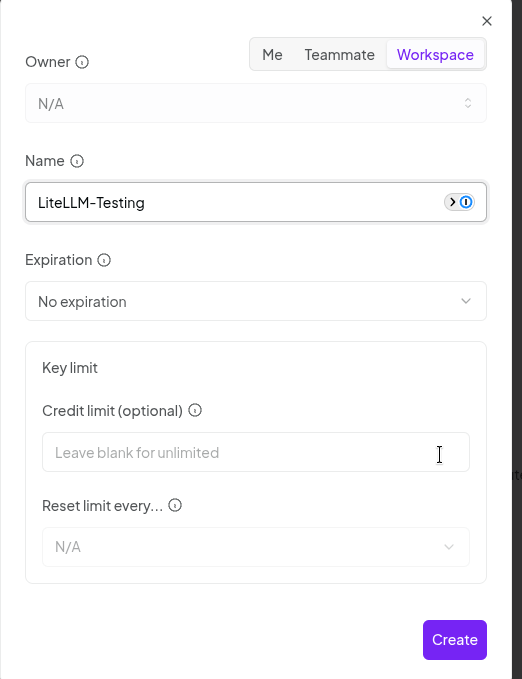
Sign up for OpenRouter, go to API Keys for the OpenRouter Workspace you need, and create an OpenRouter API Key:

By the way, in OpenRouter you can set your own limits on a key:
Let’s add a new model – for testing we’ll set our own name in model_name, but in production we use a “generic” one that clients expect.
In api_base we override the URL with the OpenRouter API one, see Using the OpenRouter API, and in api_key – the API Key we created above:
...
    model_list:

      - model_name: or-gpt-4.1-mini
        litellm_params:
          model: openrouter/openai/gpt-4.1-mini
          api_base: https://openrouter.ai/api/v1
          api_key: os.environ/OPENROUTER_API_KEY
...
While testing, we can pass the key variable through Helm’s envVars; in production this is done via External Secrets Operator (see AWS: Kubernetes and External Secrets Operator for AWS Secrets Manager and LiteLLM: AI Gateway in Kubernetes and metrics to VictoriaMetrics):
...
  envVars:
    OPENROUTER_API_KEY: "sk-or-v1-***"
...
Let’s check with curl:
$ curl -sS -D /tmp/headers 'https://aigw.test.example.co/chat/completions' -H 'Content-Type: application/json' -H "Authorization: Bearer $LITELLM_TESTING_KEY" --data ' { "model": "or-gpt-4.1-mini", "messages": [ { "role": "user", "content": "what llm are you" } ] } '  | jq
{
  "id": "gen-1785490640-Tbfwc5Rlx7cyhqpxzSB6",
  "created": 1785490640,
  "model": "or-gpt-4.1-mini",
  ...
The headers give us all the interesting info (I use -D into a file so jq works correctly):
$ cat /tmp/headers
...
x-litellm-model-name: openrouter/openai/gpt-4.1-mini
x-litellm-model-api-base: https://openrouter.ai/api/v1
...
But once we rolled OpenRouter out to “test production” – we started catching 429 errors, so we had to add fallbacks to OpenAI.
The limits are described in Credit Limits and Rate Limits, and even though our models aren’t free – we still hit errors.
And in any case, you should have fallbacks anyway.
OpenRouter also supports Automatic failover between models, but that requires changes on the client side – and we want this as transparent as possible, with minimal changes on the clients.
So we’ll set it up on LiteLLM instead, see Fallbacks (Provider Failover).
The LiteLLM docs are a bit of a mess here (not the first time, btw) – one example describes it as litellm_settings.fallbacks, another as router_settings.fallbacks.
But router_settings is the correct one, since it takes priority – router.py:
...

      _fallbacks = fallbacks or litellm.fallbacks

...
And fallbacks “arrive” from router_params in proxy_server.py:
...
router = litellm.Router(
    **router_params,
...
The format is pretty simple – “model to set the fallback for : list of models to route to on failure”:
router_settings:
  fallbacks: [{"<QUERY_MODEL>": ["<FALLBACK_MODEL1>","<FALLBACK_MODEL2>"]}]
You can also set a general fallback instead of a model-specific one, see Default Fallbacks:
router_settings:
  default_fallbacks: ["claude-opus"]
(again – in the docs it’s set under litellm_settings instead of router_settings, though it works the same either way)
Alright, let’s try it and see how it works.
Let’s add a fallback for our test model:
router_settings:
  fallbacks: [{"or-gpt-4.1-mini": ["gpt-4.1-mini"]}]
And in the model itself – we “break” the api_base with a wrong port:
model_list:
  - model_name: or-gpt-4.1-mini
    litellm_params:
      model: openrouter/openai/gpt-4.1-mini
      api_base: https://openrouter.ai:8000/api/v1
      api_key: os.environ/OPENROUTER_API_KEY
Let’s repeat the request:
$ curl -sS -D /tmp/headers 'https://aigw.test.example.co/chat/completions' -H 'Content-Type: application/json' -H "Authorization: Bearer $LITELLM_TESTING_KEY" --data ' { "model": "or-gpt-4.1-mini", "messages": [ { "role": "user", "content": "what llm are you" } ] } '  | jq
{
  "id": "chatcmpl-E7eVkBzpdbWp5n6JagYlYHTlEEI1f",
  "created": 1785492728,
  "model": "gpt-4.1-mini-2025-04-14",
  ...
And the headers – now the response is from OpenAI:
$ cat /tmp/headers | grep x-litellm-model
x-litellm-model-id: 8b2d27fc9982e18f87ed59ca8c8b0d02c52546f26ece314f17d14433ed6498c2
x-litellm-model-name: openai/gpt-4.1-mini
x-litellm-model-api-base: https://api.openai.com
x-litellm-model-group: gpt-4.1-mini
See Fallbacks + Retries + Timeouts + Cooldowns.
For fallback routing you can set a few useful options:
num_retries: how many times to retry the request against the primary model group before switching to the fallback model
timeout: how long to wait for a response before redirecting requests to the fallback model
timeout, the next num_retries attempt starts (if set to more than 1), and only then does it move on to the fallback modeallowed_fails: how many failed requests to a model are allowed before it goes into cooldown
cooldown_time: how many seconds the model will be “disabled” from general routingAgain, the docs are a bit… rough here, since, for example, it says “allowed_fails: 3 # cooldown model if it fails > 1 call in a minute“, and instead of “in a minute“, they probably meant 30 seconds, matching the cooldown_time example.
Of course, it’s a good idea to monitor when fallbacks kick in – and when they fail.
LiteLLM has built-in metrics for this, see Fallback (Failover) Metrics:
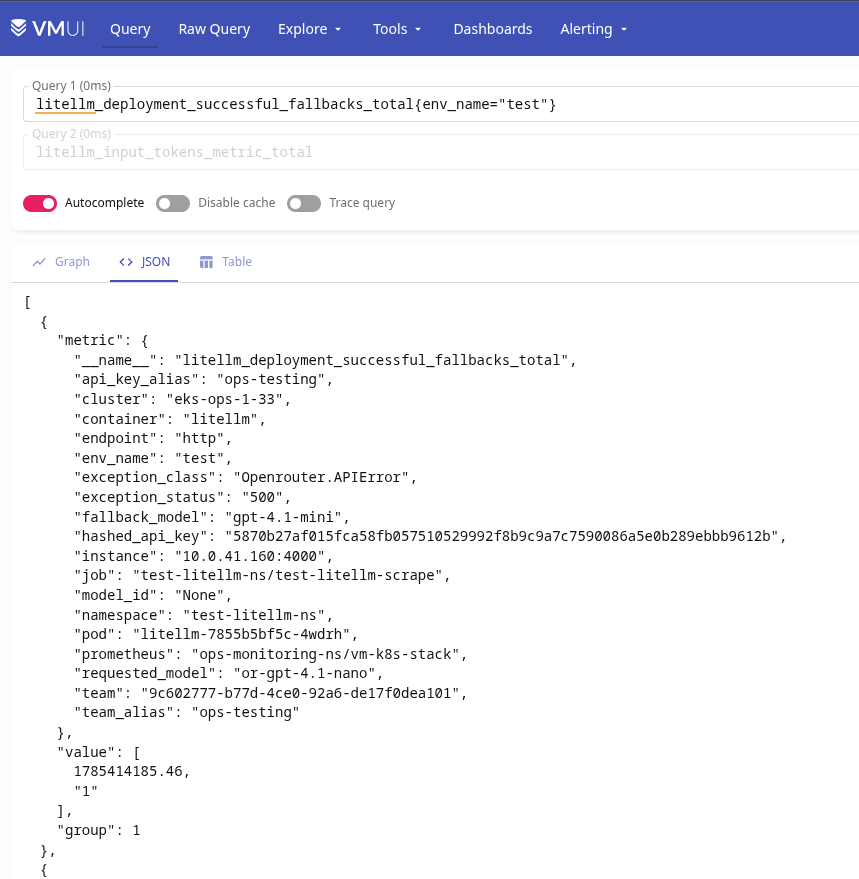
Here:
litellm_deployment_cooled_down: how many times a deployment (model) was put into cooldownlitellm_deployment_successful_fallbacks: number of successful fallback triggerslitellm_deployment_failed_fallbacks: number of failed fallback attemptsAnd an example alert:
- alert: LiteLLM Deployment Failed Fallback
  expr: |
    sum by (requested_model, fallback_model, api_key_alias, team_alias, exception_class, exception_status) (
      increase(litellm_deployment_failed_fallbacks_total[5m])
    ) > 0
  for: 30s
  labels:
    component: devops
    environment: ops
    severity: critical
    ilert_routingkey: devops-ops-critical
  annotations:
    summary: LiteLLM Deployment Failed Fallback
    description: |-
      LiteLLM failed to handle a request using a fallback model during the last 5 minutes.
      *Failed fallbacks*: `{{ "{{" }} $value }}`
      *Requested model*: `{{ "{{" }} $labels.requested_model }}`
      *Fallback model*: `{{ "{{" }} $labels.fallback_model }}`
      *API key alias*: `{{ "{{" }} $labels.api_key_alias }}`
      *Team alias*: `{{ "{{" }} $labels.team_alias }}`
      *Exception class*: `{{ "{{" }} $labels.exception_class }}`
      *Exception status*: `{{ "{{" }} $labels.exception_status }}`
      <https://{{ $.Values.monitoring.root_url }}/d/adtt9jj/adrmshg/litellm-system-overview |:grafana: LiteLLM System overview>
We have services that want to keep going to OpenAI directly – but we don’t want to change anything in their code, meaning model_name has to stay as-is.
There are a few options here, see the Tag Based Routing docs:
We create a new key, though when creating a key you can’t set Tags on it right away, since “This feature is only available for LiteLLM Enterprise“.
But you can create the key – and then set the Tag you need in its Settings afterward:
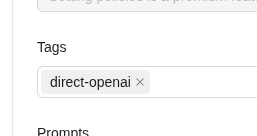
And similarly – a key tagged “direct-openrouter“.
In router_settings we add enable_tag_filtering=true, and in model_list we describe a model group – two deployments with the same model_name, but different conditions in tags:
router_settings:
  enable_tag_filtering: True

model_list:

  - model_name: or-gpt-4.1-mini
    litellm_params:
      model: openrouter/openai/gpt-4.1-mini
      api_base: https://openrouter.ai/api/v1
      api_key: os.environ/OPENROUTER_API_KEY
      tags: ["direct-openrouter"]

  - model_name: or-gpt-4.1-mini
    litellm_params:
      model: openai/gpt-4.1-mini
      api_key: os.environ/OPENAI_API_KEY
      tags: ["direct-openai"]
Let’s make a request with the “direct-openai” key:
$ curl -sS -D /tmp/openai 'https://aigw.test.example.co/chat/completions' -H 'Content-Type: application/json' -H "Authorization: Bearer sk-***" --data ' { "model": "or-gpt-4.1-mini", "messages": [ { "role": "user", "content": "what llm are you" } ] } ' | jq
{
  "id": "chatcmpl-E7f89zMEtza5liQnm8uBVQaaBcyVv",
  "created": 1785495109,
  "model": "gpt-4.1-mini-2025-04-14",
  ...
We get a response from OpenAI:
$ cat /tmp/openai | grep x-litellm-model
x-litellm-model-id: b1cd50178d84ad641058301b47c9f171d86337bcc7f0c08dc425f9f44ec2dffd
x-litellm-model-name: openai/gpt-4.1-mini
x-litellm-model-api-base: https://api.openai.com
And with the “direct-openrouter” key:
$ curl -sS -D /tmp/openrouter 'https://aigw.test.example.co/chat/completions' -H 'Content-Type: application/json' -H "Authorization: Bearer sk-***" --data ' { "model": "or-gpt-4.1-mini", "messages": [ { "role": "user", "content": "what llm are you" } ] } ' | jq
{
  "id": "gen-1785495093-Toi3dLdjHJ692Ue8bFgl",
  "created": 1785495093,
  "model": "or-gpt-4.1-mini",
  ...
We get a response from OpenRouter:
$ cat /tmp/openrouter | grep x-litellm-model
x-litellm-model-name: openrouter/openai/gpt-4.1-mini
x-litellm-model-api-base: https://openrouter.ai/api/v1
Another option – instead of adding tags manually, just use the User Agent from the headers.
The docs on Regex-based tag routing (tag_regex) describe tag_regex as “Use tag_regex on a deployment to match incoming requests by their headers” – so it sounds like it can match any header, but in reality only User-Agent is taken into account (if I’m reading the code right):
...
        # Build header strings for regex matching from what the proxy already stores.
        # Currently we match against User-Agent; format matches "^User-Agent: claude-code/..."
        user_agent = metadata.get("user_agent", "")
        header_strings: list[str] = [f"User-Agent: {user_agent}"] if user_agent else []
...
Still, in my case that’s enough – one of our services is TypeScript with user-agent = "OpenAI/JS 6.26.0", and the other is Python with user-agent = "OpenAI/Python 2.45.0".
Let’s change the conditions in the models to use a regex:
- model_name: or-gpt-4.1-mini
  litellm_params:
    model: openrouter/openai/gpt-4.1-mini
    api_base: https://openrouter.ai/api/v1
    api_key: os.environ/OPENROUTER_API_KEY
    tag_regex:
      - '^User-Agent: OpenAI/JS '

- model_name: or-gpt-4.1-mini
  litellm_params:
    model: openai/gpt-4.1-mini
    api_key: os.environ/OPENAI_API_KEY
    tag_regex:
      - '^User-Agent: OpenAI/Python '
Let’s make a request with the “main” test key (which has no tags), but explicitly pass -H 'User-Agent: OpenAI/JS 6.26.0':
$ curl -sS -D /tmp/js-headers 'https://aigw.test.example.co/chat/completions' -H 'Content-Type: application/json' -H "Authorization: Bearer $LITELLM_TESTING_KEY" -H 'User-Agent: OpenAI/JS 6.26.0'   --data '{    "model": "or-gpt-4.1-mini",
    "messages": [{
      "role": "user",
      "content": "JS routing test unique-001"
    }]
  }' | jq
{
  "id": "gen-1785495531-69Gu3ziqrjBmlNyEx3Jo",
  "created": 1785495531,
  "model": "or-gpt-4.1-mini",
  ...
We got a response from OpenRouter:
$ cat /tmp/js-headers
...
x-litellm-model-name: openrouter/openai/gpt-4.1-mini
x-litellm-model-api-base: https://openrouter.ai/api/v1
...
And a similar request, but with -H 'User-Agent: OpenAI/Python 2.45.0':
$ curl -sS -D /tmp/python-headers   'https://aigw.test.example.co/chat/completions'   -H 'Content-Type: application/json'   -H "Authorization: Bearer $LITELLM_TESTING_KEY"   -H 'User-Agent: OpenAI/Python 2.45.0'   --data '{
    "model": "or-gpt-4.1-mini",
    "messages": [{
      "role": "user",
      "content": "Python routing test unique-001"
    }]
  }' | jq
{
  "id": "chatcmpl-E7fFeVdB0ZWynqc5JxO3d4lUA4Gqf",
  "created": 1785495574,
  "model": "gpt-4.1-mini-2025-04-14",
  ...
And this time we got a response from OpenAI:
$ cat /tmp/python-headers
x-litellm-model-name: openai/gpt-4.1-mini
x-litellm-model-api-base: https://api.openai.com
Done.

此内容由惯性聚合(RSS阅读器)自动聚合整理,仅供阅读参考。 原文来自 — 版权归原作者所有。