







Workflow development in genomics has always demanded a rare combination of domain expertise and software engineering skills. You need to understand biology and master a domain-specific language like Workflow Description Language (WDL) or Nextflow. On top of that, you have to navigate cloud infrastructure and troubleshoot failures that only surface after a run has already consumed hours of computing time. It’s a slow, frustrating loop that hasn’t changed much, even as tools like Kiro IDE and AI-powered assistants have transformed the rest of software development. The result is a development experience that lags far behind what application developers take for granted and a significant drag on the pace of genomics research and clinical pipeline development.
We built the AWS HealthOmics extension for Kiro, and its companion Kiro Power, to change that. Together, they bring the full modern IDE experience — IntelliSense, real-time diagnostics, go-to-definition, and AI assistance — directly to genomics workflow development. You can write, validate, deploy, debug, and optimize workflows without leaving your editor, and without having to explain workflow languages or the HealthOmics service to your AI assistant every time you start a new task.
AWS HealthOmics is a HIPAA-eligible service that accelerates clinical diagnostic testing, drug discovery, and agriculture research by fully managing the complex infrastructure behind your bioinformatics workflows. While HealthOmics provides a fully secured and scalable environment for running your workflows, developing and debugging workflows requires the domain expertise of the bioinformatics developer.
This blog walks through what the extension and power provide, how they work together, and how you can use these tools with Kiro to speed up your workflow development by 2x or more.
Kiro is an agentic AI-powered IDE built by AWS that helps you go from prototype to production with spec-driven development. To improve Kiro’s bioinformatics workflow abilities, we built the AWS HealthOmics Kiro Power — a companion package that automatically configures the HealthOmics Model Context Protocol (MCP) server and provides Kiro with domain-specific steering guides.
When the power is installed, Kiro gains deep context about HealthOmics workflows. It knows how to deploy Nextflow and WDL pipelines to HealthOmics, how to set up Amazon Elastic Container Registry (ECR) pull-through caches for public containers, how to version and update existing workflows, and how to troubleshoot creation and run failures. Instead of you having to explain HealthOmics best practices in every prompt, the power teaches Kiro so it can guide you through these workflows correctly from the start.
Full IDE Language Support
The AWS HealthOmics extension brings bioinformatics workflow development directly into the Kiro IDE. It provides full language support for WDL and Nextflow, — the two most widely used workflow languages in genomics — with syntax highlighting, IntelliSense, go-to-definition, find references, and real-time diagnostics. Whether you’re writing a new variant-calling pipeline or maintaining an existing RNA-seq workflow, the extension gives you the same rich editing experience you’d expect for any first-class programming language (Figure 1).
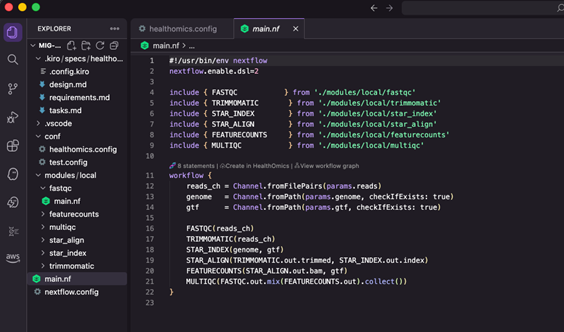
Figure 1 – A Nextflow Project in the IDE
Integration with the Kiro Agent and HealthOmics
Beyond code editing, the extension acts as a bridge between your local development environment and AWS HealthOmics. A built-in HealthOmics Explorer lets you browse workflows and runs from your AWS account without leaving the IDE (Figure 2). You can deploy workflows directly, start and monitor runs, and when something goes wrong, use AI-assisted failure diagnosis to quickly pinpoint and even correct the issue. For completed runs, the extension offers performance analysis to help you optimize resource utilization and cost.
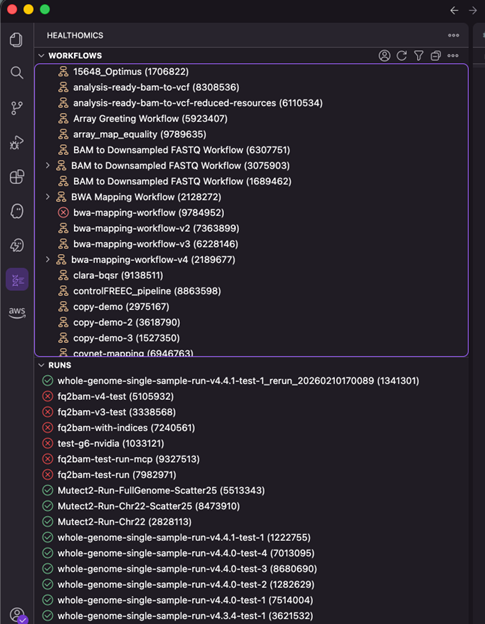
Figure 2: Viewing workflows and recent runs available in your HealthOmics account
A built-in compatibility checker validates your workflows against HealthOmics requirements in real time, catching issues like unsupported directives or incorrect container formats before you ever attempt a deployment (Figure 3).
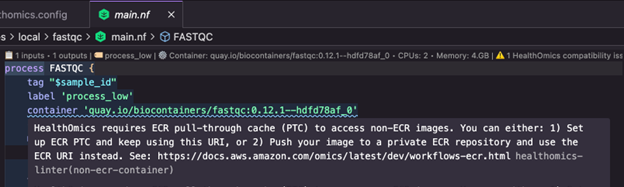
Figure 3: The IDE extension has detected a HealthOmics compatibility issue related to the use of public containers and suggests two options for remediation.
AWS HealthOmics MCP Server Integration
The extension also integrates with the AWS HealthOmics MCP Server, enabling AI-powered workflow management through natural language. You can ask Kiro to package and deploy a workflow, diagnose a failed run, or suggest optimizations — and the extension handles the underlying API calls. Customizable prompt templates make it easy to standardize common operations across your team, and workspace-level configuration keeps your IAM roles, output locations, and run parameters consistent from session to session.
Interactive Guides
To help you get started quickly, the extension also ships with a set of interactive guides covering everything from first-time setup to spec-driven workflow development and cross-platform migration (Figure 4). Each guide walks you through a real workflow with copy-pasteable prompts and direct command links, so you can learn by doing rather than reading documentation.
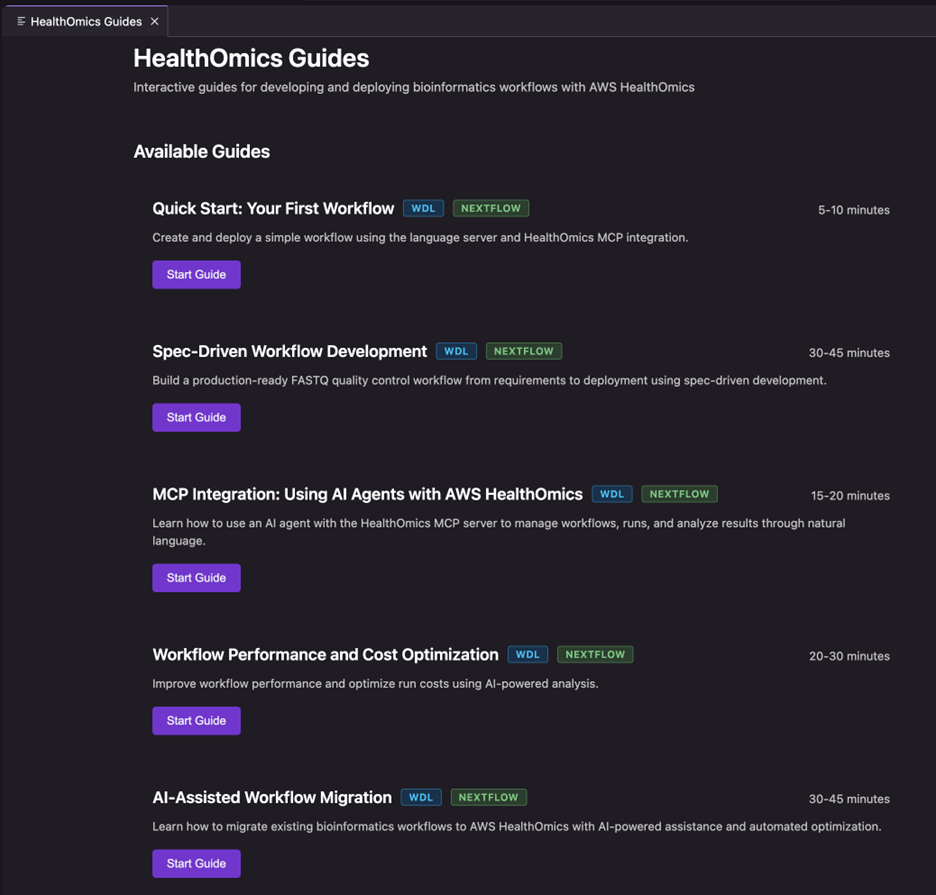
Figure 4: The HealthOmics guides’ panel
You can even ask Kiro to create a totally new workflow definition from only a natural language description (Figure 5). You can either do this in Kiro’s ‘Vibe’ coding mode, or for more complex workflows you can make use of Kiro’s powerful ‘Spec’ coding mode. The Kiro Agent along with the HealthOmics extension and power can take you through the entire development life cycle from coding to deployment, testing, debugging and optimization with AI assistance at every stage – all without leaving your IDE (Figure 6).
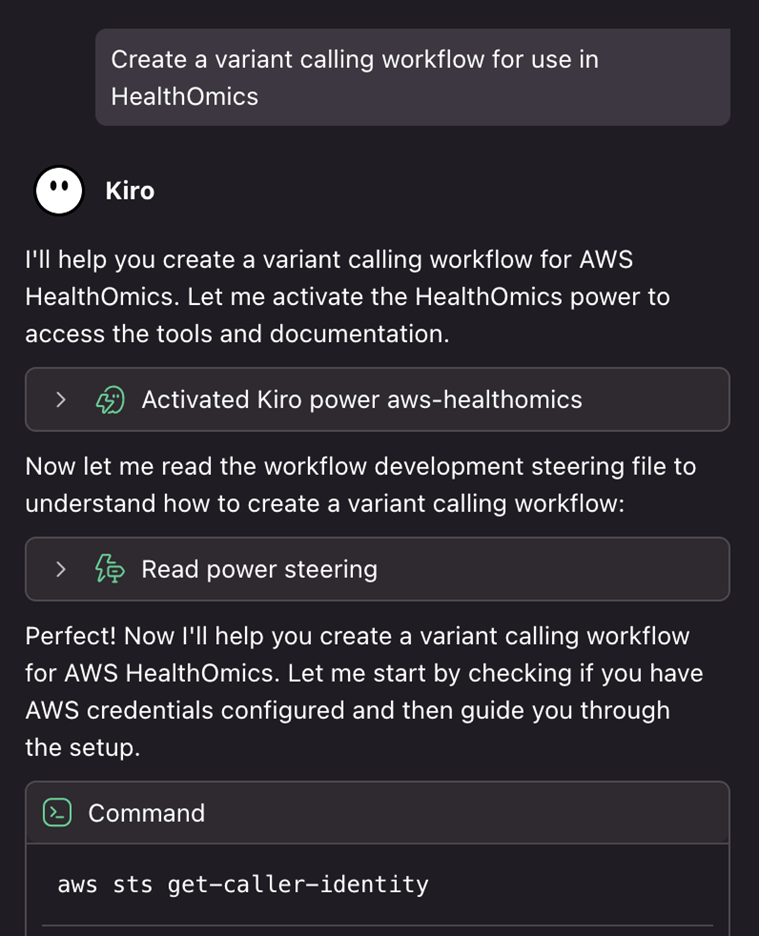
Figure 5: Initiation of a workflow creation process from a natural language prompt. Kiro recognizes that it can gain additional context on the required steps from the HealthOmics Kiro Power
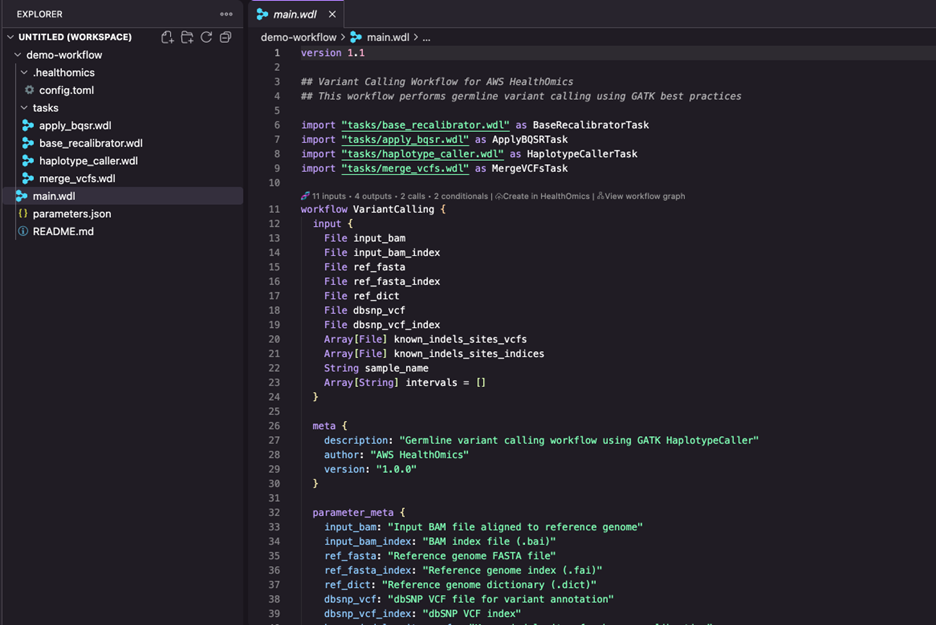
Figure 6: A WDL variant calling workflow generated by Kiro following HealthOmics best practices.
In internal testing, users reported more than a 2x speedup on typical workflow creation and migration tasks when using the extension and power together. In one case, a complex multi-step migration of an RNASeq workflow that had previously taken several days, and multiple failed test runs was completed in under half a day — including a successful test run on HealthOmics. The combination of real-time compatibility validation, AI-guided migration steps, and one-click deployment removes the trial-and-error loop that makes these tasks so time-consuming.
The AWS HealthOmics extension for Kiro and its companion Kiro Power deliver measurable productivity gains achieving more than 2x speedup on typical workflow creation and migration tasks, with complex multi-step migrations that previously took days now completed in under half a day. The extension provides comprehensive IDE language support for WDL and Nextflow with IntelliSense, real-time diagnostics, and seamless AWS HealthOmics integration for direct deployment and monitoring. Real-time compatibility checking eliminates costly trial-and-error cycles, while MCP integration ensures Kiro has access to the latest HealthOmics features and best practices without requiring repeated explanations.
From natural language spec creation to deployment, testing, debugging, and optimization—the entire development lifecycle is now AI-assisted within a single IDE, delivering a development experience that finally matches what modern application developers expect: faster iteration, fewer errors, and more time focused on science rather than infrastructure.
To get started today: download Kiro; install the AWS HealthOmics extension; and add the AWS HealthOmics Power from the Powers panel. Once you’re set up, open the Quick Start guide from the command palette (HealthOmics: Show Guides) and follow along — you’ll go from an empty editor to a deployed workflow in minutes.
此内容由惯性聚合(RSS阅读器)自动聚合整理,仅供阅读参考。 原文来自 — 版权归原作者所有。