







Almost seven years ago, in late 2019, some apps started refusing to open perfectly good documents for bizarre reasons, such as claiming a PDF file was a malicious app that couldn’t be checked. Although this may have become less frequent in recent years, the behaviour and reasons haven’t changed much since. Worst affected has been Preview with PDF files, and when I was struck yet again by this in Tahoe 26.5.1 I thought it was time to re-examine this persistent problem.
Partly because of these problems, I wrote my own PDF viewer Podofyllin which isn’t sandboxed, and I have that set as the default app to open PDF files. However, I have noticed that changing that default to Preview for an individual PDF is likely to result in Preview’s misbehaviour. This has provided a reproducible model for testing Preview’s rejection of valid and benign PDFs, which otherwise can appear almost random.
At the time, a novel extended attribute com.apple.macl was implicated, which was unfortunate as it’s one of the few xattrs that’s protected by SIP, thus can’t be removed in place without disabling SIP globally. Since then, another related xattr has been used widely for security purposes, com.apple.provenance, although that hasn’t been implicated here. There’s also one of the oldest xattrs of them all, com.apple.quarantine, which is now applied promiscuously by sandboxed apps like Preview to files that have never left local storage.
Although contents of com.apple.macl and com.apple.provenance are opaque references, com.apple.quarantine contains a simple string, like
0082;69f902b9;Pages;09540EA0-17C7-42FF-A96A-B3909E45F9DE
where the first four characters are the quarantine flag itself. Most commonly, the third character is set to 8 when that file is still in quarantine, and changed to c when it has cleared quarantine. My utility xattred can not only add its own quarantine xattrs, but can be used to edit them, for example by changing the flag between x8xx and xcxx (or any other values).
All tests were performed on a Mac mini M4 Pro running macOS 26.5.1 Tahoe with a largely vanilla setup, Full Security and SIP enabled.
In all conditions used for testing, Podofyllin opened all PDFs it was asked to, without reporting any problems.
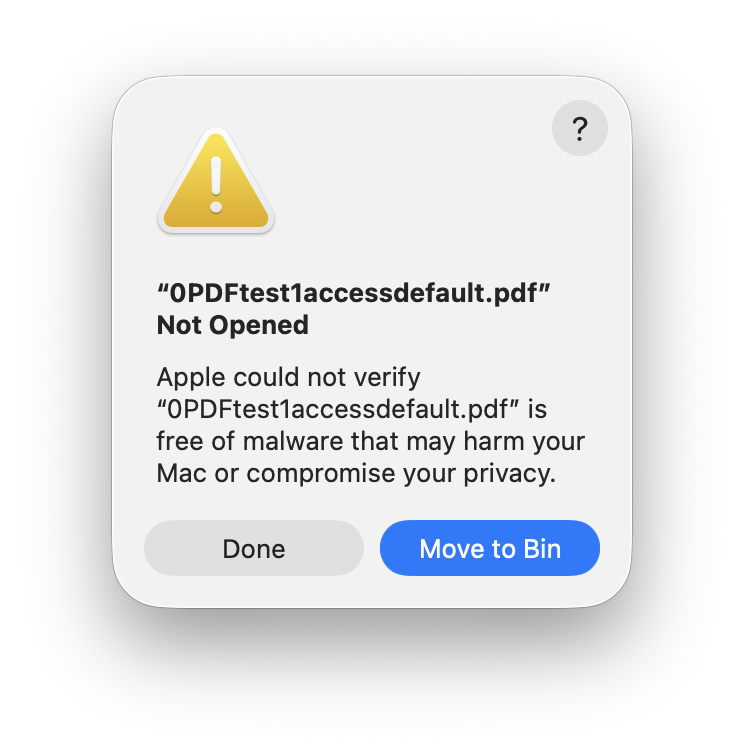
Preview behaved differently, according to how it was asked to open a file, and the flag state of the com.apple.quarantine xattr attached to the PDF file:
8, but the file opened without any warning when the flag was c.8, but the file opened without any warning when the flag was c.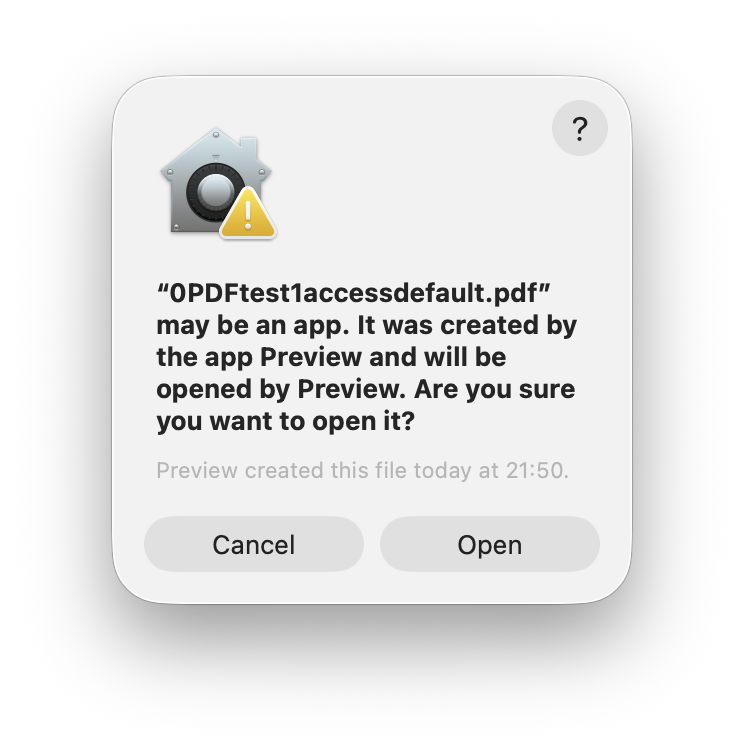
With a reproducible model available, two refusals by Preview were captured in log excerpts. One of those is analysed in detail in the Appendix. It demonstrates that LaunchServices recognised that the PDF document to be opened was in quarantine, which resulted in its checking by XProtect. However, the error reported was -67062, that the document hadn’t been validly signed, and that appears to have been the primary cause of refusal to open that file, and display of the dialog.
Given that Preview adds a com.apple.quarantine xattr to every PDF file it opens, and macOS has no feature to sign editable documents such as PDFs, this system appears set up to fail and block Preview from opening files.
If you try to open a PDF document in Preview and it refuses, use the Open command in the app to do so. Unfortunately, this won’t lead to its quarantine flag being cleared, enabling you to double-click that document successfully in the future. The only sure way to accomplish that is to edit the flag in the document’s com.apple.quarantine extended attribute using xattred. Unlike quarantined apps whose quarantine flags are cleared following Gatekeeper clearance, there doesn’t appear to be any simpler general way to clear the quarantine flag for a document. That is a surprising shortcoming.
What I haven’t considered here is another problem encountered in Preview, when a document has been modified, and the app refuses to save it. That’s best for another time.
To facilitate their inclusion here, angle brackets have been replaced by square brackets throughout. Times are given in arbitrary seconds elapsed. In this case, the file that been double-clicked was named 0PDFtest1accessdefault.pdf.
This starts with a double-click of the document to be opened
0.952801 Finder sendAction:
Some 0.03 seconds later, LaunchServices registers this as the opening of that PDF document, which it matches against the running app Preview
1.087768 com.apple.launchservices Opening document [FSNode 0xb44d90500] { isDir = n, path = [private] } with application [FSNode 0xb44d92ae0] { isDir = y, path = [private] }

1.117540 com.apple.launchservices LAUNCH: Launch of [FSNode 0xb44d92ae0] { isDir = y, path = [private] } matched already running application, 0x0-0x86086
As that document has a com.apple.quarantine xattr, it’s recognised as being in quarantine, and requires special handling
1.117541 com.apple.launchservices QUARANTINE: Setting risk category to LSRiskCategoryUnknown

1.123552 com.apple.launchservices QUARANTINE: Setting paths for LSQItemPathsAEodoc to [private]

1.123580 com.apple.launchservices QUARANTINE: Resolving all quarantine items, caller=669 items=[private] options=LSOpen2Options(preferRunning allowErrorUI userIntent )
That invokes an assessment by XProtect, initially against a short blacklist in XProtect.meta.plist
1.129612 com.apple.xprotect XPAssessment performAnalysisOnFileImpl continueOnError: 0 forcedRulesOnly: 0

1.129877 com.apple.xprotect Using meta-plist from: /var/protected/xprotect/XProtect.bundle/Contents/Resources/XProtect.meta.plist
Then a fuller security assessment is started
1.130742 com.apple.xprotect Calling SecAssessmentCreate with URL [private], context [private]
and just 0.001 seconds later comes the error that the file isn’t signed
1.140203 com.apple.securityd MacOS error: -67062

1.140257 com.apple.securityd temporarySigning type=3 matchFlags=0x0 path=/Users/hoakley/Documents/0PDFtest1accessdefault.pdf

1.140638 com.apple.securityd MacOS error: -67062
Those results are returned, but not revealed, and an XProtect malware scan is started, against its main Yara rules
1.141071 com.apple.xprotect SecAssessment results: [private] (null)

1.141076 com.apple.xprotect Starting malware scan for: [private]

1.141606 com.apple.xprotect Using XProtect rules location: /var/protected/xprotect/XProtect.bundle/Contents/Resources/XProtect.yara
That isn’t reported as being complete before the warning dialog is shown
1.237484 com.apple.AppKit (app) begin modal window ffffffff
此内容由惯性聚合(RSS阅读器)自动聚合整理,仅供阅读参考。 原文来自 — 版权归原作者所有。