


惯性聚合 高效追踪和阅读你感兴趣的博客、新闻、科技资讯
阅读原文 在惯性聚合中打开

推荐订阅源

OSCHINA 社区最新新闻
OSCHINA 社区最新新闻
P
Privacy & Cybersecurity Law Blog
腾讯CDC
freeCodeCamp Programming Tutorials: Python, JavaScript, Git & More
博客园 - 【当耐特】
爱范儿
爱范儿
博客园 - 司徒正美
量子位
Recent Commits to openclaw:main
奇客Solidot–传递最新科技情报
奇客Solidot–传递最新科技情报
K
KPMG report finds enterprise disconnect between AI and its ROI | CIO
博客园_首页
月光博客
月光博客
S
SegmentFault 最新的问题
Hacker News - Newest:
Hacker News - Newest: "LLM"
PCI Perspectives
PCI Perspectives
S
Secure Thoughts
Hacker News: Ask HN
Hacker News: Ask HN
Application and Cybersecurity Blog
罗磊的独立博客
H
Heimdal Security Blog
小众软件
小众软件
Attack and Defense Labs
V
Visual Studio Blog
Exploit-DB.com RSS Feed
Cloudbric
Cloudbric
Stack Overflow Blog
Stack Overflow Blog
L
LINUX DO - 最新话题
Forbes - Security
Forbes - Security
Last Week in AI
Last Week in AI
阮一峰的网络日志
阮一峰的网络日志
W
WeLiveSecurity
IT之家
IT之家
U
Unit 42
H
Hacker News: Front Page
让小产品的独立变现更简单 - ezindie.com
Recent Announcements
The Last Watchdog
The Last Watchdog
www.infosecurity-magazine.com
G
Google Developers Blog
C
CERT Recently Published Vulnerability Notes
Scott Helme
Scott Helme
V
Vulnerabilities – Threatpost
L
LangChain Blog
大猫的无限游戏
大猫的无限游戏
博客园 - 叶小钗
S
Schneier on Security
F
Fortinet All Blogs
Google DeepMind News
T
Threat Research - Cisco Blogs

Whexy Blog

We lost the AIxCC. So, what now? Arm VMM with Apple's Hypervisor Framework Driving WaveShare E‐Paper Display with a Raspberry Pi Pico in MicroPython Use cgroup v2 inside docker containers Annual Hit Piece: Fuzzing Top Conference Paper Debunking Report Solving SSH Key Login Issues on Synology NAS Can SSD Cache Improve Synology NAS Write Speeds? Virtualization is all you need Running Windows Games on Mac Without Virtual Machines Tears of the Kingdom: End of an Era Anonymous CDN Traffic Relay Self-host Relay Service with CDN Home Networking Solution Building Your Own Blog System Connecting Smart Devices to SUSTech Campus Network Function Color Theory Stop Forkin' Around: Faster Creating of Large Processes on Linux PMU Interrupts: How to handle them Asynchronous Mutex Using QEMU to run Linux images on M1 Macbook Alligator In Vest - My first research work Experience Using Several Plugins in Complex LaTeX Projects Variance in Rust Understanding Rust Generic Traits SUSTeam: Ultimate Gaming Platform Inline Assembly Language in C React Learning Notes Building a School Bus Schedule App for Apple Watch 12307 Train Ticket Purchase Platform Building a Super Simple OpenJudge in Two Nights Setting Up Remote Backup for macOS Shell Script for Automatically Logging into SUSTech Campus Network Building a Movie Streaming System in the Dorm
Sakai and Local Folder Synchronization
Whexy · 2020-02-27 · via Whexy Blog

Whexy /

February 27, 2020

The Sakai system that school teachers often use to publish courseware and assignments also supports WebDAV protocol. By configuring local WebDAV services, you can easily download course resources, saving time and effort.

Using Sakai Personal Resource Pages at SUSTech

SUSTech gives each student 1GB of Sakai space. Using WebDAV service, you can open it as a folder locally. First thing to do is change the default password. On the Sakai-Gateway page, click "Reset Password" on the left, enter your school email (with @mail.sustech.edu.cn suffix) on the right page, then press "Send Password". Later you can receive a "Password Reset Reminder" in the WeChat official account "Southern University of Science and Technology" Sakai function page, click to enter and input the password you want to use for WebDAV.

  • Can only input school email
  • Email won't actually receive emails
  • If you don't receive reminders in WeChat official account, please uncheck "Disable WeChat message reminders" in "Sakai" → "Profile" → "Preferences" → "WeChat Messages"

After that, in Sakai site "Resources" functions, you can see the "Upload-Download Multiple Resources" tab. Click to enter, which contains WebDAV connections for this site.

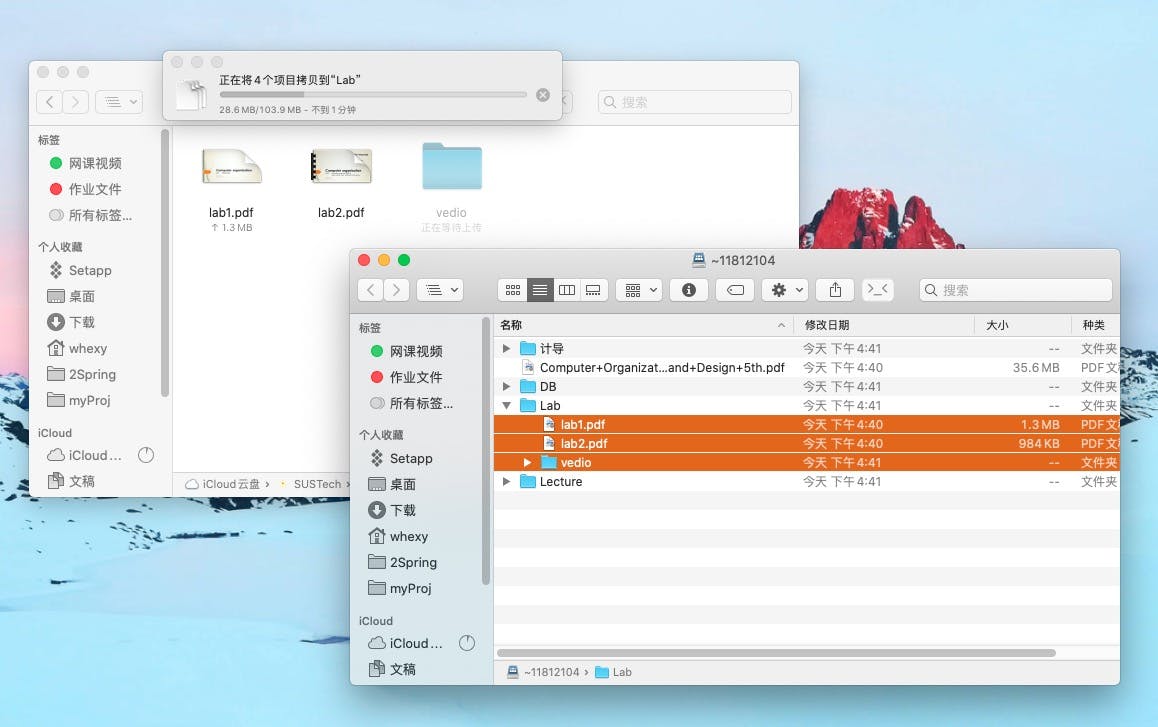
Taking macOS operating system as an example. Press shortcut ⌘+K in "Finder", then input the WebDAV address shown on Sakai. In the login page that appears, input your student ID and the password you changed earlier. You can then open Sakai content as a folder.
© LICENSED UNDER CC BY-NC-SA 4.0