

惯性聚合 高效追踪和阅读你感兴趣的博客、新闻、科技资讯
阅读原文 在惯性聚合中打开

推荐订阅源

Attack and Defense Labs
Cyber Security Advisories - MS-ISAC
Recent Announcements
博客园 - 【当耐特】
博客园 - 三生石上(FineUI控件)
量子位
aimingoo的专栏
aimingoo的专栏
V
V2EX
Vercel News
Vercel News
B
Blog
M
MIT News - Artificial intelligence
OSCHINA 社区最新新闻
OSCHINA 社区最新新闻
The Cloudflare Blog
H
Hackread – Cybersecurity News, Data Breaches, AI and More
cs.AI updates on arXiv.org
Hacker News: Ask HN
Hacker News: Ask HN
TaoSecurity Blog
TaoSecurity Blog
N
News and Events Feed by Topic
D
DataBreaches.Net
Blog — PlanetScale
Blog — PlanetScale
S
Secure Thoughts
U
Unit 42
博客园 - 叶小钗
cs.CV updates on arXiv.org
Hacker News - Newest:
Hacker News - Newest: "LLM"
N
News | PayPal Newsroom
Help Net Security
Help Net Security
S
Security Affairs
Microsoft Security Blog
W
WeLiveSecurity
博客园 - Franky
Forbes - Security
Forbes - Security
Microsoft Azure Blog
博客园_首页
Schneier on Security
I
InfoQ
B
Blog RSS Feed
大猫的无限游戏
大猫的无限游戏
A
About on SuperTechFans
Webroot Blog
Webroot Blog
AWS News Blog
AWS News Blog
Last Week in AI
Last Week in AI
Security Archives - TechRepublic
C
CERT Recently Published Vulnerability Notes
N
News and Events Feed by Topic
阮一峰的网络日志
阮一峰的网络日志
L
Lohrmann on Cybersecurity
SecWiki News
SecWiki News
Recent Commits to openclaw:main
J
Java Code Geeks

博客园 - 威少小二orz

团结引擎抖音小游戏一定要手动填缓存资源域名 团结引擎+Addressable+Instant Game打包抖音小游戏 团结引擎发布抖音小游戏(十万个坑已踩完) 团结引擎发布小游戏区分不同平台 团结引擎发布小游戏与js版本SDK的互相调用 Unity发布京东小游戏 LayerMask的使用规范 Unity使用https请求握手失败的处理方案 【MAUI开发】一、初识MAUI Android中使用GSON解析JSON数据 游戏软著渠道的用户协议和隐私协议方案(启动显示方案) C#文件夹复制 C#在Json序列化中动态忽略某些属性或字段 安卓多个Activity大退时自动重启的问题处理 C#中接收到的Json数据中key为数字的问题处理 对于UniWebView这种组件违规获取信息的处理 TapTap实名认证-Android Unity使用Get和Post传递json数据并转换成class对象 Unity获取手机本地应用以及调起apk安装、启动app、安装完成回调 Unity接入穿山甲GroMore广告——重构偏2(Banner广告)
Unity RectTransform中使用stretch模式时代码动态控制Left、Top、Right、Bottom
威少小二orz · 2023-10-16 · via 博客园 - 威少小二orz

Unity RectTransform中使用stretch模式时代码动态控制Left、Top、Right、Bottom

对于屏幕进行适应的代码:

  var rect = panelObj.AddComponent<RectTransform>();
            rect.anchorMin = Vector2.zero;
            rect.anchorMax = Vector2.one;
            rect.SetSizeWithCurrentAnchors(RectTransform.Axis.Horizontal, Screen.width);
            rect.SetSizeWithCurrentAnchors(RectTransform.Axis.Vertical, Screen.height);

在横向stretch、纵向stretch模式下:
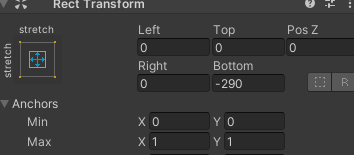
对于Left、Top、Right、Bottom进行修改:

            rect.offsetMin = Vector2.zero;//对应Left、Buttom  //new Vector2(x,y);,x对应Left,y对应Buttom
            rect.offsetMax = Vector2.zero;//对应Right、Top  //new Vector2(x,y);,x对应Right,y对应Top

在横向stretch、纵向top模式下:
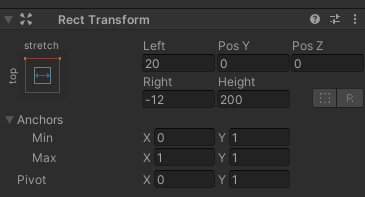
 offsetMin对应Left、(-Height)

offsetMax对应-Right、PosY

在横向stretch、纵向middle械式下:
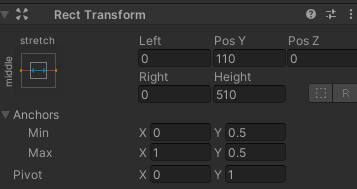
 offsetMin对应Left、(-Height)

offsetMax对应-Right、PosY

PosY会自动根据位置变化。

在横向stretch、纵向button模式下:
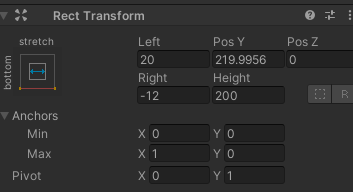
 offsetMin对应Left、(-Height)

offsetMax对应-Right、PosY

PosY会自动根据位置变化。

而上下滑动,一般用的最多的是:

在横向stretch、纵向top模式,也就是本文中的图二。