惯性聚合 高效追踪和阅读你感兴趣的博客、新闻、科技资讯
阅读原文 在惯性聚合中打开

推荐订阅源

MongoDB | Blog
MongoDB | Blog
V
V2EX
让小产品的独立变现更简单 - ezindie.com
有赞技术团队
有赞技术团队
freeCodeCamp Programming Tutorials: Python, JavaScript, Git & More
罗磊的独立博客
月光博客
月光博客
爱范儿
爱范儿
D
Docker
U
Unit 42
P
Proofpoint News Feed
I
InfoQ
腾讯CDC
OSCHINA 社区最新新闻
OSCHINA 社区最新新闻
L
LangChain Blog
V
Visual Studio Blog
IT之家
IT之家
Vercel News
Vercel News
G
Google Developers Blog
M
MIT News - Artificial intelligence
美团技术团队
The GitHub Blog
The GitHub Blog
阮一峰的网络日志
阮一峰的网络日志
MyScale Blog
MyScale Blog

博客园 - 所长

xilinx axi qspi V3.2 slave interrupt lwip 快速 高频 短帧发送 测试 If your port already typedef's in_addr_t, define IN_ADDR_T_DEFINED to prevent this code from redefining it. FPGA Verilog 线性反馈移位寄存器(LFSR) Libero FIFO Controller without Memory Software-Defined Radio for Engineers 一 频谱仪 N9020A 操作步骤记录 FPGA-CAN MAC 层 IP 核测试(二) 源码阅读 libero reg 编译时 占用 RAM 资源 而不是 LUT 资源 加扰和解扰 FPGA-CAN MAC 层 IP 核测试(一) 上板实测 Microchip SoftConsole v2022.2-RISC-V-747 polarfire soc 裸机例程中 链接文件 mpfs-envm-lma-scratchpad-vma.ld 分析 FlashPro5 导致 window11 蓝屏 libero verilog 模块例化时,信号不存在 默认是 不连接 A3P250 在线 debug 抓取信号 Identify 在线逻辑分析仪 MPFS250T MSS 引脚 上下拉配置 如何在 libero 中 写一个 axi4 slave 总线的 IP核 可以 和 CoreAXI4Interconnect 连接 (五) 官方参考 verilog 按键消抖模块 如何在 libero 中 写一个 axi4 slave 总线的 IP核 可以 和 CoreAXI4Interconnect 连接 (四) axi-lite 信号抓取 libero Active Probes 如何在 libero 中 写一个 axi4 slave 总线的 IP核 可以 和 CoreAXI4Interconnect 连接 (三) C代码测试 访问卡死 如何在 libero 中 写一个 axi4 slave 总线的 IP核 可以 和 CoreAXI4Interconnect 连接 (二) axi-lite 如何在 libero 中 写一个 axi4 slave 总线的 IP核 可以 和 CoreAXI4Interconnect 连接(一)libero 设置把模块信号变总线方式 libero 2025.2 Macro Library User Guide for SmartFusion 2 and IGLOO 2 FPGAs 如何在 libero 中 写一个 axi4 slave 总线的 IP核 可以 和 CoreAXI4Interconnect 连接 (零) MSS CFG MPFS250T FLASH 只有 128KB 调整代码优化 AD9361 SPI no-os 文件移植 SoftConsole MPFS250T 初学(七) 初始化日志记录 AD9361 SPI no-os 文件移植 SoftConsole MPFS250T 初学(六) 开启 日志打印 Calibration TIMEOUT (0x247, 0x2) AD9361 SPI no-os 文件移植 SoftConsole MPFS250T 初学(五) ad9361_check_cal_done 卡死
libero smartdebug
所长 · 2026-04-13 · via 博客园 - 所长

PolarFire® SoC FPGA

架构、应用、安全性特性、设计环境和设计硬件

image

Libero SoC v2025.2

SmartDebug User Guide

libero v12.1

SmartDebug User Guide

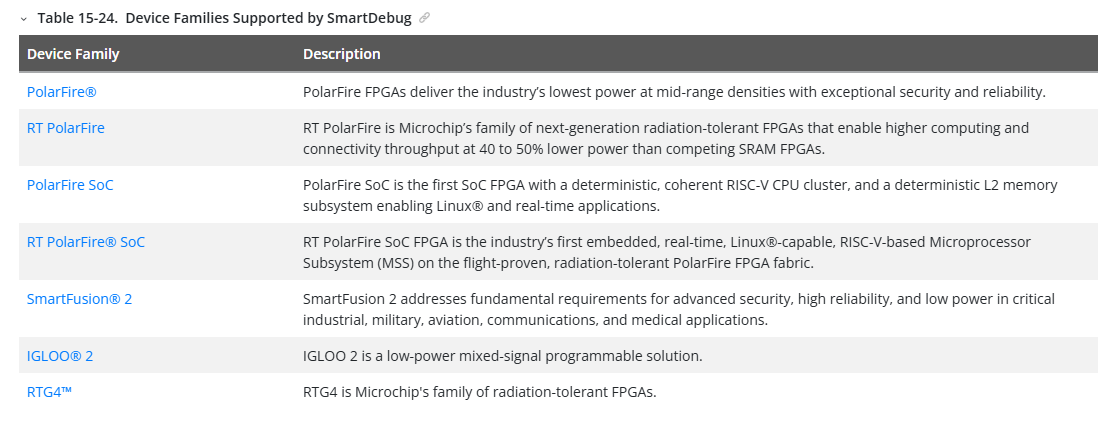
支持的芯片

image

15.3.1 SmartDebug 入门(libero help)


SmartDebug 允许您查询和查看嵌入式硅片特征及设备状态。以程描述了使用SmartDebug的最常见步骤。

注:使用SmartDebug时,将PC上的FlashPro程序器连接到目标设备。

  1. 创造你的设计。
  2. 展开调试设计,并在设计流程窗口中双击“SmartDebug Design”。SmartDebug 会为你的目标设备打开。
  3. 点击查看设备状态以查看设备状态报告并检查问题。

Expand Debug Design and double click SmartDebug Design in the Design Flow window.
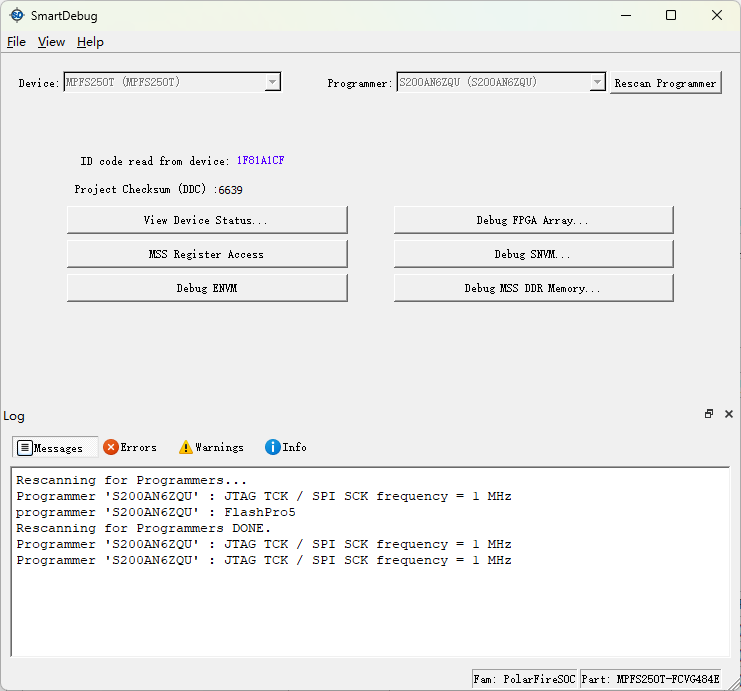
image

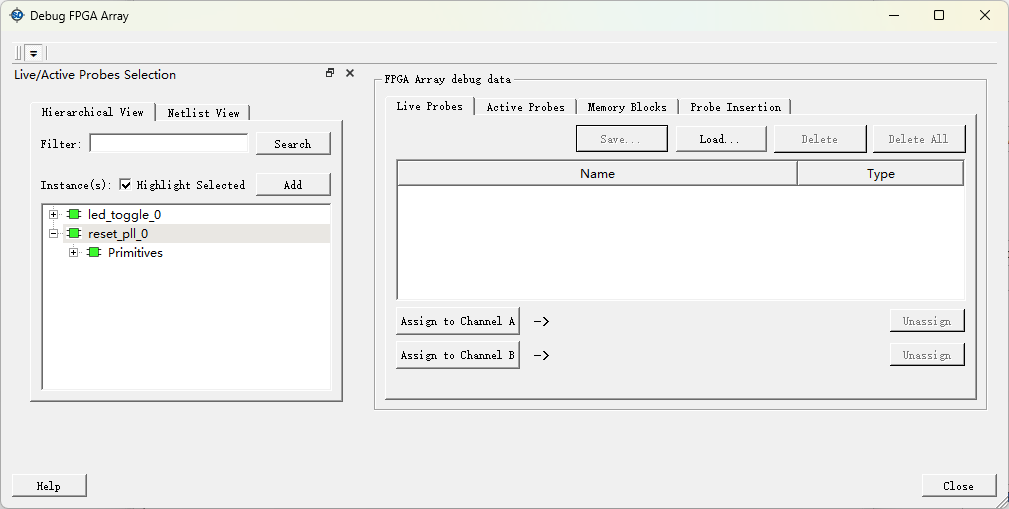
 单击 debug FPGA Array

image

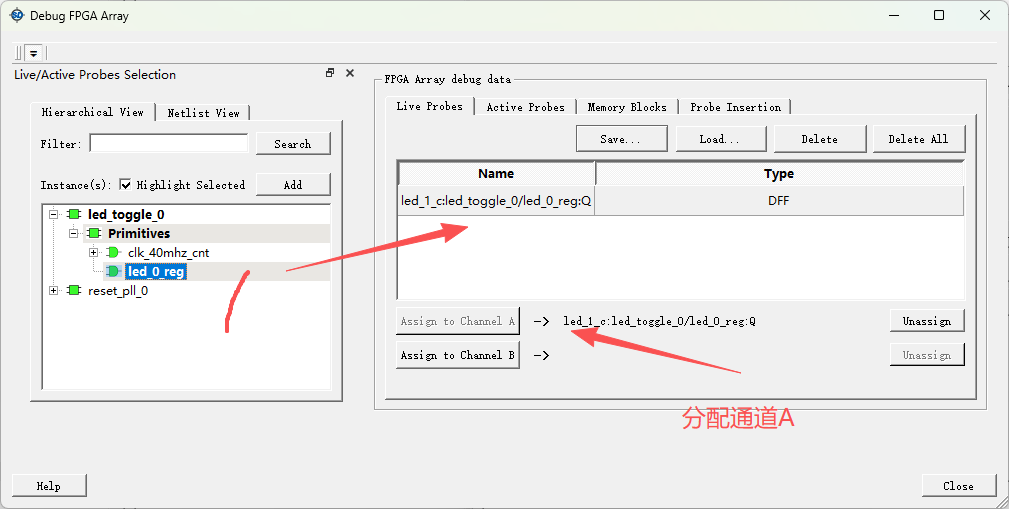
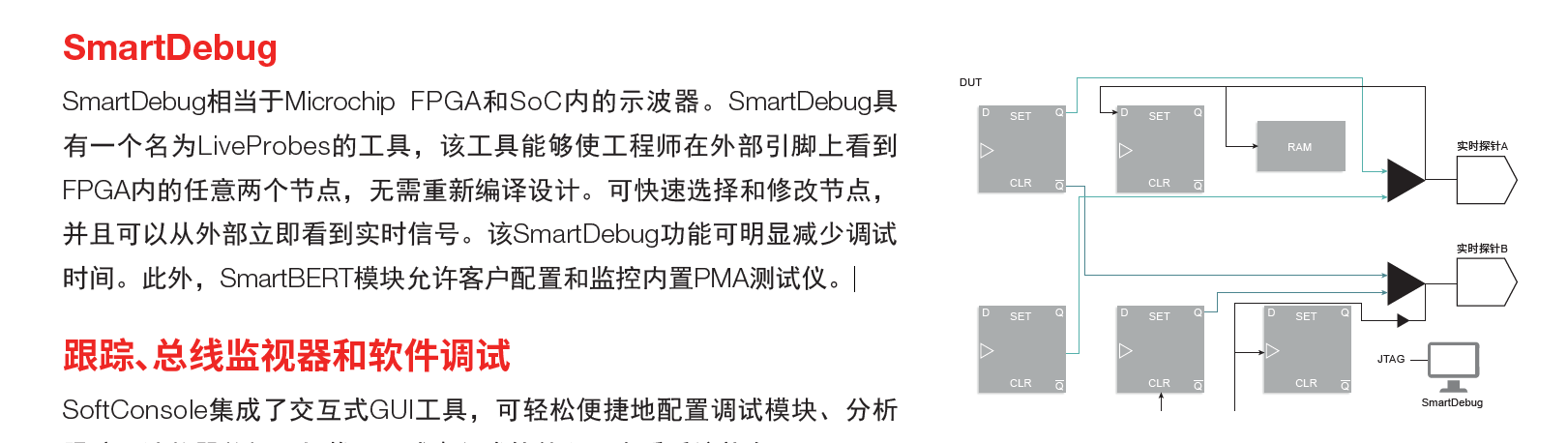
Live probes: 实时探针

Actice Probes 

image

还在学习中 

posted on 2026-04-13 15:11  所长  阅读(5)  评论()    收藏  举报