


惯性聚合 高效追踪和阅读你感兴趣的博客、新闻、科技资讯
阅读原文 在惯性聚合中打开

推荐订阅源

The GitHub Blog
The GitHub Blog
S
SegmentFault 最新的问题
L
LangChain Blog
Simon Willison's Weblog
N
News and Events Feed by Topic
Exploit-DB.com RSS Feed
WordPress大学
WordPress大学
M
MIT News - Artificial intelligence
A
About on SuperTechFans
Microsoft Security Blog
I
Intezer
Know Your Adversary
Know Your Adversary
H
Heimdal Security Blog
博客园 - 叶小钗
B
Blog RSS Feed
F
Fortinet All Blogs
Hacker News: Ask HN
Hacker News: Ask HN
A
Arctic Wolf
小众软件
小众软件
Help Net Security
Help Net Security
MongoDB | Blog
MongoDB | Blog
aimingoo的专栏
aimingoo的专栏
G
Google Developers Blog
Forbes - Security
Forbes - Security
Latest news
Latest news
AI
AI
I
InfoQ
H
Hackread – Cybersecurity News, Data Breaches, AI and More
C
CXSECURITY Database RSS Feed - CXSecurity.com
W
WeLiveSecurity
C
Cybersecurity and Infrastructure Security Agency CISA
人人都是产品经理
人人都是产品经理
Cyberwarzone
Cyberwarzone
奇客Solidot–传递最新科技情报
奇客Solidot–传递最新科技情报
J
Java Code Geeks
Engineering at Meta
Engineering at Meta
C
Cyber Attacks, Cyber Crime and Cyber Security
O
OpenAI News
博客园 - 【当耐特】
T
Threat Research - Cisco Blogs
GbyAI
GbyAI
U
Unit 42
D
Darknet – Hacking Tools, Hacker News & Cyber Security
G
GRAHAM CLULEY
Apple Machine Learning Research
宝玉的分享
宝玉的分享
Google DeepMind News
T
Threatpost
T
The Blog of Author Tim Ferriss
罗磊的独立博客

Feed of liolok

Containerize Steam with systemd-nspawn Containerize Android Studio with systemd-nspawn Run Desktop App with systemd-nspawn Container Oculus Quest 2 Usage Note Set Environment Variables with pam_env Install Arch Linux on Acer Swift 3 SF313-52 Run Mastodon Server on Arch Linux VPS V2Ray Subscription Parse Manage Dotfiles with Git and Stow Run SS and MTProxy Server on AWS How to Add Image to Hexo Blog Post Build Blog with Hexo and GitHub Pages
Fix Broken URLs of My Site
2022-04-18 · via Feed of liolok

cd ~{,/zhs/}

Problem

URLs should’ve been permanent, however due to kinds of situations, URLs that referenced by other websites will lead to 404 page or even worse.

As for my own situation: I tried several URL styles in this few years, for example in URL of an article written in Chinese, should I include Chinese or using English only, and using title case or not. I also changed my mind about using GitHub Pages subdomain, migrated to my own custom domain.

When you look up for something on Internet, sometimes webpage or even the whole website just can’t open. It may be shut down and unmaintained for good, but also may be in a situation like mine: article migrated to a new URL.

I always feel disappointed when I happen to open a broken URL, so it’s such a Karma that I broke my own URLs: People consider my article worthy to reference, I should not fail them and leave things broken.

I came up with two solutions:

  1. Inform people that my webpage has been migrated, request for updating the reference link:
    • Pro: Seamless visiting experience
    • Con: How to reach people? I’d also feel kind of shame to trouble others for my own problem.
  2. Perform automatically redirection on old broken webpage:
    • Pro: No need to change the references
    • Con: May be bad for visiting experience, confusing, breaking.

Find Referenced Broken URLs

More realistic case is: my article has been not referenced at all, there is nothing to fix, nobody would ever click on the broken URL.

It’s the referenced broken URLs that should be concerned, I tried to find them over search engine, found some but still felt not quite satisfied.

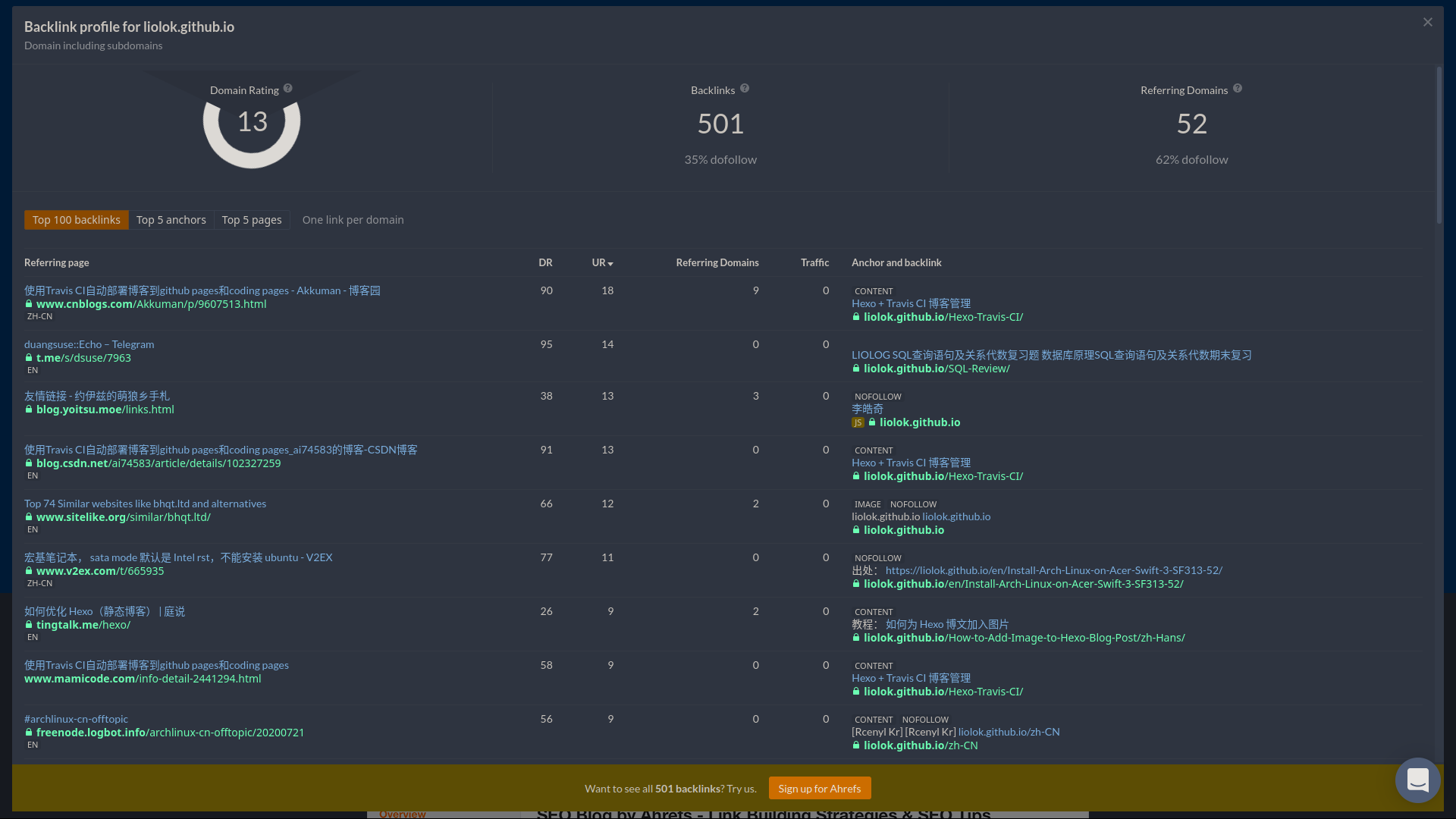
So this time I discovered this online tool: ahrefs.com/backlink-checker.

Using for free charge without signing up, you can reverse search:

  • Certain exact URL
  • All URLs under certain domain (forced including subdomain)

on their “backlinks”, limited to top 100 results.
Old URL Auto Redirect

Redirection could also be implement by HTTP status code 301/302, but this method doesn’t suit my case so I didn’t dig in.

Write a HTML on old URL to achieve automatic redirection to new URL:

Note: If using directory style URL (pretty URL), like me, the HTML file should locate under corresponding directory with name index.html.

<!DOCTYPE html>
<html lang="en-US">

<head>
    <meta charset="utf-8">
    <meta http-equiv="X-UA-Compatible" content="IE=edge">
    <meta name="viewport" content="width=device-width, initial-scale=1">
    <meta http-equiv="refresh" content="3; url=https://liolok.com/v2ray-subscription-parse/">
    <link rel="canonical" href="https://liolok.com/v2ray-subscription-parse/">
    <title>Site Moved</title>
</head>

<body>
    <h1>Site Moved</h1>
    <p><a href="https://liolok.com/v2ray-subscription-parse/">Redirecting to my new site...</a></p>
</body>

</html>

Core code is that line of meta refresh. content parameter contains a delay interval like 3 or 5 seconds, and the new URL to redirect.

Conclusion

To keep permanent URLs available, basic solutions are:

  1. Do NOT change path to your webpage
  2. Do NOT change domain of your website
  3. Do NOT lose your domain
  4. Hope human civilization not falling so hard that Internet down for good
  5. Try to live forever for maintaining your website

That’s all, wish you guys good health and long live.