



惯性聚合 高效追踪和阅读你感兴趣的博客、新闻、科技资讯
阅读原文 在惯性聚合中打开

推荐订阅源

Stack Overflow Blog
Stack Overflow Blog
WordPress大学
WordPress大学
罗磊的独立博客
S
Secure Thoughts
Schneier on Security
博客园 - Franky
www.infosecurity-magazine.com
Exploit-DB.com RSS Feed
爱范儿
爱范儿
cs.CV updates on arXiv.org
Hacker News: Ask HN
Hacker News: Ask HN
PCI Perspectives
PCI Perspectives
Google DeepMind News
S
Security Affairs
SecWiki News
SecWiki News
博客园 - 聂微东
Security Archives - TechRepublic
Google Online Security Blog
H
Heimdal Security Blog
S
Security @ Cisco Blogs
Engineering at Meta
Engineering at Meta
C
CXSECURITY Database RSS Feed - CXSecurity.com
Cloudbric
Cloudbric
Threat Intelligence Blog | Flashpoint
V
Visual Studio Blog
P
Proofpoint News Feed
Project Zero
Project Zero
T
Threat Research - Cisco Blogs
Webroot Blog
Webroot Blog
Blog — PlanetScale
Blog — PlanetScale
K
KPMG report finds enterprise disconnect between AI and its ROI | CIO
W
WeLiveSecurity
Last Week in AI
Last Week in AI
月光博客
月光博客
Microsoft Azure Blog
M
MIT News - Artificial intelligence
有赞技术团队
有赞技术团队
S
Securelist
GbyAI
GbyAI
Application and Cybersecurity Blog
C
CERT Recently Published Vulnerability Notes
Recent Commits to openclaw:main
Cyberwarzone
Cyberwarzone
B
Blog RSS Feed
P
Palo Alto Networks Blog
H
Hacker News: Front Page
D
Docker
雷峰网
雷峰网
Latest news
Latest news
Microsoft Security Blog

Video Conferencing Blog

How to create a "Let's Encrypt" certificate on Windows TrueConf AI Server 1.1: Detecting Speakers by Voice, Uploading Recordings, and Transcription Search — Video Conferencing Blog TrueConf Server: Security Updates for June 2026 — Video Conferencing Blog TrueConf 4.0 for iOS: Voice Messages and Additional Statuses — Video Conferencing Blog Self-Hosted Video Conferencing in Enterprise Environments Business Document Sharing: Secure Files Collaboration + 5 Best Tools TrueConf Room 5.1: Setting Up an Additional Video Stream and Convenient Content Sharing from a TrueConf Group 2.1 Major Update: AI, New Interface, Tablet Control, and Much More — Video Conferencing 10 Best Free Video Conferencing Tools with No Time Limit TrueConf Earns “Top Performer” Recognition in FeaturedCustomers’ Spring 2026 Report — Video TrueConf 2.0.1 Add-ons for Corporate Calendars — Video Conferencing Blog 10 Best Video Meeting Tools in 2026 TrueConf 3.2 for Android: Voice Messages and PIN to Access the App — Video Conferencing Blog Video Conferencing 2026: A Complete Guide to 9 Leading Platforms TrueConf Calendar Connector 2.3: Changes and Improvements — Video Conferencing Blog TrueConf Server: Security Updates for April 2026 — Video Conferencing Blog TrueConf AI Server 1.0.2: Conference Summary — Video Conferencing Blog TrueConf Server 5.5.4: Changes and Improvements — Video Conferencing Blog TrueConf 8.5.4: Changes and Improvements — Video Conferencing Blog How to install TrueConf client application for Linux TrueConf at GITEX Africa 2026 — Video Conferencing Blog TrueConf Server 5.5.3: User Connection History, List of Videos in the Personal Area — Video TrueConf Calendar Connector: What's New in Versions 2.1 and 2.2 — Video Conferencing Blog TrueConf 3.1.2 for Android TV: Updated UI — Video Conferencing Blog What to do if file transfer is not working? — Video Conferencing Blog TrueConf 8.5.3: Useful Changes and Improvements — Video Conferencing Blog TrueConf MCU 2.2: New Layout Editor, Improved Cascading, and Security Settings — Video Conferencing Blog TrueConf at Convergence India 2026 — Video Conferencing Blog TrueConf 3.1.2 for Android: List of Upcoming Meetings and New Noise Suppression — Video Conferencing TrueConf Server: Security Updates for March 2026 — Video Conferencing Blog Future of secure collaboration at GITEX Africa 2026 — Video Conferencing Blog Important TrueConf Server security updates — Video Conferencing Blog No outages in collaboration: Power Grid Bangladesh adоpts TrueConf — Video Conferencing Blog Filtering LDAP accounts — Video Conferencing Blog
Password Management in TrueConf — Video Conferencing Blog
Theodor Lazarev · 2026-05-07 · via Video Conferencing Blog

When using TrueConf solutions, you will often need to access your personal profile and account as a user, or the server software admin panel as an administrator. This article explains how to set or change passwords, as well as the reasons why the password configuration option may be unavailable.

User Passwords

Changing a TrueConf Server User Password

If you need to change your password, follow these steps:

No further confirmation will be required. Your password has been changed!

Why Password Change May Be Unavailable

The password change function may not always be available—for example, if your administrator has configured integration with Active Directory (or another directory service). If you have forgotten your old password or wish to change it, you will need to contact your system administrator. Their contact details can usually be found on your video conferencing server’s guest page.

Personal Data Security – Can the Administrator See Your Password?

An important question regarding user data security is whether passwords could be leaked.

Regardless of the credential storage mode (Registry or LDAP), passwords on the TrueConf Server side always remain inaccessible to the server administrator. Therefore, if you forget your password, it cannot be retrieved—only reset, allowing you to set a new one. Additionally, when using local passwords, an administrator may set a temporary password for your initial account login, which you will be required to change upon first authentication. When accounts are synchronized from LDAP/AD, passwords are managed entirely by the directory service.

TrueConf Server Administrator Passwords

In addition to user passwords, there are also passwords for administrators to access the server panel.

The administrator password is the same as that used for user accounts belonging to the designated administrator group. For more details, please refer to our documentation.

On Linux operating systems, you can change your password using the passwd command. Let’s consider two possible scenarios:

  • If you are logged into the OS under the account for which you want to change the password, simply run:
  • passwd

  • If you are logged into the OS under one account but want to change the password for another:
  • sudo passwd [user]

After entering the command, you will be prompted to enter your current password and then set a new one.

Note: When changing passwords on CentOS, there are specific considerations related to extended file access control lists (ACLs). After changing a user account password in the OS, the following command must be executed (as an administrator):

sudo setfacl -m u:trueconf:r /etc/shadow

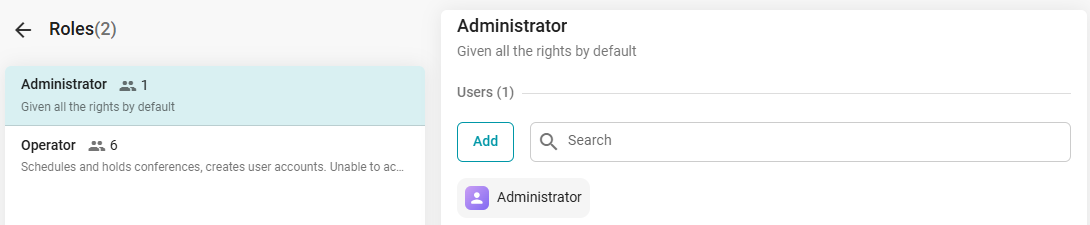
Administrator and Operator Passwords in TrueConf MCU

TrueConf MCU has two roles for accessing its management panel: Administrator and Operator. To learn about the permissions associated with these roles, please refer to our documentation.

By default, immediately after deploying TrueConf MCU, the administrator credentials are as follows:

  • Username: admin
  • Password: admin

You can change your own login credentials, as well as those for users with the Operator role, after completing the registration procedure. This can be done in the Contact Card menu under the Account section:
Password Management in TrueConf 5