



惯性聚合 高效追踪和阅读你感兴趣的博客、新闻、科技资讯
阅读原文 在惯性聚合中打开

推荐订阅源

Microsoft Azure Blog
S
Securelist
V
Vulnerabilities – Threatpost
C
Cyber Attacks, Cyber Crime and Cyber Security
Schneier on Security
Cyberwarzone
Cyberwarzone
Simon Willison's Weblog
Hacker News - Newest:
Hacker News - Newest: "LLM"
P
Palo Alto Networks Blog
T
Troy Hunt's Blog
SecWiki News
SecWiki News
Security Archives - TechRepublic
T
The Blog of Author Tim Ferriss
Project Zero
Project Zero
Microsoft Security Blog
The Register - Security
OSCHINA 社区最新新闻
OSCHINA 社区最新新闻
J
Java Code Geeks
F
Full Disclosure
阮一峰的网络日志
阮一峰的网络日志
www.infosecurity-magazine.com
Attack and Defense Labs
Know Your Adversary
Know Your Adversary
WordPress大学
WordPress大学
PCI Perspectives
PCI Perspectives
N
News | PayPal Newsroom
The Last Watchdog
The Last Watchdog
酷 壳 – CoolShell
酷 壳 – CoolShell
P
Privacy & Cybersecurity Law Blog
P
Proofpoint News Feed
V
Visual Studio Blog
C
CERT Recently Published Vulnerability Notes
H
Help Net Security
K
KPMG report finds enterprise disconnect between AI and its ROI | CIO
云风的 BLOG
云风的 BLOG
月光博客
月光博客
T
The Exploit Database - CXSecurity.com
I
InfoQ
大猫的无限游戏
大猫的无限游戏
钛媒体:引领未来商业与生活新知
钛媒体:引领未来商业与生活新知
U
Unit 42
腾讯CDC
小众软件
小众软件
V2EX - 技术
V2EX - 技术
罗磊的独立博客
Cloudbric
Cloudbric
Recorded Future
Recorded Future
IT之家
IT之家
Google DeepMind News
C
CXSECURITY Database RSS Feed - CXSecurity.com

Sanity.io

A Board Game agent built using Sanity Context and Vercel's AI SDK | Sanity Build a prototype with Claude Code that your whole team can edit | Sanity What’s New - May 2026 | Sanity I built a London pub guide with v0 and the Sanity MCP in six hours. Here's what I learned. | Sanity Build a conference concierge with Agent Context and Anthropic | Sanity Build a content-aware Telegram agent with Vercel AI SDK and Chat SDK | Sanity How I used Agent API to generate photos for my family’s recipes | Sanity What’s New April - 2026 | Sanity Better context, better matches: An AI love story (for dogs) | Sanity How to write for an agent | Sanity Content Agent, meet Slack: AI content operations in your workflow | Sanity Structure powers intelligence | Sanity Your agent needs better content. Here's how to give it. | Sanity How to serve content to agents (a field guide) | Sanity Sanity TypeGen GA: Automatic TypeScript types for content and GROQ | Sanity Sanity is now available on the Vercel Marketplace | Sanity The logo soup problem (and how to solve it) | Sanity Content Releases: From scattered updates to coordinated publishing | Sanity What's New - February 2026 | Sanity How we solved the agent memory problem | Sanity v0 Builder Challenge: The winners | Sanity Introducing: Sanity Agent Skills | Sanity Content Agent: Days of work in one conversation | Sanity Our Sanity Values | Sanity Open Source Pledge 2025: Stepping up when it matters | Sanity v0 builder challenge: $3000 in prizes | Sanity Why AI Breaks Without Structured Content Operations | Sanity What’s New January - 2026 | Sanity BFCM 2025: What teams built when infrastructure stopped being the problem | Sanity How AI shaped holiday shopping and what it means for content in 2026 | Sanity Sanity Studio v5: Embracing React 19 | Sanity You’ll need a CMS eventually. Let your agent set it up. | Sanity “You should never build a CMS” | Sanity AI Content Operations: A 30-Day Implementation Guide | Sanity What’s New December - 2025 | Sanity Scheduled Drafts: Stop manually publishing content at midnight | Sanity What’s New November - 2025 | Sanity Everything *[NYC] 2025 recap: A day of AI, Content Operations, and Culture | Sanity Clankers and content operations | Sanity Content Agent: AI that understands your structured content is here | Sanity Why design-driven content modeling creates technical debt, not velocity | Sanity What's New October - 2025 | Sanity From studio to inbox: How Kevin Green eliminated email campaign friction | Sanity The content editor's guide to content operations [E-commerce edition] | Sanity styled-components maintenance mode: A 40% faster fork | Sanity From zero code to a live website in 7 hours (thanks, Cursor!) | Sanity First attempt will be 95% garbage: A staff engineer's 6-week journey with Claude Code | Sanity Internationalization is more than translating words | Sanity What's New - September 2025 | Sanity We just deleted our 35k-member community Slack | Sanity What's New - August 2025 | Sanity The engineer's guide to content operations [E-commerce edition] | Sanity SEO for AI: Evolving from Web Pages to the Content Lake | Sanity What's New - July 2025 | Sanity Sanity Studio v4: A major version bump for a minor reason | Sanity What's New - June 2025 | Sanity Dashboard and Insights: Your New Content HQ | Sanity Canvas: AI-accelerated, context-aware, freeform authoring | Sanity Agent Actions: AI building blocks for structured content | Sanity Functions: Life beyond pressing publish | Sanity A new era for content applications with Sanity App SDK | Sanity The end of CMS era and our $85M Series C. | Sanity What's New – May 2025 | Sanity What's New – April 2025 | Sanity Pushing all the envelopes with ambitious content | Sanity Self-hosting is only free if your time is worth nothing | Sanity Content that lasts: Scaling beyond your frontend | Sanity The Live Content API is now Generally Available | Sanity The future beyond AI chat bots | Sanity Learning the new skill of working with AI | Sanity What's New - March 2025 | Sanity Give it in plain text: Making your content AI-Ready | Sanity No More 'DO NOT PUBLISH': Introducing Content Releases | Sanity React in 2025, what's next? | Sanity The final boss of front-end: block editors | Sanity Introducing Sanity for Startups | Sanity A block content editor that loves you back | Sanity A Black Friday Snooze Fest: Massive Traffic, No Drama | Sanity How to make a recipe site that scales well | Sanity The Sanity Winter Release 2024 | Sanity AVIF Arrives, Sanity’s Promise Fulfilled | Sanity Sanity joins the Open Source Pledge | Sanity Your content is now Live by default | Sanity Begin Team to Join Sanity | Sanity Sanity Digest - September '24 Edition | Sanity Sanity partners with Google. Now live on the Google Cloud Marketplace. | Sanity Sanity Digest - August ‘24 Edition | Sanity Now playing: the latest Mux Video Input plugin for Sanity | Sanity Community Digest - June ‘24 Edition | Sanity Community Digest - May ‘24 Edition | Sanity Guide to Sanity's newest product announcements | Sanity AI and Content Creation: A Leader's Guide | Sanity Of course, you should be able to type your content quickly! | Sanity New to AI Assist: translation, reference suggestions, image generation | Sanity Speak the language of your editors: Sanity Studio UI localization | Sanity Introducing the new Sanity Growth plan to serve collaborative teams | Sanity Presentation: Work faster than ever with structured content | Sanity Goodbye Feedback Frenzy, Hello Sanity Studio Comments! | Sanity Easing into the App Router with the Sanity Toolkit for Next.js | Sanity Making website updates easier with structured content | Sanity
Introducing the Sanity Model Context Protocol (MCP) server | Sanity
Even Westvang · 2025-04-11 · via Sanity.io

The local MCP server (@sanity/mcp-server) is deprecated.

We recommend migrating to the remote MCP server at mcp.sanity.io.

Read the launch post for the remote MCP server

The remote server offers OAuth authentication, managed infrastructure, and automatic updates. No npm install, no API token management required, no version maintenance.

To migrate, run: npx sanity@latest mcp configure

The local server will continue to work but won't receive new features.

Have you ever wished you could just ask your favorite AI Agent to find, update, or create content for you? The Model Context Protocol (MCP) makes this possible, and we've built a server that brings this capability to your Sanity projects. The Sanity MCP server connects your structured content directly to AI agents like Claude and Cursor, letting you manage content through natural language conversations.

Need to update product descriptions across multiple pages? Want to organize content for a seasonal campaign? Simply describe what you need, and let the AI handle the technical details. No more switching contexts or remembering query syntax.

Here's what you can do with the Sanity MCP server:

  • Query your content using natural language instead of writing GROQ
  • Create and update documents by describing what you want
  • Organize content releases and schedule publication
  • Explore your schema without digging through documentation
  • Perform semantic searches across your content
  • Get information about your projects
  • Create and update datasets

Let's get practical and see how you can start using the MCP server today.

Quickstart: Remote MCP server

The remote MCP server is hosted on Sanity's infrastructure and is the easiest way to get started.

The server follows Anthropic's official MCP specification and should work with any MCP clients. Follow the documentation for your client for how to add MCP servers. Typically, you add a section like the following to the relevant configuration file:

See the MCP server documentation for more installation instructions in Cursor, Claude Code and more.

Setting up the MCP server locally

If you're itching to see the MCP server in action (and who wouldn't be?), let's get you up and running in minutes. The setup is straightforward—just follow these steps, and you'll be able to converse with your content in no time.

Go to the GitHub repository for more information.

First, make sure you've deployed your schema manifest. This is crucial because the MCP server needs to understand your content structure to work on it:

You'll also need your Sanity credentials handy (you can find these in your project settings):

  • Project ID
  • Dataset name
  • API token with appropriate permissions

Now for the fun part. Add the Sanity MCP server to your AI tool's configuration file:

Where exactly this configuration goes depends on which AI tool you're using:

Troubleshooting Node.js version managers

Using nvm, mise, or another Node version manager? Here's a quick fix for the most common setup issue. It's a one-time configuration that creates the necessary system links:

Windows users can run this in PowerShell (as Administrator):

Your first MCP conversation

With everything set up, you're ready for your first AI-powered content conversation! Try these starter prompts:

  • "Show me all blog posts published in the last month"
  • "Create a new product page for our upcoming feature"
  • "Update our pricing information across all service pages"
  • "Schedule the Easter marketing campaign content release for next Tuesday"

The first time you run a command, your AI agent will most likely ask for permission to use the Sanity tools. After that, you're off to the races!

From insights to actions

In the week we had of internal testing at Sanity, we found that you can use the MCP server in tandem with AI in two fundamental approaches.

Content Intelligence: Learn about your content

This mode brings your content into the conversation, making it part of your thinking process. It's like having a research assistant who:

  • Reads and understands your entire content library
  • Answers questions about your existing content
  • Identifies patterns, gaps, and connections
  • Provides insights that inform your decision-making

The power here lies in how naturally you can explore your content. Instead of constructing complex queries, you simply ask questions in plain language: "What product pages haven't been updated in the last six months?" or "Which blog posts mention our enterprise features?"

In this conversation with Claude, I asked, "What are common ways of defining 'Sanity Studio' in our Sanity documentation?" Here is what it did:

  • Got the context of the project and the schema
  • Did semantic searches from our embeddings indices
  • Fetched the articles and GROQed the text blocks mentioning "Sanity Studio"
  • Summarized its findings into nine common Studio definitions

These could be useful insights for our documentation team, ensuring we stay consistent and helpful in defining our products. But knowing is only half the battle, which takes us to the really powerful stuff.

Content Operations: Get stuff done

This mode puts your content ideas into action. It's like having a skilled content operations specialist who can:

  • Create new content following your schemas
  • Update existing content across multiple documents
  • Organize content into strategic releases
  • Manage publishing workflows through simple instructions

The transformation happens when you go from "I need to update all product descriptions to include our new pricing model" to simply saying exactly that—and having it done. Let's say we needed to rename "Sanity Create" to "Sanity Canvas". Here is a video of Claude at work finding documents that mention Sanity Create and staging the name change into a Content Release (cut and sped up for demo purposes):
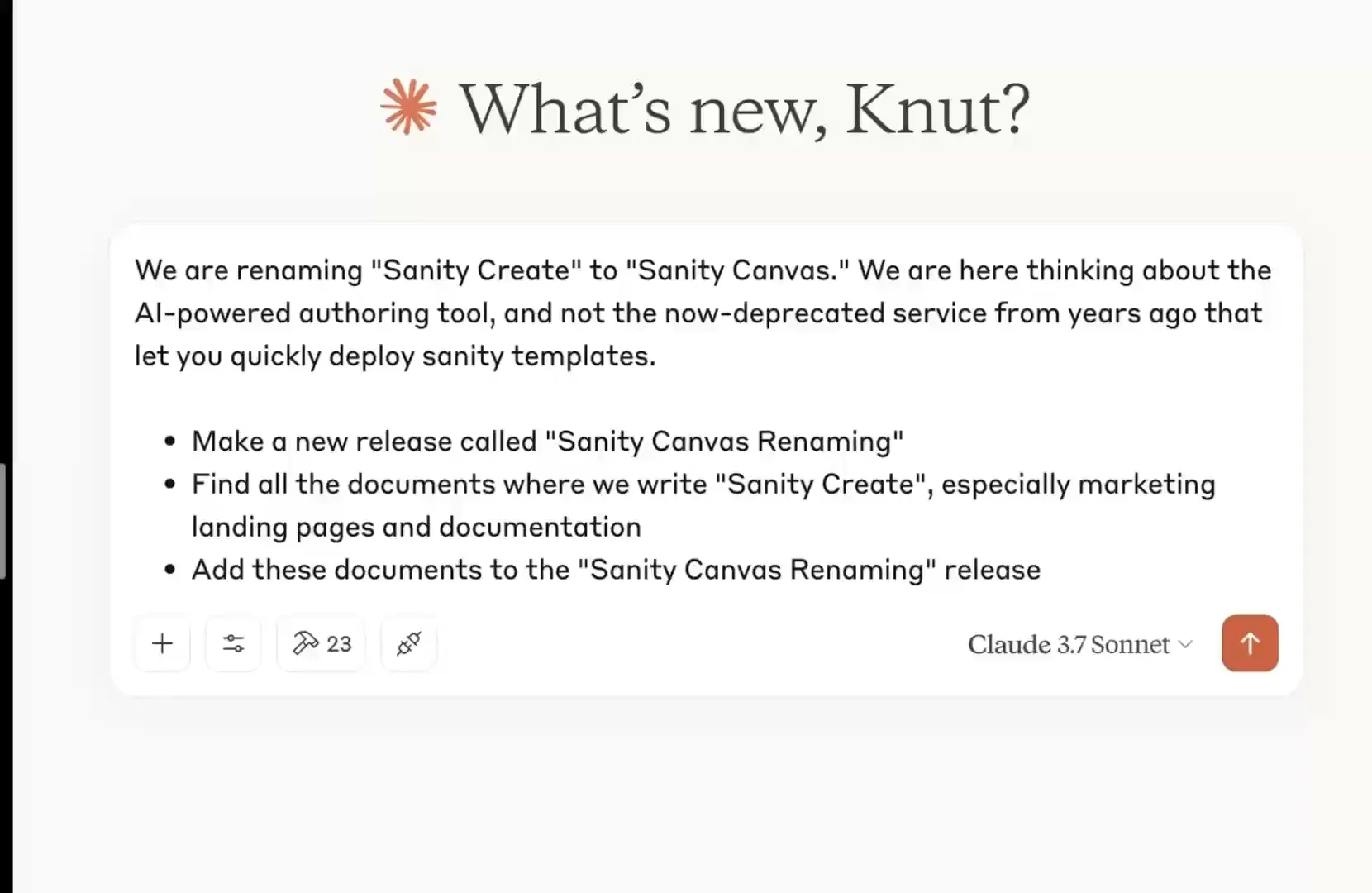
That's pretty useful!

It doesn't always get everything right, but it did save us a lot of time. Now a human editor can go through the changes to quality control that everything is correct before running the release.

What makes the MCP server so handy isn't just these individual capabilities but how seamlessly you can flow between understanding your content and taking action on it—all through natural conversation rather than technical interfaces.

The Model Context Protocol (MCP) provides a standardized interface for AI models interacting with external systems through APIs. Anthropic proposed and maintains it, and MCP has gained traction as the default way to make services available as AI tools. For example, OpenAI is on board with official support, and the Google team has committed to maintaining the official Go SDK. Reassuring!

So far, it has worked with most applications by installing and configuring the MCP server, which then shows up as "tools" that your AI Agent or chat can use. Conceptually, it is a bit like building a GraphQL API, where you translate the schema to resolvers that connect to the data and operations you want to expose.

Usually, the AI will intuit when and what tools to use depending on what you ask it to do. Claude will explicitly ask for permission to run tools within a conversation, while Cursor can run them automatically, depending on your configuration.

Claude will ask for explicit permission before it runs tools from the MCP server

For now, the most common way to install and run MCP servers is to install them locally on your computer and authenticate with API tokens stored in the JSON configuration. The MCP specification maintainers and the developer community are still actively figuring out how to best implement MCP servers, especially when hosting them remotely and dealing with authentication and security. We are actively following these discussions.

Beyond the basics: MCP Server capabilities

So, what can you use the Sanity MCP server for? Pretty much anything you can do with your content in Sanity! We are launching the server with several tools and capabilities.

General tools:

  • Start your session with essential context and configuration details
  • Access your current Sanity environment settings
  • View all available projects at a glance
  • Browse studio hosts for any project

Document management:

  • Retrieve individual or multiple documents instantly
  • Create new content with automatic schema validation
  • Make batch document changes in single transactions
  • Update existing documents while maintaining integrity
  • Remove specific documents or groups that match the criteria
  • Apply various mutation types within single operations
  • Control document publication status seamlessly
  • Move drafts to published status individually or in batches
  • Revert published content back to draft form

Release management:

  • Create new content releases with custom metadata
  • Add individual or multiple documents to planned releases
  • Get comprehensive views of release contents
  • Control publication status of release documents
  • Remove specific content from planned releases
  • Update release titles and descriptions

Dataset management:

  • Create custom datasets with flexible access controls
  • Modify dataset settings and permissions
  • Permanently remove datasets when needed
  • View detailed information about all available datasets

Content querying:

  • Access the complete GROQ query language specification
  • Execute powerful queries to find exactly what you need

AI-Powered search:

  • List available embedding indices
  • Find content based on meaning rather than exact keywords

Schema tools:

  • Get high-level overviews of your content structure
  • Access detailed information about specific content types, including field descriptions

We are all still figuring this stuff out!

It's tempting to come up with lofty promises about how this revolutionizes content operations and will 10x the productivity of your teams. Using these tools, you get a sense of the potential, but you will also discover that it's also a skill to manage AI in a way that makes it do the right things and not over-eagerly get off the trail. Working with the MPC server is an excellent way to build those skills.

And speaking of skill building, you might also be interested in some of our recent AI materials:

And don't forget to check out our upcoming Spring release; there will be more AI news there, too! 🍰