





2021-03-30: This article uses Webtask which now has been sunset. You can still read it to learn how to use observables in serverless functions. However, we recommend using our Sanity-Algolia toolkit for indexing content from your Sanity Content Lake in Algolia.
<Movie trailer voice>
In a world where monoliths break up, devs build new exciting services with towering JAMstacks, serverless functions, and epic cloud services. Yet they face one challenge: Moving data from one service to another. Introducing Observables. The code pattern that takes streams of data, mutate it to your liking, and pipe it effortlessly to another place. Coming soon to a code editor near you.
</Movie trailer voice>
With Sanity’s powerful export API it's easy to make a small serverless function in order to index all your content in Algolia for the times you want to harness its search capabilities. It's also a nice way to learn about observables in JavaScript.
Algolia is a powerful search-as-a-service that makes it easy to provide weighted searches, statistics, and rich user interfaces for search for your frontends. Webtask by Auth0 is a service that makes it easy to build serverless functions right in the browser. In this tutorial we will look closer on how we can use Sanity’s export API to quickly get the content you want to index into Algolia using a scheduled serverless function.

First you'll have to sign up for an account at Algolia. It should be pretty straightforward. Once you've set up an account go to API keys in the sidebar. You should be able to do this tutorial on the free plan, but note that there are some limits that may kick in at some point.

Have the keys available, because we're going to need them when we set up our serverless function.
There are many great services for setting up serverless functions: begin.com, code.xyz, Netlify functions, AWS Lambda, Now, Google Cloud Functions, the list could go on. For this tutorial we'll use webtask.io because it easy to set up, runs in the browser, and has scheduling as a feature. It shouldn't be too much work adapting this code to other services though.
Go to webtask.io/make, log in and make a new function from an empty template. Go to the 🔧wrench menu and choose secrets and Add Secret.

Call your "secret key" ALGOLIA_TOKEN and copy-paste your Admin API Key from Algolia into the "secret value" field. In other words: You should be careful with where you save this. This key will now be available under context.secrets.ALGOLIA_TOKEN in your function.
A serverless function often looks like this code snippet. It is a function that takes two parameters, one of the HTTP request and additional information (e.g. secret keys stored in the function-as-a-service), and a callback or response function that you run at the end to return whatever feedback or data that the function needs to return. Different services allow for different programming languages, so serverless functions can also be written in for example Python, Java, or Go. In this tutorial, we'll use JavaScript in a Node.js environment.
In Webtask you call the callback function with two parameters, the second parameter is what you'll return when someone calls your function, it can be an HTTP status code (200 for OK, 500 for error), a string, or even an object.
A serverless function often have a limited execution time. That means that whatever it does, it has be done within the time limit of the service. Sometimes it's 30 seconds, or up to 15 minutes. That means that serverless functions are best suited for single quick tasks. To index all your content may not sound like such, but Sanity’s export API is so quick it takes only a couple of seconds. So without further ado, let’s dive into it!
First, we must make it possible for the function to connect to our index in Algolia.
Webtask will show a '+'-mark left of the line numbers when you add a 'require'-statement, click this to import the npm module you specified. You can also add NPM-modules via the wrench menu.
While we could have used the Sanity JavaScript client and used GROQ to get some content, we will use the export API for this function. The export API will stream all your public content in a ndjson-format, and do it very quickly in just one API call.
The export API can end up delivering lots of data and does that via a stream. In many cases, we could probably write all this data to memory (i.e. a variable) and then send it to Algolia, but a more robust and scalable pattern is to do it in a stream using something called Observables. To do that we'll use a library called RxJS (that we use extensively at Sanity). We'll start by converting the Algolia client’s saveObjects-method (which is callback-based) to a function that returns an Observable using a function in RxJS called bindNodeCallback.
Now the fun stuff! First, we have to import the methods we need to pipe the stream we get from the export API into Algolia. The thinking is that we want to get all the data, do some manipulation and pick out what we want to index, and then ship updates to Algolia in batches. When the job is done, we want the function to return with a message of how many documents it updated, and how many batches. The end result will look like this:
Let's zoom in and look closer of what's going on here.
Initially, we set up the request to the export API URL with request(sanityExportURL), this will return a node stream of delineated JSON objects which we pipe to ndjson() that transforms the data in to and emits it to objects.
This stream of objects is then transformed to a RxJS stream that is piped to the map operator. The map operator passes each object to a function. Here we use parameter destructuring to pick out those fields we want, and build a new object using Object.assign (we could have used ES6 spread syntax, but the node environment in Webtask doesn't seem to have those yet).
Not all objects that are apassed to this function will have all the keys, and will be undefined. Notice that I have defaulted the array fields since they are sent to a function (there are probably many other ways we could have dealt with this). At the bottom of this file we add a small helper function that takes structured text from Sanity and transforms it into a simple text string. We declare it as a function in order to hoist it, so that it can be used above.
The subsequent arguments in the pipe-method are bufferCount that collects the objects from map and passes them on when the specified number is met (100). We use mergeMap to pass each chunk to the partialUpdateObjects function, one by one. It will wait for async operations (like passing data to Algolia) and return the response. Finally, we collect them all in an array in toArray(). so that we can count them and return the summary of how the job went.
We use subscribe to receive the emitted array of arrays with all the objects, and sum up all the objects with reduce. At the end, we call the callback-function that is passed with the serverless function and return a string with how many documents we updated, and how many batches it took.
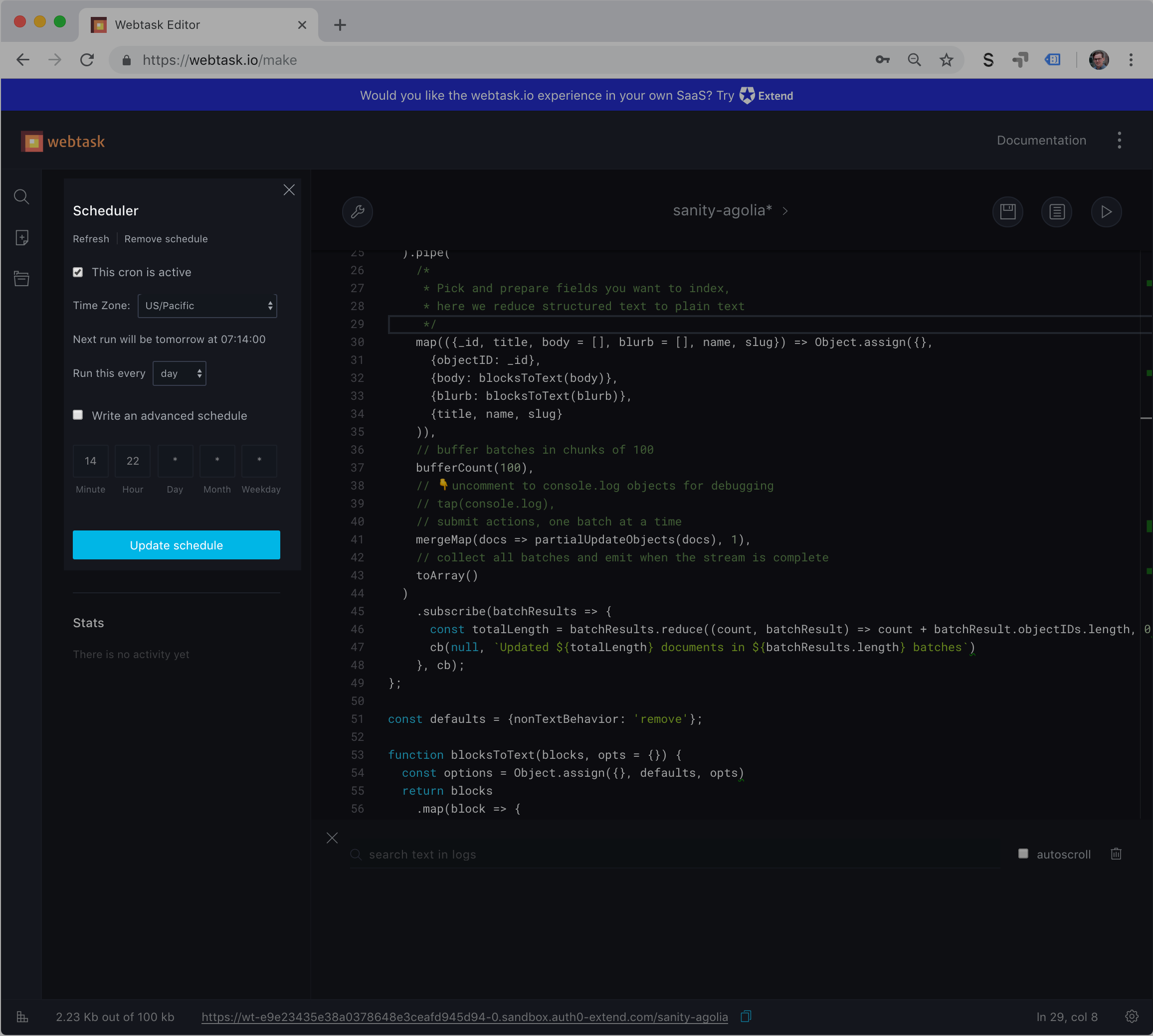
Of course, we can run this function manually by requesting the URL that is displayed at the bottom of the Webtask UI. You should keep this URL secret since you don't want anyone to just trigger a reindexing (the function in the screenshots is deleted). But syncing your search indexes is a great example of something that should be done automatically. You can also add this URL to a webhook, so that it runs every time something updates (it's done after a couple of seconds), but that's probably overkill, and will most likely burn up your quota. So that's where scheduling comes in. If you again open the wrench menu and choose Scheduler, you'll open a panel where you can select the time span for repeating the function. It should be as often as seems sensible, depending on how much your content changes. You can of course still trigger the indexing manually by calling the URL.
What you have done now is pretty awesome: In less than 60 lines of code you have set up a serverless function that streams all your content from Sanity with one API call, manipulates each document and passes it on to another service. And it can do that with a lot of content only taking a couple of seconds. In this case, we experimented with Algolia, but there's probably a ton of other use cases that can be adapted from this setup. We can't wait to hear about them – so feel free to tells us on your own blog, on twitter, and in our community Slack.
此内容由惯性聚合(RSS阅读器)自动聚合整理,仅供阅读参考。 原文来自 — 版权归原作者所有。