





Teams are wiring AI coding agents straight to their warehouse over MCP and asking things like “What was our revenue by channel in Q2?” The agent finds a revenue table, runs a query, and returns a number in seconds, with no waiting on the data team. While the answer initially looks right, the problem is that the number is often wrong. A query can be technically correct and still not match what the business means by “revenue,” say by including returns that haven’t been processed yet.
Bits Data Analysis, now in Preview, gets teams answers that are fast and reliable using curated context from across your business.
In this post, we’ll show how Bits Data Analysis helps you:
Answer business questions with the right context
Connect business metrics to production root causes
Curate business context with the Context Workbench
When you ask a question, Bits Data Analysis answers using the context Datadog already has about your data and your business. It returns the answer with a confidence indicator, linked to the exact definitions and tables it used.
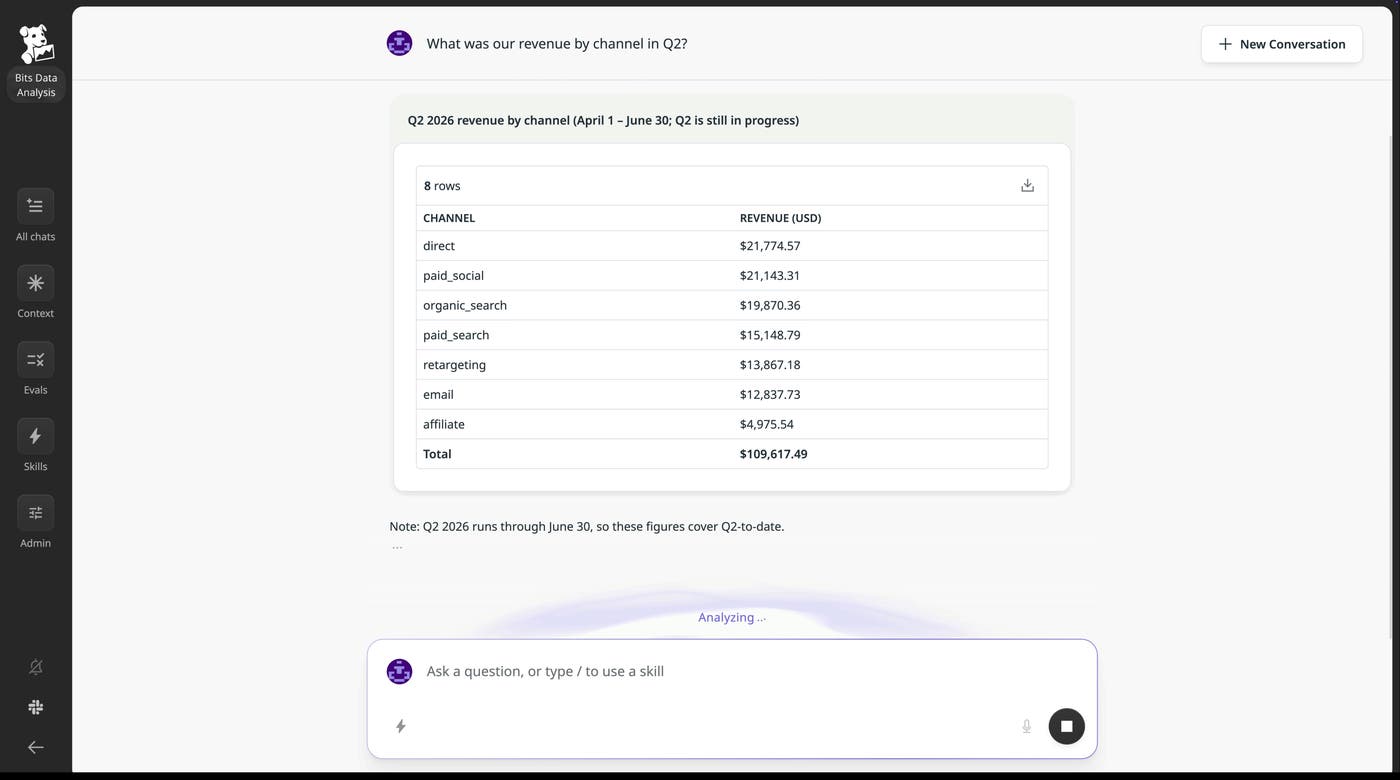
That context is built automatically, and it starts with your data stack. From Data Observability and Catalog, Datadog knows your tables, metric definitions, freshness, quality signals, and lineage, pulled from Snowflake, BigQuery, Databricks, dbt, Fivetran, Tableau, Looker, Power BI, and more. Governed metadata tells the agent what a table contains, while lineage tells it where the data came from. That replaces months of manual semantic-layer work.
Bits Data Analysis also enriches the context it gleans from your data stack with the rest of your Datadog telemetry data: Product Analytics, traces and logs from upstream applications, sales and traffic metadata from users, and source code across your applications and pipelines. Each time someone asks a question, the agent uses that context to pick the right source, apply the right definition, and check whether the data is fresh enough to trust. And because Bits Data Analysis works in Slack, the Datadog web app, and in coding agents through MCP, everyone who asks a question gets the same answer.
Bits Data Analysis connects your business data with the rest of your application, infrastructure, frontend, deployment, and cloud cost telemetry data in Datadog. This enables the agent to correlate business metrics with latency, errors, and other application-level impacts—something most business intelligence (BI) tools can’t do.
Consider a follow-up to our initial revenue question: “Tuesday afternoon revenue dipped. What’s going on?” Bits Data Analysis confirms the revenue data is clean and current, then keeps investigating across Datadog: checkout service latency in APM, deployment events, frontend behavior in RUM, errors in Error Tracking, and usage in Product Analytics. It finds checkout service p95 latency jumped from 200 ms to 3 seconds at 2 p.m., overlays the deployment timeline, and ties the dip to a checkout service deploy five minutes earlier. In just one conversation, we went from an ambiguous business question to a root cause.
A BI tool sees revenue change but can’t reach the slow API’s metrics, while an APM tool sees the latency spike but doesn’t know which business metric it hit. Datadog has business data, applications, code, infrastructure, frontend, and spend in one place, so the agent can quickly connect them.
With Bits Data Analysis, the data team’s job shifts from answering every question to owning the context behind the answers.
The Context Workbench is where they do it. It shows every question users asked and every answer the agent gave, including the reasoning and definitions behind each one. Admins can also define evaluations, or the common questions they expect along with the answers they expect back, and run them to confirm the agent is answering correctly.
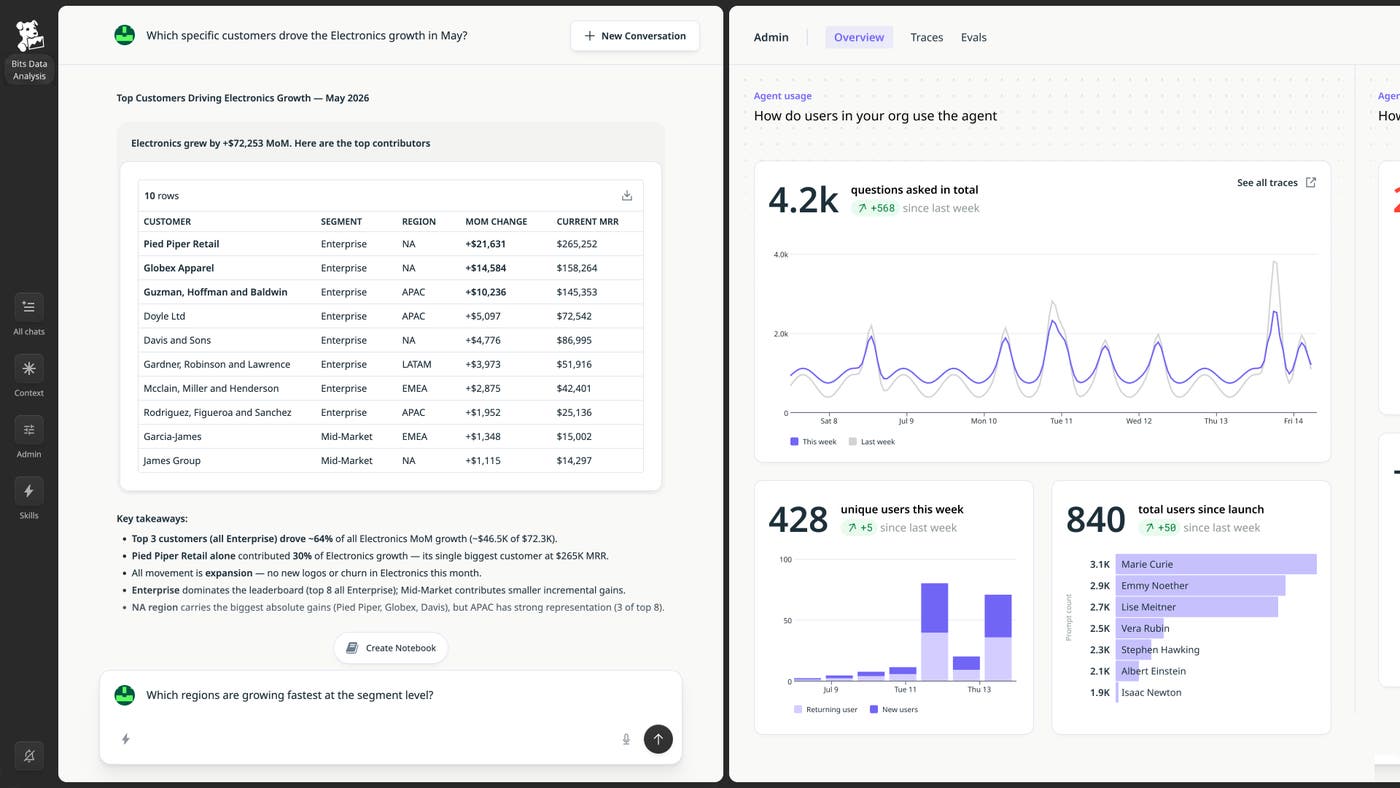
For example, let’s say two people asked the agent about “same-store sales growth” this week and got two different answers. The first answer counted stores open less than a year; the second dropped temporarily closed locations. In the Workbench, the data team spots the drift, pins one definition, and adds an evaluation case from the real question. They re-run the suite, it passes, and the fix lands on every surface: Slack, web app, and MCP.
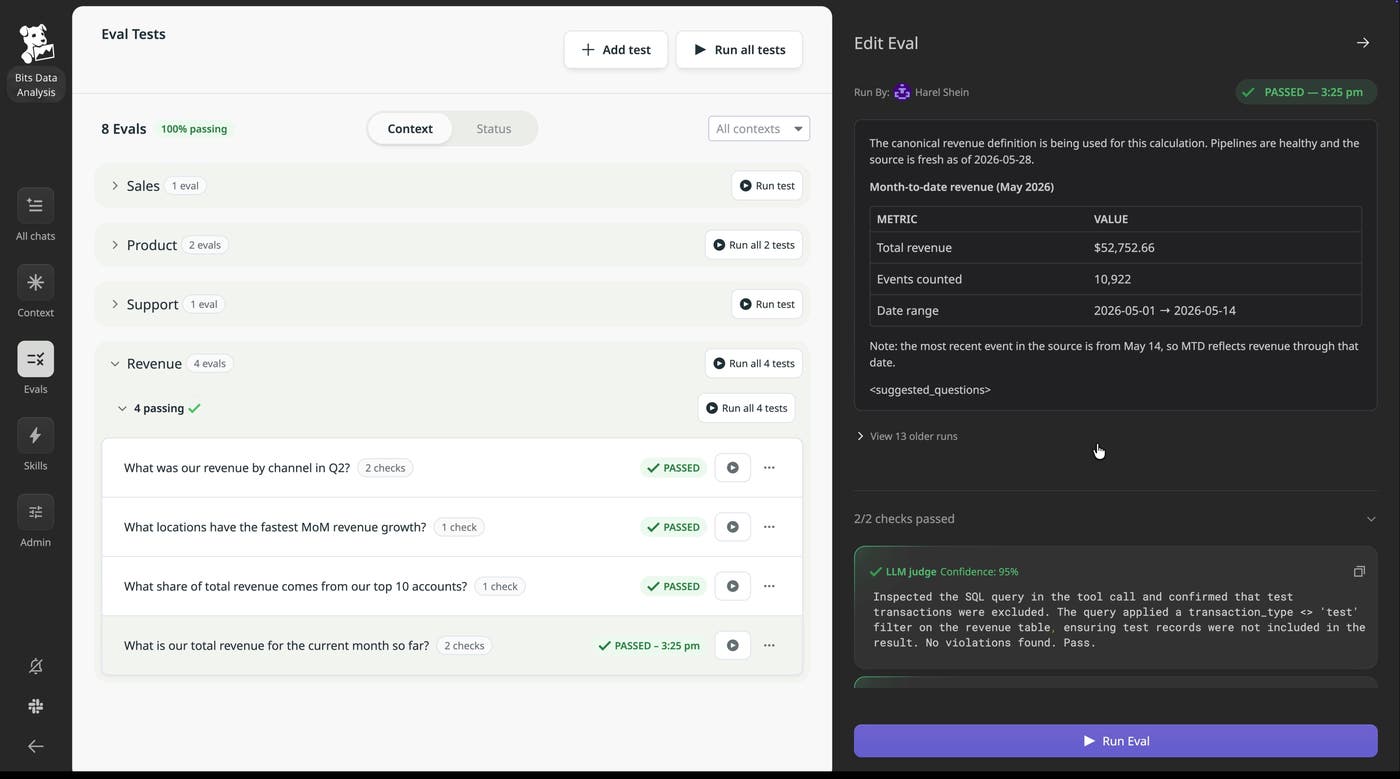
Datadog seeds the evaluation suite out of the box, with questions pulled from your popular dashboards, dbt models, and common warehouse patterns. The agent self-corrects its context until those evaluations pass, so you’re improving against the questions people actually ask instead of synthetic ones.
Bits Data Analysis answers business questions using context your data team owns. It tells you which definitions it used, factors in freshness and quality, and keeps investigating across Datadog to connect a business outcome to the deployment, error, or latency spike behind it.
We’ve released this product across engineering and business teams at Datadog, including sales, marketing, support, and recruiting, as well as with select design partners. Teams across functions are able to self-serve analytics and get reliable answers they can count on.
Sign up for the Preview of Bits Data Analysis today. Data Observability is generally available for all Datadog customers. If you’re new to Datadog, start a 14-day free trial.
此内容由惯性聚合(RSS阅读器)自动聚合整理,仅供阅读参考。 原文来自 — 版权归原作者所有。