

惯性聚合 高效追踪和阅读你感兴趣的博客、新闻、科技资讯
阅读原文 在惯性聚合中打开

推荐订阅源

V
Visual Studio Blog
freeCodeCamp Programming Tutorials: Python, JavaScript, Git & More
博客园 - 聂微东
博客园 - 【当耐特】
Cyber Security Advisories - MS-ISAC
C
Check Point Blog
H
Hackread – Cybersecurity News, Data Breaches, AI and More
美团技术团队
WordPress大学
WordPress大学
Last Week in AI
Last Week in AI
Y
Y Combinator Blog
IT之家
IT之家
T
Tailwind CSS Blog
月光博客
月光博客
Vercel News
Vercel News
V
V2EX
Engineering at Meta
Engineering at Meta
B
Blog
Stack Overflow Blog
Stack Overflow Blog
A
About on SuperTechFans
Hugging Face - Blog
Hugging Face - Blog
人人都是产品经理
人人都是产品经理
腾讯CDC
I
InfoQ

Datadog | The Monitor blog

Introducing our open source AI-native SAST Instrument and monitor Boomi integration flows with OpenTelemetry and Datadog Not all index scans are equal: How we cut query latency by over 99% Platform engineering metrics: What to measure and what to ignore Integrate Recorded Future threat intelligence with Datadog Cloud SIEM CI/CD security: threat modeling using a MITRE-style threat matrix CI/CD security: How to secure your GitHub ecosystem Ingress NGINX is EOL: A practical guide for migrating to Kubernetes Gateway API Operating agentic AI with Amazon Bedrock AgentCore and Datadog LLM Observability: Lessons from NTT DATA Introducing the Datadog Code Security MCP Capture and analyze custom heatmaps in Session Replay Understand session replays faster with AI summaries and smart chapters Monitor ClickHouse query performance with Datadog Database Monitoring How we designed empathetic alert sounds for on-call engineers Search and act across Datadog to resolve issues faster with Bits Assistant Measure the business impact of every product change with Datadog Experiments Analyzing round trip query latency Configuring JavaScript caches for better performance Introducing Bits AI Dev Agent for Code Security Datadog achieves ISO 42001 certification for responsible AI Monitor Nutanix clusters, hosts, and VMs with Datadog Monitor Juniper Mist in Datadog A new Host Map for modern infrastructure Annotate traces to improve LLM quality with Datadog LLM Observability What’s new in Cloud SIEM: AI-powered investigations, enhanced threat intelligence, and scalable security operations Explore Kubernetes with native OpenTelemetry data Monitor Oracle Fusion Cloud Applications with Datadog Announcing the Datadog Terraform provider v4.0.0 Scaling Kubernetes workloads on custom metrics How to design cloud environments for AI-powered threat analysis
Explore your data in full-screen graph mode
Miranda Kapin · 2019-06-21 · via Datadog | The Monitor blog

As you navigate through Datadog, you may find that you want to dive into a graph to explore your timeseries data more deeply, or make quick changes to a graph without permanently altering it. To make it easier to explore the data in your graphs, we’re excited to introduce a newly revamped full-screen view for our timeseries graphs. You can now quickly and easily apply functions, navigate through time to find anomalies, and save and share your work. To access this exploratory view, either double click on your graph’s header, or click on the full-screen button in the upper right-hand side of the graph.

Explore your timeseries data

Full-screen graphs enable you to apply advanced functions such as anomaly detection to your graphs, without needing to build a new graph or clone an existing one. With this new feature you can quickly click to apply smoothing, trend lines, anomaly detection, forecasting, or outlier detection. You can also visualize a cumulative sum of the data or an overlay of historical timeseries for comparison to a previous timeframe.

The new full-screen view doesn’t just allow you to transform your graphs—you can also see how the data in your graphs fits into trends over longer timeframes. The mini-map below the main graph in full-screen mode displays the recent history of the timeseries so you can see the bigger picture, click and drag to switch timeframes, and zoom in and out of your selected timeframe on the fly.

Create new visualizations

The full-screen view is a great way to explore your data without needing to create a new graph or permanently modify your existing graphs. But if you do create a visualization that you want to keep, it’s easy to save the changes to the current graph or save the visualization as a new graph.
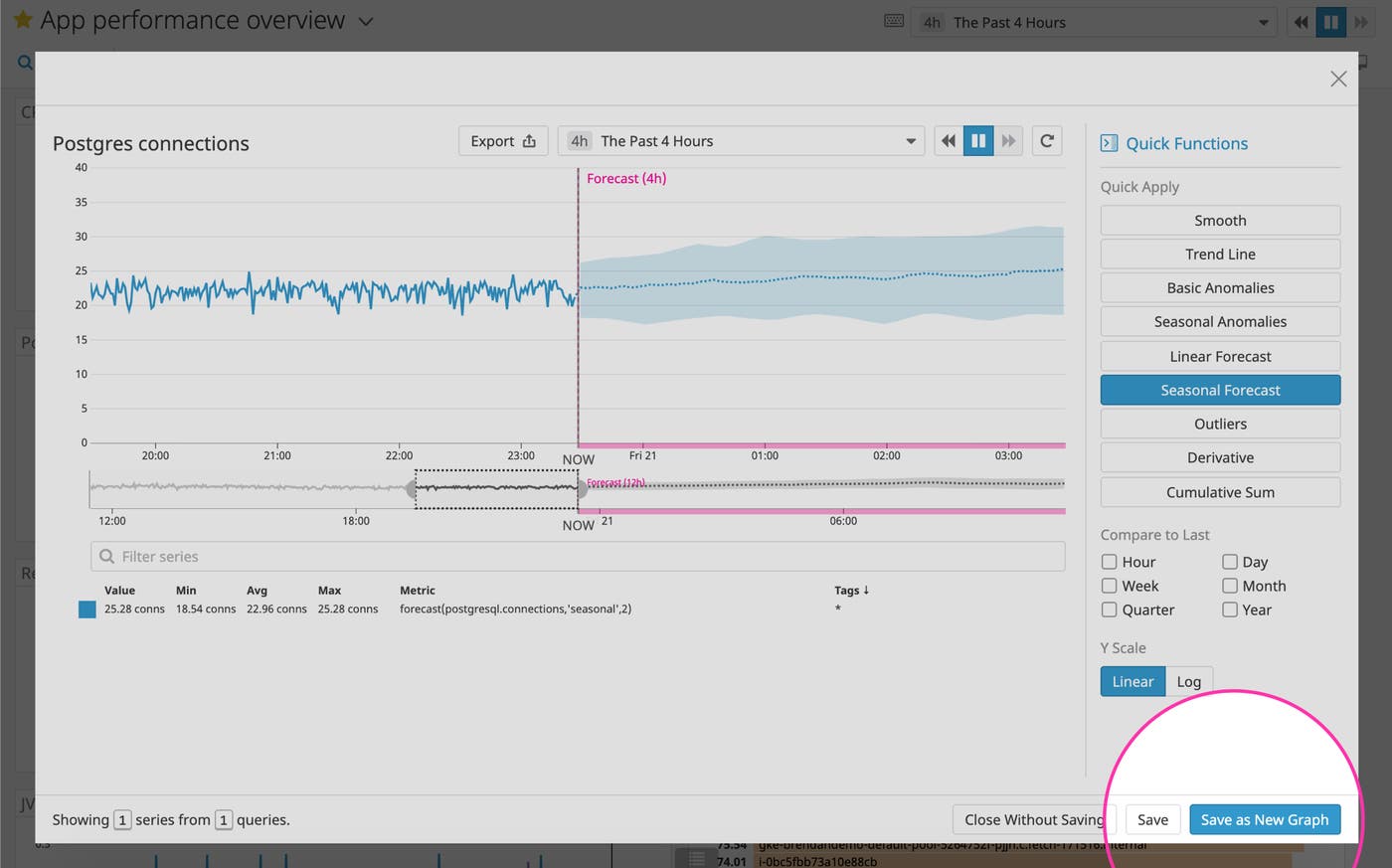
Save your exploratory graphs to your dashboard

Try full-screen graph mode

If you’re already a Datadog customer, you can start exploring your data in full-screen mode on your existing dashboards today. If you aren’t yet using Datadog, you can sign up for a 14-day free trial and start visualizing all your data in one place.