




惯性聚合 高效追踪和阅读你感兴趣的博客、新闻、科技资讯
阅读原文 在惯性聚合中打开

推荐订阅源

Martin Fowler
Martin Fowler
OSCHINA 社区最新新闻
OSCHINA 社区最新新闻
IT之家
IT之家
美团技术团队
酷 壳 – CoolShell
酷 壳 – CoolShell
Y
Y Combinator Blog
T
Tailwind CSS Blog
D
Docker
博客园 - Franky
freeCodeCamp Programming Tutorials: Python, JavaScript, Git & More
Google DeepMind News
腾讯CDC
Vercel News
Vercel News
Engineering at Meta
Engineering at Meta
U
Unit 42
The Cloudflare Blog
S
SegmentFault 最新的问题
WordPress大学
WordPress大学
爱范儿
爱范儿
Recent Announcements
博客园 - 聂微东
博客园 - 叶小钗
H
Help Net Security
MyScale Blog
MyScale Blog

Analytics Vidhya

Handling Imbalanced Classification: What Works Better Than SMOTE GPT-5.6 Is Here: Sol, Terra, and Luna Loop Engineering for AI Agents: How /loop is Changing AI Workflows DeepSeek DSpark: The Speculative Decoding Trick Behind 400% Faster LLM OKF: Redefining Knowledge Bases for AI Agents Modern VLMs Explained: How GPT-4o, Gemini, Claude Vision, and Qwen-VL Work YOLO26 Tutorial: Object Detection, Pose Estimation & More Large Action Models (LAMs) vs Agentic LLMs: What's the Real Difference? Claude Sonnet 5: The Fable 5 at Home The Best $20 AI Plan: ChatGPT Plus vs Claude Pro vs Gemini Pro GraphRAG vs Vector RAG: Which Retrieval Method is Best? The Self-Improving Loop in AI Agents: Architecture, Benefits, and How it Outperforms Traditional Agent Workflows Harness-1: The 20B Retrieval Subagent That Beats GPT-5.4 at Search Sakana Fugu: Multi-Agent System as a Model Claude's Hidden Art Skill: Making Illustrations With Code System Design for ML Interviews: 10 Real Problems Walked Through Most People Use ChatGPT Wrong: 10 Features and Tips That Changed How I Work OpenAI Just Launched 3 Free AI Courses with Certificates Autoregressive Models: Predicting the Future Using the Past Gemini Omni: AI Video Generation Inside Gemini DiffusionGemma: Google’s Diffusion-Based Open Model for Faster Text Generation Top 10 AI Engineering Tools Everyone is Using in 2026 I Tested Claude Fable 5: Can Anthropic’s Newest AI Deliver on the Hype? Prophet vs NeuralProphet vs TimeGPT vs Chronos: A Practical Comparison Build an Emergency Helpline Voice Agent with LangChain Choosing the Right Vector Database for RAG and AI Applications Google Gemma 4 12B: Architecture, Benchmarks, Access, and Hands-on Guide for Developers How to Choose the Right AI Model for Your Needs Agent Observability with LangSmith, Langfuse, and Arize: A Hands-On Comparison How to Use Claude Managed Agents?
Using AI When You Don’t Trust AI
Vasu Deo Sankrityayan · 2026-06-26 · via Analytics Vidhya

You’ve heard the warnings! Don’t tell ChatGPT your secrets. The robots are reading everything. Your data is the product. And yet here you are: using them as a subscriber. Because AI is genuinely useful!

The good news: that distrust is healthy, and you don’t have to choose between using AI and protecting yourself. You can do both. You just need to know what happens to your words after you hit send, and which switches to flip.

No technical background needed. By the end you’ll have a short checklist you can use to preserve your sanity (and identity) while using AI chatbots.

Table of contents

  • The Chatbot Routine
  • The 3 Layers of Protection
  • Layer 1: Turn off training (do this once, today)
  • Layer 2: Use incognito/temporary modes for sensitive tasks
  • Layer 3: Account hygiene and the nuclear options
  • The To-(Not)Do list
  • The Bottom Line
  • Frequently Asked Questions

The Chatbot Routine

Here’s the part most people get wrong. They picture the chatbot as a private notepad. It isn’t. 

Every message you send travels to a company’s servers to be processed, and what happens after that depends entirely on your settings and the company’s policies.
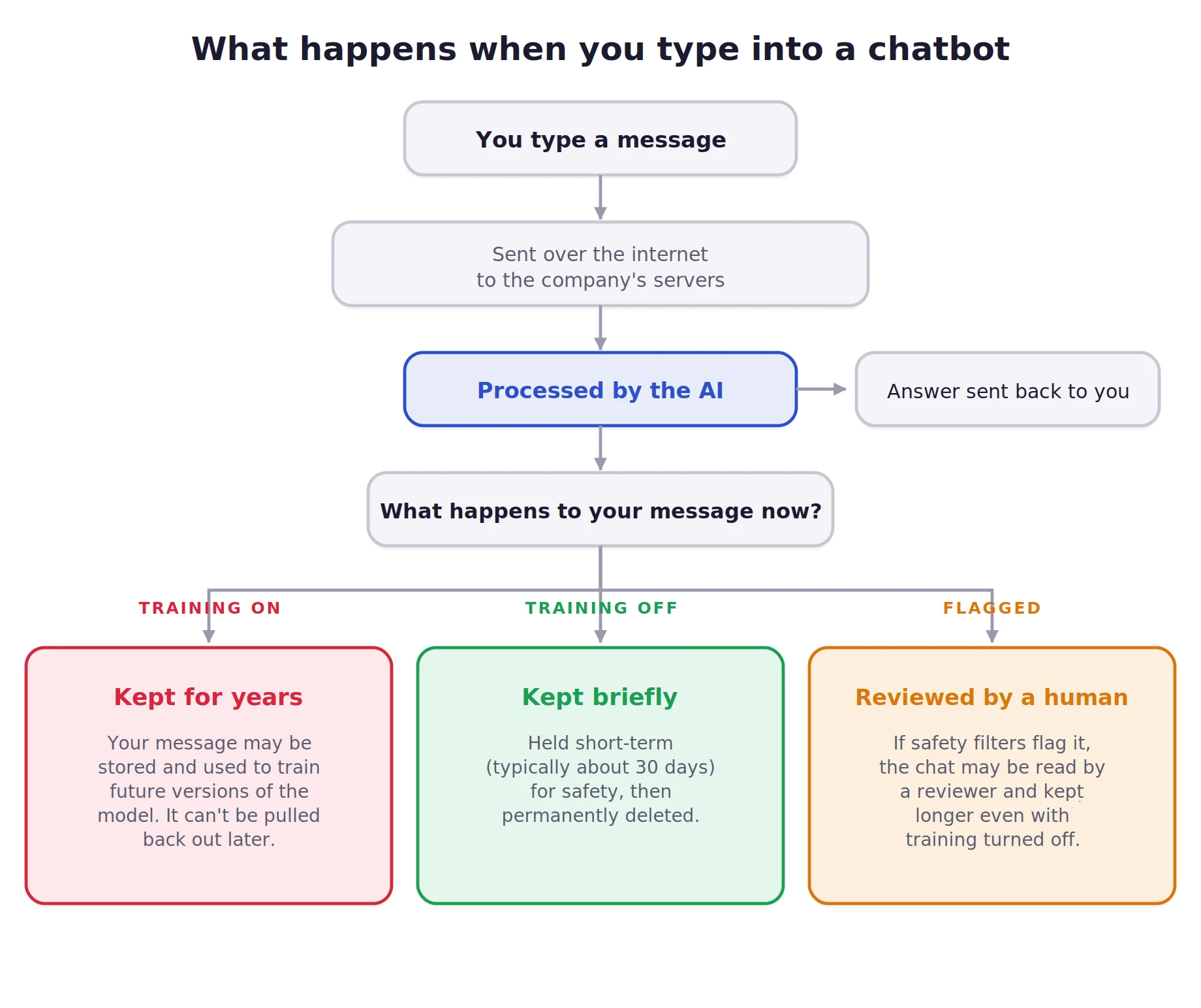
What happens when you type in to a chatbot

Three facts sit underneath everything else:

  1. Your message always leaves your device: There’s no local-only mode in a normal chatbot. The settings control what happens to your data after it arrives, not whether it leaves.
  2. By default, many chatbots train on your chats: A 2025 Stanford study found six leading U.S. AI companies feed user inputs back into their models, some without an easy opt-out. Even Anthropic, long seen as the privacy-friendly one, switched in late 2025 to training unless you opt out.
  3. Once your words are baked into a model, they can’t come back out: Opting out only protects you going forward, which is why acting sooner beats acting perfectly.

You can’t undo the past. But what you can do is take full control from one on. 

The 3 Layers of Protection

Think in layers, not a single switch. Each one lowers your exposure. Most people stop at zero, and getting to layer two takes about five minutes.
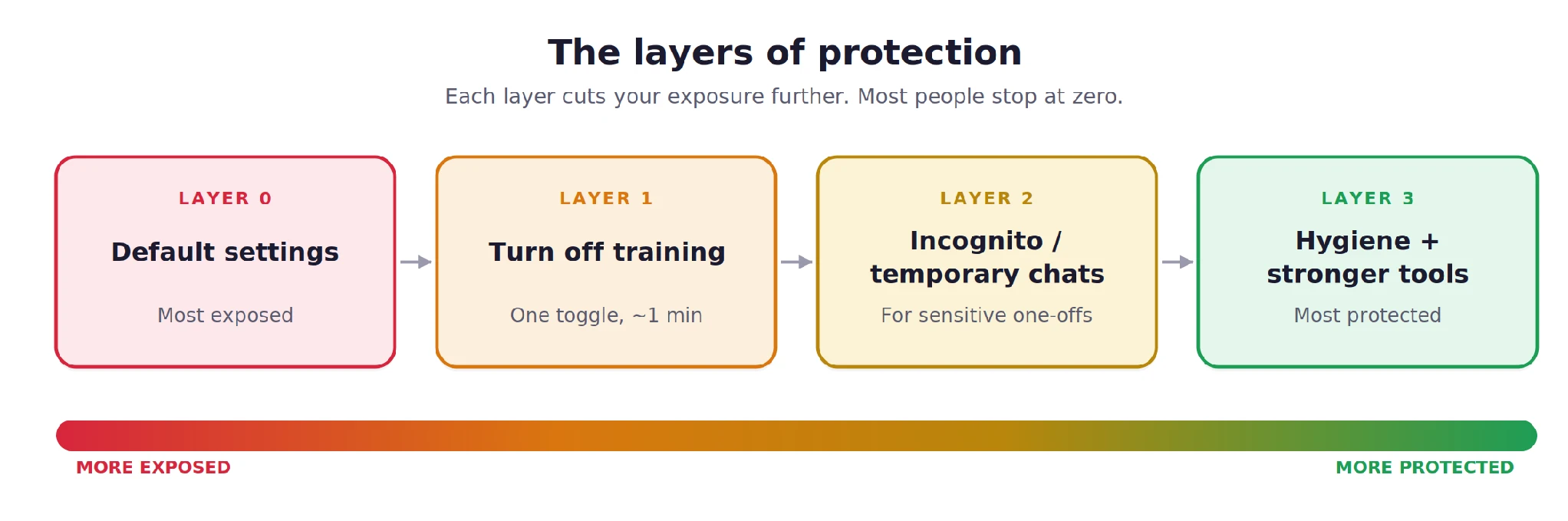
The layers of protection
Each layer cuts your exposure further

Layer 1: Turn off training (do this once, today)

This single toggle stops your future conversations from being fed into the model. It’s usually buried in settings, but it takes seconds. As of mid-2026:

Tool Where to find it What to do
ChatGPT Settings → Data Controls → “Improve the model for everyone” Switch it off
Claude Settings → Privacy → “Help improve Claude” Switch it off
Gemini Activity / privacy settings → Gemini Apps Activity Turn it off
Grok (on X) X Settings → Privacy & Safety → data-sharing for Grok and the in-chat “Improve the model” toggle Disable both

Three things to know:

  • It only works going forward. It won’t pull back data already used in a finished training run.
  • It usually doesn’t delete your chats. They stay in your history, but only the training use stops.
  • It doesn’t turn off safety reviews. Flagged conversations can still be kept and read.

If you use AI through an official API (as a developer, or via a tool built on one), inputs to OpenAI, Anthropic, and Google aren’t used for training by default, with shorter retention. More private, but it means wiring up an integration instead of using the normal app.

Layer 2: Use incognito/temporary modes for sensitive tasks

Turning off training is the baseline. But sometimes you want a conversation that simply doesn’t stick around at all. Not in your history, not in the AI’s memory, not in training. That’s what these modes are for.
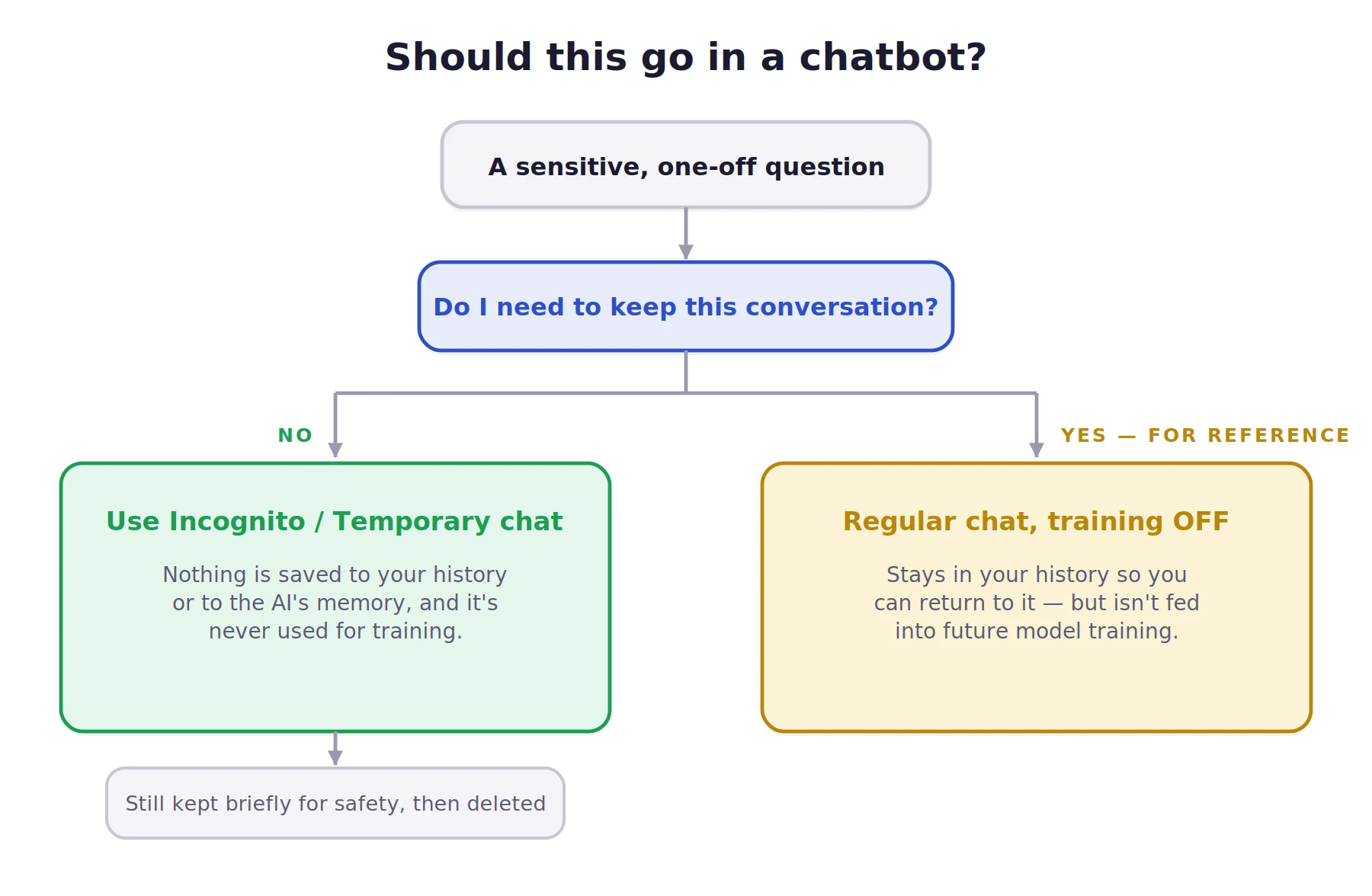
Should this go in a chatbot
A quick test before you hit send
  • Claude (Incognito chat): click the ghost icon, top right. Not saved to history, not added to memory, and never used for training even if “Help improve Claude” is on. Kept about 30 days, then deleted.
  • ChatGPT (Temporary Chat): tap the icon at the top of the screen. No history, no memory, no training. Deleted after about 30 days.
  • Gemini (temporary chats): same idea, shorter window. Google may keep it around 72 hours for abuse checks.

Is Claude’s incognito actually better? Yes

  1. It’s exempt from training no matter what your other settings say
  2. A lot of features like image generation, file downloads etc. are unavailable on Incognito mode of most LLMs. Claude provides full access to all of its tools that you would’ve gotten access to using a regular chat. 

But none of these modes are magic, Claude included:

  • Incognito isn’t anonymous. The company still knows it’s your account, your IP, your session. It hides the chat from your history, not from them.
  • It isn’t end-to-end encrypted like Signal. “Temporary” means “not stored long-term,” not “unreadable.”
  • On Team and Enterprise plans, admins may be able to export incognito chats. Don’t assume your employer can’t see them.

If your real need is “no one at the company can ever tie this question to me,” no consumer incognito mode does that. That’s a job for local, offline AI, not a ghost icon.

Layer 3: Account hygiene and the nuclear options

Small habits that add up:

  • Turn off memory and personalization if you don’t want the AI building a profile of you.
  • Prune your connectors. Every linked app (Drive, email) widens your exposure.
  • Delete old chats you don’t need. They usually clear from storage within about 30 days.
  • Use MFA, and log out on shared devices. A logged-in session is easy for someone to walk up and read.
  • Re-check your settings monthly. Defaults change, as late 2025 proved.

If your work really demands it: run a local open-source model so chats never leave your machine, or use an enterprise plan with Zero Data Retention, which contractually means nothing gets stored.

The To-(Not)Do list

The things that turn a small slip into a real problem:

  • Login credentials: passwords, API keys, recovery codes, PINs. Strip them out even when troubleshooting.
  • Identity documents: ID or passport numbers, full date of birth with address. Raw material for identity theft.
  • Financial details: account or card numbers, statements, tax IDs.
  • Medical information: most chatbots aren’t bound by health-privacy laws like HIPAA, and your symptoms can be stored or used to infer things about you.
  • Other people’s private info: a friend’s number, a colleague’s situation. They didn’t agree to be in a database.
  • Your unprotected work: unpublished plans, manuscripts, confidential company material.

The trick isn’t silence, it’s redaction. Make the question generic. Instead of “My employee Sarah Chen, ID 4471, keeps missing deadlines,” ask “How do I give feedback to someone who keeps missing deadlines?” Same answer, zero exposure.
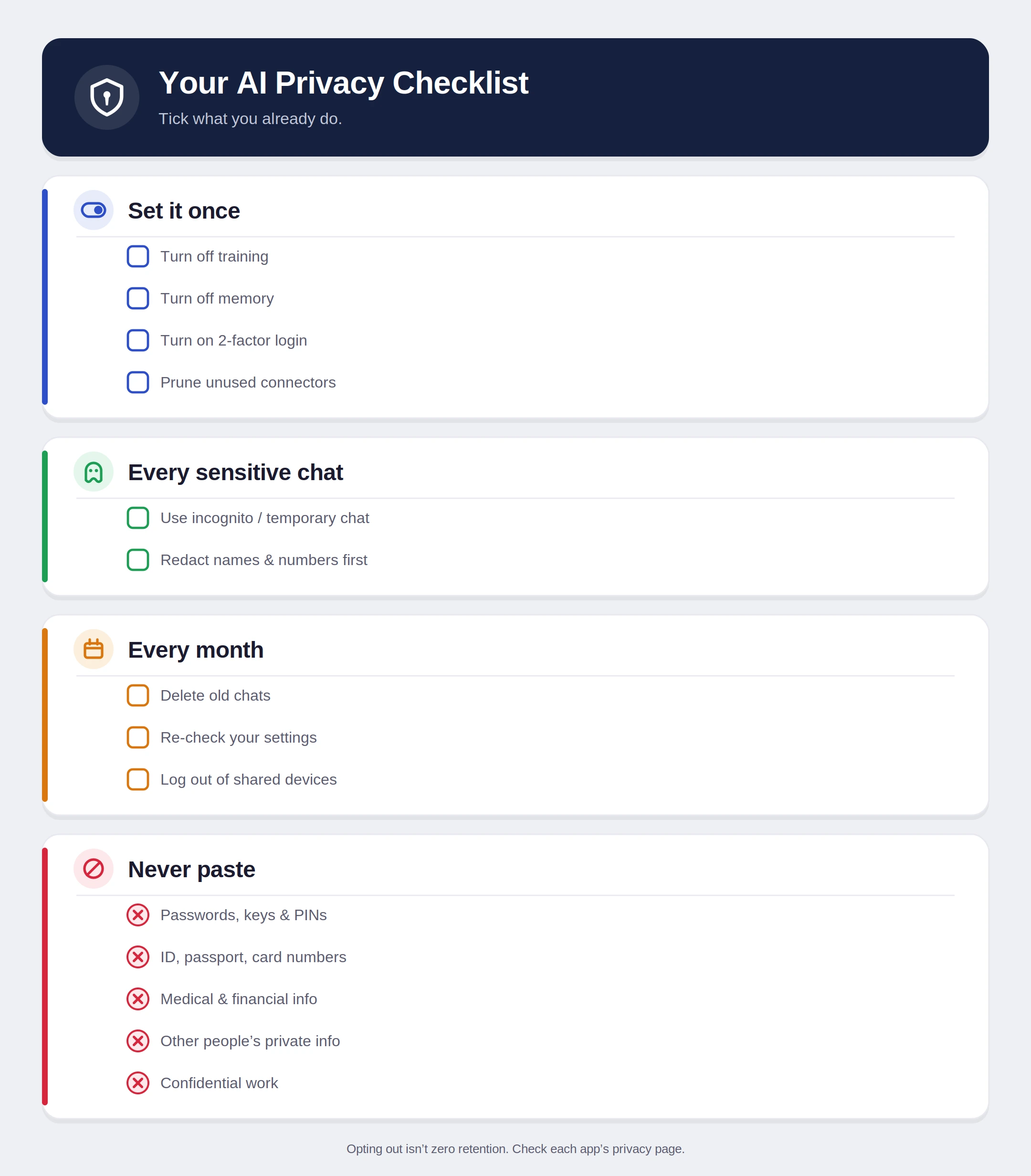
Your AI Privacy Checklist
User the following checklist as a reference for the future

The Bottom Line

No checkbox makes a cloud chatbot truly private. Every message still leaves your device, opting out isn’t the same as zero retention, safety systems can still flag content, and deleted isn’t always gone. Anyone who tells you otherwise is selling something.

That’s not a reason to avoid AI. It’s a reason to use it like a grown-up.
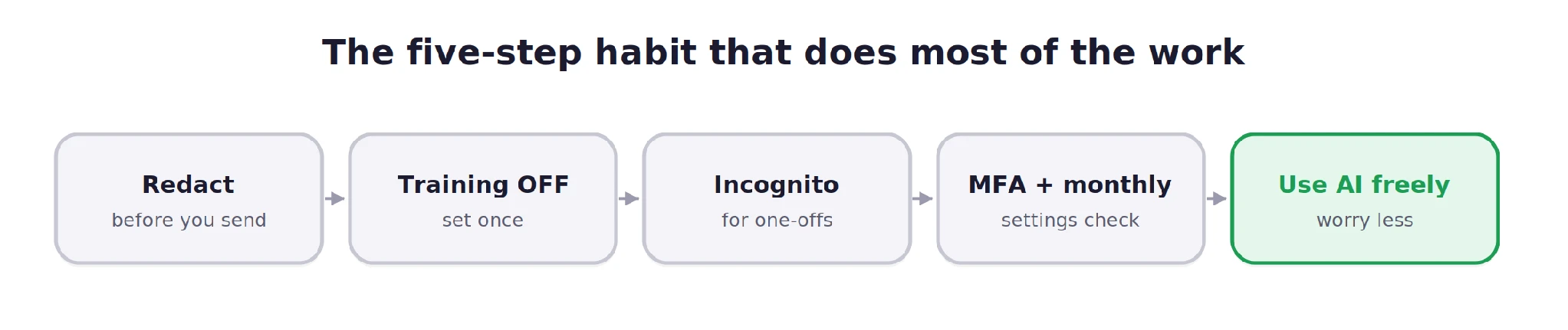
The five-step habit that does most of the work

Distrust isn’t paranoia. It’s just good hygiene: the digital equivalent of locking your door. You can absolutely keep using these tools every day. Just remember the postcard rule, flip the switches once, reach for incognito when it counts, and keep your most sensitive details where they belong: under your control.

Frequently Asked Questions

Q1. How do I stop AI chatbots from using my chats for training?

A. Turn off model training in each chatbot’s privacy or data controls settings.

Q2. Are temporary or incognito AI chats private?

A. They reduce history, memory, and training use, but companies may still retain them briefly for safety checks.

Q3. What should I never paste into AI chatbots?

A. Never paste passwords, API keys, financial details, identity documents, medical records, or confidential work information.

I specialize in reviewing and refining AI-driven research, technical documentation, and content related to emerging AI technologies. My experience spans AI model training, data analysis, and information retrieval, allowing me to craft content that is both technically accurate and accessible.

Login to continue reading and enjoy expert-curated content.