

惯性聚合 高效追踪和阅读你感兴趣的博客、新闻、科技资讯
阅读原文 在惯性聚合中打开

推荐订阅源

Y
Y Combinator Blog
The GitHub Blog
The GitHub Blog
云风的 BLOG
云风的 BLOG
Engineering at Meta
Engineering at Meta
Google DeepMind News
aimingoo的专栏
aimingoo的专栏
Recent Announcements
A
About on SuperTechFans
U
Unit 42
MyScale Blog
MyScale Blog
J
Java Code Geeks
博客园_首页
Blog — PlanetScale
Blog — PlanetScale
D
Docker
Microsoft Azure Blog
博客园 - 司徒正美
量子位
月光博客
月光博客
G
Google Developers Blog
V
V2EX
博客园 - 聂微东
宝玉的分享
宝玉的分享
IT之家
IT之家
Vercel News
Vercel News

Analytics Vidhya

Handling Imbalanced Classification: What Works Better Than SMOTE GPT-5.6 Is Here: Sol, Terra, and Luna Loop Engineering for AI Agents: How /loop is Changing AI Workflows DeepSeek DSpark: The Speculative Decoding Trick Behind 400% Faster LLM OKF: Redefining Knowledge Bases for AI Agents Modern VLMs Explained: How GPT-4o, Gemini, Claude Vision, and Qwen-VL Work Large Action Models (LAMs) vs Agentic LLMs: What's the Real Difference? Claude Sonnet 5: The Fable 5 at Home The Best $20 AI Plan: ChatGPT Plus vs Claude Pro vs Gemini Pro GraphRAG vs Vector RAG: Which Retrieval Method is Best? Using AI When You Don’t Trust AI The Self-Improving Loop in AI Agents: Architecture, Benefits, and How it Outperforms Traditional Agent Workflows Harness-1: The 20B Retrieval Subagent That Beats GPT-5.4 at Search Sakana Fugu: Multi-Agent System as a Model Claude's Hidden Art Skill: Making Illustrations With Code System Design for ML Interviews: 10 Real Problems Walked Through Most People Use ChatGPT Wrong: 10 Features and Tips That Changed How I Work OpenAI Just Launched 3 Free AI Courses with Certificates Autoregressive Models: Predicting the Future Using the Past Gemini Omni: AI Video Generation Inside Gemini DiffusionGemma: Google’s Diffusion-Based Open Model for Faster Text Generation Top 10 AI Engineering Tools Everyone is Using in 2026 I Tested Claude Fable 5: Can Anthropic’s Newest AI Deliver on the Hype? Prophet vs NeuralProphet vs TimeGPT vs Chronos: A Practical Comparison Build an Emergency Helpline Voice Agent with LangChain Choosing the Right Vector Database for RAG and AI Applications Google Gemma 4 12B: Architecture, Benchmarks, Access, and Hands-on Guide for Developers How to Choose the Right AI Model for Your Needs Agent Observability with LangSmith, Langfuse, and Arize: A Hands-On Comparison How to Use Claude Managed Agents?
YOLO26 Tutorial: Object Detection, Pose Estimation & More
Mounish V · 2026-07-05 · via Analytics Vidhya

Looking to model to implement pose estimation? I know something that can perform detection, instance segmentation, pose estimation and classification, all of that in real-time. Yes, I’m talking about the YOLO26 from ultralytics

It can aid security systems or can be fine-tuned to detect even smaller objects. Wondering how to get started? No worries, we’ll cover the basics of YOLO and learn to perform inference using the model.  
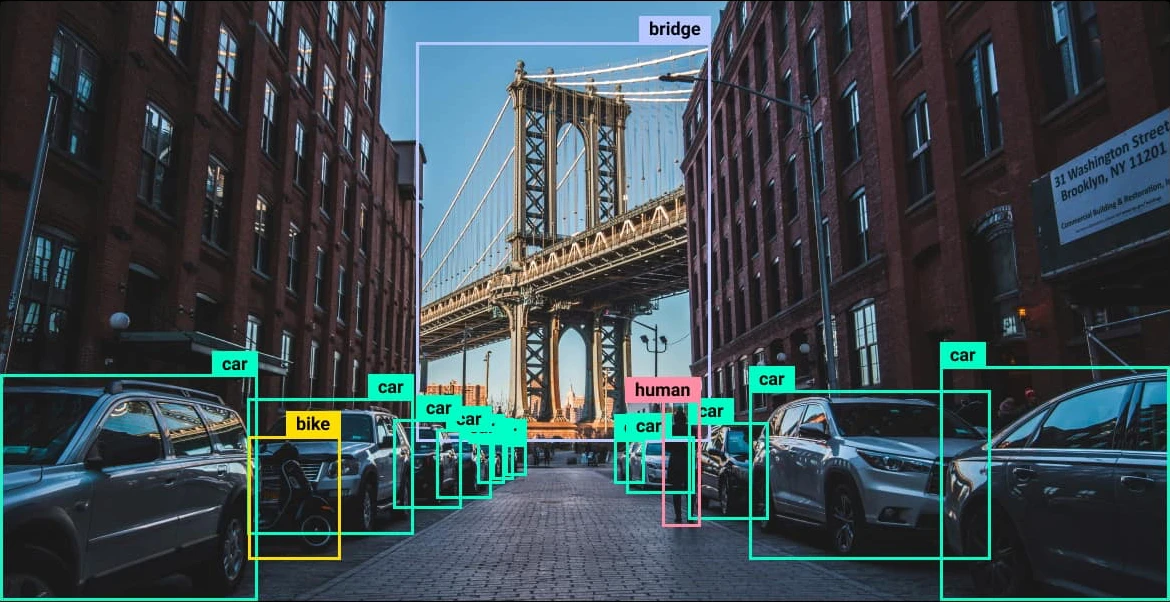
Table of contents

  • Background on YOLO
  • Architecture
  • Hands-On
  • Conclusion
  • Frequently Asked Questions

Background on YOLO

Background of YOLO

YOLO (You Look Only Once) is a family of deep learning models used for computer vision tasks; the foundational logic is the use of localization and classification. In simple words, localization detects objects and finds the coordinates of each one. Then, the classifier predicts the class probabilities and assigns the most probable class to that object. The latest family of models from YOLO is YOLO26, as mentioned earlier they can perform: 

  • Object Detection: Finds one or more objects in an image and predicts their class confidence score and bounding box. This tells you what the object is and where it is located. 
  • Classification: Assigns the image to one of 1000 ImageNet categories. The class with the highest probability is selected as the final prediction. 
  • Pose Estimation: Detects the 17 human body keypoints defined by the COCO dataset. These include points like the nose, shoulders elbows, knees and ankles to estimate each person’s pose. 
  • Oriented Bounding Box (OBB) Detection: Predicts rotated bounding boxes using five parameters. x. y. w. h and θ. This is especially useful for aerial and satellite images where objects rarely appear perfectly aligned. 
  • Instance Segmentation: Generates a pixel level mask for every detected object. This helps seperate individual objects even when they belong to the same class. 

These models have a higher accuracy and better efficiency than the previous generations of models.  
Architecture

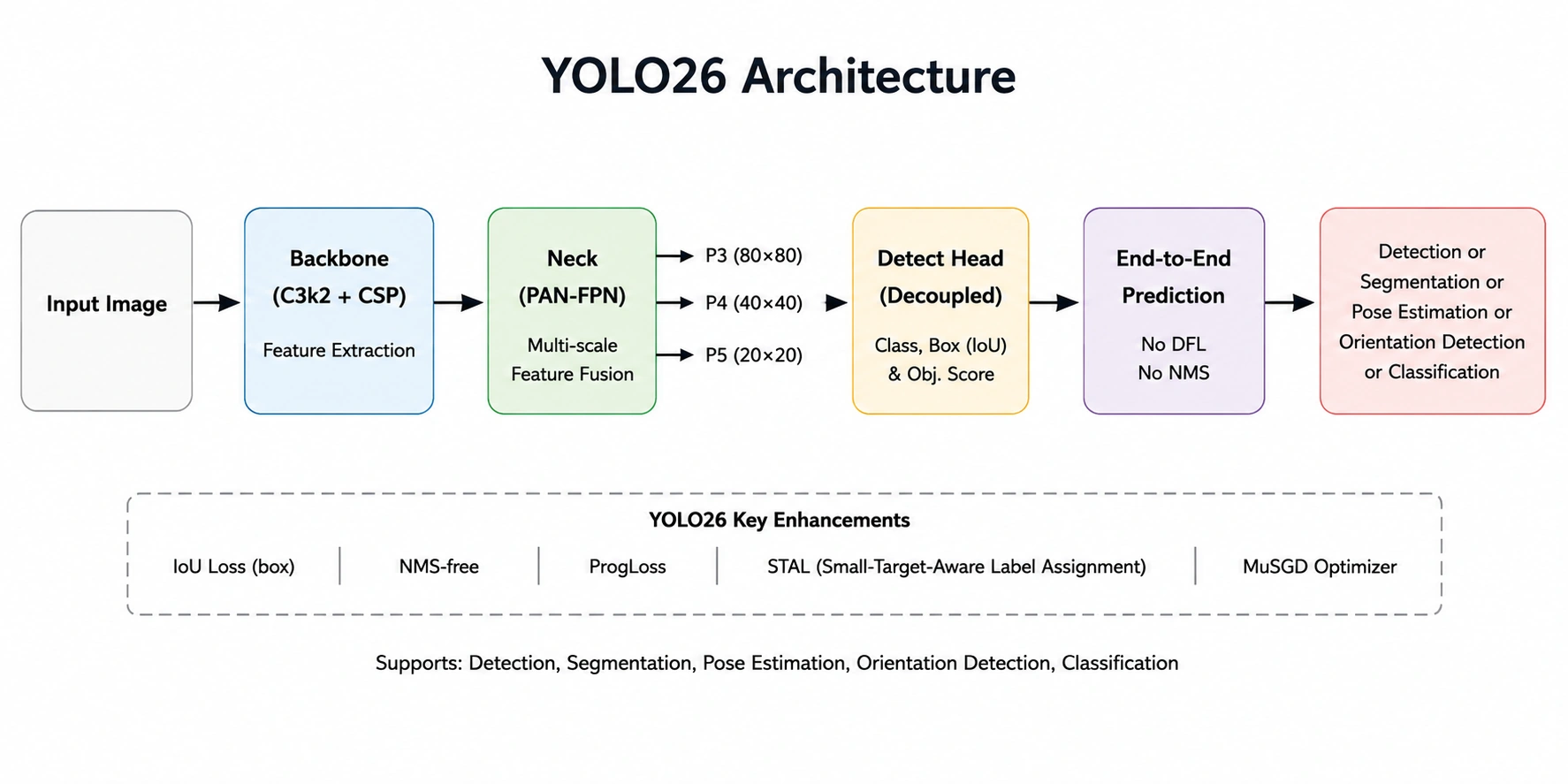
YOLO26 Architecture
  • Input Image: The input image is resized and normalized before the model processes it.
  • Backbone (C3k2 + CSP): Extracts features from the image like edges, textures, shapes, and object patterns. 
  • Neck (PAN-FPN): Performs fusion of P3, P4 & P5. This helps improve the detection of small, medium, and large objects respectively. 
  • Detection Head: Predicts the object classes, bounding boxes, and confidence scores using the fused feature maps. 
  • End-to-End Inference: Eliminates a few things present in the previous generations, specifically DFL and NMS. Simplifying the pipeline while improving inference latency. 
  • Output: Object detection, segmentation, pose estimation, orientation detection, or classification. 

For Context

  • C3k2: A feature extraction block introduced recently in YOLO models. It improves feature learning with fewer parameters.  
  • PAN (Path Aggregation Network): Passes low level and high level features in both directions, helping object detection of varied sized objects accurately.  
  • FPN (Feature Pyramid Network): Combines feature maps from multiple depths, helps recognize objects at multiple scales.  
  • P3 -> High resolution feature map, P4 -> Medium resolution feature map and P5 -> Low resolution feature map. They help the model detect small, medium, and large objects respectively. 

Hands-On

Let’s try out the YOLO26 with the help of Google Colab. We’ll primarily be using this image during the inference:
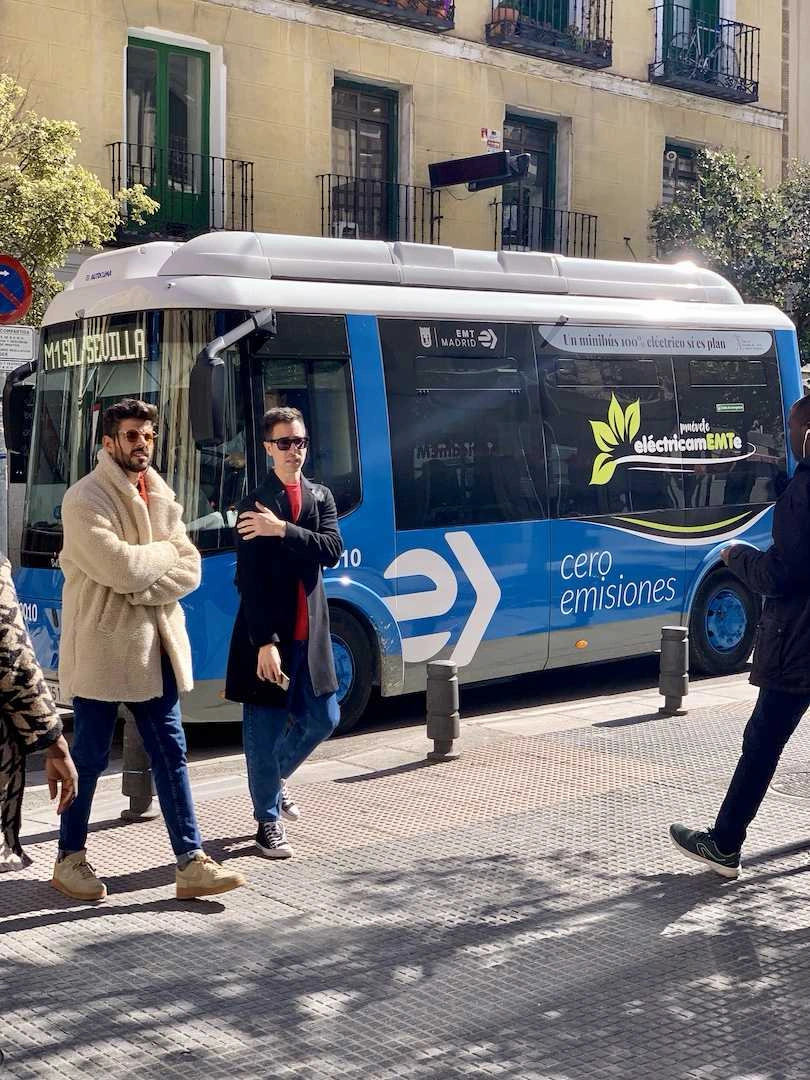
Input Image

Note: YOLO models don’t require high-end hardware, they can be run locally in Jupyter Notebook as well. 

Installations 

!pip install -q "ultralytics>=8.4.0" 

Here ‘-q’ is used to install the library and dependencies without displaying anything. 

Defining Helper function 

from PIL import Image 

# helper function 
def show(result): 
    display(Image.fromarray(result.plot()[..., ::-1]))

This will be used to display the results.  

Object detection 

from ultralytics import YOLO 

IMAGE = "https://ultralytics.com/images/bus.jpg" 
model = YOLO("yolo26n.pt") 
result = model(IMAGE)[0] 

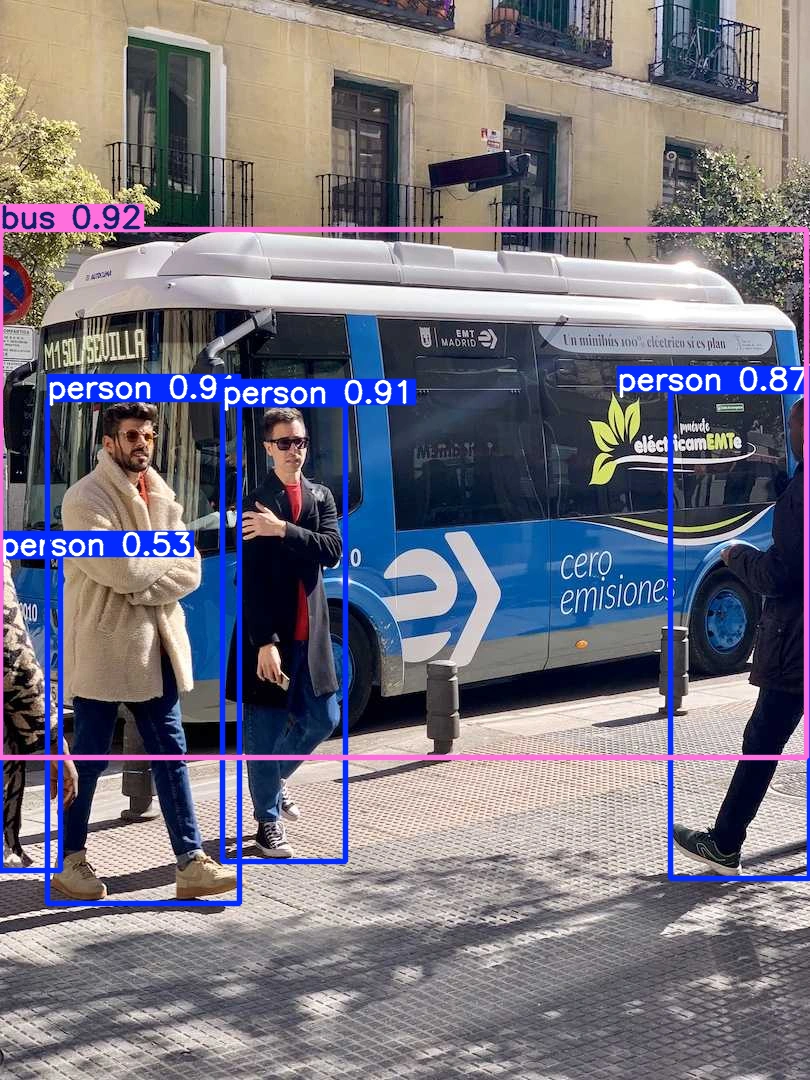
show(result)
Instance Segmentation in YOLO26

The model has successfully detected the bus and the people. 

Instance Segmentation 

seg_model = YOLO("yolo26n-seg.pt") 
result = seg_model(IMAGE)[0] 
show(result)
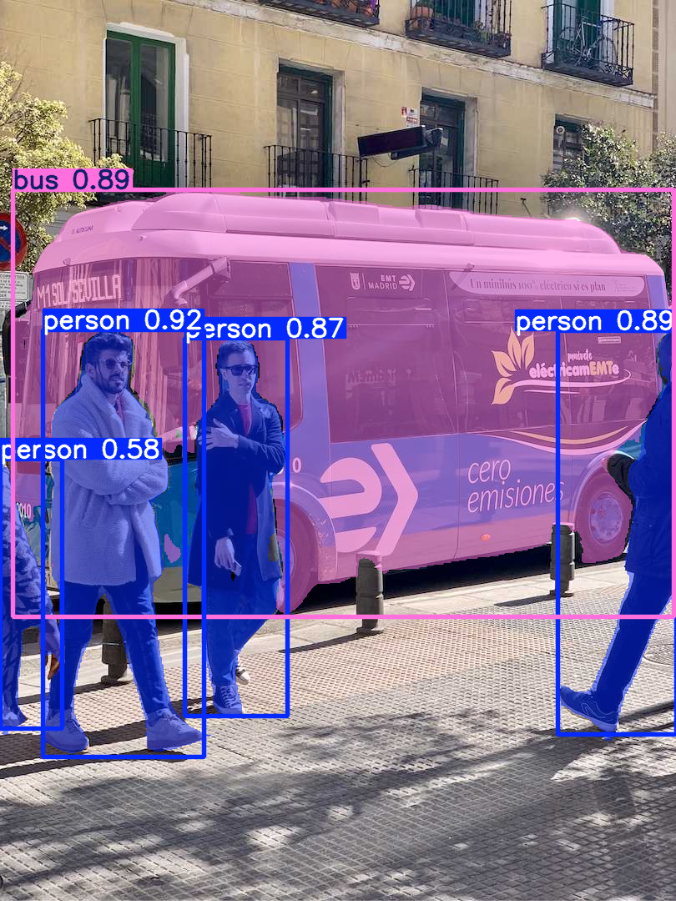
Entity recognition using YOLO26

Here the model has performed the segmentation, it has masked the objects it has detected. The edge detection also looks good. 

Pose / Keypoint Estimation 

pose_model = YOLO("yolo26n-pose.pt") 

result = pose_model(IMAGE)[0] 

show(result)
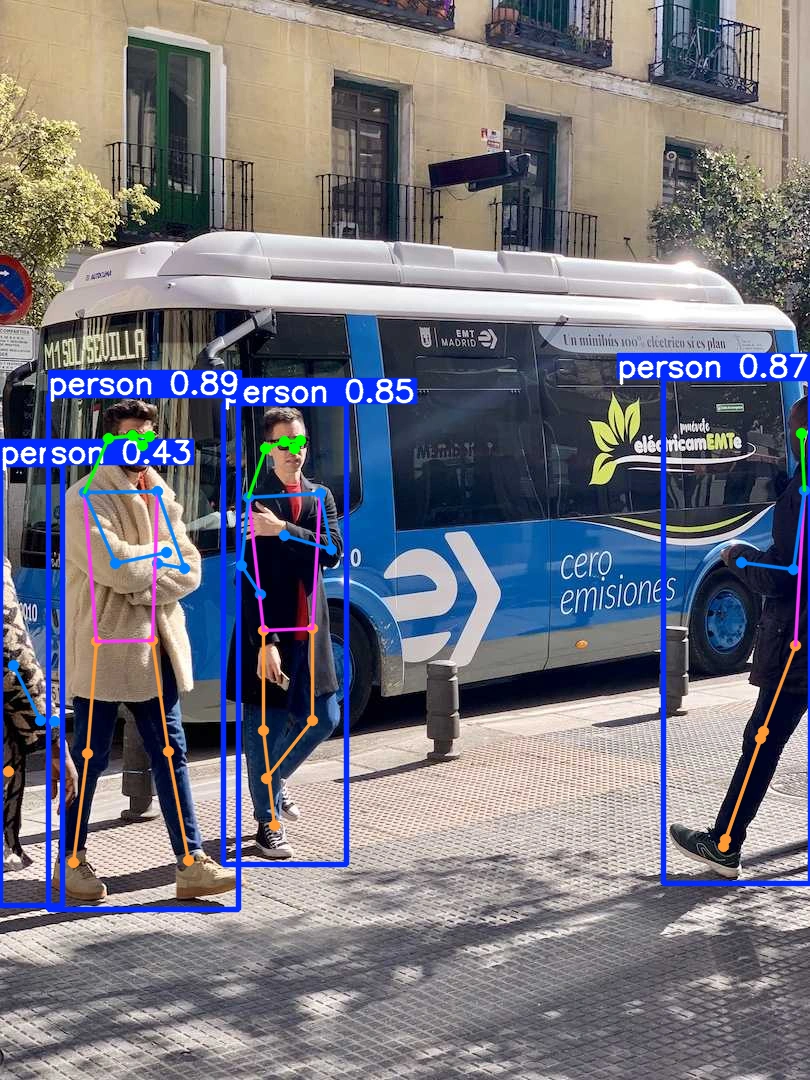
Oriented Bounding Boxes in YOLO26

The model has successfully predicted the human body key points for pose detection.  

Oriented Bounding Boxes 

obb_model = YOLO("yolo26n-obb.pt") 
result = obb_model("https://ultralytics.com/images/boats.jpg")[0] 
show(result)
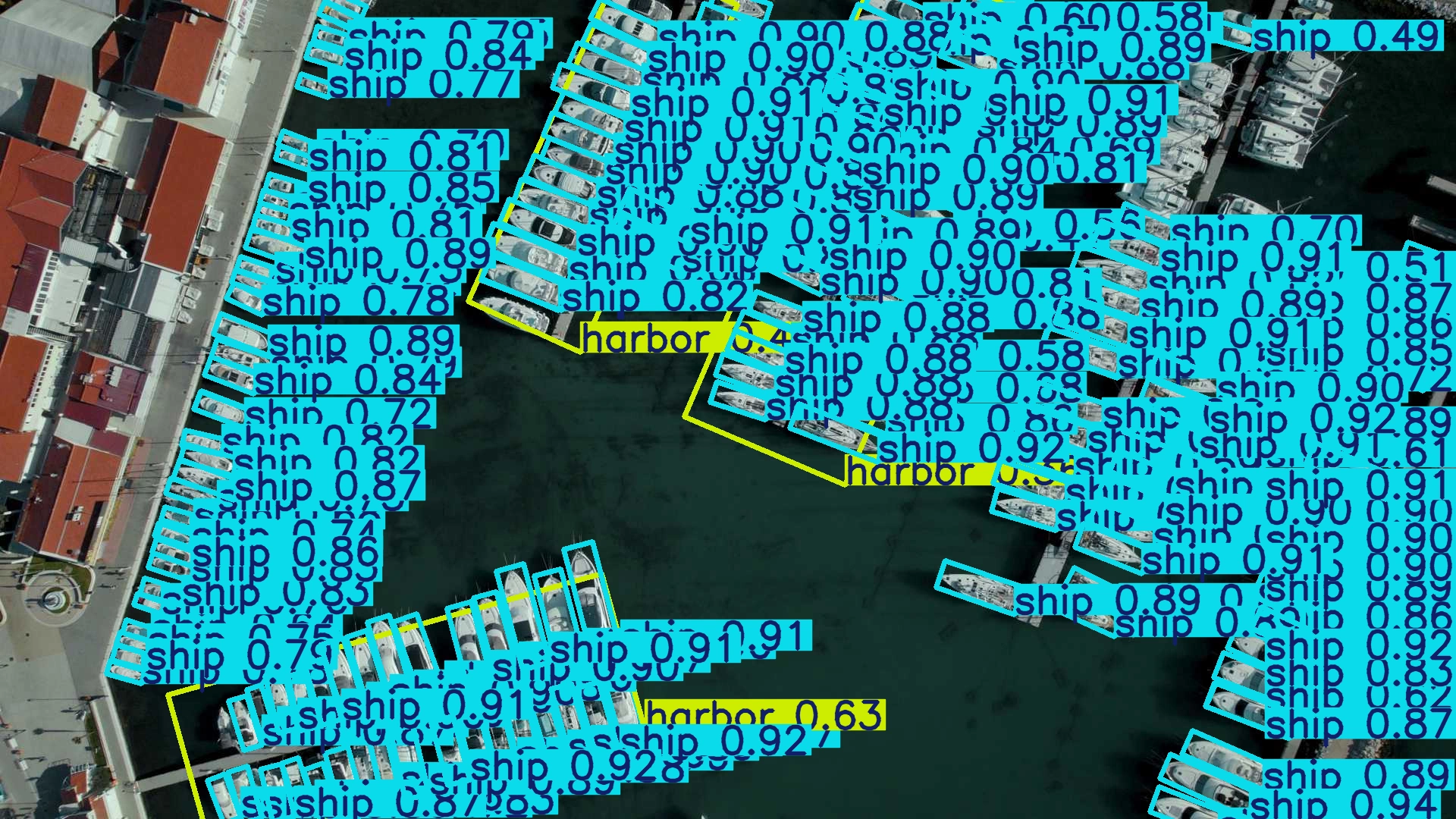
Car Detection

This model can specifically detect objects in aerial, top-down, or satellite images. As you can see it has detected the ships in the image very well. 

Image Classification 

cls_model = YOLO("yolo26n-cls.pt") 
result = cls_model(IMAGE)[0] 

for i in result.probs.top5: 
   print(f"{result.names[i]:<25} {result.probs.data[i]:.2%}")

Output:

Output

The model outputs the probabilities of 1000 classes, here the classifier predicted the class as minibus accurately.  

Conclusion

In summary, you learned the basics of YOLO and YOLO26, explored its architecture, and performed inference in Google Colab for object detection, instance segmentation, pose estimation, oriented bounding boxes, and image classification. With its improved accuracy, efficiency, and real-time performance, YOLO26 is a nice choice for a wide range of computer vision applications. 

Frequently Asked Questions

Q1. Can I use YOLO26 on my own images? 

A. In Google Colab, you can upload an image using files.upload() function and pass the uploaded path to the model for inference. 

Q2. Can I perform pose estimation on a video using YOLO26? 

A. Yes. You can read the video as images (frames), run the model on every frame, and then combine the processed frames as a video. 

Q3. Does YOLO26 require a GPU?

A. No. YOLO26 models can run on a CPU, although a GPU would be much faster for inference for larger tasks. 

Passionate about technology and innovation, a graduate of Vellore Institute of Technology. Currently working as a Data Science Trainee, focusing on Data Science. Deeply interested in Deep Learning and Generative AI, eager to explore cutting-edge techniques to solve complex problems and create impactful solutions.

Login to continue reading and enjoy expert-curated content.