



Collecting images enables us to customize powerful machine learning models in new and exciting ways. For example, some of text-to-image models on Replicate can be steered using an existing image. This capability is great for when we want to steer vision models toward a particular scene or aesthetic, but it requires that we have example images of our own.
I’m Clay, a member of LAION and of the team at Replicate. In this post, I’m going to show you how to use a pip package called clip-retrieval to collect hundreds of images (and captions) from the LAION-5B dataset. We’ll look at how to collect images that either match a text description or have a similar style to some existing images.
clip-retrieval was developed by a fellow member of LAION, Romain Beaumont. It works by embedding the billions of images and captions in the LAION dataset with CLIP. Using the magic of k-NN and autofaiss, we can create an in-memory index over these embeddings with fairly fast retrieval times. If you’re interested in how this works on a technical level, I recommend reading Romain’s article “Semantic search with embeddings: index anything”.
Let’s get started by installing clip-retrieval:
lets us query pre-built CLIP faiss indexes using the class ClipRetrieval.ClipClient. By default, queries are sent to the free, hosted knn index over LAION-5B built by LAION-AI.
We can set a custom num_images to return. Let’s use 400 for now.
After getting set up, we can query the backend:
The response will be a JSON array of results containing a caption, url, and similarity.
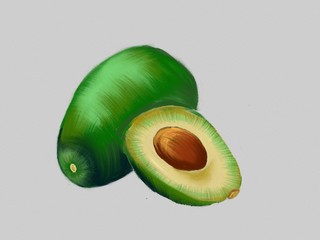
the second result for “fresh avocado, digital art”
Because the API de-duplicates results, we won’t get exactly 400 back.
But, hey - 321 isn’t half bad!
I love to use this as a way of finding good init images for various text-to-image models. Init images guide a text-to-image model to produce different variations of your image, with some influence from the specified prompt. In some cases, using an init image can even make the model run faster (I also mentioned init images in my previous blog post).
We can use Replicate to explore the effect of init images easily. First, we get set up on Replicate:
Grab your API token from here, then set your API token as an environment variable.
Now, we can run text-to-image models remotely! I use “afiaka87/glid-3-xl”, a photorealistic image model that takes a prompt and an init_image argument. The init_image argument conveniently accepts URL’s, so there’s no need to download clip-retrieval results in advance. Let’s use the first result from our search as an init image:
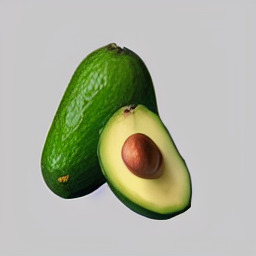
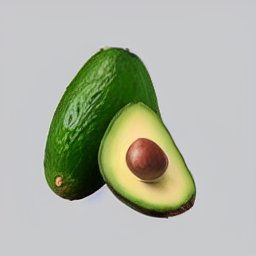
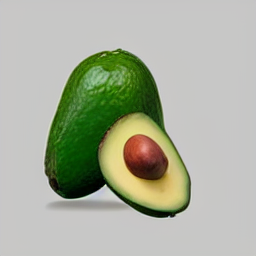
Another cool thing we can do with clip-retrieval is take an existing image and try to find images similar to it.
For this, we will need CLIP. Let’s load CLIP with some helper methods for converting torch tensors to the numpy arrays that clip-retrieval expects.
You can find similar examples and usage in the official clip_retrieval.clip_client notebook.
clip-retrievalInstead of using text as an input and converting it into a text embedding, we now use images as an input and convert it to an image embedding.
Let’s take this image of a model wearing a blue dress and find some similar images.
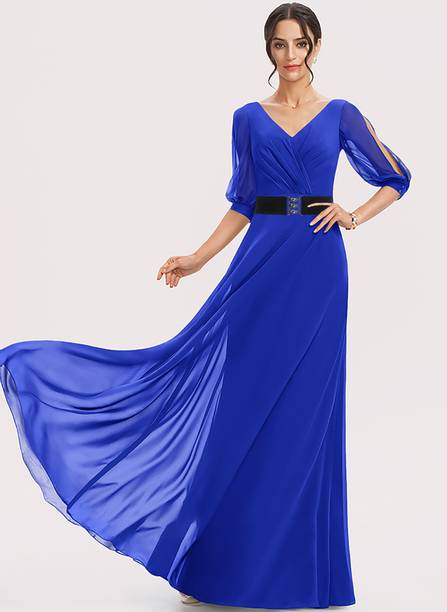
The input image is an image of a woman wearing a blue dress.
Again, the response will be a JSON array of results containing a caption, url, and similarity.

The first result is “Cinderella Divine 1295 Long Chiffon Grecian Royal Blue Dress Mid Length Sleeves V Neck.”
Querying Laion5B with text and images are just a few things you can do with clip-retrieval.
One of the key benefits of deep learning is that, given enough data, we can scale or finetune models to improve general and/or task-specific (“downstream”) performance. With clip-retrieval, finetuning models with data that you curate is now possible. We’re writing a future blog post to show you how to finetune models of your own and run them on Replicate. Stay tuned!
There are absolutely other use cases, too. If you have any other cool ideas, reach out on the Replicate’s Discord. We’d love to hear them!
此内容由惯性聚合(RSS阅读器)自动聚合整理,仅供阅读参考。 原文来自 — 版权归原作者所有。