


惯性聚合 高效追踪和阅读你感兴趣的博客、新闻、科技资讯
阅读原文 在惯性聚合中打开

推荐订阅源

Project Zero
Project Zero
WordPress大学
WordPress大学
Cyber Security Advisories - MS-ISAC
V
Visual Studio Blog
爱范儿
爱范儿
P
Proofpoint News Feed
F
Fortinet All Blogs
雷峰网
雷峰网
小众软件
小众软件
Jina AI
Jina AI
人人都是产品经理
人人都是产品经理
TaoSecurity Blog
TaoSecurity Blog
Exploit-DB.com RSS Feed
S
Secure Thoughts
Recent Commits to openclaw:main
博客园 - 司徒正美
freeCodeCamp Programming Tutorials: Python, JavaScript, Git & More
Microsoft Azure Blog
IT之家
IT之家
S
Security @ Cisco Blogs
Help Net Security
Help Net Security
GbyAI
GbyAI
Webroot Blog
Webroot Blog
T
Troy Hunt's Blog
B
Blog
MongoDB | Blog
MongoDB | Blog
月光博客
月光博客
H
Heimdal Security Blog
Google Online Security Blog
S
Security Affairs
云风的 BLOG
云风的 BLOG
Engineering at Meta
Engineering at Meta
www.infosecurity-magazine.com
H
Help Net Security
O
OpenAI News
H
Hacker News: Front Page
博客园 - 叶小钗
Last Week in AI
Last Week in AI
S
Schneier on Security
The Last Watchdog
The Last Watchdog
C
Cyber Attacks, Cyber Crime and Cyber Security
cs.CV updates on arXiv.org
MyScale Blog
MyScale Blog
Recorded Future
Recorded Future
博客园 - 【当耐特】
V
Vulnerabilities – Threatpost
大猫的无限游戏
大猫的无限游戏
N
News | PayPal Newsroom
The Hacker News
The Hacker News
A
Arctic Wolf

Replicate's blog

How to make remarkable videos with Seedance 2.0 – Replicate blog How to prompt Seedream 5.0 – Replicate blog Recraft V4: image generation with design taste – Replicate blog Run Isaac 0.1 on Replicate – Replicate blog Run FLUX.2 on Replicate – Replicate blog How to prompt Nano Banana Pro – Replicate blog Retro Diffusion's pixel art models are now on Replicate – Replicate blog Replicate is joining Cloudflare – Replicate blog Extract text from documents and images with Datalab Marker and OCR – Replicate blog How to prompt Veo 3.1 – Replicate blog IBM's Granite 4.0 is now on Replicate – Replicate blog Which image editing model should I use? – Replicate blog Introducing our new search API – Replicate blog Torch compile caching for inference speed – Replicate blog Announcing Replicate's remote MCP server – Replicate blog How to prompt Veo 3 with images – Replicate blog Open source video is back – Replicate blog Generate consistent characters – Replicate blog Bria is now on Replicate – Replicate blog How we optimized FLUX.1 Kontext [dev] – Replicate blog Compare AI video models – Replicate blog The FLUX.1 Kontext hackathon – Replicate blog How to prompt Veo 3 for the best results – Replicate blog Get the most from Google Veo 3 – Replicate blog FLUX.1 Kontext from the community – Replicate blog Generate incredible images with Google's Imagen 4 – Replicate blog Run OpenAI’s latest models on Replicate – Replicate blog NVIDIA H100 GPUs are here – Replicate blog Run 30,000+ LoRAs on Hugging Face with Replicate – Replicate blog Ideogram 3.0 on Replicate – Replicate blog Run MiniMax Speech-02 models with an API – Replicate blog Easel AI is now on Replicate – Replicate blog Stylized video with Wan2.1 – Replicate blog Creative roundup: avatars, lightsabers, and LoRA tricks – Replicate blog Wan2.1: generate videos with an API – Replicate blog Wan2.1 parameter sweep – Replicate blog You can now fine-tune open-source video models – Replicate blog Generate short videos with the Replicate playground – Replicate blog AI video is having its Stable Diffusion moment – Replicate blog FLUX fine-tunes are now fast – Replicate blog FLUX.1 Tools – Control and steerability for FLUX – Replicate blog NVIDIA L40S GPUs are here – Replicate blog Ideogram v2 is an outstanding new inpainting model – Replicate blog Stable Diffusion 3.5 is here – Replicate blog FLUX is fast and it's open source – Replicate blog FLUX1.1 [pro] is here – Replicate blog Using synthetic training data to improve Flux finetunes – Replicate blog Fine-tune FLUX.1 with an API – Replicate blog Fine-tune FLUX.1 to create images of yourself – Replicate blog Replicate Intelligence #12 – Replicate blog Replicate Intelligence #11 – Replicate blog Fine-tune FLUX.1 with your own images – Replicate blog Replicate Intelligence #10 – Replicate blog FLUX.1: First Impressions – Replicate blog Replicate Intelligence #9 – Replicate blog Run FLUX with an API – Replicate blog Replicate Intelligence #8 – Replicate blog Run Meta Llama 3.1 405B with an API – Replicate blog Replicate Intelligence #7 – Replicate blog Replicate Intelligence #6 – Replicate blog Replicate Intelligence #5 – Replicate blog How to get the best results from Stable Diffusion 3 – Replicate blog Run Stable Diffusion 3 on your Apple Silicon Mac – Replicate blog Push a custom version of Stable Diffusion 3 – Replicate blog Replicate Intelligence #4 – Replicate blog Run Stable Diffusion 3 on your own machine with ComfyUI – Replicate blog H100s are coming to Replicate – Replicate blog Run Stable Diffusion 3 with an API – Replicate blog Replicate Intelligence #3 – Replicate blog Replicate Intelligence #2 – Replicate blog Replicate Intelligence #1 – Replicate blog Shared network vulnerability disclosure – Replicate blog Run Snowflake Arctic with an API – Replicate blog Run Meta Llama 3 with an API – Replicate blog Run Code Llama 70B with an API – Replicate blog How to create an AI narrator for your life – Replicate blog Clone your voice using open-source models – Replicate blog Businesses are building on open-source AI – Replicate blog How to run Yi chat models with an API – Replicate blog Scaffold Replicate apps with one command – Replicate blog Using open-source models for faster and cheaper text embeddings – Replicate blog Generate music from chord progressions and text prompts with MusicGen-Chord – Replicate blog Generate images in one second on your Mac using a latent consistency model – Replicate blog How to use retrieval augmented generation with ChromaDB and Mistral – Replicate blog Fine-tune MusicGen to generate music in any style – Replicate blog Jet-setting with Llama 2 + Grammars – Replicate blog How to run Mistral 7B with an API – Replicate blog Make smooth AI generated videos with AnimateDiff and an interpolator – Replicate blog Fine-tuned models now boot in less than one second – Replicate blog Painting with words: a history of text-to-image AI – Replicate blog We're cutting our prices in half – Replicate blog A guide to prompting Llama 2 – Replicate blog Streaming output for language models – Replicate blog Fine-tune SDXL with your own images – Replicate blog Run Llama 2 with an API – Replicate blog Run SDXL with an API – Replicate blog A comprehensive guide to running Llama 2 locally – Replicate blog Fine-tune Llama 2 on Replicate – Replicate blog What happened with Llama 2 in the last 24 hours? 🦙 – Replicate blog Make any large language model a better poet – Replicate blog
Use FLUX.1 Kontext to edit images with words – Replicate blog
2025-05-29 · via Replicate's blog

FLUX.1 Kontext is a new image editing model from Black Forest Labs. It is the best in class model for editing images using text prompts, and the latest addition to the FLUX.1 family.

In our tests we’ve found Kontext to give accurate and brilliant results. It’s better and cheaper than OpenAI’s 4o/gpt-image-1 model (and there’s no yellow tint).

There are three models, two are available now, and a third open-weight version is coming soon:

  • FLUX.1 Kontext [pro]: State-of-the-art performance for image editing. High-quality outputs, great prompt following, and consistent results.
  • FLUX.1 Kontext [max]: A premium model that brings maximum performance, improved prompt adherence, and high-quality typography generation without compromise on speed.
  • Coming soon: FLUX.1 Kontext [dev]: An open-weight, guidance-distilled version of Kontext.

We’re so excited with what Kontext can do, we’ve created a collection of models on Replicate to give you ideas:
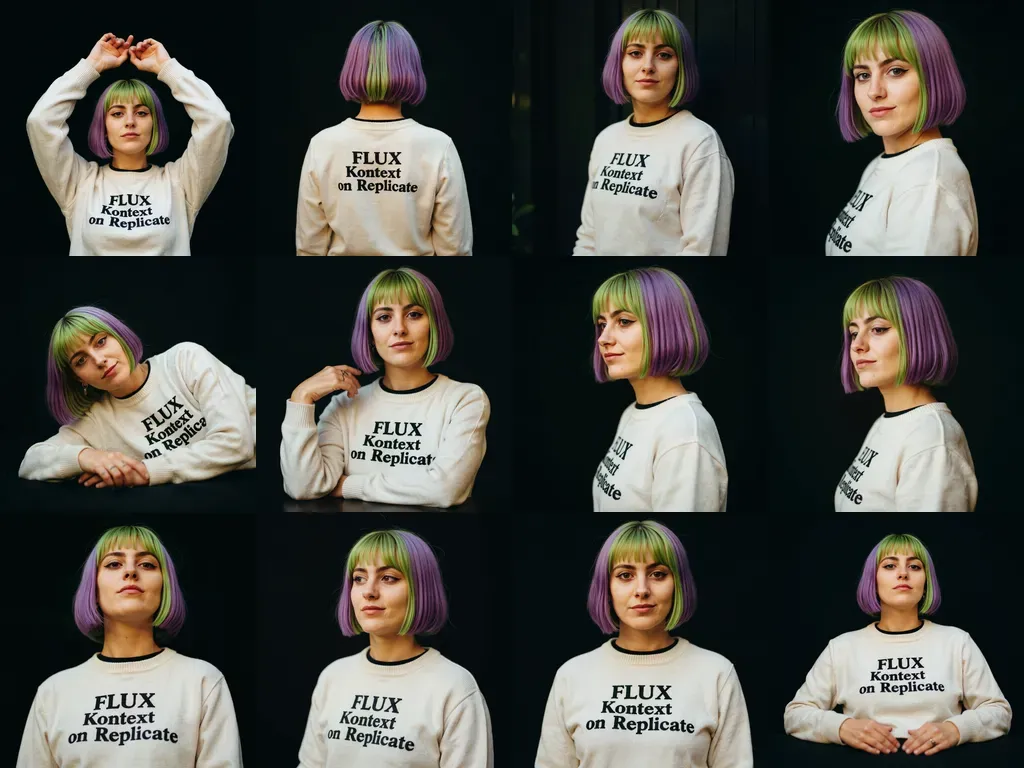
Grid of images
From a single image, Kontext can generate a series of portraits. Try it out.

Run Kontext with an API

Like all models on Replicate, you can run Kontext with an API with just a few lines of code.

Here’s an example of how to run Kontext Pro with the Replicate JavaScript client:

What you can do with Kontext

An image editing model lets you guide how an image changes. That means you can use text prompts to make small tweaks or big transformations while keeping the original image as your starting point. Change a car’s color, swap a background, or give a portrait a whole new style — all by telling Kontext what you want.

Kontext is really good with quick image edits. You’ll see in these examples that when you edit an image of a person, the person keeps their identity, whether the change is big or small.
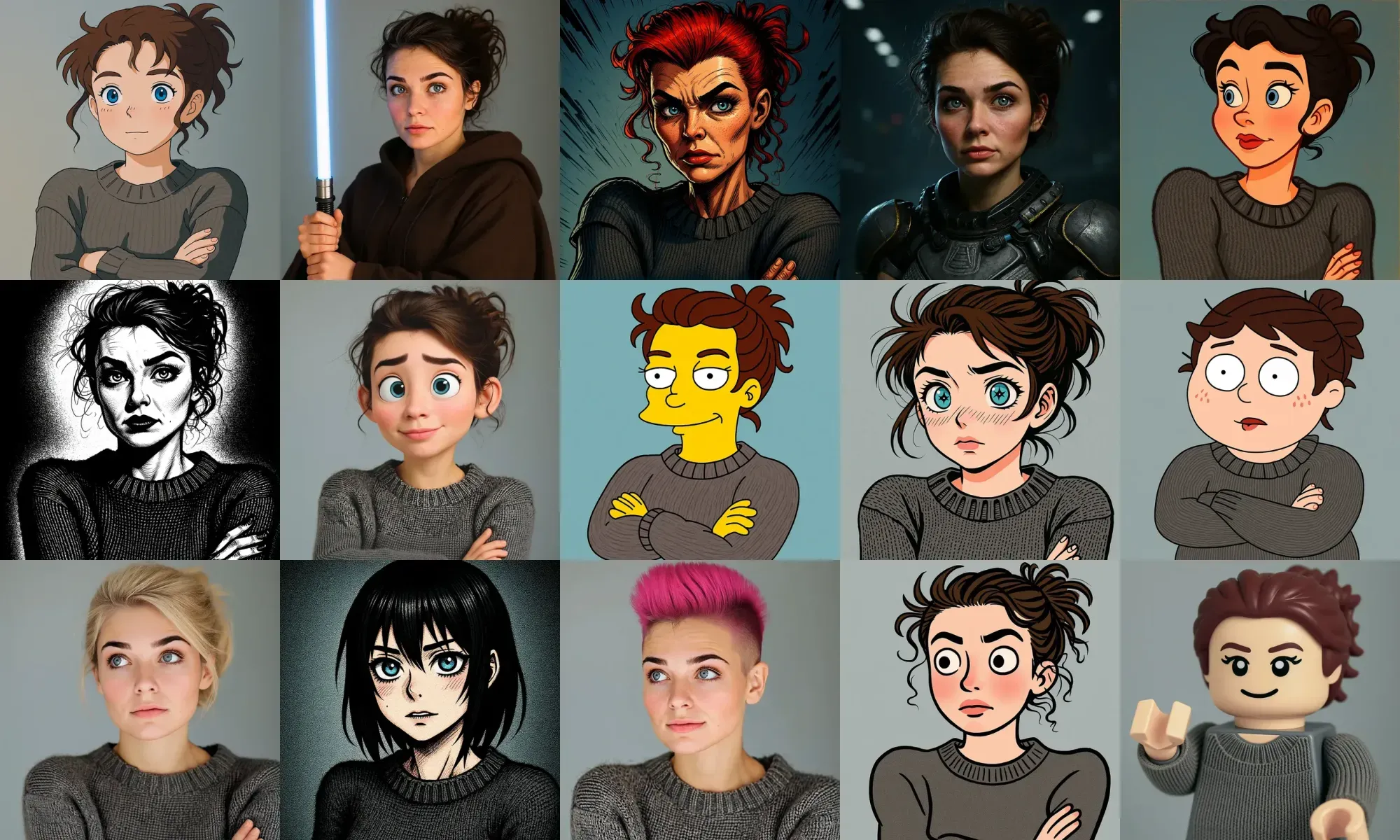
Grid of images
Most of the prompts we tried, they just worked.

For more complex changes, such as adding people or altering the setting, it’s best to describe each modification clearly. As long as your instructions per edit aren’t too complicated, being specific tends to give better results.

When editing people in images, small wording choices can make a big difference. A prompt like “transform the person into a Viking” might lead to a full identity swap. If you want to keep the same person, it helps to be more specific. You can focus your prompt on just the part you want to change, like clothing, eye color, or background.

Style transfer

When you’re prompting for style transfer, being specific makes all the difference (you’ll notice a theme with prompting FLUX Kontext). Instead of vague instructions like “make it artistic,” name the exact style, like “impressionist painting” or “watercolor sketch.” Referencing well-known movements or artists helps guide the model more clearly: think “Renaissance” or “1960s pop art.”

Kontext works quite well with reimagining images with different art media, for example.

If a style label doesn’t do the trick, describe the key traits that define it, such as “visible brushstrokes, thick paint texture, and rich color depth.” And if you want certain elements to stay the same, say so (“keep the original composition”). The more precise your language, the more intentional your results will be.

Text editing

Kontext can edit text directly in images, so you don’t need to recreate signs, posters, or labels from scratch. The clearest way to do this is often by quoting the exact text you want to change.

Here are some general tips when dealing with text:

  • Stick to readable fonts. Highly stylized text may not work as well.
  • Be explicit about what to keep. If preserving font style matters, make sure to mention it.
  • Match text length when possible. Big shifts in length can change the layout in ways you might not want.

Character consistency

Kontext is also great at keeping characters consistent, even through a bunch of edits. Start with a clear reference (like “the woman with short black hair”) and say what’s changing, whether it’s the setting, activity, or style. If you want the same person to stick around, just mention what to keep: face, expression, clothing, or whatever else matters.

Notice how we’re able to maintain character consistency through a long series of edits:

Occasionally, editing backgrounds and scenes while keeping characters consistent will require clarity to keep the subject in the same position, scale, or pose.

A short prompt can sometimes leave too much open to interpretation:

Put him on the beach

To better preserve a subject’s position, try a more descriptive prompt like this:

Change the background to a beach while keeping the person in the exact same position, maintain identical subject placement, camera angle, framing, and perspective. Only replace the environment around them.

Commercial use

If you generate images using Kontext directly on Replicate, you’re free to use those outputs in your commercial projects, including apps, marketing, or any other business use.

It’s simple: run Kontext or its derivatives on Replicate, and you can use everything you generate, commercially.

Prompting tips and tricks

Kontext is surprisingly versatile. Whether you’re tweaking outfits, reimagining a photo as an oil painting, or swapping out signage text, the key is in how you write your prompts: clear, specific, and step-by-step when needed.

It’s easy to imagine FLUX Kontext powering some seriously creative apps. A visual story builder that evolves a character across scenes, a poster generator that updates brand content in seconds, or an AI-powered art canvas for rapid concept prototyping — there is so much potential. If you’re building something visual, Kontext is worth experimenting with.

Here’s a good TL;DR for prompting FLUX Kontext:

  • Be specific: Use clear, detailed language. Name exact colors, describe visual elements precisely, and choose direct action verbs. Avoid vague terms like “make it better.”
  • Start simple: Begin with basic changes. Test small edits first, then build on what works. Kontext supports iterative editing, so take advantage of that.
  • Preserve intentionally: Say what should stay the same. Use phrases like “while keeping the same facial features” or “maintain the original composition” to protect key elements.
  • Iterate when needed: Break complex edits into smaller steps. Big changes are easier to manage when done in sequence.
  • Name subjects directly: Use descriptive phrases like “the woman with short black hair” or “the red car.” Avoid pronouns—they’re often too vague.
  • Use quotation marks for text: Be exact when editing text. Writing “replace ‘x’ with ‘y’” works better than general instructions.
  • Control composition explicitly: When editing scenes, say if you want to keep things like camera angle or framing. It helps avoid unexpected layout changes.
  • Choose verbs carefully: Words like “transform” suggest a full rework. If you want more control, use specific actions like “change the clothes” or “replace the background.”

Let the hacking begin. Chat with us on Discord or show us your creations on Twitter X!