









TL;DR: pg_protoexport is a PostgreSQL protocol documentation tool. It is opensource, multiplatform and publicly available here https://github.com/xfischer/pg_protoexport
Every conversation between a PostgreSQL client and server is just bytes on a wire. The wire protocol is well documented, but the docs are abstract: a `Parse`, a `Bind`, an `Execute`, a stream of `DataRow`s. When you open a real capture in Wireshark, you see the packets — but not the story they tell.
I was doing research around the protocol, and I wanted to share some findings with my team, including protocol diagrams.
ASCII art could be used to represent packets, but it’s quite painful to do this by hand. How can I draw one of those? Are there any obvious tools around that do this?
The database used in this example is the famous pagila sample database updated for PostgreSQL by EDB colleague Devrim Gunduz and Robert Treat (AWS).
Let’s dig into a basic example: a simple query returning one data row:
Here is the query run with psql:
pagila=# SELECT * FROM actor LIMIT 1;
 actor_id | first_name | last_name |     last_update
----------+------------+-----------+---------------------
        2 | NICK       | WAHLBERG  | 2006-02-15 09:34:33
(1 row)
Now, if we were to explain what is sent and received on the wire, we could use plain english:
Messages are "Type Length Value". The first byte of a message identifies the message type, and the next four bytes specify the length of the rest of the message (this length count includes itself, but not the message-type byte). The remaining contents of the message are determined by the message type.
A Query message is sent with the query text as the payload. The server responds with a RowDescription, DataRow, CommandComplete and ReadyForQuery messages.
Ref: PostgreSQL official documentation (Simple Query and Query message format)
Another common way of communicating is the PQtrace format. It's the format used by libpq when message logging is activated. This can only be done via C code. (timestamps omitted for readability)
F	33	Query	 "SELECT * FROM actor LIMIT 1;"
B	120	RowDescription	 4 "actor_id" 1469051 1 23 4 -1 0 "first_name" 1469051 2 1043 65535 49 0 "last_name" 1469051 3 1043 65535 49 0 "last_update" 1469051 4 1114 8 -1 0
B	54	DataRow	 4 1 '2' 4 'NICK' 8 'WAHLBERG' 19 '2006-02-15 09:34:33'
B	13	CommandComplete	 "SELECT 1"
B	5	ReadyForQuery	 I
Here we can see that the frontend (F) sends a Query message, and the backend (B) sends 4 messages back.
This format is pretty compact (and has been improved since PG14).
We can assume that RowDescription gives the following information :
Query syntax is OK
There are incoming DataRow messages
What columns to expect
While very useful, if your application is not using libpq, this approach is not an option.
Another common way of communicating is via ASCII art: we represent the packet as a datagram using text.
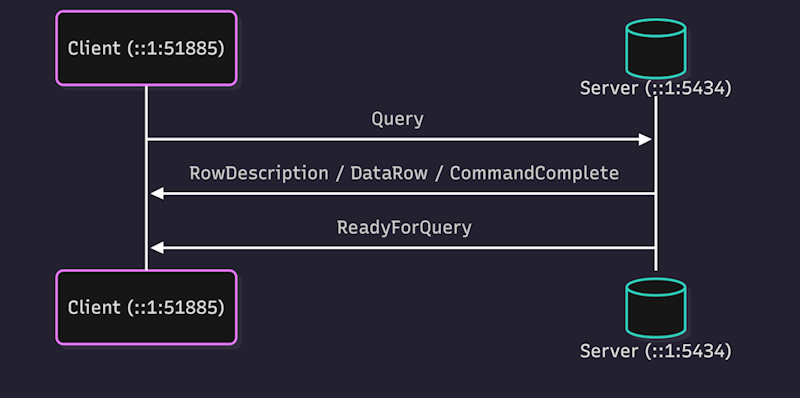
There are two ways of communicating what's going on. First a sequence diagram where frontend and backend are on opposite sides and we see a compact view of messages sent, with timings:
Client (::1:51885)                 Server (::1:5434)
|                                                  |
|         16:36:55.580514 (capture start)          |
|--------------------- Query --------------------->|
|                                                  |
|           Δ +3094 µs (total +3094 µs)            |
|<-- RowDescription / DataRow / CommandComplete ---|
|                                                  |
|<---------------- ReadyForQuery ------------------|
Another way is when giving full details in a graphic way:
16:36:55.580514 (capture start)
[F->B] Query (34 bytes)
0      1        5                               34
+------+--------+--------------------------------+
| code | length |             query              |
| 'Q'  |   33   | "SELECT * FROM actor LIMIT 1;" |
+------+--------+--------------------------------+

Δ +3094 µs (total +3094 µs)
[B->F] RowDescription (121 bytes)
0      1        5            7
+------+--------+------------+
| code | length | fieldCount |
| 'T'  |  120   |     4      |
+------+--------+------------+
    7             16          20             22         26              28              32       34
    +-------------+-----------+--------------+----------+---------------+---------------+---------+
    | columnName0 | tableOid0 | columnIndex0 | typeOid0 | columnLength0 | typeModifier0 | format0 |
    | "actor_id"  |  1469051  |      1       |    23    |       4       |      -1       |    0    |
    +-------------+-----------+--------------+----------+---------------+---------------+---------+
    34             45          49             51         55              57              61       63
    +--------------+-----------+--------------+----------+---------------+---------------+---------+
    | columnName1  | tableOid1 | columnIndex1 | typeOid1 | columnLength1 | typeModifier1 | format1 |
    | "first_name" |  1469051  |      2       |   1043   |      -1       |      49       |    0    |
    +--------------+-----------+--------------+----------+---------------+---------------+---------+
    63            73          77             79         83              85              89       91
    +-------------+-----------+--------------+----------+---------------+---------------+---------+
    | columnName2 | tableOid2 | columnIndex2 | typeOid2 | columnLength2 | typeModifier2 | format2 |
    | "last_name" |  1469051  |      3       |   1043   |      -1       |      49       |    0    |
    +-------------+-----------+--------------+----------+---------------+---------------+---------+
    91              103         107            109        113             115             119     121
    +---------------+-----------+--------------+----------+---------------+---------------+---------+
    |  columnName3  | tableOid3 | columnIndex3 | typeOid3 | columnLength3 | typeModifier3 | format3 |
    | "last_update" |  1469051  |      4       |   1114   |       8       |      -1       |    0    |
    +---------------+-----------+--------------+----------+---------------+---------------+---------+

[B->F] DataRow (55 bytes)
0      1        5            7
+------+--------+------------+
| code | length | fieldCount |
| 'D'  |   54   |     4      |
+------+--------+------------+
    7               11            12
    +---------------+--------------+
    | columnLength0 | columnValue0 |
    |       1       |      2       |
    +---------------+--------------+
    12              16            20
    +---------------+--------------+
    | columnLength1 | columnValue1 |
    |       4       |    "NICK"    |
    +---------------+--------------+
    20              24            32
    +---------------+--------------+
    | columnLength2 | columnValue2 |
    |       8       |  "WAHLBERG"  |
    +---------------+--------------+
    32              36                     55
    +---------------+-----------------------+
    | columnLength3 |     columnValue3      |
    |      19       | "2006-02-15 09:34:33" |
    +---------------+-----------------------+

[B->F] CommandComplete (14 bytes)
0      1        5           14
+------+--------+------------+
| code | length |  message   |
| 'C'  |   13   | "SELECT 1" |
+------+--------+------------+

[B->F] ReadyForQuery (6 bytes)
0      1        5            6
+------+--------+------------+
| code | length | statusCode |
| 'Z'  |   5    |    'I'     |
+------+--------+------------+
Text is very portable. But there are tools around that handle the graphical representation better than text. I chose PlantUML and Mermaid as they are the ones I am familiar with.
PlantUML is pretty handy, I used to work a lot with it. As it's not rendered easily without plugins, the final product is usually an image.
Mermaid is the (relatively) new guy in town, and is natively supported on GitHub and other platforms. Great for sharing diagrams!
This diagram can be viewed live on the pg_protoexport repository. The full packet detailed view is here. (however, not that readable)
LaTeX is my preferred ❤️ rendered, and the first exporter I wrote. With the bytefield package, it renders nice and clean diagrams:
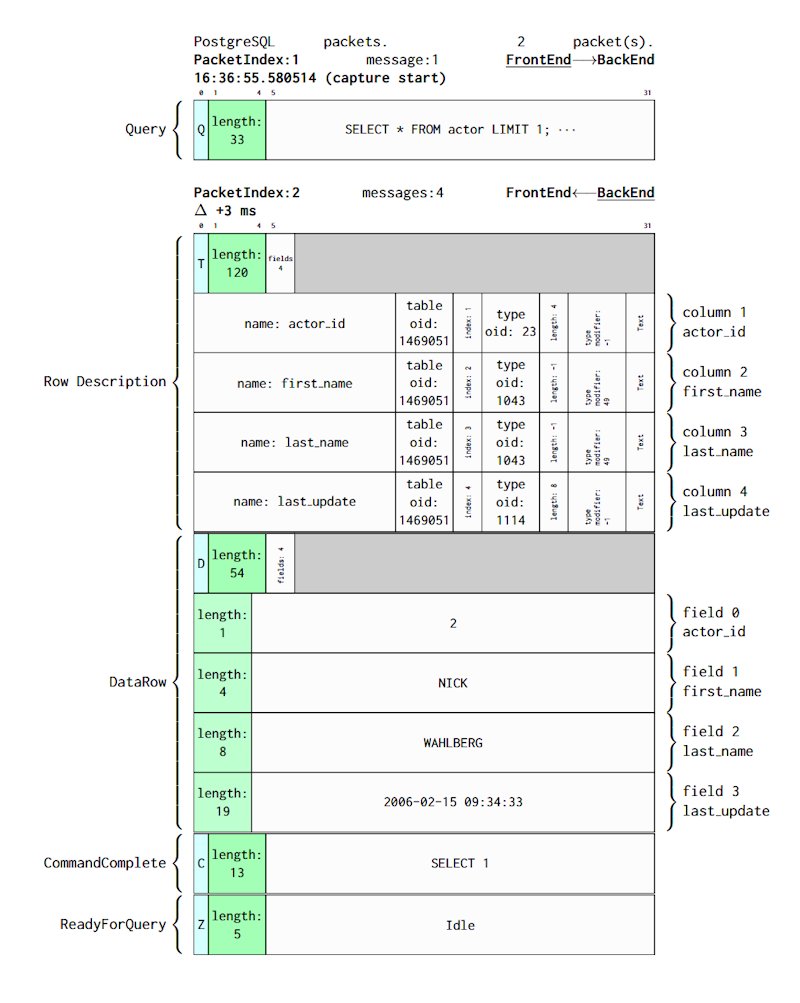
With this LaTex rendering you have a good level of control over the design. The main caveat is that the final product is usually an image (I generate it with ImageMagick) or a PDF.
This idea of documenting protocol conversations became code. I did the LaTeX implementation by hand and then used Claude Code to refactor, handle CI/CD and add more exporters. Here are the features implemented:
The tool is distributed through two channels:
As a .NET CLI Tool if you have .NET SDK installed:
dotnet tool install --global pg_protoexport
And it also launched my speaker journey, as I gave several talks about the protocol in 2026 (PGDay Armenia, PGConf.BE and Swiss PG Day), presenting the tool.
I will give this “Deep dive into the PostgreSQL frontend/backend protocol” next at PG Summit US 2026 and will be happy to do a demo of pg_protoexport at the EDB booth.
All message diagrams is my slides were generated by pg_protoexport.
Source code is available here, and contributions are welcome!
此内容由惯性聚合(RSS阅读器)自动聚合整理,仅供阅读参考。 原文来自 — 版权归原作者所有。