







当把Web项目部署到Azure的时候,有时候会出现COULD NOT LOAD FILE OR ASSEMBLY的问题。这样问题一般是由于某些依赖的Assembly的版本不对导致的,例如在开发机上可能同时安装了MVC 3和MVC4。那么开发机不会出现问题,因为可以找到相应的Assembly。但是部署到Azure后就出现了依赖文件的问题。例如问题如下:
"COULD NOT LOAD FILE OR ASSEMBLY 'SYSTEM.WEB.WEBPAGES, VERSION=2.0.0.0, CULTURE=NEUTRAL, PUBLICKEYTOKEN=31BF3856AD364E35' OR ONE OF ITS DEPENDENCIES. THE LOCATED ASSEMBLY'S MANIFEST DEFINITION DOES NOT MATCH THE ASSEMBLY REFERENCE. (EXCEPTION FROM HRESULT: 0X80131040)"
Could not load file or assembly 'System.Web.Helpers, Version=1.0.0.0, Culture=neutral, PublicKeyToken=31bf3856ad364e35' or one of its dependencies. The system cannot find the file specified.
如果你登录到Azure的机器,然后修改注册表HKEY_LOCAL_MACHINE\SOFTWARE\Microsoft\Fusion!EnableLog] (DWORD) to 1
你可以看到更详细的信息,例如如下:
=== Pre-bind state information ===
LOG: User = NT AUTHORITY\NETWORK SERVICE
LOG: DisplayName = System.Web.Helpers, Version=1.0.0.0, Culture=neutral, PublicKeyToken=31bf3856ad364e35
 (Fully-specified)
LOG: Appbase = file:///E:/sitesroot/1/
LOG: Initial PrivatePath = E:\sitesroot\1\bin
Calling assembly : (Unknown).
===
LOG: This bind starts in default load context.
LOG: Using application configuration file: E:\sitesroot\1\web.config
LOG: Using host configuration file: D:\Windows\Microsoft.NET\Framework64\v4.0.30319\aspnet.config
LOG: Using machine configuration file from D:\Windows\Microsoft.NET\Framework64\v4.0.30319\config\machine.config.
LOG: Post-policy reference: System.Web.Helpers, Version=1.0.0.0, Culture=neutral, PublicKeyToken=31bf3856ad364e35
LOG: Attempting download of new URL file:///D:/Windows/Microsoft.NET/Framework64/v4.0.30319/Temporary ASP.NET Files/sts/5c2051b2/ac0bf06b/System.Web.Helpers.DLL.
LOG: Attempting download of new URL file:///D:/Windows/Microsoft.NET/Framework64/v4.0.30319/Temporary ASP.NET Files/sts/5c2051b2/ac0bf06b/System.Web.Helpers/System.Web.Helpers.DLL.
LOG: Attempting download of new URL file:///E:/sitesroot/1/bin/System.Web.Helpers.DLL.
LOG: Attempting download of new URL file:///E:/sitesroot/1/bin/System.Web.Helpers/System.Web.Helpers.DLL.
LOG: Attempting download of new URL file:///D:/Windows/Microsoft.NET/Framework64/v4.0.30319/Temporary ASP.NET Files/sts/5c2051b2/ac0bf06b/System.Web.Helpers.EXE.
LOG: Attempting download of new URL file:///D:/Windows/Microsoft.NET/Framework64/v4.0.30319/Temporary ASP.NET Files/sts/5c2051b2/ac0bf06b/System.Web.Helpers/System.Web.Helpers.EXE.
LOG: Attempting download of new URL file:///E:/sitesroot/1/bin/System.Web.Helpers.EXE.
LOG: Attempting download of new URL file:///E:/sitesroot/1/bin/System.Web.Helpers/System.Web.Helpers.EXE.
解决方法查找项目的References下面各个Assembly,查找其版本
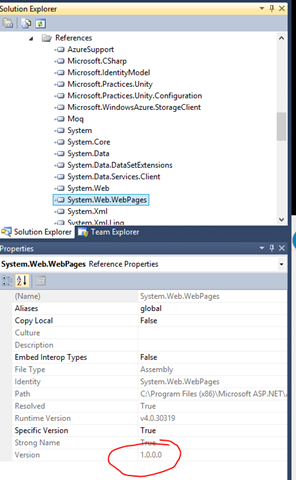
如果版本用错了,那么需要重新引用正确的版本。
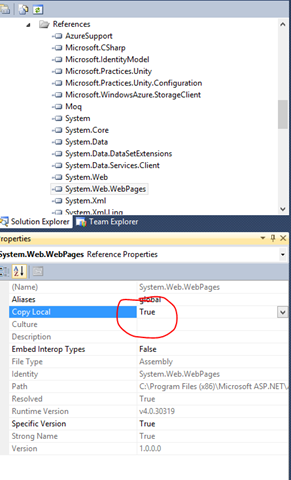
如果Azure上没有安装支持的库或者runtime,需要把Copy Local修改成True,这样dll就一并打包到Azure的package中。
有时候这些问题很难查,最好也是最花时间的方式是把整个包拉下来,通过ILSpy等工具查依赖项,细心仔细一个个查。
此内容由惯性聚合(RSS阅读器)自动聚合整理,仅供阅读参考。 原文来自 — 版权归原作者所有。